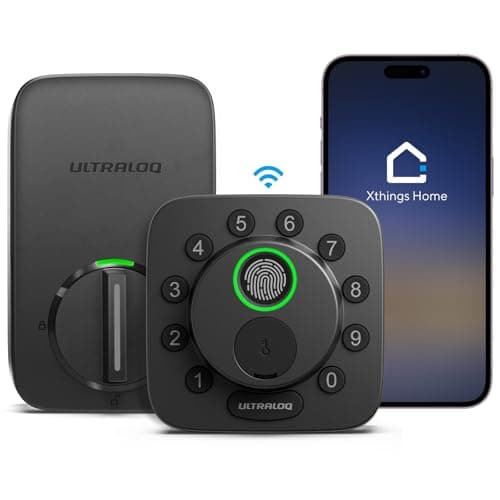
Wi-Fi is the most expensive radio a battery lock can carry and the only one it does not need. It is in most smart locks because it is the shortest path to a notification on a phone, not because unlocking a door requires it. Take it out and a lock still reads a fingerprint, still verifies a code, still turns a bolt — because all of that happens inside the lock. What you lose is the part that happens somewhere else. This page ranks five deadbolts by what radio is actually in them, and says plainly what each one stops being able to do.
Smart locks that work without Wi-Fi: what the phrase actually means
Three different readers type this query and they do not want the same lock, so it is worth separating them before any product comes into it.
- There is no internet at the property. A cabin, a workshop, a storage unit, a gate. Nothing with a radio has anything to talk to, so the only sane purchase is a lock that never expected to talk to anything.
- There is a network, but you do not want the lock on it.You would rather the door was not an internet-facing device with a vendor account behind it. A low-power mesh radio — Thread, Z-Wave, Zigbee — answers to a hub in your house instead.
- There is a network and it does not reach the door. A detached garage, a side entrance, a thick masonry wall. Wi-Fi at 2.4GHz gives up before Thread or Z-Wave does, both of which relay through other mains-powered devices in the mesh.
The first reader needs no radio. The second and third need a radio that is not Wi-Fi. The mechanism underneath all three cases — what the radio in a lock is actually for, and what carries on without it — is worked through in do smart locks need Wi-Fi, and we do not repeat it here. This page is the shortlist.
How these five compare
Compiled from manufacturer specifications and published documentation, October 2026. Battery figures are the makers' own stated figures, not measurements.| Lock | Radio in the lock | Entry without a phone | Remote access needs | Power | Subscription |
|---|
| ULTRALOQ Bolt SE | Matter over Thread (Wi-Fi mode optional, in software) | Fingerprint, code, key | A Thread border router and a Matter controller | 4x AA | None |
|---|
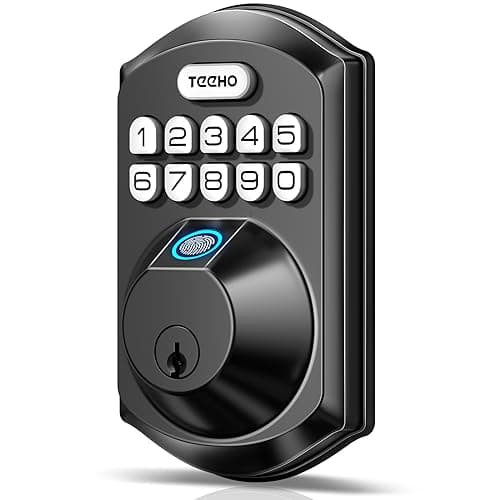
| TEEHO TE002 | None | Fingerprint, code, key | Not possible — there is no radio | 4x AA | None, and no account either |
|---|
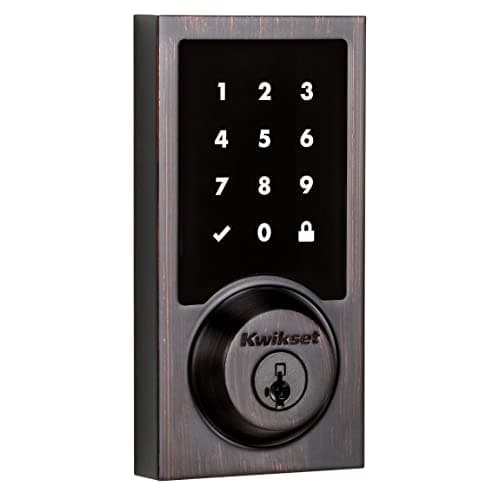
| Kwikset SmartCode 916 | Z-Wave | Code, key | A Z-Wave hub you already run | 4x AA | None |
|---|
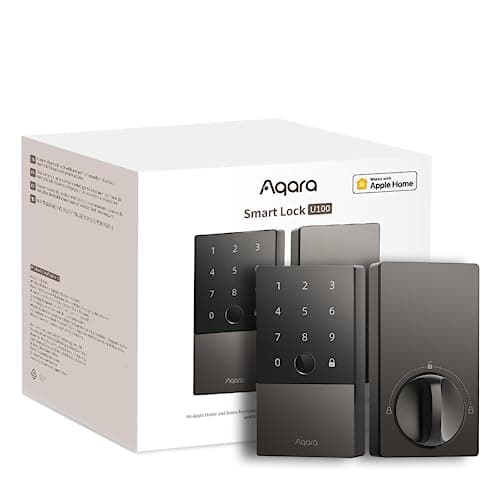
| Aqara Smart Lock U100 | Bluetooth (plus Apple Home Key over NFC) | Fingerprint, code, key, Home Key tap | An Aqara hub or an Apple home hub | 8x AA | None |
|---|
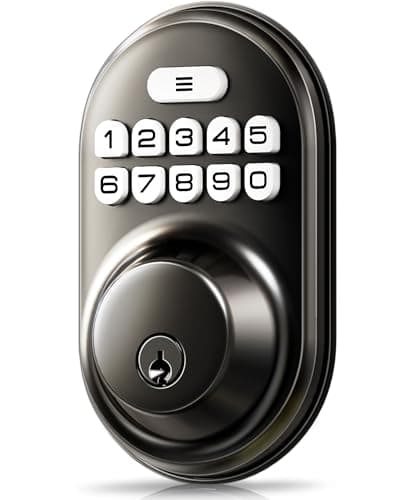
| Veise Keypad Deadbolt | None | Code, key | Not possible — there is no radio | 4x AA | None, and no account either |
|---|
Note the column that is identical all the way down. Not one of these locks has a subscription attached to any function, which is not a coincidence: a plan needs a server, a server needs a connection, and four of the five are built not to have one. The arithmetic on what plans cost elsewhere in this category is in our subscription cost comparison. How we rank without a test lab is set out in full at our methodology.
ULTRALOQ Bolt SE — the one to buy
The Bolt SE is the pick because it is the only lock here that is genuinely smart and genuinely off Wi-Fi at the same time. ULTRALOQ ships it in Matter-over-Thread mode; Thread is a low-power mesh radio, so the lock joins a Thread network rather than your router, and a Matter controller — an Apple TV or HomePod, a recent Echo, a Google or SmartThings hub — is what carries the connection out of the house if you want it to. There is a Wi-Fi mode too, selectable in the app, and for the purposes of this page you simply do not use it.
What you get at the door is unusual at this price: a fingerprint reader, a keypad, an app, a watch app and a mechanical key. All five of those work with the house network down, because the matching happens inside the lock. ULTRALOQ states roughly eight months on Wi-Fi with alkaline cells rising to about a year and a half on Matter over Thread with lithium cells — a real argument for running it in the mode this page recommends anyway.
The honest cons. Thread still needs a border router somewhere in the house, so this is not the lock for a property with no network at all. One SKU with two connectivity modes chosen in software means a lot of the advice you will read about the Bolt SE describes the mode you are not running. And ULTRALOQ names BHMA and ANSI generally but publishes no specific grade for this model, which is a gap the Kwikset below does not have. If what you want is the best Matter implementation rather than simply the absence of Wi-Fi, that whole field is ranked in our Matter lock roundup.
TEEHO TE002 — for a door with no network at all
The TEEHO is the right answer to the strict reading of the question. It has no radio. There is no app, no account, no firmware update, no pairing and nothing for an attacker on the internet to reach, because the lock is not on the internet and cannot be put there. You enroll fingerprints and codes at the keypad, and a mechanical key is the last resort. On a cabin, a garage, a workshop or a gate house it is not a compromise — it is the correct product, and it costs a fraction of the connected ones.
The cons are exactly the flip side. You cannot check whether the door is locked from anywhere but in front of it, you cannot issue a code to a contractor without being there, and you get no notification when it opens. There is also no published BHMA grade we could locate, which is a real gap on a front door where the grade is the only comparable security number in the category. If the only missing piece is knowing the door opened, note that a contact sensor is a separate, cheap device that does precisely that job on its own radio — the field is ranked in our door and window sensor roundup, and pairing a dumb lock with a smart sensor is an underrated arrangement.
Kwikset SmartCode 916 — if you already run a hub
The Z-Wave workhorse, and the pick for a house that already has Home Assistant, Hubitat or SmartThings running. No Wi-Fi, no manufacturer cloud in the path at all: the lock answers to your hub and nothing else, which is the strongest version of the “not on the internet” argument because there is no vendor who could change the terms later. The Z-Wave radio also draws far less than Wi-Fi, so battery life is among the best here.
Two cons, and the first is disqualifying for most people. Without a Z-Wave hub this lock does nothing beyond its keypad — there is no app-only mode, and buying a hub purely to run one lock is a poor trade. Second, the SmartKey cylinder carries a documented bypass trade-off that is worth reading about before you choose this body over a standard cylinder. There is no fingerprint reader either; this is a touchscreen code pad and a key. If you run a local platform already, the wider set of locks that behave well inside one is in our Home Assistant lock rankings.
Aqara Smart Lock U100 — the Apple house answer
The U100 is a Bluetooth lock at the door with one feature that makes it unusually good at working without a network: Apple Home Key. The credential lives in the iPhone or Apple Watch Wallet and is presented over NFC, which is a contactless read between two devices standing next to each other. No Wi-Fi, no cellular and no hub is involved in that tap. Add the fingerprint reader, the keypad and the mechanical key and you have four ways through the door, all of which work with the house offline.
The cons are remote access and cells. Reaching the lock from work needs an Aqara hub or an Apple home hub to bridge it, and without one this is a Bluetooth lock: excellent at the door, unreachable from anywhere else. And it takes eight AA cells rather than four, which is a large power reservoir but also eight batteries to buy and swap as a matched set. We go through the whole lock in our Aqara U100 review.
Veise Keypad Deadbolt — the cheapest way off the network
The least expensive thing on this page, and it solves a real problem: a door that currently only takes a key gets a backlit code pad, auto-lock so it secures itself behind you, and an anti-peek entry mode that lets you type junk digits around the real code in front of a delivery driver. No radio, no account, nothing to pair or update.
It is code and key only — no fingerprint reader, no app, no notifications — and like the TEEHO it has no published BHMA grade we could find. Treat it as a keyless upgrade to an interior, garage or side door rather than as a front-door security product, and if you want to know when that door opened, a contact sensor next to it is the cheap fix. For code management across a household — how many slots a lock has, how codes are scheduled and revoked — the field is ranked in our keypad lock roundup, and the rest of the category sits at the smart locks hub.