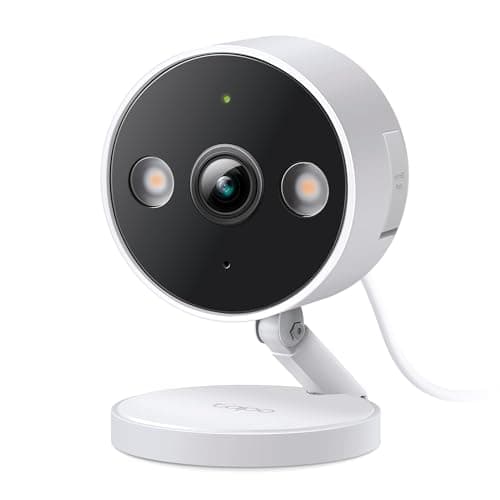
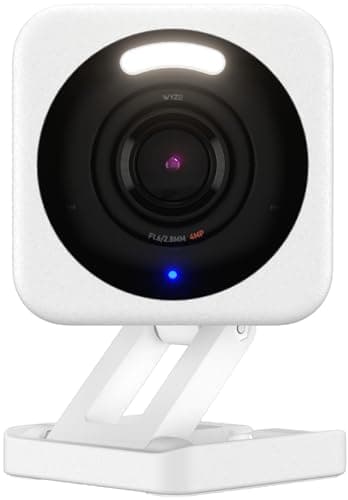
Wyze Cam v4 and the TP-Link Tapo 2K+ wired camera are the two cheapest competent cameras you can buy, and both record to a local microSD card without a compulsory plan. The gap is narrow and specific: the Wyze is a touch sharper and has a livelier hacking community, while the Tapo records continuously with nothing important held back behind a subscription. Point decides it more than brand does.
Wyze vs Tapo cameras: the short answer
Buy the Wyze Cam v4 if you want the lowest entry price, slightly higher 2.5K resolution, and an active third-party firmware scene — and the camera points somewhere low-stakes like a garage, shed or driveway. Buy the Tapo 2K+ wired camera if you want genuine 24/7 continuous recording to a card with no feature dangled behind a plan, from a large networking vendor with a steadier security record. Both are local-storage cameras; neither bills you to watch your own footage back. That is the whole reason either one belongs on our budget camera roundup. If the brand you are actually weighing Tapo against is eufy rather than Wyze — a system with a base station against standalone cameras and a card you own — that pairing has its own rule in eufy vs Tapo.
The decision rule in one line:if the camera watches something you would hate to lose footage of, the Tapo's plan-free continuous recording is the safer default; if it watches a low-stakes corner and you want to spend the least or tinker with firmware, the Wyze is the cheaper competent option — after you have read Wyze's published incident history.
Head to head: where the two budget lines actually diverge
The columns below are the ones that decide the purchase. Megapixels are on the list because the two are close enough that the small difference is real; what is not here is a price, because a shelf price on a budget camera moves week to week and the total cost is the point.
Compiled from manufacturer specifications, August 2026.| Model | Resolution | Recording to a local card | What a plan gates | Power |
|---|
| Wyze Cam v4 | 2.5K | Yes, to microSD, no plan required | Smarter detection features sit behind Cam Plus | Mains |
|---|
| TP-Link Tapo 2K+ Wired | 2K+ | Yes, 24/7 continuous to microSD, no plan required | Nothing core — continuous recording works plan-free | Mains |
|---|
Storage: both local, but the plan line sits in a different place
Start with the thing they share, because it is the reason to consider either one over a cloud-only camera: both write video to a microSD card in the camera, and playback of that card costs nothing. Neither is a Ring-style arrangement where the hardware records nothing reviewable unless you subscribe. If you have landed here from the local storage versus cloud guide, both of these are firmly on the local side of that line.
The difference is where each brand draws its paywall. Wyze lets you record to the card for free, but several of the smarter behaviors — the person, package and vehicle filtering that turns a wall of motion alerts into a useful few — live behind its Cam Plus plan. You can run a Wyze Cam v4 with no plan and it will record; you just get a blunter set of alerts while doing it. The Tapo's pitch is the plainer one: it records continuously, all day, to the card, and the continuous recording is not the thing being upsold. For a camera whose job is “have the footage if I ever need it,” the Tapo asks for less.
Continuous recording matters more than the spec sheet makes it sound. An event-clip camera only writes when it thinks something happened, so the thirty seconds before it triggered — often the part you actually want — never exists. A camera recording 24/7 to a card has the whole timeline. That is the Tapo wired camera's quiet advantage, and it is why it earns a place on our local-storage camera roundup rather than only the budget one.
Resolution and image: a small, honest edge to Wyze
On paper the Wyze Cam v4 is the sharper camera, at 2.5K against the Tapo's 2K+. In practice that is a modest difference — enough to make a face at the door a little cleaner, not enough to read a license plate at the end of a driveway, which neither of these cameras is built to do. If long-range detail is the requirement, you are shopping in the wrong tier entirely and should read our PoE camera roundup, where optical zoom and 4K sensors actually exist. Between these two, treat resolution as a tiebreaker, not the deciding factor.
Power and mounting: both wired, and why the sibling models matter
Both of these specific models are mains-powered. Neither is a battery camera, so both need a socket or a wired supply within reach of the mount, and both reward that constraint with continuous power and no charging cycle to forget. If the position you have in mind has no supply, the honest answer is that neither of these is your camera — both brands also sell battery, wire-free siblings for exactly that case, and the trade there is the usual one: convenience of siting against the loss of true 24/7 recording. For a fixed, powered spot, the wired versions are where the budget-camera value peaks, which is why they are the pair worth comparing.
The Tapo wired camera is rated for indoor or outdoor use, so a single model covers a hallway or a side passage; just remember an outdoor mount needs an outdoor-rated supply, which is a bigger job than the camera costs. The Wyze Cam v4 is likewise indoor or outdoor capable, and its most defensible role is the low-stakes outdoor corner — a garage, a shed, a bin store — where the cheapest competent camera is exactly the right amount of camera.
App, firmware and the trust question
The apps are close, and both are friendlier than the older PoE tools you would meet a tier up. TP-Link is a large, established networking vendor, and its firmware cadence across the Tapo line tends to be steady. Wyze's advantage is different: a wide, active third-party firmware and integration community, so a Wyze Cam v4 is often the camera people reach for when they want to bend it into something the manufacturer did not intend.
The caveat belongs to Wyze, and it is a fact rather than a rumor: the brand has had publicly disclosed security incidents, including episodes where users briefly saw feeds that were not theirs. That does not make the camera unusable — it makes it a camera you point carefully. For a driveway it is an easy recommendation; for anywhere private, read the disclosures first and, if in doubt, choose the Tapo or step up a tier. We keep the full method for how we weigh incidents like this on our methodology page, and the rest of this hub is indexed at comparisons.
The neighboring question — whether either of these is really “free” against a cloud camera — is the subject of the Ring vs Wyze comparison, which pits the best app in the category against the cheapest local card.
The decision rule
There is no single winner, because the two draw their compromise in different places. Pick the description that fits your camera's job.
Buy the Wyze Cam v4 if…
- You want to spend the least and the camera watches something low-stakes — a garage, shed, driveway or workshop.
- The slightly higher 2.5K resolution is worth having, and you are happy to run without Cam Plus and accept blunter alerts.
- You like an active third-party firmware community and the option to tinker beyond what the app allows.
- You have read Wyze's published incident history and are comfortable pointing the camera accordingly.
Buy the TP-Link Tapo 2K+ wired camera if…
- You want genuine 24/7 continuous recording to a local card with nothing core held behind a plan.
- You would rather buy from a large networking vendor with a steadier security record than manage risk around a cheaper brand.
- The camera watches something you would hate to lose footage of, where the whole timeline matters more than a marginally sharper image.
- You want one indoor-or-outdoor-rated model to cover more than one job.
What decides the price
At this tier the shelf price is not the number that matters, because both record locally and neither forces a recurring fee. The Wyze tends to sit a little lower up front, and its optional Cam Plus is what would add a recurring line if you decide the smarter detection is worth it. The Tapo asks nothing extra for its core continuous recording. Compare total cost of ownership rather than the sticker: a plan-free camera plus a card you buy once is the honest baseline, and it is the baseline the whole no-subscription camera roundup is built around.
The mistake buyers make
The common error is treating “records locally” as the finish line and ignoring which features are still gated. Both cameras record to a card for free, but the useful behavior can still sit behind a plan — on the Wyze side that is the smart detection. The right question is never “does this brand have a subscription” but “which specific function stops working if I never pay,” and on a budget camera the answer is usually the difference between raw footage and footage you can actually search.
How we compared these
Everything above is compiled from manufacturer specifications and published support documentation, which is the only method we use and the only one we claim. Products we claim to have tested: 0. The rubric, the sources and what we refuse to assert are set out in full on our methodology page, and the wider camera hub is at cameras.