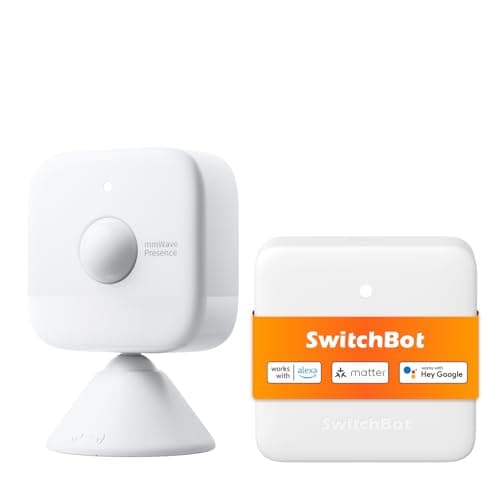
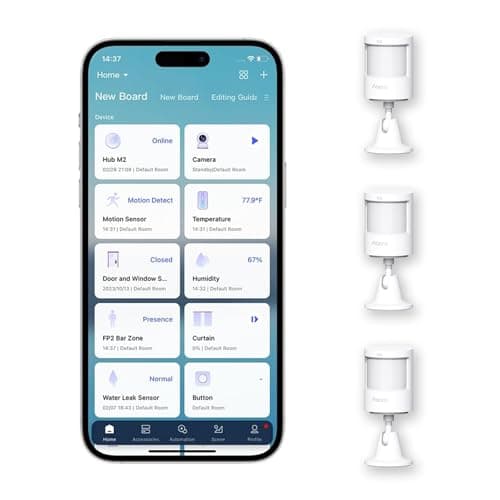
The best smart motion sensor for most rooms is the Aqara Motion Sensor P1: a passive-infrared sensor with a five-year published battery life and an adjustable 1-to-200-second timeout, which is the setting that decides whether your lights behave or flicker off while you are still in the room. If you need a sensor that notices a person sitting perfectly still, that is a different technology entirely, and the SwitchBot mmWave radar is the pick.
Every motion sensor sold splits into one of two mechanisms, and the split decides everything else about how it behaves. A passive infrared (PIR) sensor watches for a warm body movingacross its field. It is cheap, it sips power, and it is blind to a person who is holding still — and it can be fooled by a sunbeam, a heating vent, or a cat. An mmWave radar sensor bounces radio off the room and measures the reflections, so it can register the tiny movement of a chest rising and falling. It sees the still person the PIR misses, at the cost of more power and a habit of seeing straight through thin walls. Get that one distinction right and the rest of this page is detail.
The question to answer first. Do you want to detect motion (someone entering or crossing a space) or presence (someone being there at all, moving or not)? Motion is a PIR job and costs very little. Presence is an mmWave job and costs more, needs power, and needs tuning. Buying the wrong one is the single most common mistake in this category, and no amount of app configuration fixes a sensor pointed at the wrong physics.
The best motion sensors, compared
Compiled from manufacturer specifications, August 2026. Confirm the hub or border router requirement for your ecosystem before ordering, as it differs by model.| Model | Sensing type | Hub / protocol needed | Pet handling | Power | Best use |
|---|
| Aqara Motion Sensor P1 | PIR (motion) | Aqara Zigbee hub | No reliable pet immunity; a larger animal triggers it | Coin cell, five-year published life | Everyday interior lighting and motion automation |
|---|
| SwitchBot mmWave Radar Motion Sensor | mmWave radar (presence) | SwitchBot hub for automations; Bluetooth otherwise | Detects any moving mass, pets included; use zones | Mains powered | True occupancy — lights that stay on while you sit still |
|---|
| Aqara Multi-State Sensor P100 | Contact + vibration (not occupancy) | Aqara hub or Thread border router | Not applicable; triggers on the object it is on | Coin cell | Window opened or struck; object movement |
|---|
The one decision: PIR motion versus mmWave presence
This is the whole category in two paragraphs. Read them once and the shortlist below picks itself.
What passive infrared actually detects
A PIR sensor sits behind a segmented plastic lens that carves its field of view into a fan of narrow zones. It does not see a person; it sees the differencein infrared heat as a warm body crosses from one zone into the next. That mechanism explains every strength and every weakness of the technology. It is why PIR is cheap and why it barely uses any power — there is no emitter, just a detector that wakes, notices a change, and radios once. It is why the Aqara P1 can publish a five-year battery life on coin cells: the sensor is asleep almost all the time and only speaks when a zone boundary is crossed. And it is why PIR is blind to a person who has stopped moving. Sit down on a sofa and hold reasonably still, and after a few seconds you have stopped crossing zone boundaries, so the sensor reports an empty room. That is not a fault to be tuned out; it is the mechanism working exactly as designed.
The same mechanism is what a sunbeam sweeping across a floor, a heating vent cycling on, or a pet padding through the room all exploit. Each of those is a moving heat difference, and a PIR sensor at this price cannot reliably tell a warm animal apart from a warm person. That is the honest limit, and it is stated plainly in the Aqara P1's own skip line.
What mmWave radar detects
An mmWave sensor is active where PIR is passive: it emits a millimeter-wavelength radio signal and reads the reflections coming back. Because it measures distance and phase rather than heat, it can register motion far smaller than a footstep — the rise and fall of a chest, the shift of a hand. That is why the SwitchBot mmWave can hold a room as “occupied” while you read a book without moving, the exact case where every PIR on this page reports the room empty and switches the lights off. The cost of that sensitivity is twofold. Radar is not a coin-cell technology, so in practice it wants mains power. And a millimeter-wave signal passes through plasterboard and thin partitions, so out of the box it will happily detect the person in the next room and report your study as occupied when nobody is in it. That is fixed with zone positioning, not ignored — but it is why the SwitchBot is a presence sensor for automation and not, in its own words, a security detector.
Pet immunity: the honest version
“Pet immune” is the most oversold phrase in this category. On a PIR sensor, pet immunity is achieved by masking the lowest detection zones or angling the sensor so a floor-level animal never crosses an active zone. It works up to a point and a weight — and the point is lower than the marketing implies. The Aqara P1 does not claim reliable pet immunity, and you should take that at face value: a cat on a windowsill or a dog more than a few kilograms will trip it, and at three in the morning that is an alert you will silence by unplugging the sensor. If you have pets of any real size and you are arming a sensor for anything alarm-adjacent, the correct move is careful mounting geometry (below), not a checkbox in an app.
mmWave does not solve this either — arguably it is worse for pets, because it detects any moving mass regardless of temperature, so a dog crossing the room is a detection event exactly like a person. What mmWave gives you is zones: you can carve out the strip of floor where the pet lives, or exclude a doorway, with more precision than a PIR lens mask allows. Neither technology is genuinely blind to a pet. One is cheap and roughly maskable; the other is expensive and precisely zoneable.
Mounting height and placement
Placement matters more than the specification on the box, and the two technologies want opposite things.
- PIR wants to see across, not along. Mount the Aqara P1 in a corner, roughly at head height to a little above, and aim it so people walk acrossits fan of zones rather than straight at it. Someone walking directly toward a PIR sensor crosses very few zone boundaries and is detected late; someone crossing sideways trips zone after zone and is caught instantly. Its 150-to-170-degree spread covers a normal room from one corner. Keep it pointed away from windows, heating vents, and anything that gets warm and moves — a register blowing hot air is a false trigger machine.
- mmWave wants a clear volume and a quiet edge. The SwitchBot radar is mounted per room and then tuned: set the detection distance so it stops at your walls, and exclude the zones where a fan blade, a billowing curtain, or a pet create constant micro-motion. Because it reads through partitions, the first job after mounting is trimming the range so it is not counting the hallway.
The Aqara Multi-State Sensor P100 is not mounted for room coverage at all — it goes on the thing you want to watch. On a window it reports both the sash being opened (contact) and the pane being struck (vibration); on a safe, a bike, or a tool chest it reports the object being moved. It is in this roundup because “motion” for many buyers means “did something move that should not have,” and that is a job for a vibration sensor on the object, not a PIR watching the room.
Do you need a hub? Zigbee, Thread and Bluetooth
None of these three is a standalone Wi-Fi device you set up from a phone and forget, and the connectivity requirement is a real part of the purchase.
- Aqara P1 speaks Zigbee and needs an Aqara Zigbee hub. It is not a Thread device, so it will not join a Matter fabric on its own; it reaches Apple Home, Google Home or a Matter setup only through a compatible Aqara hub that bridges it. Once paired, control is local through that hub.
- SwitchBot mmWave talks Bluetooth locally, but to run automations or reach it remotely you need a SwitchBot hub in the mix.
- Aqara P100 supports Thread and Zigbee, so it runs through an Aqara hub or a Thread border router depending on how you build the rest of the house.
If “no vendor hub, no cloud” is your hard requirement, the sensor that gets closest in this family is the Thread-native Aqara Door and Window Sensor P2, which joins a Matter fabric directly — but it is a contact sensor, not a motion sensor. The protocol landscape, and why Thread and Matter change what “local” means, is set out in our Matter and smart-home-security explainer.
What each one actually automates
The point of a motion sensor is the automation it enables, and the three here enable genuinely different things.
- Aqara P1 (PIR).The classic triggers: turn a light on when someone enters, turn it off a set interval after the last movement, flag a room as active, send a notification when nothing should be moving. It is excellent at “something just entered” and poor at “someone is still here,” which is why the adjustable 1-to-200-second timeout matters so much: too short and the light dies while you stand at the counter, too long and it burns for a quarter of an hour after you leave.
- SwitchBot mmWave (presence). The automation PIR cannot do: lights that stay on the entire time a room is occupied, whether or not anyone is moving, and go off promptly when it is genuinely empty. That is the right tool for a home office, a reading corner, or bathroom lighting. It is the wrong tool for detecting someone who should not be there, because its ability to read through a wall makes it good at knowing a room is occupied and bad at telling you precisely who is where.
- Aqara P100 (contact + vibration).Not occupancy at all. Its automations fire on a state change of the object it is attached to: the window opened, or the window was hit. Ten sensitivity levels let you tune out a rattly sash instead of switching the sensor off. Note the honest limit in its own record — frame vibration is not acoustic glass-break detection, and it can miss a large pane broken cleanly at the far corner.
Which one to buy
- You want reliable, cheap, battery-frugal motion for lighting.Aqara Motion Sensor P1. It is the everyday pick, the five-year battery makes it install-and- forget, and the adjustable timeout is the feature that separates a motion sensor that behaves from one that annoys you. Buy it if you already run — or are willing to add — an Aqara Zigbee hub, and if you do not have larger pets roaming the covered room.
- You want lights that stay on while you sit still. SwitchBot mmWave radar. It solves the one problem every PIR on this page cannot, at the cost of mains power and some tuning. Treat it as an occupancy sensor for automation, not a security device.
- You want to know a window was opened or struck.Aqara Multi-State Sensor P100. It covers the “did something move” job that a room-watching PIR handles badly, by sitting on the object itself.
Most people who shop for a motion sensor are really building a small system, and the same buyer is usually adding contact sensors on the doors and, often, a smart lock the same evening. The contact-sensor half is ranked at best door and window sensors, the lock half at best smart locks, and if SwitchBot is already your ecosystem, the lock decision is walked through in August vs SwitchBot lock.
How we picked
Products we claim to have tested: zero. We do not run a lab and we will not imply one. What this ranking is built from is the published manufacturer specification, the support documentation for the hub and protocol requirements, and the physics of the two sensing technologies, which is stable and citable. Rankings weight the fit between mechanism and job, the honesty of each product about its own limits, the connectivity requirement, power, and value. Every pick carries a specific reason to skip it. The full rubric is at methodology, and the rest of the category is on the sensors hub.
How to choose a motion sensor
Match the sensor to the automation, not the room
Start from the sentence you want to be true. “When someone comes in, turn the light on” is a PIR job — buy the Aqara P1. “Keep the light on the whole time anyone is in here” is a presence job, and no PIR will ever do it well because holding still is invisible to infrared — buy the SwitchBot mmWave. “Tell me if this window is opened or hit” is neither; it is a contact-and-vibration job for the P100. Almost every disappointed motion-sensor owner bought the right product for a different sentence than the one they actually needed.
What actually decides the price
In rough order: the sensing technology itself (an active radar transceiver costs more than a passive infrared detector, and always will), the power arrangement (a device that must be mains-powered is a different install and a different price from a coin-cell device that lasts years), the tuning intelligence (zone positioning and sensitivity steps are real engineering), and the multi-pack economics — the Aqara P1 is sold in a three-pack because a house wants several, and buying per-room in threes is where the value sits. What does not add to the price on any of these three is a subscription; none of them charges a monthly fee, which is the standard we hold every sensor to across the sensors category.
The mistake buyers make
Three, in order of frequency. First, buying a PIR sensor and expecting it to hold a room “occupied” while people sit still — it cannot, and the fix is an mmWave sensor, not a longer timeout. Second, buying an mmWave sensor as a security detector and discovering it reads through the wall into the next room; it is an occupancy sensor and is honest about it. Third, underestimating a pet: pet immunity on a budget PIR is a mounting trick with a low weight ceiling, not a guarantee, and the answer is careful geometry, not a marketing checkbox.
Get the timeout right, then the height, then the aim
On a PIR sensor the adjustable clear interval is the single setting that decides whether you keep the thing. Set it to how long a person might reasonably pause mid-task in that room — short in a hallway, longer at a kitchen counter. Then mount in a corner at about head height so people cross the detection fan sideways rather than walking into it, and keep the lens pointed away from windows and heat sources. Those three adjustments do more for real-world behavior than any spec on the box.
The pairing most people actually want
A motion sensor watches a volume of air; it says something moved, not what or where the opening is. Pair it with a contact sensor on each door and window and you get the plain binary fact — this door is open — that a motion sensor can only infer. That list is at best door and window sensors, and if you are covering entrances, a lock that reports its own bolt state belongs in the same plan — ranked at best smart locks. Both live on the same Zigbee or Thread network you are already building for the motion sensor.