Skip to content
SensorLatch

HUB 02 · Smart Locks

The Best Smart Locks for Elderly Parents

The problem is almost never the lock. It is a door left unlocked, a key that cannot be found, and a code only one person in the family can change.

By Stephen V.Updated How we pick
#ad

We earn a commission if you buy through our links. It does not change the price you pay, and it does not decide our picks — our selection criteria are published in full. How this works.

Verdict

The bottom line

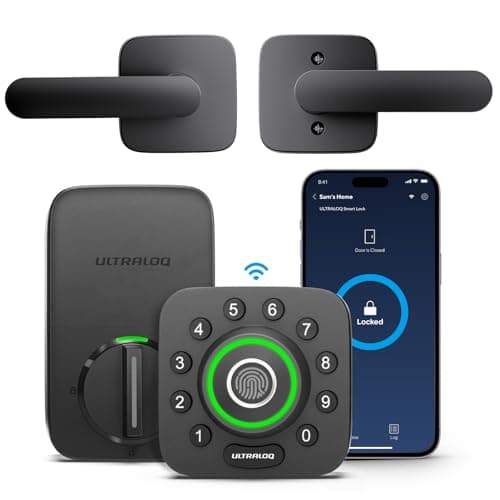
For an older parent the lock to buy is the Ultraloq U-Bolt Pro Wi-Fi. It offers the most ways in of any lock at the price — fingerprint on the outside knob, keypad code, app, and a mechanical key that still works — its Wi-Fi is built into the lock rather than a bridge that can be unplugged by mistake, and the bundle includes a door sensor, so a family member can see that the door is genuinely shut rather than just that the bolt was thrown. Enroll a code as well as a print: fingerprint readers of every brand struggle with dry, cold or worn skin, and that is the entry method most likely to fail for the person who needs it.

The short answer

Quick picks

#ProductBest forScorePrice
01
Ultraloq Ultraloq U-Bolt Pro Wi-Fi (with Handle)
Ultraloq U-Bolt Pro Wi-Fi (with Handle)

The most entry methods for the money: fingerprint, code, app, Bluetooth, auto-unlock and a mechanical key, with built-in Wi-Fi rather than a bridge. If you want every door to open every way, this is the cheapest route there — and the listing we link ships the matching handle set with the deadbolt.

Best fingerprint lock
7.9
$159.99Amazon
02
eufy eufy Smart Lock C220
eufy Smart Lock C220

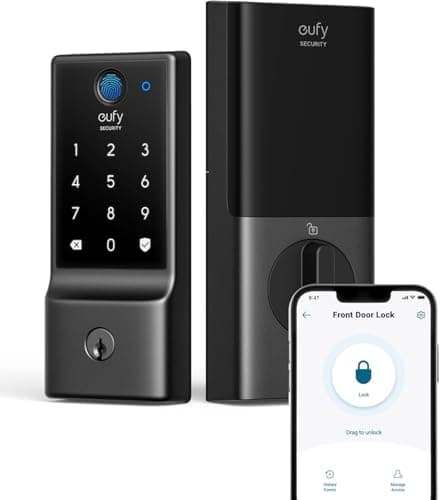
Fingerprint plus built-in Wi-Fi at the bottom of the price band that includes both. eufy's whole pitch is no monthly fee, and the lock line holds to it.

Best budget fingerprint lock
7.4
$99.99Amazon
03
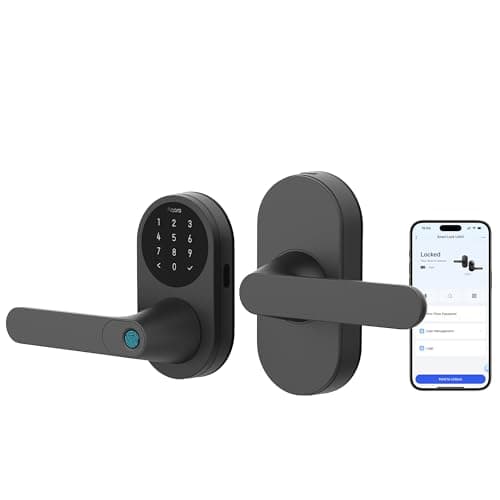
Aqara Aqara Smart Lock with Handle U300
Aqara Smart Lock with Handle U300

The most ways in of anything here, and natively Matter over Thread. The catch is the form factor: this is a lever handle set, so it upgrades the latch your door closes on rather than the deadbolt it locks with.

Most unlock methods
8.6
$199.99Amazon
04
Schlage Schlage Encode Plus Wi-Fi Deadbolt
Schlage Encode Plus Wi-Fi Deadbolt

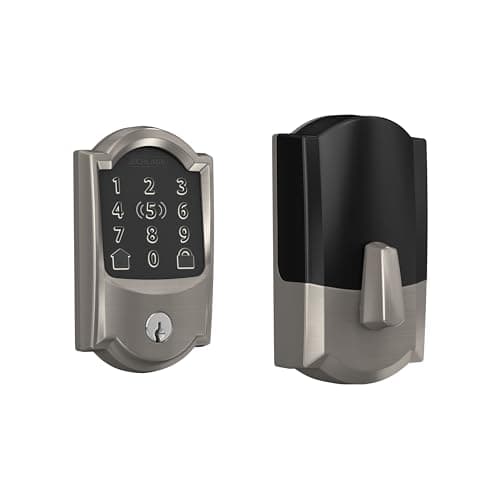
The one with the strongest published hardware pedigree. Schlage's deadbolt line is the reference point for BHMA Grade 1 in residential locks, and the Plus adds Apple Home Key so you tap a phone or watch instead of typing.

Best build quality
8.2
$284.99Amazon
05
Veise Veise Keyless Entry Keypad Deadbolt
Veise Keyless Entry Keypad Deadbolt

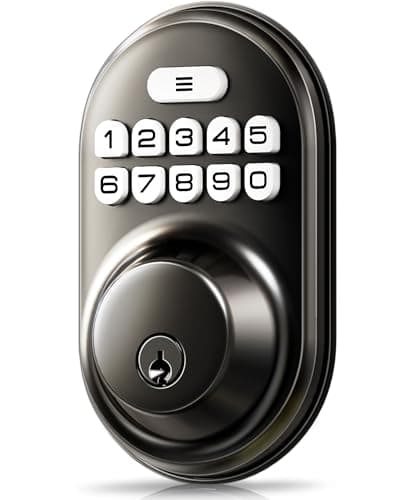
The cheapest thing on this site that solves a real problem: a backlit code pad on a door that currently only takes a key, with auto-lock and an anti-peek entry mode.

Best budget keypad lock
7.2
$31.66Amazon

#ad · Prices pulled live from the Amazon Product API, last checked October 5, 2026. Where we have no verified live price we show none — we would rather leave a gap than print a number that has gone stale. Scores are our own, compiled from published specs; they are not test results.

A smart lock on a parent's door is solving three specific, unglamorous problems: the door gets left unlocked, the spare key has been under the mat for eleven years and nobody knows who has a copy, and when a carer or a neighbor needs access somebody has to drive over with a key. Those are the problems to rank against — not app design, and not anything dramatic.

What actually decides this purchase

Five things, in this order. Can the person living there get in without a phone? Can they do it without fine finger control or a remembered code? Does the door lock itself, because auto-lock fixes the most common failure in this whole category? Can somebody else change access remotely, without a visit? And is there still a mechanical key, because a lock with no key fallback puts a flat battery between an older person and their own house.

Notice what is missing from that list. Resolution of the keypad, the number of integrations, voice control: all nice, none decisive. We also deliberately do not rank on alarm features or anything framed around intrusion. The realistic daily benefit is an unlocked door that locks itself and a carer who can be let in without a key handover.

Avoid a scrambling keypad for this use.The Lockly Secure Plus reshuffles the digit positions on every use, which genuinely defeats shoulder-surfing and smudge attacks — and makes the pad significantly harder for a child, an older relative or anyone with low vision. The security property and the usability cost are the same feature. It is a good lock and we rank it well in our keypad lock roundup; it is the wrong lock for this page.

Touchscreens, fingerprints and physical keys

Each entry method has a failure mode that lands disproportionately on older hands, and no maker advertises it. A capacitive touchscreen needs skin contact to register, so dry or cold fingers can tap at it with nothing happening. A fingerprint reader works from ridge detail that wears down with age and manual work, so enrollment can fail outright or degrade over months. A remembered code is fine until it is not. A mechanical key needs grip and rotation, which is the specific motion arthritis takes away first.

The conclusion is not that one method wins; it is that the lock should offer several. Every pick on this page offers at least two beyond the app, and the one that offers the most is ranked first for that reason. Where a maker publishes a touchscreen rather than physical buttons we say so in the table, because it is the method most likely to frustrate.

How we ranked them

Entry methods available without a phone, first. Then whether a second person can manage codes and see activity remotely, because that is the difference between a lock that helps the family and one that only helps the resident. Then auto-lock. Then key fallback and battery arithmetic. Then published hardware pedigree, which is where the deadbolt rankings start and this page finishes. The rubric is at our methodology and is compiled from published specifications, not from testing.

Compiled from manufacturer specifications, October 2026. Keypad type is as the maker publishes it; a blank means they do not state it.
LockWays in without a phoneKeypad typeRemote code managementMechanical key
Ultraloq U-Bolt Pro Wi-FiFingerprint, code, keyKeypadYes, Wi-Fi in the lockYes
eufy Smart Lock C220Fingerprint, code, keyKeypadYes, Wi-Fi in the lockYes
Aqara Smart Lock U300Fingerprint, code, Home Key tap, keyTouchscreenYes, via a Matter controllerYes
Schlage Encode PlusCode, Home Key tap, keyTouchscreenYes, Wi-Fi in the lockYes
Veise Keypad DeadboltCode, keyBacklit code padNo radio at allYes

Ultraloq U-Bolt Pro — the most ways in, and a door sensor

Two things put this first. The fingerprint reader is on the outside knob, where a hand already is, rather than on a separate pad that has to be found and aimed at — a small ergonomic difference that matters more than any specification on the box. And the bundle includes a door sensor, so the app can distinguish “the bolt is thrown” from “the door is actually closed,” which is precisely the thing a family member checking in from another city wants to know.

Built-in Wi-Fi means there is no bridge sitting in a hallway socket to be unplugged by a vacuum cleaner. Anti-peep code entry lets a real code be padded with junk digits in front of a stranger. The honest limitation is the one in its own record: capacitive fingerprint readers misread when wet or cold, and on an exposed door with no overhang the household ends up typing the code anyway. Enroll a code for everyone, treat the print as the convenience.

eufy Smart Lock C220 — the same three methods, less money

Fingerprint, keypad, app and key with built-in Wi-Fi, at the bottom of the price band that includes all four. For a straightforward front door on a standard bore it does everything the Ultraloq does except ship a door sensor, and eufy does not gate lock features behind a plan, which is not true of every brand in this category.

The trade is power. Built-in Wi-Fi in a battery lock is the heaviest possible draw, so expect shorter runs between cell changes than a Bluetooth or Thread lock — and on a lock somebody else maintains, battery changes are a visit. The arithmetic is worked through in how long smart lock batteries last. There is also no Matter upgrade path: it is a Wi-Fi lock and it stays one.

Aqara Smart Lock U300 — the lever, which is the accessibility argument

This is the only pick here that is a lever handle set rather than a deadbolt, and for hands that struggle to grip and twist, a lever is the single biggest usability change available on a door — it is operated with a forearm, an elbow or a closed fist. It also carries the widest set of entry methods on the page: fingerprint, touchscreen code, Apple Home Key tap, Bluetooth and a mechanical key, and it is natively Matter over Thread so any Matter platform can manage it.

The limitation is structural and it is why this is third rather than first: a lever set is the latch, not the bolt. On a front door the deadbolt is the lock that matters and this does not replace it. The realistic arrangement is this on the handle and something from the deadbolt rankingsabove it, or this on an interior or garage-to-house door. Apple Home Key specifically needs an Apple device that is both a Matter controller and a Thread border router — a HomePod or Apple TV, not just an iPhone.

Schlage Encode Plus — the strongest published hardware

Schlage is the reference point for published BHMA grades in residential deadbolts, which most smart-lock brands simply do not publish, and the Plus adds Apple Home Key so an iPhone or Apple Watch tap opens the door with no code and no app. For a parent who already uses an iPhone, a tap is the least demanding entry method on this page.

Two reasons it is not higher. The keypad is a touchscreen, which is the method most likely to fail for dry hands. And a large share of what you pay over the standard Encode is Home Key, which buys nothing at all in a household with an Android phone. It is also one of the most expensive locks in the category.

Veise Keypad Deadbolt — for a parent who wants nothing connected

Some people do not want an app on their door, and that is a legitimate position rather than a problem to solve. This is a backlit code pad with auto-lock and a physical key, no radio, no account and nothing to update — and auto-lock alone fixes the most common real failure on this list, which is a door left on the latch.

Be clear about what you give up: there is no remote anything. A code change means a visit, you cannot see whether the door is locked, and there are no alerts. If the main reason for buying is remote access for a carer, this is the wrong pick. If the main reason is that the door should lock itself and the key should stop living under the mat, it is the cheapest honest answer on the site, and a contact sensor beside it covers the alerting job for a few dollars more — which is exactly what its own record recommends.

Setting it up so it actually helps

Three things to do on the day, none of them in the manual. Enroll at least two entry methods for the resident, not one: a print and a code, or a code and a key kept somewhere sensible. Give the carer, the neighbor and each family member their own code rather than sharing one, so a code can be withdrawn without changing everybody's — the mechanics of that are in our guide to guest codes and access. And agree who owns the account before you install it: a lock administered from a phone that nobody else can unlock is a problem waiting for a bad week. The rest of the category is at the smart locks hub.
In detail

The picks, in full

01
Ultraloq Ultraloq U-Bolt Pro Wi-Fi (with Handle)

Best fingerprint lock

Ultraloq U-Bolt Pro Wi-Fi (with Handle)

Fingerprint + code + keyBuilt-in Wi-Fi4x AAHandle set included
No subscriptionWorks offline (code + print)
7.9/10

The most entry methods for the money: fingerprint, code, app, Bluetooth, auto-unlock and a mechanical key, with built-in Wi-Fi rather than a bridge. If you want every door to open every way, this is the cheapest route there — and the listing we link ships the matching handle set with the deadbolt.

Security
8
Door fit
8
Offline
9
Battery
7
Ecosystem
7.5

What it gets right

  • Fingerprint reader is on the outside knob where your hand already is, not on a separate pad
  • Bundled door sensor tells you the door is actually shut, not just that the bolt threw
  • Anti-peep code entry lets you pad a real code with junk digits in front of a stranger

What it doesn't

  • Fingerprint readers of any brand degrade with wet, cold or worn fingers — always enroll a code as well
  • The app ecosystem is smaller than Yale's or Schlage's, so third-party integrations lag

What it costs to run

4x AA alkaline. No subscription for fingerprint, code, app or remote unlock.

Skip this if…

…your entry door faces weather with no overhang. Capacitive fingerprint readers are the first thing to misread when the sensor is wet or your hands are cold, and on an exposed north-facing door you will end up typing the code anyway — in which case a cheaper keypad lock does the same job.

$159.99on Amazon

$209.9924% off

Price last checked October 5, 2026. Prices move constantly — Amazon's at checkout is the one that counts.

#ad · we may earn a commission from this link to Ultraloq U-Bolt Pro Wi-Fi (with Handle)

02
eufy eufy Smart Lock C220

Best budget fingerprint lock

eufy Smart Lock C220

Fingerprint + code + keyBuilt-in Wi-Fi4x AAFull deadbolt
No subscription
7.4/10

Fingerprint plus built-in Wi-Fi at the bottom of the price band that includes both. eufy's whole pitch is no monthly fee, and the lock line holds to it.

Security
7.5
Door fit
8
Offline
8
Battery
6.5
Ecosystem
7

What it gets right

  • Wi-Fi is in the lock, so there is no bridge to buy, site and power
  • Fingerprint, keypad, app and key covers every household member's preference
  • eufy does not gate lock features behind a plan, which is not true of every brand here

What it doesn't

  • Built-in Wi-Fi in a battery lock is the heaviest possible power draw — expect shorter runs than a Bluetooth or Thread lock
  • Fewer third-party integrations than the Yale and Schlage lines

What it costs to run

4x AA alkaline. No plan required for any function including remote unlock.

Skip this if…

…you want Matter or Thread. This is a Wi-Fi lock and it stays a Wi-Fi lock — there is no module to swap and no protocol upgrade path, so a house built around a Matter fabric should look at the Yale module system or the Aqara U100 instead.

$99.99on Amazon

$169.9941% off

Price last checked October 5, 2026. Prices move constantly — Amazon's at checkout is the one that counts.

#ad · we may earn a commission from this link to eufy Smart Lock C220

03
Aqara Aqara Smart Lock with Handle U300

Most unlock methods

Aqara Smart Lock with Handle U300

Native Matter over ThreadApple Home KeyFingerprint + touchscreen keypadLever handle set, not a deadboltMechanical key override
Native Matter over ThreadApple Home KeyLever lock, not a deadbolt
8.6/10

The most ways in of anything here, and natively Matter over Thread. The catch is the form factor: this is a lever handle set, so it upgrades the latch your door closes on rather than the deadbolt it locks with.

Matter class
9.5
Controller reach
9.5
Access methods
9.5
Security
6.5
Battery
8

What it gets right

  • Aqara describes the U300 as natively Matter enabled over Thread, so it is managed by any Matter platform — Alexa, Apple Home, Google Home, Home Assistant or SmartThings — through a Matter controller
  • Apple Home Key tap-to-unlock is supported, which almost no Matter lock at this price does
  • Fingerprint, touchscreen keypad, PIN, Bluetooth and a mechanical key is the widest set of access methods on this page
  • As a lever set it suits an interior, garage-to-house or office door where a deadbolt was never fitted

What it doesn't

  • It is a lever handle set. On a front door the deadbolt is the lock that matters, and this does not replace it
  • Apple Home Key specifically needs an Apple device that is both a Matter controller and a Thread border router — a HomePod or Apple TV, not just an iPhone
  • Aqara does not publish an ANSI/BHMA grade for it, so there is no independent door-hardware rating to check
  • Fingerprint enrollment and much of the user management happen in the Aqara app rather than in your Matter controller

What it costs to run

No subscription. No fee for any unlock method, including Apple Home Key. Aqara publishes the battery specification in the U300 manual rather than on the listing - check it before buying.

Skip this if…

…the door you are upgrading has a deadbolt and that is what you wanted to make smart. This is the handle, not the bolt, and swapping it does not change what secures the door at night.

$199.99on Amazon

Price last checked October 5, 2026. Prices move constantly — Amazon's at checkout is the one that counts.

#ad · we may earn a commission from this link to Aqara Smart Lock with Handle U300

04
Schlage Schlage Encode Plus Wi-Fi Deadbolt

Best build quality

Schlage Encode Plus Wi-Fi Deadbolt

Wi-Fi + BluetoothApple Home Key4x AATouchscreen
No subscriptionCloud account required for remote
8.2/10

The one with the strongest published hardware pedigree. Schlage's deadbolt line is the reference point for BHMA Grade 1 in residential locks, and the Plus adds Apple Home Key so you tap a phone or watch instead of typing.

Security
9
Door fit
8
Offline
8.5
Battery
7.5
Ecosystem
8

What it gets right

  • Schlage publishes BHMA grades for its deadbolts — most smart-lock brands do not, which is the whole point of our grades guide
  • Apple Home Key support means an iPhone or Apple Watch tap unlocks it, including on a dead phone's power reserve
  • Built-in Wi-Fi with no separate bridge to power and lose

What it doesn't

  • One of the most expensive locks in this category
  • Home Key is genuinely useful only inside the Apple ecosystem; Android buyers pay for a feature they cannot use

What it costs to run

4x AA alkaline. No plan is required for app control, codes or notifications.

Skip this if…

…you are not in the Apple ecosystem. A large share of what you are paying over the standard Encode is Home Key, and without an iPhone or Apple Watch that premium buys you nothing you will ever use.

$284.99on Amazon

Price last checked October 5, 2026. Prices move constantly — Amazon's at checkout is the one that counts.

#ad · we may earn a commission from this link to Schlage Encode Plus Wi-Fi Deadbolt

05
Veise Veise Keyless Entry Keypad Deadbolt

Best budget keypad lock

Veise Keyless Entry Keypad Deadbolt

Code + keyNo wireless radio4x AAAnti-peek code entry
Fully offlineNo app or remote access
7.2/10

The cheapest thing on this site that solves a real problem: a backlit code pad on a door that currently only takes a key, with auto-lock and an anti-peek entry mode.

Security
6
Door fit
8
Offline
10
Battery
8.5
Ecosystem
3.5

What it gets right

  • Auto-lock means the door secures itself behind you, which is the single most common real-world failure it fixes
  • Anti-peek entry lets you type junk digits around the real code in front of a delivery driver
  • Nothing to pair, update, or account for — it works out of the box forever

What it doesn't

  • No fingerprint, no app, no notifications
  • No published BHMA grade we could find

What it costs to run

4x AA alkaline. No service, no subscription, no account.

Skip this if…

…this is your only front-door lock and you want any kind of alerting. It cannot tell you the door was opened; a $15 contact sensor next to it is what does that job.

$31.66on Amazon

$47.3733% off

Price last checked October 5, 2026. Prices move constantly — Amazon's at checkout is the one that counts.

#ad · we may earn a commission from this link to Veise Keyless Entry Keypad Deadbolt

How to choose a lock for an older relative

  1. How will they get in on a normal day? Pick the method first, then the lock. A tap, a print, a code and a key are not interchangeable for the person using them.
  2. Is there auto-lock? This is the feature that fixes the actual problem. Every lock on this page has it.
  3. Who needs to manage access, and from where?If the answer is “a son two hours away,” you need Wi-Fi in the lock or a hub in the house. If the answer is “nobody,” a lock with no radio is cheaper and never needs an app update.
  4. Is the mechanical key kept? Insist on it. A key fallback is what stands between a flat battery and a locked-out parent, and it is also what a locksmith or a family member can use in a genuine emergency.
  5. Who changes the batteries? A Wi-Fi lock on a door you visit monthly is a different proposition from one you visit twice a year. Check whether the lock has a low battery warning the resident will actually notice.

What decides the price

Entry methods and published pedigree. A fingerprint reader adds cost, Apple Home Key adds cost, and a published BHMA grade tends to come with the brands that charge for it. Built-in Wi-Fi costs less than it used to but costs battery life instead. None of these locks has a subscription attached to codes, alerts or remote unlock — a point worth checking on anything you buy outside this page, because it is not universal.

The mistake families make

Buying for the person who installs it rather than the person who uses it. An app-first lock with a scrambling keypad is a great purchase for a tech-comfortable household and a daily irritation for an eighty-year-old. The second mistake is removing the key cylinder: key-free versions are tidier and cheaper, and they turn a flat battery into a locked door. The third is one shared code for the whole family and the carer, which means the day you want to withdraw one person's access you have to re-teach everybody a new number.

How we picked

Products we claim to have tested: 0

Everyone in this category says they tested a dozen locks on their own front door. We have not tested any, and we say so. Here is what we do instead: read the manufacturer's manual and spec sheet, record the published protocol, power and storage figures, check the published standard where one exists, compute what the device costs to keep running, and cite all of it so you can check the work. Prices come live from Amazon's API and disappear rather than go stale.

The scores above are judgments from that documented research — not bench measurements. The full rubric, including what disqualifies a product, is published in full.

Questions

Frequently asked

What is the best smart lock for an elderly parent?
The Ultraloq U-Bolt Pro Wi-Fi, because it offers fingerprint, code, app and key entry, has Wi-Fi built into the lock so a family member can manage codes remotely, and ships a door sensor that reports whether the door is actually closed. Enroll a code as well as a print, since fingerprint readers struggle with dry or worn skin.
Are touchscreen keypads harder for older people to use?
They can be. A capacitive touchscreen needs skin contact to register, so dry or cold fingers may tap with no response. That is why we prefer locks offering several entry methods and note the keypad type in the table. A scrambling keypad, where the digits move position on every use, is the worst choice for this purpose.
Can I manage my parent's smart lock from another city?
Yes, if the lock has Wi-Fi built in or a hub in the house. The Ultraloq, eufy and Schlage picks here all connect directly; the Aqara needs a Matter controller on site. A lock with no radio, like the Veise, cannot be managed remotely at all — a code change means a visit.
Should the lock still have a physical key?
Yes. Key-free versions are cheaper and tidier, and they turn a flat battery into a door nobody can open. Every pick on this page keeps a mechanical cylinder. Keep the spare somewhere a family member can reach rather than under the mat.
Is a lever handle better than a deadbolt for arthritic hands?
A lever is much easier to operate than a knob, because it needs no grip or wrist rotation. But a lever set is the latch, not the bolt: it does not replace the deadbolt that secures a front door at night. The usual arrangement is a smart lever on the handle and a deadbolt above it.

Keep reading

Receipts

Sources

We do not run a testing lab and we do not pretend to. Specifications come from the manufacturer's own published documents and from published standards; prices come from the live Amazon API. Where a figure is not published, the page says “not published” rather than guessing. Read the full method.