HUB 06 · Guides
Smart home hubs for security: what they do and which to buy
A hub is the difference between sensors that notify you and sensors that act. Here is what each type does, and the cases where you do not need one at all.
We earn a commission if you buy through our links. It does not change the price you pay, and it does not decide our picks — our selection criteria are published in full. How this works.
What does a smart home hub do for security?
A hub translates. Most cheap, long-lasting security sensors speak a low-power radio — Zigbee, Thread or Z-Wave — that your phone and router cannot hear. The hub listens to that radio, puts the devices on your network, and runs the automations locally, so a door opening can turn on a light or trigger a siren without the internet being involved at all.
You may not need one.If every device you own has Wi-Fi built in, a hub adds nothing. Hubs matter when you want the cheap, tiny, multi-year-battery sensors, and those are almost all Zigbee, Thread or Z-Wave — because Wi-Fi is a power-hungry radio that a coin cell cannot sustain for years.
The four jobs a hub does
“Smart home hub” is one phrase covering several distinct functions. A given box may do one of these or all four, and knowing which is which is most of what you need to shop properly.
- Zigbee coordinator. Runs a Zigbee network and lets Zigbee sensors join it. This is the job that makes the cheapest, smallest contact sensors usable.
- Thread border router.Bridges a Thread mesh onto your home network. Thread is the low-power radio Matter uses for battery devices, and without a border router a Thread sensor has nothing to talk to. Some devices you already own may do this — certain speakers, streaming boxes and displays include one.
- Matter controller.Commissions Matter devices and lets them be controlled from your chosen app. Matter is the standard that finally lets a sensor from one brand work in another brand's app, and it is explained properly in our Matter guide.
- Automation engine. Executes the rules. The important question here is whether rules run on the hub in your house or on a server somewhere, because only the first kind keeps working when your broadband does not.
A camera base station is a fifth kind of hub with a different job entirely: it stores video. It is not a substitute for any of the four above, and mixing the two up is the most common confusion in this category.
| Type of hub | What it enables | Buy one if |
|---|---|---|
| Zigbee coordinator | Cheap multi-year-battery contact, motion and leak sensors | You want many sensors at low cost |
| Thread border router | Matter-over-Thread sensors and locks | You are buying Thread devices and own no border router |
| Matter controller | Cross-brand control from one app | You want to mix brands without mixing apps |
| Local automation engine | Rules that run during an internet outage | You want the house to work when the connection does not |
| Camera base station | Central local video storage | You have cameras and refuse a cloud plan |
Why the good sensors need a hub in the first place
It looks like an artificial complication until you look at the power budget. A Wi-Fi radio is designed to move a lot of data quickly, and it draws current accordingly: waking, joining the network, authenticating and transmitting costs far more energy than a contact sensor has to spend. That is why Wi-Fi contact sensors are rare, why the ones that exist tend to be bulky, and why nobody advertises a five-year battery on one.
Zigbee, Thread and Z-Wave were designed for the opposite job: tiny messages, sent rarely, by devices that must live for years on a coin cell. A door sensor sends a few bytes when the door moves and sleeps the rest of the time. The price of that efficiency is that your phone and your router cannot hear those radios, so something has to translate — and that something is the hub. Seen this way, the hub is not an extra device you have been talked into. It is the cost of sensors small enough to sit on a window frame and long-lived enough that you forget they are there.
These radios are also mesh networks, which has a second consequence worth knowing. Every mains-powered device on the mesh — a plug, a bulb, a repeater — relays for the battery ones, so a house with a few powered Zigbee or Thread devices scattered through it has a far more reliable sensor network than a house with a hub and nothing but battery sensors at the edges. If a distant sensor keeps dropping out, adding a powered device halfway there usually fixes it more cheaply than anything else.
The hub to buy for a normal house
For most households building a subscription-free sensor estate, the useful purchase is a single box that is a Matter controller, a Thread border router and a Zigbee coordinator at once, and that runs its automations locally. That combination means you can buy whichever sensor is genuinely best rather than whichever sensor matches your hub, and it means the rules keep firing during an outage.
The Aqara Hub M100 is our default recommendation for exactly this reason: it covers the same three roles as the flagship for a fraction of the price, and being a Thread border router is what unlocks the Aqara P2 sensors we recommend most often in our door and window sensor roundup. The Aqara Hub M3 is the same idea with more capacity, third-party Zigbee support and a PoE option, which is worth the difference on a large estate of fifty-plus devices and is not worth it in a three-bedroom house. The M100 pairs Aqara Zigbee devices only and holds 20 of them plus 20 Thread nodes, which is the ceiling to check your plan against. Why an Aqara hub and a SwitchBot hub are not the same class of product — protocol hub against Bluetooth bridge — is set out in Aqara versus SwitchBot.
The eufy HomeBase 3 sits in the fifth category above. It is a camera base station: local video storage of up to 16TB with on-device detection and no plan. If your problem is where camera footage lands rather than which radio your sensors speak, that is the box, and it is covered in our local-storage cameras roundup. Owning one does not remove the need for a sensor hub, and owning a sensor hub does not remove the need for it.
One scope note. This page judges hubs on security duty alone — the radios that sensors and locks speak, and whether the rules keep firing with the broadband down. If you are weighing the same boxes on the wider job as well, meaning lighting, climate, media and voice in one app, Latch & Hub's roundup of the best smart home hubs ranks them against that broader brief, and the shortlists overlap less than you would expect.
When you can skip the hub entirely
Three cases, and they cover a lot of people.
- You already own a Thread border router.Several popular speakers, smart displays and streaming boxes include one. If you have one and Thread is all you need, buy Thread sensors and skip the hub — check your device's specification rather than assuming either way.
- You are buying only Wi-Fi devices. Wi-Fi cameras, Wi-Fi doorbells and Wi-Fi locks connect directly to your router. The cost is battery life on anything small, which is why Wi-Fi contact sensors are rare and why the ones that exist are usually hub-based anyway.
- You want a handful of standalone alarms. A siren-only window alarm or a self-contained keypad lock has no radio and needs no hub. Simplicity is a legitimate design goal, and the no-hub options are ranked in our no-hub sensor roundup.
The case that runs the other way is a Matter device with nothing to join. A Matter-certified garage door controller is a standard device that any controller can adopt — and, without one in the house, an expensive Bluetooth remote. That dependency is set out in the best smart garage door openers, which is worth reading before you decide the hub is optional.
The failure modes worth planning for
A hub is a single point of failure for everything that depends on it, and it is worth being clear-eyed about that before you build a house around one. Three things go wrong in practice.
- The hub loses power. Every sensor on it goes silent, because the sensors were never talking to anything else. A hub on the same socket as a lamp somebody switches off at the wall is a genuinely common cause of a dead sensor estate. Put it somewhere it will not be unplugged.
- The vendor changes the deal. A hub whose automations run in a cloud depends on that cloud continuing to exist in its current form. This is the strongest argument for local execution, and it is a durability argument rather than an outage one.
- It becomes a lock-in.A hub that only pairs its own brand's sensors is a purchase that constrains every subsequent purchase. This is exactly the problem Matter was created to solve, and it is why a hub that is also a Matter controller is worth more than its specification suggests.
None of these argues against buying a hub. They argue for buying one that runs locally, speaks a standard rather than only a brand, and lives somewhere sensible. Those three properties are most of what separates a hub you keep from one you replace in two years.
Choosing so you do not buy twice
Two questions save most of the money wasted in this category. First: which radio do the sensors you actually want speak? Pick the sensors, then buy the hub they need — doing it the other way around is how people end up with a hub that supports none of the devices they were excited about. The protocol trade-offs are laid out in Z-Wave vs Zigbee vs Matter.
Second: do the automations run locally? A hub whose rules execute in a vendor cloud is a hub that stops automating when your connection drops, which for security is the wrong time. Manufacturers state this, though rarely prominently; look for “local automations” or “local execution” in the specification. It is also the reason a lot of readers of this site end up running Home Assistant, where the whole point is that the engine is yours — that path is covered for locks in our Home Assistant lock roundup and for cameras in our Home Assistant camera roundup.
One last piece of practical advice: put the hub in the middle of the house, not in the cupboard by the front door where the router lives. Zigbee, Thread and Z-Wave are mesh networks with modest range, and a hub at one end of a building spends its life at the edge of its own network. Central placement, off the floor, away from the metal box the broadband arrives in, fixes more reliability complaints than any device upgrade.
The hardware
The hardware this guide is about
The products this guide refers to, with prices pulled live from Amazon and dated on every card. Full rankings live in the roundups linked above.
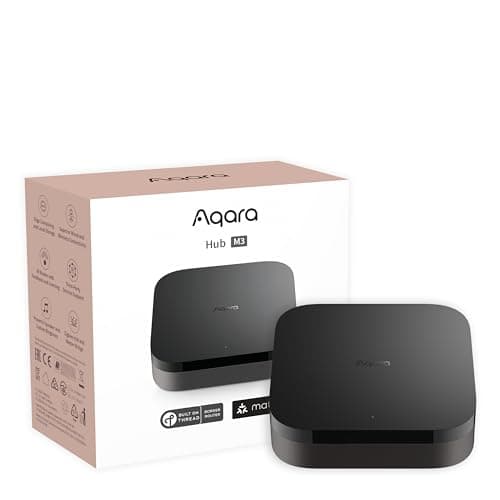
Best smart home hub for security
Aqara Hub M3
Matter controller, Thread border router, Zigbee coordinator, PoE and an IR blaster in one box — the single most useful purchase for anyone building a local, subscription-free sensor estate.
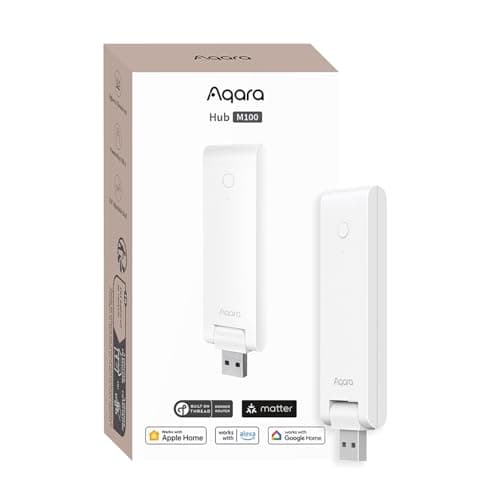
Best value hub
Aqara Hub M100
A USB stick that is a Matter controller, a Thread border router and an Aqara Zigbee hub at once, for about the price of one sensor. For a normal house this is the hub to buy, not the flagship.
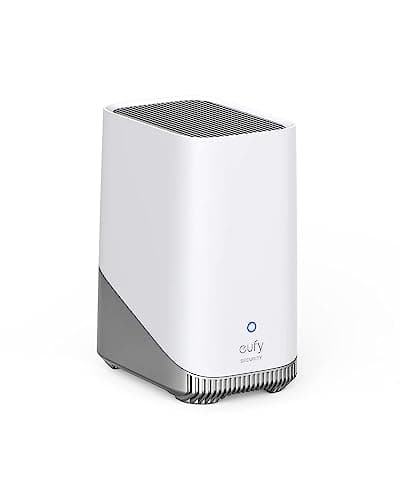
Best local storage base
eufy HomeBase 3 (S380)
The box that makes eufy's no-subscription claim true. Up to 16TB of expandable local storage and on-device face recognition, so the processing and the footage both stay in your house.
#ad · As an Amazon Associate we earn from qualifying purchases.
Questions
Frequently asked
Do I need a smart home hub for home security?
What is the difference between a hub and a camera base station?
Does Matter mean I no longer need a hub?
Will my automations work if the internet goes down?
Where should I put a smart home hub?
Keep reading
Related
- Best door and window sensorsThe sensors a hub exists to support, ranked by protocol and battery life.
- Best no-hub door sensorsThe alternative: sensors that need no hub at all.
- Matter, explainedWhat the standard does and does not fix for security devices.
- Z-Wave vs Zigbee vs MatterPick the radio first, then buy the hub that speaks it.
- Best smart home ecosystem for securityThe layer above the hub: which platform to let own the devices, and why.
Receipts
Sources
- Connectivity Standards Alliance — Matter specification, controllers and Thread requirements
- Thread Group — Thread border router documentation and network fundamentals
- Aqara — Hub M3 and Hub M100 specifications, protocol support and local automation documentation
- eufy — HomeBase 3 specifications and local storage documentation
We do not run a testing lab and we do not pretend to. Specifications come from the manufacturer's own published documents and from published standards; prices come from the live Amazon API. Where a figure is not published, the page says “not published” rather than guessing. Read the full method.