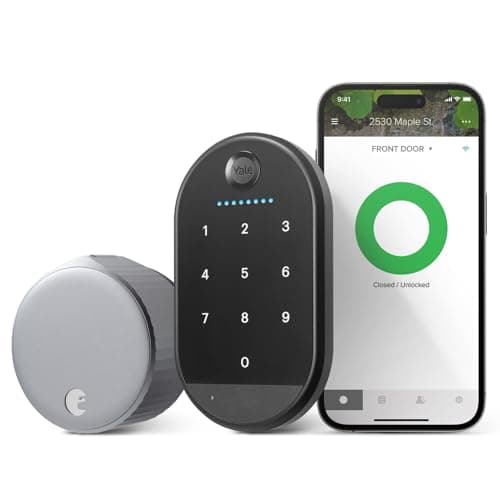
Neither of these touches the outside of your door. Both clamp onto the interior of the deadbolt you already have, turn the thumbturn for you, and leave the exterior cylinder and your existing keys working exactly as before — which is why both are on every renter's shortlist and why neither needs a landlord's permission or a drill. The difference is what you bolt on around that core. August builds the Wi-Fi radio into the lock and ships the more mature app; SwitchBot splits the job across a Bluetooth motor, a hub and a fingerprint keypad, and the Touch Combo bundle we link ships all three together. You are choosing between an integrated package and an assembled kit that arrives assembled.
August vs SwitchBot Lock Ultra: the short answer
Buy the August Wi-Fi Smart Lock if you want remote access working out of the box with nothing else to buy, and you value the most refined app and the most reliable auto-unlock in the retrofit class. Buy the SwitchBot Lock Ultra Touch Combo if fingerprint entry is the point — both bundles put a pad in the box, but only SwitchBot's reads a print — and you do not mind a second box on a socket indoors to reach the lock from away. Both keep your key, both reverse on move-out, and both are ranked on our no-drill renter roundup. The split is integration against price-plus-modularity.
The decision rule in one line: if you want it to work remotely the moment you install it and you will open the door with your phone, August. If codes and a fingerprint matter and you would rather they came in the box than as an accessory, and a separate hub box indoors is not a dealbreaker, SwitchBot.
Head to head: what actually separates two retrofits
Both share the parts that make a retrofit a retrofit: interior-only install, existing deadbolt untouched, existing key still works. So the columns below are the places they diverge — how remote access is achieved, how you add codes, and what you feed for power.
Specifications compiled from the manufacturer documentation cited in Sources, August 2026. Prices are live and dated below the table.| Model | Best for | Install | How remote access works | Keypad & fingerprint | Power | Price |
|---|
| August Wi-Fi Smart Lock | Best for renters | Clamps on interior; keeps deadbolt and key | Built-in Wi-Fi — no hub needed | Code-only Yale Keypad in the bundle; nothing reads a print | 2x CR123A lithium | $107.00·on Amazon |
|---|
| SwitchBot Lock Ultra | Best no-drill retrofit | Mounts on interior; keeps deadbolt and key | Through a SwitchBot hub — included in the bundle we link | Fingerprint keypad included in the Touch Combo bundle | Rechargeable pack, charged over USB-C | Check price on Amazon → |
|---|
#ad· Prices pulled live from the Amazon Product API, last checked October 15, 2026. Where we have no verified live price the button reads “check price” rather than showing a number that has gone stale. We may earn a commission if you buy through these links.
What August is genuinely better at
Built-in Wi-Fi with no second box. The August talks to your network on its own. Install it, and remote lock, remote unlock, and away-from-home notifications work immediately — there is no separate bridge to place, power, and troubleshoot. SwitchBot gets there too, because the bundle we link puts the hub in the box, but it does so with a second device that needs a socket indoors — so August still wins on simply having fewer parts.
The more mature app and auto-unlock. August largely defined the retrofit category, and it shows in the software. Auto-unlock — the lock sensing your phone returning and opening the door before you reach for it — is the feature owners report still using a year later, and August's implementation is the one others are measured against. It is not a gimmick you toggle once; it is the reason a mature app matters on a lock you touch every day.
A cleaner single purchase. For a buyer who will enter by phone, key or code, August is the whole system in one box. No hub, no second thing to charge, and the Yale Keypad that handles codes is already in the bundle. That simplicity is worth real money to some people, and it is why August remains the default recommendation on the main smart lock roundup for renters who want the least fuss.
What SwitchBot Lock Ultra is genuinely better at
Every way in, in one order. Read these as systems rather than sticker prices and the Touch Combo is the better-value side: the bundle carries the lock, the fingerprint keypad and the hub, where August's number covers the lock, its radio and a code-only pad. Bare lock against bare lock, August is the cheaper start. Configured so a guest can open the door with a thumb, SwitchBot is. It sits on our budget smart lock roundup as the retrofit option for exactly that reason.
Fingerprints, not just codes. August's bundle covers codes with the Yale Keypad, but nothing in it reads a print. The Touch Combo ships a fingerprint pad with the lock, so opening the door with a thumb rather than a phone or a code needs nothing else ordered. The wider field of code locks is on our keypad door lock roundup.
A rechargeable pack instead of a diet of cells. August runs on CR123A lithium cells you replace; the Lock Ultra uses a rechargeable pack you top up. Over years that is fewer disposable batteries in the drawer and in the landfill. It is a modest advantage, but a real one on a device you would otherwise be feeding lithium cells for a decade.
The hub question, stated honestly
The one line that decides a lot of these purchases is this: SwitchBot needs a hub to be reachable from away, and August does not. The lock itself is Bluetooth — excellent when you are standing at the door and unreachable when you are not — so remote lock, remote status and voice-assistant control all run through a SwitchBot hub. The bundle we link includes that hub, so remote access works without a second order, but it is still a second device to find a socket for and keep powered. That is not a flaw so much as a different architecture. Check which SwitchBot SKU you are actually buying: the bare lock is also sold on its own, and on that one the hub is a separate purchase. Our guide on whether a smart lock needs Wi-Fi walks through when remote access earns its keep and when Bluetooth-only is genuinely enough.
Where each one costs you
Neither charges a subscription. On both, app control and the core lock functions are free forever — SwitchBot's hub is hardware, not a plan, and August's Wi-Fi is included. So the recurring cost is only power: replacement CR123A cells for August, a recharge cycle for SwitchBot. The battery mechanics, and why a motor fighting a stiff bolt drains faster, are covered in how long smart lock batteries last.
On up-front cost, read them as systems rather than sticker prices. August's number includes the radio and the code-only Yale Keypad; the SwitchBot Touch Combo we link includes the hub and the fingerprint keypad as well as the lock. So the August bundle starts lower for codes, and a fingerprint setup costs less on the SwitchBot side. Decide which configuration you actually need before you compare the two numbers.
The shared caveat: a retrofit is only as good as your deadbolt
Both of these drive the deadbolt you already own, which means both inherit its problems. If your bolt is stiff, or the strike is misaligned so you have to lean on the door to throw it, a small motor will struggle, jam, drain its battery, and report failures — and no app setting fixes a mechanical bind. Before either lock, work the deadbolt by hand: it should throw and retract with one easy finger. If it does not, fix the strike alignment or replace the deadbolt first. This is the single most common reason a retrofit disappoints, and it is worth confirming your door is a candidate at all with will a smart lock fit my door.
The decision rule
There is no winner here because the two locks target different priorities. Pick the sentences that describe you.
Buy the August Wi-Fi Smart Lock if…
- You want remote access the moment it is installed, with no hub to buy, place, or power.
- You will open the door mostly by phone or key, so a code keypad is optional rather than the point.
- You value the most mature app and the best auto-unlock in the retrofit class — the features you actually use daily.
- You would rather pay a bit more for one integrated box than assemble a lower-cost kit.
Buy the SwitchBot Lock Ultra Touch Combo if…
- Fingerprint entry is the point, and you would rather a thumb opened the door than a code typed on a pad.
- You want a reversible smart retrofit that arrives fully kitted, hub and biometric pad included, in one box.
- You already own SwitchBot gear, or a separate hub box indoors is not a dealbreaker for you.
- You prefer a rechargeable battery pack to a steady supply of disposable lithium cells.
What decides the price
August charges for integration: the radio is in the lock and the app is the most refined in the class, and you pay for both up front. SwitchBot builds the same capability out of modules — hub for remote, keypad for codes, fingerprint pad for biometrics — and sells them in different combinations. That is why the honest comparison is not lock against lock but the specific SwitchBot configuration you intend to run against the all-in-one August. A bare Lock Ultra is the cheapest start; the Touch Combo we link is the fully kitted one.
The mistake buyers make
The frequent error is comparing the shelf prices and stopping there. SwitchBot lists the Lock Ultra in several configurations, and if you buy a bare one expecting to check the door from work, you will find remote access needs a hub you did not budget for. Decide first whether you need remote access and biometrics at all; if you do, compare the SwitchBot bundle that carries both against the August bundle, and the choice becomes an honest one. The second mistake — installing either on a stiff deadbolt — is covered above and is worth re-reading before you order.
How we compared these
Everything above is compiled from manufacturer specifications and published support documentation, the only method we use. Both locks, and the rest of the retrofit field, sit on the smart locks hub, and the rest of this hub is indexed at comparisons; our rubric and sources are published in full on the methodology page. If a full deadbolt swap is on the table instead, the Schlage versus Yale comparison is the next read.