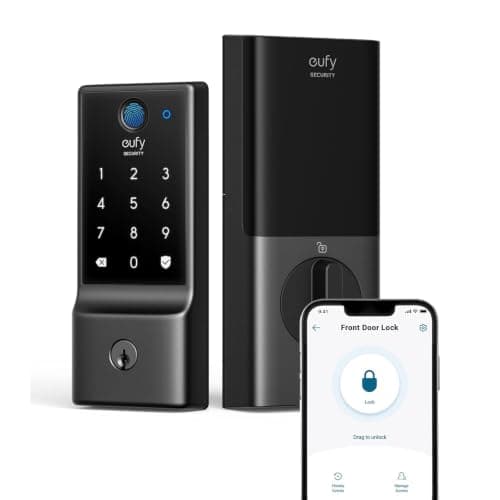
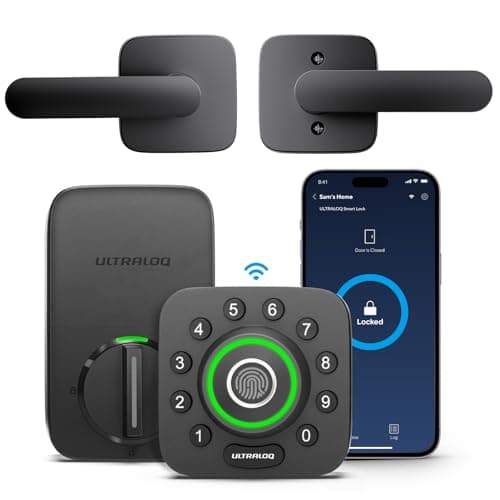
Both of these open with a fingerprint, both have Wi-Fi built into the lock so there is no bridge to buy, and both are full deadbolt replacements running on four AA cells. So the choice is not fingerprint against no-fingerprint — it is breadth against budget. The Ultraloq U-Bolt Pro piles on entry methods and throws in a door-open sensor; the eufy C220 strips the list down to the ways most households actually use and prices itself at the bottom of the band that includes both fingerprint and built-in Wi-Fi. What you are really deciding is how many ways in you need to pay for.
Ultraloq U-Bolt Pro vs eufy Smart Lock C220: the short answer
Buy the Ultraloq U-Bolt Pro if you want every way in — fingerprint, code, app, Bluetooth auto-unlock, and a mechanical key — plus an anti-peep keypad and a bundled sensor that tells you the door is actually shut, and you will pay a little more for that breadth. Buy the eufy Smart Lock C220 if budget is the deciding factor and fingerprint, code, app, and key already cover your household, and you are content with a fixed Wi-Fi radio and no Matter or Thread path. Both are on our best fingerprint door locks roundup, at different points for different budgets.
The decision rule in one line: if you want the widest set of entry methods and a door sensor in the box, Ultraloq. If you want fingerprint entry at the lowest credible price and the basics are enough, eufy.
Head to head: two fingerprint deadbolts, different reach
Both share the core: fingerprint reader, code entry, app control, a real keyway, built-in Wi-Fi, four AA cells, and no subscription for any function. The columns below are where they diverge — how many ways they let you in, whether a door sensor is included, and how deep the third-party integration goes.
Compiled from manufacturer specifications, August 2026.| Model | Entry methods | Connectivity | Door-open sensor | Power | Third-party integration |
|---|
| Ultraloq U-Bolt Pro | Fingerprint, code, app, Bluetooth auto-unlock, key | Built-in Wi-Fi | Bundled | 4x AA | Smaller ecosystem than Yale or Schlage |
|---|
| eufy Smart Lock C220 | Fingerprint, code, app, key | Built-in Wi-Fi | Not included | 4x AA | Fewer third-party integrations |
|---|
What Ultraloq is genuinely better at
Entry-method breadth.This is the whole case. The U-Bolt Pro is the cheapest route to a lock that opens six ways — fingerprint on the knob where your hand already is, code, app, Bluetooth, auto-unlock on approach, and a mechanical key as the backstop. If you have a household where one person likes a thumb, one likes a code, and one insists on a key, the Ultraloq covers all of them without compromise. The eufy covers most of that but not Bluetooth auto-unlock, and that gap is the point.
A bundled door sensor.The Ultraloq ships with a sensor that reports the door is actually shut, not merely that the bolt threw — a real distinction, because a bolt can extend into thin air on a door left ajar. Knowing the difference is the kind of detail that separates a lock you trust from one you second-guess, and it is included rather than an upsell.
Anti-peep code entry. The keypad lets you pad a real code with junk digits in front of a stranger, so a shoulder-surfer in a shared hallway cannot read your PIN off your hand. On a door with foot traffic nearby, that is a genuinely useful piece of design. Ultraloq is also a more established fingerprint-lock platform, which is part of why it anchors our main smart lock roundup in the biometric slot.
What eufy is genuinely better at
Price. The C220 is the budget entry into fingerprint-plus-built-in-Wi-Fi, and for a buyer who wants a thumb to open the door without a premium outlay, that is the entire appeal. It sits on our budget smart lock roundupbecause it delivers the headline feature — biometric entry, no bridge, no plan — for less than most of the field asks.
No plan, no exceptions.eufy's whole brand pitch is that it does not bill you monthly, and the lock line holds to it: fingerprint, code, app, and remote unlock all work with no subscription. Some brands in this category quietly gate a feature behind a plan; eufy does not, and on a device you will own for years, that consistency is worth stating.
A tidy four-method set that covers most homes.Fingerprint, keypad, app, and key is genuinely enough for the majority of households. Not everyone needs Bluetooth auto-unlock or a bundled sensor, and paying only for what you will use is a legitimate position. If your list of must-haves stops at “open with a thumb, hand out a code, check it from my phone,” the eufy does that for less.
The trait they share, and the one that bites
Both put Wi-Fi inside a battery-powered lock, and that is the heaviest power draw a smart lock takes on — a built-in radio holding a network connection runs the cells down faster than a Bluetooth or Thread lock does. Neither of these will match the battery life of a Bluetooth-only design, and the eufy's own record flags this as its most tangible cost. Enroll a code alongside your fingerprint on either lock so a flat battery never leaves you stranded, and read the mechanism in how long smart lock batteries last before you decide the tradeoff is acceptable. If you would rather not run a Wi-Fi radio in the door at all, the reasoning for and against is in do smart locks need Wi-Fi.
Fingerprints in the real world
One honest caveat applies to both, and to every capacitive fingerprint reader regardless of brand: wet, cold, or worn fingers read poorly. On an exposed door with no overhang, a rainy morning or a January cold snap will send you to the keypad more often than the marketing implies. This is physics, not a defect, and the fix is the same on either lock — enroll a code as well and treat the fingerprint as the fast path, not the only path. If your entry door faces weather with nothing above it, weigh whether you are really buying the fingerprint for the days you will most want it.
Ecosystem and where each one fits
Neither of these is the lock for a deep smart-home integrator. Ultraloq's app ecosystem is smaller than Yale's or Schlage's, and the eufy has fewer third-party integrations still — and critically, the C220 is a fixed Wi-Fi lock with no module to swap, so there is no Matter or Thread upgrade path in its future. If you are building a house around a Matter fabric, both of these are the wrong shape and the module-based Yale is the comparison you actually want. But if the lock is a lock first and a smart-home node a distant second — which is true of most buyers — the narrower ecosystem is a fair trade for the price and the fingerprint. The wider decision framework is in how to choose a smart lock, and the full field lives on the smart locks hub.
The decision rule
There is no winner here because the two locks sit at different budgets for different needs. Pick the sentences that describe you.
Buy the Ultraloq U-Bolt Pro if…
- You want the widest set of entry methods — fingerprint, code, app, Bluetooth auto-unlock, and key — in one lock.
- You value a bundled door-open sensor that confirms the door is actually shut, not just that the bolt threw.
- Anti-peep code entry matters because your door is in a shared hallway or has foot traffic nearby.
- You will pay a little more for breadth and a more established fingerprint-lock platform.
Buy the eufy Smart Lock C220 if…
- Budget is the deciding factor and you want fingerprint entry at the lowest credible price.
- Fingerprint, code, app, and key already cover everyone in your household — you do not need auto-unlock or a door sensor.
- You want a brand that charges no monthly fee for any lock function, ever.
- You are content with a fixed Wi-Fi radio and do not need a Matter or Thread upgrade path.
What decides the price
The gap between these two is breadth, not quality of the core. Ultraloq charges for the extra entry methods, the bundled sensor, and the anti-peep keypad; eufy strips the list to the four methods most homes use and prices accordingly. Ask yourself honestly which of the Ultraloq extras you will actually use. If auto-unlock and a door sensor are features you will lean on, the premium is earned. If they are features you will toggle once and forget, the eufy is the rational buy and the difference stays in your pocket.
The mistake buyers make
The frequent error is buying the fingerprint and then relying on it alone. Capacitive readers fail in cold and wet, and a battery running a Wi-Fi radio will eventually go flat — on either lock, if the fingerprint is your only enrolled method, one bad morning locks you out. Always enroll a backup code, and keep a mechanical key somewhere sensible. The second mistake is buying either of these expecting a Matter future; the C220 in particular has no upgrade path, so if standards flexibility is a real requirement, this is the wrong pair entirely.
How we compared these
Everything above is compiled from manufacturer specifications and published standards documentation, the only method we use. Both locks, and the rest of the biometric field, are ranked on the best fingerprint door locks roundup, the rest of this hub is indexed at comparisons, and our rubric and sources are published in full on the methodology page.