HUB 06 · Guides
Smart Lock Security Risks by Protocol: Wi-Fi, Zigbee, Z-Wave, Thread and Matter
The radio a lock uses decides who could plausibly attack it and from where. Four of the five answers are boring, and the interesting differences are not the ones the marketing highlights.
We earn a commission if you buy through our links. It does not change the price you pay, and it does not decide our picks — our selection criteria are published in full. How this works.
Which smart lock protocol is most secure?
Thread and Z-Wave expose the least, because neither is reachable from the internet without something else letting it through. Wi-Fi exposes the most, because the lock holds a credential to a vendor cloud that anyone in the world can reach. But on every protocol, the account is a larger practical risk than the radio, and the door frame is a larger risk than both.
That is the short answer, and most people can stop there. What follows is the reasoning, because “most secure protocol” is a question people ask in the wrong shape. Radios are not more or less secure in the abstract. They differ in who has to be where to attack them, and that is a far more useful thing to compare.
This page is deliberately narrow. It is about the radio only. The whole-lock threat model — the bolt, the strike, the cylinder, the app account, the vendor cloud — is in are smart locks safe, and that is the page to read first if you are deciding whether to fit one at all. What the radios do differently in terms of capability, range and hub requirements is in Z-Wave against Zigbee against Matter.
The only distinction that matters: reachable from where?
Sort the protocols by the attacker's required position and the category organizes itself immediately.
| Protocol | Attacker has to be | Reachable from the internet | Largest realistic risk |
|---|---|---|---|
| Wi-Fi | Anywhere, via the vendor cloud | Yes, through the vendor | Account compromise or a vendor breach |
| Bluetooth | Within a few meters of the door | No, unless bridged by a hub | Pairing and session handling at close range |
| Zigbee | Within radio range of the mesh | No, unless the hub exposes it | Weak commissioning on cheap devices |
| Z-Wave | Within sub-GHz range of the network | No, unless the controller exposes it | Older devices predating S2 security |
| Thread / Matter | On the local network or in mesh range | No, unless a controller exposes it | The controller and the accounts on it |
Read that column again, because it is the whole page. Four of the five protocols require the attacker to be physically near your house. One does not. Everything else is detail.
Wi-Fi: the only one with a route from anywhere
A Wi-Fi lock joins your router and then maintains a connection to the manufacturer's servers so the app works when you are not home. That is the entire value proposition and it is also the entire risk. The lock is now transitively reachable by anyone who can authenticate to the vendor's cloud as you, or by anyone who compromises the vendor.
Neither of those is exotic. Credential stuffing against a reused password is the most common way a consumer smart home account is taken over, and it requires no skill and no proximity. That is why two-factor authentication on the lock account is not a nice-to-have on a Wi-Fi lock — it is the single highest-value security setting in the entire product, worth more than the brand, the grade or the price.
The second Wi-Fi consideration is one people rarely count as security: battery. A radio associating with a router is dramatically more power-hungry than a mesh radio that sleeps between events. A lock that dies unexpectedly is a lock that is not doing its job, and on a Wi-Fi lock that happens sooner. That is availability, and availability is part of security whether or not it feels like it.
If you buy one Wi-Fi lock, do these three things. Turn on two-factor authentication. Use a password that exists nowhere else. Remove old guest codes and revoked users on a schedule you actually keep. Those three take fifteen minutes and close more realistic risk than any hardware upgrade at this price.
Bluetooth: short range, and that is the point
A Bluetooth lock has no route from the internet at all unless a hub bridges it. To attack the radio you have to be standing near the door — and someone standing near your door already has access to the far cheaper attacks that the main safety guide describes, which involve leverage rather than software.
What matters on a Bluetooth lock is how pairing and sessions are handled. Encrypted, authenticated pairing with rotating session material is table stakes and the established brands do it. Where trouble has historically shown up is the very cheap end: fixed keys, no authentication on the unlock command, or a mobile app that trusts anything that answers. There is no way for a buyer to audit that from a listing, which is a genuine argument for buying a lock from a company with something to lose.
Retrofit locks are usually Bluetooth-first, with a hub sold alongside to add remote access. That architecture is a reasonable middle ground: the lock itself never speaks to the internet, and the bridge can be unplugged. Whether that suits you is worked through in retrofit against full replacement.
Zigbee and Z-Wave: local by construction
Both are low-power mesh radios that need a coordinator, and neither is routable from the internet. An attacker has to be within radio range, which for Zigbee at 2.4GHz is roughly the house and for Z-Wave in the sub-GHz band is somewhat further because lower frequencies pass through walls better.
The meaningful distinction inside these two is generational rather than protocol-level. Z-Wave introduced S2, a security framework with authenticated pairing and out-of-band key exchange, and locks are required to implement it. A current Z-Wave lock is a well-specified thing. A ten-year-old one from before S2 is not, and it is the age of the device rather than the name of the protocol that decides which you have.
Zigbee is the same story with more variance, because the Zigbee ecosystem contains a much wider quality range. The specification supports proper commissioning; individual cheap devices have not always implemented it well. On a door lock specifically, this is an argument for a lock from a lock company rather than the cheapest module on a marketplace.
Both protocols share one underrated advantage that has nothing to do with cryptography: the automation runs on a hub in your house. A rule that executes locally keeps working during an outage, and a lock that keeps working is a lock that has not created a new problem. Which hub to run that on is covered in the best smart home hubs for security.
Thread and Matter: the smallest exposed surface, with a caveat
Matter over Thread is the newest arrangement and, on paper, the tightest. Thread is a low-power IPv6 mesh that reaches the rest of your network only through a border router. Matter's commissioning happens on your own network rather than through a vendor account, and operation is local — the manufacturer's servers are not in the path for the lock to do its job. That removes the single largest risk on the Wi-Fi side of this page: there is no vendor cloud holding a credential that unlocks your door.
The caveat is that the risk does not vanish, it moves. Your Matter controller now holds the keys, and whatever account secures that controller — an Apple ID, a Google account, a SmartThings login, a Home Assistant instance you exposed to the internet — becomes the thing worth protecting. That is usually a better place for the risk to sit, because those accounts tend to be better defended than a lock vendor's, but it is a transfer rather than an elimination.
One more honest note. Matter certification is a functional and interoperability certification. It is not a penetration test of an individual product, and it says nothing about the physical lock. Which locks implement Matter natively rather than through a module, and what a controller actually exposes once one joins, is ranked in the best Matter smart locks.
How to tell what your lock actually uses
Listings are vague about this on purpose, because “works with Alexa” sells better than “Bluetooth, plus a bridge sold separately.” Three checks settle it in a minute.
- Does it need a hub, bridge or border router? If yes, the lock itself is almost certainly Bluetooth, Zigbee, Z-Wave or Thread, and the hub is what reaches the internet. If no, and it has remote access, it is Wi-Fi.
- What are the batteries and how long do they last? A lock quoting six to nine months on four AA cells is very likely holding a Wi-Fi association. One quoting a year or more is sleeping between events, which means a mesh radio or Bluetooth.
- Does it appear in a platform without the vendor app?A lock you can add to Apple Home or SmartThings directly is a Matter or HomeKit device. One that requires you to create a vendor account first, then link it, is a cloud-to-cloud integration — which tells you the manufacturer's servers are in the path regardless of what radio is inside.
What a bridge changes, and what it does not
Most Bluetooth locks are sold alongside a plug-in bridge that adds remote access. It is worth being precise about what that does to the threat model, because it is not nothing and it is not the same as buying a Wi-Fi lock.
The lock keeps its short-range radio. What changes is that a second device on your network now relays commands to it from the vendor's cloud, which means the account risk from the Wi-Fi section above arrives in full. The difference is that it arrives in a component you can unplug. A bridge in a drawer is a lock with no remote path at all, and that is a genuinely useful property — you can take the exposure back whenever you want to, which is not true of a lock with the radio soldered inside it.
The same logic applies to hubs. A Zigbee or Z-Wave lock is local by construction, but a hub that exposes your devices to a vendor cloud for remote access re-creates the path. Whether that happens is a property of the hub and how you configured it, not of the lock, and it is one of the things worth checking before you buy either — the options are compared in the best smart home hubs for security.
What none of these protocols protect
Everything above concerns the radio. None of it touches the four things that actually decide whether a door holds.
- The strike and the frame. Residential forced entry is leverage against wood. Three-inch screws into the framing stud cost a few dollars and outperform every protocol decision on this page.
- The cylinder. If the lock is keyed, the key is a parallel entry path that no radio choice affects.
- The codes you handed out.A revoked dog walker with a live code is the most common real-world “breach” of a residential smart lock, and it is an administration problem, not a cryptographic one.
- The rest of the perimeter. A hardened front door beside a sliding patio door on a factory latch is a well-defended segment of an undefended line. That is what patio door locks and contact sensors on every opening are for.
If you want a lock chosen on the radio you already run, the rankings that sort by connectivity are at the smart locks hub, and the rubric behind every score is published at how we pick.
The hardware
The hardware this guide is about
The products this guide refers to, with prices pulled live from Amazon and dated on every card. Full rankings live in the roundups linked above.
Best Matter smart lock
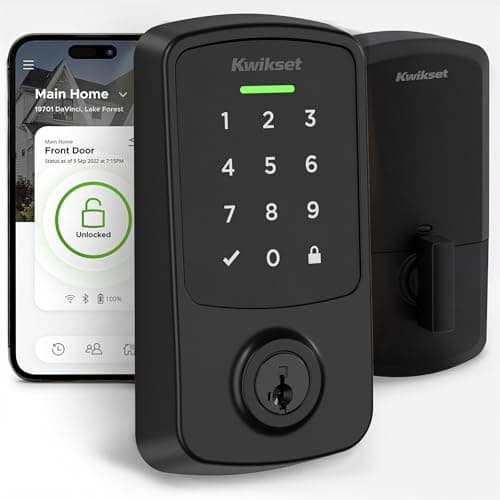
Kwikset Aura Reach (Matter over Thread)
Native Matter over Thread in a deadbolt with a published ANSI/BHMA grade — a combination almost nothing else in this category offers. It is the Matter lock to buy if you want the door hardware to be as serious as the protocol.

Best overall smart lock
Yale Assure Lock 2 (Wi-Fi, keyed)
The modular one. Yale sells the same lock body in keyed and key-free, touchscreen and keypad, with the radio as a swappable module — so you buy the connectivity you want instead of the connectivity that shipped.
Best for Home Assistant and Z-Wave
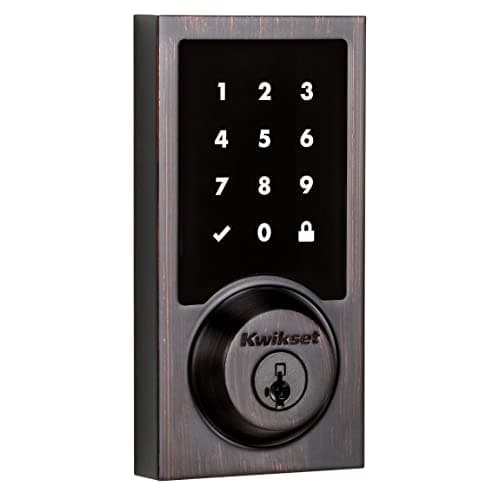
Kwikset SmartCode 916 Z-Wave Touchscreen Deadbolt
The Z-Wave workhorse. No Wi-Fi, no manufacturer cloud — it joins a Z-Wave hub such as Home Assistant, Hubitat or SmartThings and is controlled entirely on your own network.
- ProductNo image
Best no-drill retrofit
SwitchBot Lock Ultra Touch Combo (with Hub Mini)
The credible way to make a rented door smart without drilling a hole. It mounts over the existing thumbturn, keeps your key, and this bundle puts the fingerprint keypad and the hub in the same box — so codes and remote access both work the day it arrives.
#ad · As an Amazon Associate we earn from qualifying purchases.
Questions
Frequently asked
Can a smart lock be hacked over the air?
Is Zigbee or Z-Wave safer for a door lock?
Does Matter make a smart lock more secure?
Should I avoid Wi-Fi smart locks?
Does the protocol affect what happens in a power cut?
Keep reading
Related
- Are smart locks safeThe whole-lock threat model this page is a chapter of. Read it first.
- Z-Wave vs Zigbee vs MatterThe same radios compared on capability rather than attack surface.
- Best Matter smart locksThe locks with the smallest exposed surface, ranked on how they implement it.
- Best smart locksThe main rankings, with each pick's radio and offline behavior stated.
Receipts
Sources
- Connectivity Standards Alliance — Matter specification, commissioning model and certification scope
- Thread Group — Thread mesh networking, IPv6 addressing and border router documentation
- Z-Wave Alliance — the S2 security framework and its requirements for locks and other secure device classes
- Connectivity Standards Alliance — Zigbee specification and device commissioning
- Builders Hardware Manufacturers Association — ANSI/BHMA grading, for the physical half of the threat model
We do not run a testing lab and we do not pretend to. Specifications come from the manufacturer's own published documents and from published standards; prices come from the live Amazon API. Where a figure is not published, the page says “not published” rather than guessing. Read the full method.