Skip to content
SensorLatch

HUB 02 · Smart Locks

The Best Smart Locks for Home Assistant

Every lock claims compatibility. The question that matters is which Home Assistant integration it uses, and whether the lock still answers when your internet does not.

By Stephen V.Updated How we pick
#ad

We earn a commission if you buy through our links. It does not change the price you pay, and it does not decide our picks — our selection criteria are published in full. How this works.

The short answer

Quick picks

#ProductBest forScorePrice
01
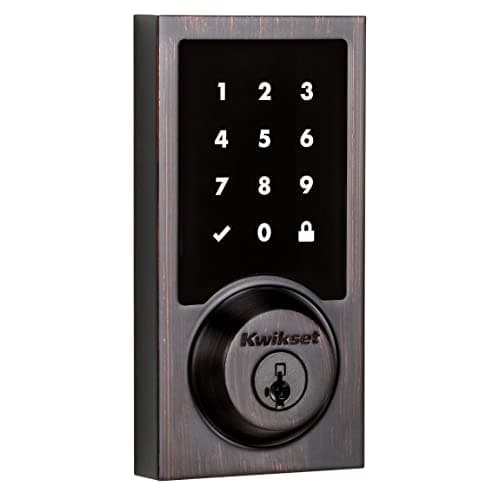
Kwikset Kwikset SmartCode 916 Z-Wave Touchscreen Deadbolt
Kwikset SmartCode 916 Z-Wave Touchscreen Deadbolt

The Z-Wave workhorse. No Wi-Fi, no manufacturer cloud — it joins a Z-Wave hub such as Home Assistant, Hubitat or SmartThings and is controlled entirely on your own network.

Best for Home Assistant and Z-Wave
8.2
$179.99Amazon
02
SwitchBot SwitchBot Lock Pro (with Remote and Hub)
SwitchBot Lock Pro (with Remote and Hub)

The cheapest credible way to make a rented door smart. It mounts over the existing thumbturn with adhesive or the supplied mount, keeps your key, and pairs with a separate keypad if you want codes.

Best no-drill retrofit
8.0
$88.75Amazon
03
no image
August Wi-Fi Smart Lock

The retrofit that started the category. It clamps onto the inside of your existing deadbolt and turns the thumbturn — the outside of the door does not change at all, which is why it is the default answer for renters.

Best for renters
8.2
Check priceAmazon
04
Yale Yale Assure Lock 2 (Wi-Fi, keyed)
Yale Assure Lock 2 (Wi-Fi, keyed)

The modular one. Yale sells the same lock body in keyed and key-free, touchscreen and keypad, with the radio as a swappable module — so you buy the connectivity you want instead of the connectivity that shipped.

Best overall smart lock
8.3
$169.99Amazon

#ad · Prices pulled live from the Amazon Product API, last checked Aug 29, 2026. Where we have no verified live price we show none — we would rather leave a gap than print a number that has gone stale. Scores are our own, compiled from published specs; they are not test results.

The best smart lock for Home Assistant is the Kwikset SmartCode 916 Z-Wave. It talks to Home Assistant over Z-Wave through the Z-Wave JS integration, which means the whole path — lock, radio, stick, automation — sits inside your house with no vendor cloud and no account to sign into. Nothing on this page is more dependable than that, and the cost is that you need a Z-Wave stick and you give up a phone app the rest of the household already understands.

The only question that separates these locks

Every lock in this category is described as “works with Home Assistant.” That phrase covers two completely different arrangements, and which one you get decides whether your front door automation is infrastructure or a nice-to-have.

  • Local integrationstalk to the lock directly over a radio in your house — Z-Wave, Zigbee, Bluetooth or Matter over Thread. Home Assistant sends the command, the lock hears it, and no part of that requires the internet. Your automations keep working through an outage, a vendor server problem, or the company deciding to change its API.
  • Cloud integrationstalk to the manufacturer's servers, which then talk to the lock. Home Assistant's August integration is documented as cloud push, so an unlock command leaves your house, crosses the internet twice, and comes back. It works well when everything is up. When the internet is down, or the vendor is having a bad morning, Home Assistant cannot operate the lock at all — even though you and the lock are in the same room.

Neither is disqualifying on its own. A cloud-integrated lock is still a good lock, and a keypad and a key do not care about your network. But if the reason you run Home Assistant is that you would rather not depend on somebody else's servers, then the integration path is the specification to shop on, and it is the one every product page buries.

Check the integration before you check the lock.Home Assistant publishes the connection class of every integration — local push, local polling, cloud push, cloud polling — on the integration's own documentation page. Read that line first. It tells you more about how the lock will behave in your house than any specification on the box.

How we ranked them

Integration path first: local beats cloud, and a documented official integration beats a community one. Then what the lock still does when Home Assistant is off — because a front door must work for people who do not know what an automation is, which means a keypad, a key or both. Then the physical install, since a retrofit and a full deadbolt replacement are different jobs with different landlord implications. Then battery arithmetic, because a lock polled frequently by a hub is a lock whose cells you will be changing more often than the manufacturer's figure suggests. The full rubric, compiled from published specifications and standards rather than bench testing, is at our methodology.

Integration classes as published in Home Assistant's own integration documentation, August 2026. Hardware specifications compiled from manufacturer sources.
LockHome Assistant pathWorks with internet downInstallPower
Kwikset SmartCode 916Z-Wave JS — localYesFull deadbolt replacement4x AA
SwitchBot Lock ProSwitchBot Bluetooth — localYes, within Bluetooth rangeRetrofit, interior side onlyRechargeable pack
August Wi-Fi Smart LockAugust — cloud pushNoRetrofit, interior side only2x CR123A
Yale Assure Lock 2August — cloud push (Yale Access)NoFull deadbolt replacement4x AA

Kwikset SmartCode 916 — the local answer

Z-Wave is an unfashionable choice in 2026 and it is still the correct one for a lock you intend to automate. Home Assistant's Z-Wave JS integration speaks to the lock directly through a stick plugged into your machine: no bridge, no vendor account, no API that can be deprecated, and no internet dependency of any kind. Lock and unlock commands, battery reporting and user-code management all arrive as ordinary local entities.

It is a full deadbolt replacement with a touchscreen keypad and Kwikset's SmartKey cylinder, so the lock is completely usable by anyone in the house who has never heard of Home Assistant — code, key, thumbturn — and your automations sit on top rather than underneath. That separation is what makes it a sensible front door rather than a hobbyist project.

Two honest costs. You need a Z-Wave controller, which is a purchase and a small amount of setup, and if you have no Z-Wave devices at all that is a real barrier — the protocol trade-offs are laid out in our Z-Wave, Zigbee and Matter guide. And the polished consumer app experience of the Yale and August below is simply not part of the deal here. What you get instead is a lock that behaves identically on the worst day your internet has all year.

SwitchBot Lock Pro — local, and no drilling

Home Assistant's SwitchBot integration connects locally over Bluetooth and, per its own documentation, does not require a SwitchBot hub or a cloud account — the encryption key for the lock can be entered by hand instead of signing in. That combination is unusual: local control, a retrofit install, and no vendor infrastructure in the path.

It is a retrofit, which is the reason many people choose it. The mechanism mounts on the inside of your existing deadbolt and turns the thumbturn, so the exterior of the door is untouched, your keys keep working and nothing is drilled — the whole argument of our renters and no-drilling roundup. For a rented flat where a Z-Wave deadbolt is not an option, this is the local-control lock.

The constraint is Bluetooth range. Your Home Assistant machine, or a Bluetooth proxy, has to be near enough to the door to hold a connection, and in a house with thick walls that usually means adding a small ESP-based proxy nearby. That is a genuine extra step, and it is the difference between this and the Z-Wave lock above, whose radio was designed for exactly this distance problem.

August Wi-Fi Smart Lock — the best cloud-path lock

Home Assistant ships an official August integration, and it is one of the better-maintained cloud integrations in the project: locks, doorbells and keypads all appear, and it covers August's own hardware as well as Yale Access models. The lock itself is the retrofit we recommend most often for renters, because it keeps your existing exterior hardware and your existing key while adding app unlock, remote access and auto-unlock — the full write-up is in our August review.

The catch is the one stated at the top of this page: the integration is documented as cloud push, so Home Assistant reaches the lock by way of August's servers. Your automations therefore inherit your internet connection and August's uptime. In practice the lock keeps working perfectly well by keypad, key and Bluetooth during an outage — you simply lose the automation layer, not the door. Whether that is acceptable is a personal call, and for many households it plainly is.

Yale Assure Lock 2 — the same path, a better door

The Assure Lock 2 reaches Home Assistant through the same August integration, because Yale Access and August are the same platform underneath. So the integration story is identical to the lock above: official, well maintained, cloud push, dependent on the internet for automation.

What differs is the hardware. This is a full deadbolt replacement rather than a retrofit, with a touchscreen keypad on the outside and a keyed cylinder on the version we rank, which makes it the better lock for a house you own and the one we pick as best overall in our main smart lock roundup. If you want the nicest door hardware here and can live with a cloud integration path, this is the lock. If the local path is the whole point of running Home Assistant, go back to the Kwikset.

What about Matter?

Matter is the obvious answer to this entire problem and it is arriving unevenly. A Matter-over-Thread lock, paired to Home Assistant through a Thread border router, is local by design with no vendor cloud anywhere — exactly the Z-Wave arrangement above without the unfashionable radio. The reason this page does not simply say “buy a Matter lock” is that support is model-specific and version-specific in a way that no marketing page makes clear: whether a given lock ships with Matter, gains it by firmware, or needs the manufacturer's own bridge to expose it varies by product and sometimes by production batch.

The practical advice is to check the specific model's current documentation rather than the brand, and to treat “Matter compatible” on a box as a question rather than an answer — the same discipline our Matter explainer applies to the rest of the category. Where Matter is confirmed for the exact model you are buying, it moves that lock into the local column and it is the best outcome available. Where it is not, the four locks above are the field.

Getting the lock into Home Assistant without regret

Three things are worth deciding before the lock arrives rather than after. First, where the radio lives: a Z-Wave stick on a machine in a cupboard two floors from the front door is a weak mesh, and a Bluetooth integration with no proxy near the door is an unreliable one. Both problems are cheap to solve in advance and irritating to diagnose later. Second, how the lock behaves when Home Assistant is not running at all — every lock here works by keypad or key regardless, and that is the property that makes automating a front door reasonable rather than reckless. Third, battery cadence: a lock being polled by a controller runs its radio more often than a lock sitting idle, so plan for the shorter end of the manufacturer's range and read our smart lock battery guide before you assume a year.

It is also worth deciding what you actually want the automation to do. The genuinely useful patterns are modest: lock the door at a set time if it was left unlocked, notify when a specific user code is entered, or unlock when a presence condition and a doorbell press coincide. The patterns that go wrong are the ambitious ones — auto-unlock on arrival, in particular, is the feature most likely to leave a door open because a phone briefly decided it was home. Our smart lock security guide covers where those risks actually sit.

In detail

The picks, in full

01
Kwikset Kwikset SmartCode 916 Z-Wave Touchscreen Deadbolt

Best for Home Assistant and Z-Wave

Kwikset SmartCode 916 Z-Wave Touchscreen Deadbolt

Z-WaveTouchscreen4x AASmartKey re-key
Local controlZ-Wave hub required
8.2/10

The Z-Wave workhorse. No Wi-Fi, no manufacturer cloud — it joins a Z-Wave hub such as Home Assistant, Hubitat or SmartThings and is controlled entirely on your own network.

Security
7.5
Door fit
8
Offline
9.5
Battery
9
Ecosystem
7

What it gets right

  • Z-Wave means the lock answers to your hub, not to a vendor's servers — nothing to shut down or start charging for
  • Long-standing, extremely well-documented device in the Home Assistant and Hubitat communities
  • Much better battery life than the Wi-Fi locks, because the radio is low power

What it doesn't

  • Useless without a Z-Wave hub — there is no app-only mode
  • SmartKey cylinder carries the documented bypass trade-off noted on the Halo

What it costs to run

4x AA alkaline, and a Z-Wave radio draws far less than Wi-Fi. No subscription and no vendor cloud in the path.

Skip this if…

you do not already run a Z-Wave hub. Buying a hub purely to run one lock is a poor trade; a Wi-Fi lock will cost you less overall and be running in ten minutes.

$179.99on Amazon

Price last checked Aug 29, 2026. Prices move constantly — Amazon's at checkout is the one that counts.

#ad · we may earn a commission from this link to Kwikset SmartCode 916 Z-Wave Touchscreen Deadbolt

02
SwitchBot SwitchBot Lock Pro (with Remote and Hub)

Best no-drill retrofit

SwitchBot Lock Pro (with Remote and Hub)

Retrofit (interior only)Bluetooth lockRechargeable packHub and Remote in the box
No drillingHub included
8.0/10

The cheapest credible way to make a rented door smart. It mounts over the existing thumbturn with adhesive or the supplied mount, keeps your key, and pairs with a separate keypad if you want codes.

Security
7
Door fit
9.5
Offline
8
Battery
8
Ecosystem
7.5

What it gets right

  • Genuinely reversible — nothing is drilled and the original deadbolt is untouched
  • Rechargeable battery pack rather than a steady diet of disposable cells
  • Cheapest path to fingerprint entry when paired with SwitchBot's keypad

What it doesn't

  • The lock itself is Bluetooth — remote access and voice assistants run through the bundled hub, which is a second box to place and keep powered
  • A motorized unit turning a stiff thumbturn is only as reliable as the deadbolt underneath it

What it costs to run

Rechargeable battery pack. No subscription — this bundle already includes the hub that carries remote access.

Skip this if…

your deadbolt is stiff. A retrofit motor drives your existing bolt, so a lock that already needs a shoulder against the door to throw will jam, drain the battery, and report failures. Fix the strike alignment first, or replace the deadbolt outright.

$88.75on Amazon

$91.984% off

Price last checked Aug 29, 2026. Prices move constantly — Amazon's at checkout is the one that counts.

#ad · we may earn a commission from this link to SwitchBot Lock Pro (with Remote and Hub)

03

Best for renters

August Wi-Fi Smart Lock

Retrofit (interior only)Wi-Fi + Bluetooth2x CR123AKeeps existing key
No drillingKeeps your existing key
8.2/10

The retrofit that started the category. It clamps onto the inside of your existing deadbolt and turns the thumbturn — the outside of the door does not change at all, which is why it is the default answer for renters.

Security
7.5
Door fit
9.5
Offline
8
Battery
7.5
Ecosystem
8.5

What it gets right

  • Nothing on the exterior changes, so your landlord's hardware and your existing keys both keep working
  • Installs with a screwdriver in minutes and reverses just as fast on move-out
  • Auto-unlock on approach is the feature people actually keep using a year later

What it doesn't

  • No keypad in the box — entry without your phone means the original physical key
  • The interior unit is chunky; on a narrow door edge or behind a storm door it can foul

What it costs to run

2x CR123A lithium cells. No subscription for app unlock, remote access or alerts.

Skip this if…

you want to give someone a code. There is no keypad on this lock at all — every guest either needs the app, a physical key, or a separate keypad accessory. If code entry is the reason you are buying a smart lock, buy a keypad model instead.

Check price on Amazon →

We don't have a verified live price right now, so we aren't showing one.

#ad · we may earn a commission from this link to August Wi-Fi Smart Lock

04
Yale Yale Assure Lock 2 (Wi-Fi, keyed)

Best overall smart lock

Yale Assure Lock 2 (Wi-Fi, keyed)

Wi-Fi + Bluetooth4x AAFull deadbolt replacementTouchscreen keypad
Works offline (keypad)No subscription for core use
8.3/10

The modular one. Yale sells the same lock body in keyed and key-free, touchscreen and keypad, with the radio as a swappable module — so you buy the connectivity you want instead of the connectivity that shipped.

Security
8.5
Door fit
8
Offline
9
Battery
7.5
Ecosystem
8.5

What it gets right

  • Codes and manual operation keep working with the internet down — the radio only carries remote access and notifications
  • Module system means a Matter or Z-Wave upgrade is a card swap, not a new lock
  • Keyed version retains a physical cylinder, which matters if you ever hand a key to a contractor

What it doesn't

  • Replaces the entire deadbolt, so the interior escutcheon is large and visible
  • Four AAs in the door means the battery compartment is part of the install, not hidden inside

What it costs to run

4x AA alkaline. No subscription is required for codes, app unlock or notifications.

Skip this if…

you rent. This is a full deadbolt replacement — you are removing the landlord's hardware, drilling nothing new but swapping everything, and you will need to reinstall the original on move-out. A retrofit like the SwitchBot Lock Pro or August leaves the existing deadbolt in place.

$169.99on Amazon

$259.9935% off

Price last checked Aug 29, 2026. Prices move constantly — Amazon's at checkout is the one that counts.

#ad · we may earn a commission from this link to Yale Assure Lock 2 (Wi-Fi, keyed)

How to choose a Home Assistant lock

  1. Do you need it to work offline?If yes, you need a local integration — Z-Wave, Bluetooth or a confirmed Matter model. If a cloud path is acceptable, the August and Yale options are better consumer hardware.
  2. Can you change the door hardware? Owners can fit a deadbolt replacement and should. Renters need a retrofit, which narrows the field to the SwitchBot and the August.
  3. What radio do you already run? If you have a Z-Wave stick, the Kwikset is an obvious yes. If you have Bluetooth proxies, the SwitchBot is. Adding a whole new radio for one device is a real cost worth counting.
  4. Who else uses the door? A keypad matters more than any integration for everyone in the household who will never open Home Assistant. Every lock here has a keypad or keeps your existing key; do not buy one that does neither.

What decides the price

Two things. The mechanism — a full deadbolt replacement with a touchscreen and a graded cylinder is more metal and more engineering than a retrofit that turns your existing thumbturn, and it costs accordingly. And the radio: locks with built-in Wi-Fi carry the cost of that radio and the servers behind it, while Z-Wave and Bluetooth locks push that cost onto hardware you already own. That is why the local-path locks on this page are often the cheaper ones, which is a pleasant inversion of how this usually goes. What none of them charges is a monthly fee: every function described here, on all four locks, works without a subscription.

The mistake buyers make

They buy the lock with the best reviews, discover it integrates through a cloud, and only then realize their carefully local setup now has an internet dependency at the front door. The integration path is a decision, not a detail, and it is fixed at the moment you choose the hardware. Decide it first. The second mistake is treating the door fit as an afterthought: backset, cross-bore and door thickness disqualify locks regardless of how well they automate, and our door fit guide is worth ten minutes with a tape measure before you order. The wider field, including locks with no automation ambitions at all, is at the smart locks hub, and the camera equivalent of this page is our Home Assistant camera roundup.

How we picked

Products we claim to have tested: 0

Everyone in this category says they tested a dozen locks on their own front door. We have not tested any, and we say so. Here is what we do instead: read the manufacturer's manual and spec sheet, record the published protocol, power and storage figures, check the published standard where one exists, compute what the device costs to keep running, and cite all of it so you can check the work. Prices come live from Amazon's API and disappear rather than go stale.

The scores above are judgments from that documented research — not bench measurements. The full rubric, including what disqualifies a product, is published in full.

Questions

Frequently asked

What is the best smart lock for Home Assistant?
A Z-Wave lock such as the Kwikset SmartCode 916, because Home Assistant's Z-Wave JS integration talks to it directly over a radio in your house with no vendor cloud in the path. That makes it the only kind of lock here whose automations are unaffected by an internet outage. If you cannot change the door hardware, the SwitchBot Lock Pro is the local-control retrofit.
Does the August integration work locally?
No. Home Assistant documents the August integration as cloud push, so commands travel to August's servers and back. It is well maintained and works reliably when the internet is up, and it covers Yale Access locks such as the Assure Lock 2 as well as August's own. But with your connection down, Home Assistant cannot operate the lock — though the keypad, key and Bluetooth still work.
Do I need a hub for a SwitchBot lock in Home Assistant?
No. Home Assistant's SwitchBot integration connects locally over Bluetooth and its documentation states a SwitchBot hub is not required. You can even enter the lock's encryption key by hand rather than signing into a SwitchBot account. What you do need is Bluetooth coverage at the door, which in most houses means a small Bluetooth proxy nearby.
Will my smart lock still work if Home Assistant goes down?
Yes. Every lock on this page is a working lock first: a keypad, a physical key, or your existing key in the case of the retrofits. Home Assistant adds automation on top of that and takes nothing away. This is the property that makes automating a front door reasonable, and it is worth confirming on any lock you consider.
Should I wait for a Matter lock instead?
Matter over Thread gives you local control without Z-Wave, which is the best of both worlds, but support is model-specific rather than brand-specific and the marketing rarely makes the distinction clear. Check the exact model's current documentation, not the brand. Where Matter is confirmed for the lock you are buying, take it; where it is not, a Z-Wave or Bluetooth lock gets you the same local behavior today.

Keep reading

Receipts

Sources

We do not run a testing lab and we do not pretend to. Specifications come from the manufacturer's own published documents and from published standards; prices come from the live Amazon API. Where a figure is not published, the page says “not published” rather than guessing. Read the full method.