The best keypad door lock for most homes is the Lockly Secure Plus. Its PIN Genie pad reshuffles the digit positions on every use, so a shoulder-surfer, a fingerprint smudge on the glass, or a wear pattern on the keys tells an observer nothing about your code. That security costs you a slower entry every time — a real trade-off we come back to below.
A keypad lock solves a specific, common problem: giving someone a way in without handing over a key or an app account. A cleaner, a dog walker, a teenager who loses things, a contractor there for one afternoon — a code covers all of them, and a good keypad lock lets you issue and revoke those codes without changing anything physical. So the questions that decide this category are not really about the pad's looks. They are: can someone watch you enter a code and reuse it, how easily can you manage codes, and does the lock keep working when the network or the hub is down.
A fixed keypad leaks your code in two ways.The obvious one is shoulder-surfing — someone simply watches your fingers. The quieter one is wear: the four digits of a code that has been typed a thousand times end up visibly worn, smudged or grease-marked, which narrows a stranger's guesses from ten thousand combinations to a couple of dozen. The two locks with anti-peek entry on this page, the Lockly and the Veise, are built to close both leaks.
The best keypad door locks, compared
Compiled from manufacturer specifications and published support documentation, August 2026. Confirm code capacity and scheduling features on the product page for the exact variant you order.| Model | Entry methods | Code capacity and features | Connectivity | Power | Works offline? |
|---|
| Lockly Secure Plus | Shuffling code, fingerprint, app, key | Multiple user codes; anti-peek shuffling pad; offline access codes | Bluetooth; hub for Wi-Fi | 4x AA | Yes; code, print and key work at the door |
|---|
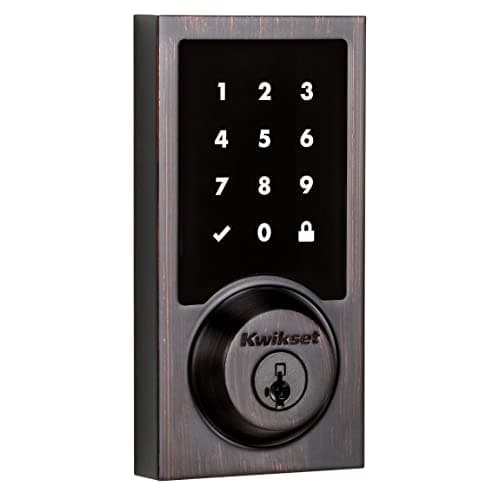
| Kwikset SmartCode 916 | Touchscreen code, Z-Wave / app, key | User codes and scheduling managed in your Z-Wave hub | Z-Wave (hub required) | 4x AA | Yes; local control, no vendor cloud in the path |
|---|
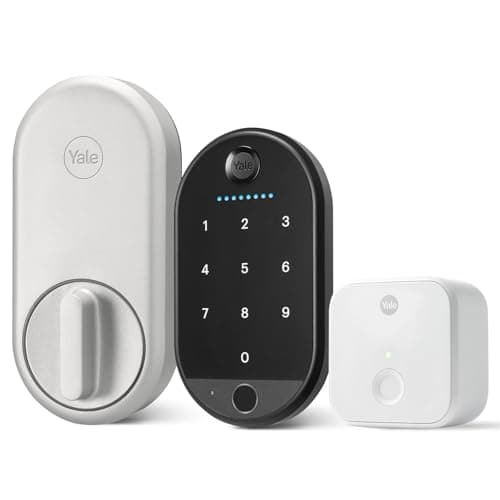
| Yale Approach Lock with Wi-Fi | App, keypad code, fingerprint, key | App-managed user and guest codes; keypad ships in the bundle we link | Wi-Fi, via the included Yale Connect bridge | 4x AA | Yes; codes work at the door; remote needs Wi-Fi |
|---|
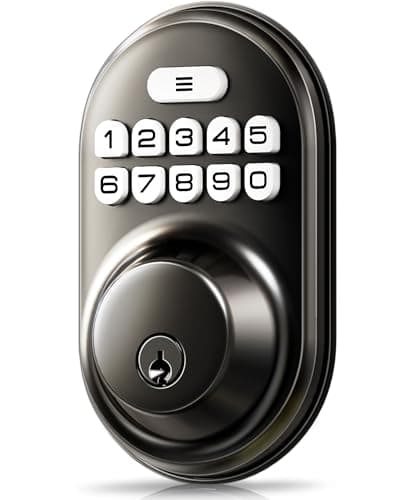
| Veise Keypad Deadbolt | Code, key | Multiple user codes; anti-peek entry; auto-lock; no scheduling | None; no wireless radio | 4x AA | Yes; fully offline by design |
|---|
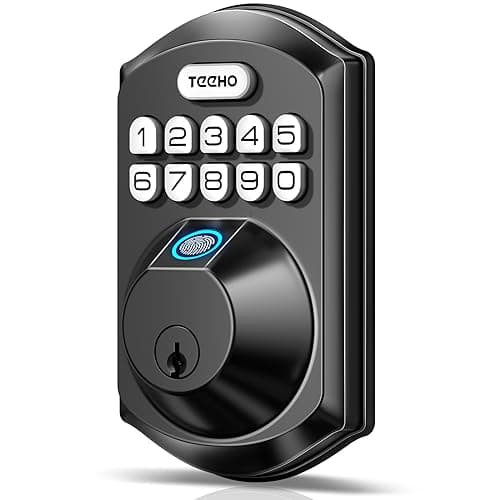
| TEEHO TE002 Fingerprint Deadbolt | Code, fingerprint, key | Multiple user codes; auto-lock; no scheduling | None; no wireless radio | 4x AA | Yes; fully offline by design |
|---|
Code entry, and who might be watching
The Lockly Secure Plus wins this page on one feature that is genuinely about the keypad rather than the connectivity around it. Its PIN Genie pad shows the digits grouped into a handful of buttons whose contents reshuffle on every use, so the physical positions your fingers touch are different each time. That defeats the two classic keypad attacks at once: a shoulder-surfer who memorizes finger positions learns nothing reusable, and there is no fixed set of keys to wear down or smudge, so the code cannot be read off the pad later. It also carries a 3D capacitive fingerprint reader and a physical key override, so the household is not stuck with the slow pad when it does not need the protection.
That protection is not free, and we will not pretend it is. A pad whose digits move is slower to read and enter than a fixed one, every single time, and it is meaningfully harder for a child, an older relative, or anyone with low vision — the security property and the usability cost are the same feature. That is the whole content of the Lockly's skip line, and if the household includes someone who finds keypads difficult, the shuffling pad is the wrong choice and a fixed touchscreen is kinder. The budget Veise offers a simpler version of the same idea: an anti-peek entry mode that lets you pad the real code with junk digits in front of a delivery driver, on a fixed pad that stays fast for everyday use.
Managing codes: the part that decides day-to-day life
A keypad lock is only as useful as your ability to add and remove codes, and the five locks here sit on a spectrum from “typed at the door” to “scheduled from your phone.”
- Scheduled and remote (Kwikset SmartCode 916).The 916 is a Z-Wave lock, so code management lives in your hub — Home Assistant, Hubitat or SmartThings. That means codes you can add, expire, and schedule to specific hours or days, all on your own network with no vendor cloud in the path and nothing to start charging for. It is the most capable code manager here for anyone who already runs a hub, and useless without one. If a hub is not in your future, its own skip line says as much.
- App-managed (Yale Approach, Lockly Secure Plus). Both let you create, share and revoke codes from the app, including time-limited guest codes. The Yale Approach is a retrofit that keeps your exterior and key, and the bundle we link ships the biometric keypad with it, so it is the pick when you want app-managed codes without replacing the whole deadbolt. The Lockly manages codes in-app and stores offline access codes for when the connection is down.
- At the door only (Veise, TEEHO). Both are radio-free, so codes are programmed on the keypad itself and there is no scheduling and no remote revocation. Change of cleaner means walking to the door and deleting a code. That is a real limitation, and it is also why these two cannot be attacked over any network and never ask for an account.
Z-Wave and Home Assistant: keeping it local
The Kwikset SmartCode 916 is the pick for a home built on local control. It has no Wi-Fi and no manufacturer cloud; it joins a Z-Wave network and answers to your hub, which means nobody can shut a service down or start metering it, and the low-power Z-Wave radio gives it markedly better battery life than the Wi-Fi locks here. It is one of the best-documented locks in the Home Assistant and Hubitat communities, so integrating it and exposing its codes to automations is well-trodden ground. The cost is honest: there is no app-only mode, so if you do not already run a Z-Wave hub, buying one purely to drive a single lock is a poor trade, and a Wi-Fi keypad lock will cost less overall. The wider question of when a lock needs a hub or Wi-Fi at all is covered in do smart locks need Wi-Fi.
Retrofit versus full replacement
Four of these are full deadbolt replacements; the Yale Approach is a retrofit, and the distinction decides whether renters can use it. The Approach clamps onto the inside of your existing deadbolt, leaving the exterior hardware and your keys untouched, and the bundle we link ships a Bluetooth biometric keypad with it, so you get code and fingerprint entry without changing the door. That makes it fully reversible on move-out, which the replacements are not. The trade-offs are that its Wi-Fi lives in a plug-in Yale Connect bridge rather than in the lock, so a socket near the door is part of the install, and that a retrofit motor inherits the mechanical faults of the deadbolt underneath it — a strike that is a couple of millimeters out of line will defeat it no matter the torque. If a rental or a no-drilling install is your constraint, the retrofit field is ranked in full at best smart locks for renters, and the case for keeping a deadbolt at all is in smart lock vs deadbolt.
Running cost and offline behavior
Every lock here runs on four AA cells and none charges a subscription, so the running cost is batteries alone. The Kwikset 916 goes longest between changes because Z-Wave draws far less than the Wi-Fi radios, and the radio-free Veise and TEEHO are similarly frugal. All five keep code entry and the key working at the door with no network, which is the reassuring baseline of this category: a keypad lock does not lock you out when the internet does. What the connection gates is the remote layer — the Yale Approach's remote access needs Wi-Fi, the Lockly's needs its hub, the Kwikset's needs your Z-Wave hub — while the Veise and TEEHO have no remote layer to lose in the first place.
Which one to buy
- Someone could watch you type, or you want no readable pad. Lockly Secure Plus. The shuffling pad and 3D reader defeat shoulder-surfing and smudge attacks that beat a fixed pad, as long as everyone in the household can cope with a slower entry.
- You run Home Assistant or another Z-Wave hub.Kwikset SmartCode 916. Local control, no vendor cloud, the best code scheduling here, and the longest battery life — provided you already have the hub.
- You rent, or you will not replace the whole deadbolt. Yale Approach Lock. A retrofit that keeps your exterior and key, with a bundled biometric keypad for app-managed codes, fully reversible on move-out.
- You want the cheapest honest keypad on a key-only door.Veise Keypad Deadbolt. Backlit code pad, auto-lock so the door secures itself behind you, and an anti-peek entry mode — with no app, no notifications and nothing to account for.
- You want a keypad plus a fingerprint reader on a side or garage door. TEEHO TE002. Code, print and key, fully offline, at a fraction of the branded price, with no radio to update or exploit.
If you decide a fingerprint is worth the premium after all, the reader-first ranking is at best fingerprint door locks. The full field across every lock type is on the smart locks hub and in best smart deadbolts.
How we picked
Products we claim to have tested: 0. We do not run a lab and we say so. Instead we compile the published specification, read each manufacturer's manuals and support pages for the keypad type, the code-management model and the offline behavior they state plainly, work out the running cost from the battery arrangement, and cite it. Rankings weight code-entry security (anti-peek and wear resistance), code management, offline and local operation, install flexibility and battery life. Every pick carries a specific reason to skip it. The rubric is published at methodology, and the touchscreen heavyweights are compared at Schlage Encode Plus vs Yale Assure Lock 2.
How to choose a keypad door lock
Fixed pad, touchscreen, or shuffling pad
The pad type is the first decision, and it is a trade between speed and secrecy. A fixed physical or touchscreen pad is fast and familiar for everyone, including children and older relatives, but the same keys are pressed for the same code every time, so wear and shoulder-surfing can leak it. A shuffling pad, like the Lockly's PIN Genie, closes that leak by moving the digits on every use, at the cost of being slower and harder for some people to use. An anti-peek mode on a fixed pad, as the Veise and Ultraloq-style locks offer, is the middle ground: you pad the real code with junk digits so an observer cannot tell which presses count, while the pad itself stays fast.
How you will manage codes
Decide this before you buy, because it is the feature you use weekly. If you want to schedule a cleaner's code for Tuesday mornings and revoke a contractor's from the office, you need a lock whose codes live in an app or a hub — the Kwikset 916 through a Z-Wave hub, or the Yale Approach and Lockly through their apps. If you only ever add or remove a handful of codes at the door and value simplicity over scheduling, a radio-free lock like the Veise or TEEHO does that forever with nothing to sign into. The wrong pairing — a radio-free lock for someone who wanted remote guest codes — is the most common source of regret in this category.
What actually decides the price
In rough order: the keypad technology (a shuffling anti-surveillance pad is the most expensive keypad feature here), the connectivity model (built-in Wi-Fi, a Z-Wave radio, or none), whether it is a full replacement or a retrofit with an add-on keypad, and secondary entry methods such as a fingerprint reader. What does not appear as a monthly charge on any of these is code management or access — none of them meters your codes behind a subscription, which is why they are here rather than the plan-gated alternatives.
The mistake buyers make
Two mistakes, really. The first is choosing a shuffling pad for a household that includes someone who finds keypads hard, then discovering the security feature is a daily obstacle for that person — match the pad to the least confident user, not the most. The second is buying a radio-free keypad lock and only realizing in week two that there is no way to grant a code remotely or see that the door is shut. A keypad lock reports nothing about the door's state; a code entered is not the same as a door closed, which is why a cheap contact sensor beside it is a common and sensible pairing. Both mistakes have their own page: locks for an older relative ranks the field on who can actually operate it, and codes and guest access covers how a new code physically reaches the lock, why a Bluetooth-only lock cannot take one from away, and the finite number of code slots the manual publishes and the box does not.
Auto-lock is the feature that fixes the real failure
The most common real-world lock failure is not a defeated code; it is a door left unlocked because someone forgot. Auto-lock — the door re-securing itself after a set delay — is the feature that actually addresses that, and the Veise and TEEHO both include it. Set the delay long enough that you are not locked out carrying groceries and short enough that the door does not sit open, and it removes the single most frequent way a household leaves itself open. Pair it with a code you have taught everyone, and the lock does its job without anyone thinking about it.
Will it fit your door
A keypad deadbolt replacement has to match your door's backset, bore and thickness, and a retrofit like the Yale Approach has to clear whatever is on the inside of the door. Confirm the measurements against the lock's stated range using will a smart lock fit my door before you order, because a keypad lock that does not fit is a return, not a workaround. And whatever you choose, keep the security fundamentals in view: the grade of the bolt and strike matter more than the pad, a point made in full at best smart locks.