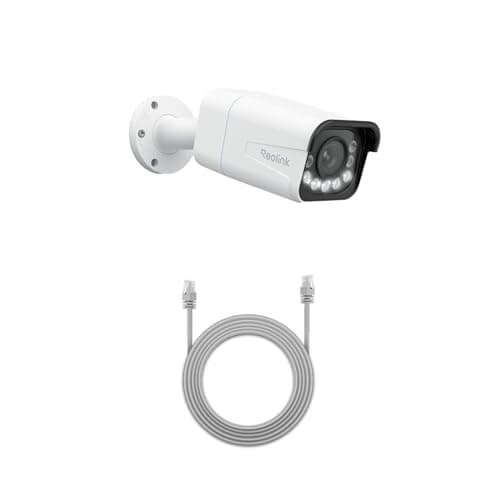
The best PoE security camera for most people is the Reolink RLC-811A: 4K over a single Ethernet run, a genuine 5x optical zoom rather than a digital crop, and continuous recording to a card or your own NVR with no account and no monthly fee. The honest catch is the cable. A PoE camera is only the convenient choice once the wire is in the wall.
Power over Ethernet is the opposite trade to a battery camera. One Cat5e or Cat6 cable carries both the power and the video, so there is no cell to recharge, no Wi-Fi channel to congest, and the footage lands on a recorder you own rather than in someone's cloud. You give up the two-minute install. In return you get a camera that runs continuously, forever, and never sends you a bill. Whether that is the right trade is the whole point of PoE vs Wi-Fi security cameras, and if you are not sure you want to run a cable at all, read that first.
The best PoE security cameras, compared
Compiled from manufacturer specifications, August 2026. The powering class below is the standard-PoE (802.3af) budget these fixed cameras sit inside; confirm the exact figure for any spotlight, heated or pan-tilt variant, which can require the higher 802.3at (PoE+) budget instead.| Model | Resolution | PoE / cabling | Storage (NVR / RTSP / ONVIF) | Zoom / lens | Indoor / outdoor |
|---|
| Reolink RLC-811A | 4K (8MP) | 802.3af, Cat5e or Cat6 | microSD on-camera, plus RTSP and ONVIF to your own NVR | 5x optical zoom | Outdoor-rated |
|---|
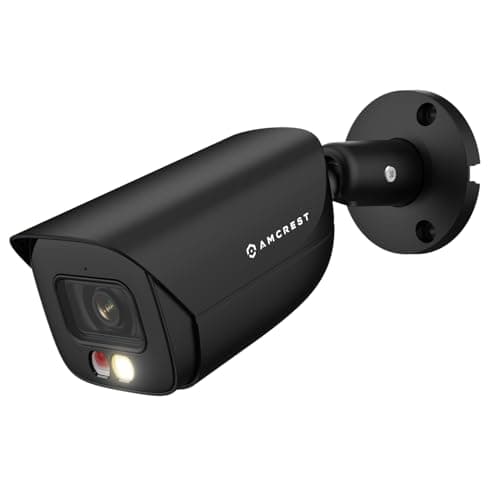
| Amcrest 5MP Bullet | 5MP | 802.3af, Cat5e or Cat6 | microSD up to 256GB, plus documented RTSP and ONVIF | Fixed lens, 132° field of view | Outdoor-rated |
|---|
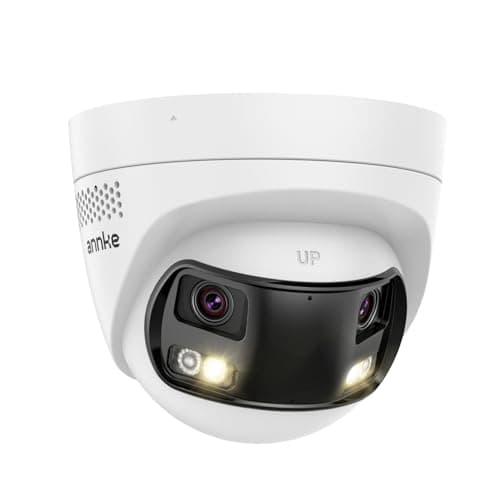
| ANNKE FCD800 | 8MP | 802.3af, Cat5e or Cat6 | On-camera SD slot, plus ONVIF to your own NVR | Dual lens, 180° stitched | Outdoor-rated |
|---|
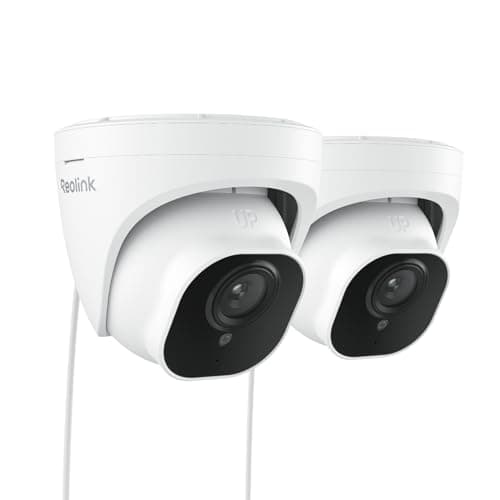
| Reolink RLC-520A (2-pack) | 5MP | 802.3af, Cat5e or Cat6 | microSD on-camera, plus RTSP and ONVIF to your own NVR | Fixed lens, no zoom | Outdoor-rated, ships as two cameras |
|---|
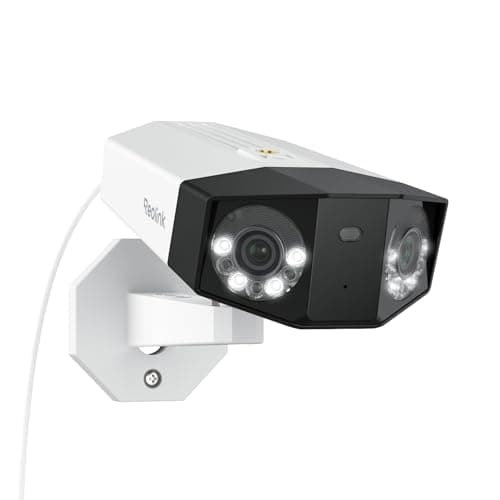
| Reolink Duo 3 PoE | Dual-lens panoramic, highest here | 802.3af, Cat5e or Cat6 | RTSP and ONVIF to your own NVR or server | Dual lens, 180° stitched | Outdoor-rated |
|---|
What PoE actually gives you
Three things, and they are the reasons people who take cameras seriously end up here.
- No power problem. The same cable that carries the video carries the power, injected at a switch or an injector at the other end. There is no battery to run flat in January, no outdoor socket to find, and no charging ladder every few months.
- No Wi-Fi problem. The stream rides a dedicated wire, so it does not compete with phones, laptops and every other camera for airtime. A house with four wireless cameras fighting one access point is a house with four cameras that drop out at the worst moment; four PoE cameras simply do not have that failure mode.
- No plan problem.Every camera here records to storage you own — a card in the camera, or a network recorder on your desk — and speaks the open protocols (RTSP and, on most, ONVIF) that let a general recorder read the stream. The recording never has to touch a manufacturer's cloud, so nobody can put your own footage behind a subscription tier. The wider argument is in local storage vs cloud security cameras.
The honest cost: the cable, and usually a switch or an NVR
This is the part the specification sheets are quiet about, and it is the part that decides whether PoE is right for you.
You have to run Ethernet.For most houses that is the whole project. A Cat5e or Cat6 cable has to travel from the camera location to wherever your switch or recorder lives, which usually means drilling an exterior wall, feeding through a soffit or a loft, and terminating a plug or a keystone at each end. It is not difficult work, but it is real work, and it is the reason a battery camera exists at all. If pulling a cable is not going to happen in your house, buy a wireless camera and be happy — the ranked options are on best wireless security cameras, and the solar route sits under the review at the foot of this section.
You usually need a PoE switch, an injector, or a PoE NVR.The camera does not power itself; something has to inject the power onto the cable. A single camera can run from a small injector. Two or more are simpler on a PoE switch. A tidy multi-camera install usually ends at a PoE NVR — a recorder with powered Ethernet ports of its own, so one box supplies power to every camera and records all of them to a hard drive. Budget for that box, because a PoE camera with nowhere to plug in is a paperweight.
Cat5e or Cat6, and how far it reaches
For cameras at these power levels, Cat5e and Cat6 both carry PoE without drama; Cat6 buys you headroom for higher-bandwidth streams and future higher-power devices, and it costs little more, so it is the default worth running. The Ethernet standard is good for roughly 100 meters, about 328 feet, from the powering port to the camera — long enough for almost any single-family house. Terminate the plugs properly or buy pre-made, gel-filled, outdoor-rated cable; a marginal termination in a damp soffit is the single most common reason a PoE camera drops off the network months after a clean install.
Storage: RTSP, ONVIF, and why they matter
RTSP is the protocol that carries the live video stream; ONVIF is the interoperability standard that lets a camera and a recorder from different brands talk to each other. When a camera publishes both, it stops being a walled-garden appliance and becomes a component you can point at whatever recorder you like — a hardware NVR, or free-and-open software such as Frigate or Blue Iris running on a spare machine. That is exactly what powers the picks on best Home Assistant security cameras, and it is why the Reolink and Amcrest models here document their RTSP paths openly rather than making you hunt a forum for the URL. If a subscription-free, entirely-in-your-house recording setup is the goal, the shortlist is at best local storage security cameras.
The five cameras, ranked
1. Reolink RLC-811A — the one to buy
It wins on the two things a wired install exists to buy: resolution and reach. The 4K sensor resolves detail the 5MP cameras below it cannot, and the 5x zoom is optical, not a digital crop, so a face at the end of a drive or a plate at the curb stays readable rather than dissolving into pixels. It records to a card on its own and speaks RTSP and ONVIF, so it drops straight into an NVR, Frigate or Blue Iris. The honest cons are the ones that come with every camera on this page: you have to run the cable, and you have to power it from a switch or an injector. If you are unwilling to do either, this is the wrong page, not the wrong camera. Everything this camera publishes, including the operating range and the storage ceiling, is in our Reolink RLC-811A review.
2. Amcrest 5MP Bullet — the cheapest genuinely open camera
The reason it ranks this high despite a 5MP sensor rather than 4K is that Amcrest publishes its RTSP URL format and ONVIF conformance openly, which turns pulling the stream into Home Assistant or Frigate into a copy-paste instead of a forum hunt. Human and vehicle detection with tripwire and intrusion zones runs on the camera rather than in a subscription tier, and the onboard microSD — up to 256GB — keeps it recording even if the network or the NVR goes down. It is 5MP, faithfully — not 4K — its night vision reaches 49ft rather than the 98ft the longer-range models in this group claim, and the apps are dated next to the consumer brands, so treat it as a component rather than an appliance. If you want to buy one camera and be finished in ten minutes, this is not it.
3. ANNKE FCD800 — two angles from one mounting point
Two 8MP lenses stitched into a single 180-degree view, so one camera on a corner covers a driveway and a side path that would otherwise take two cameras and two cable runs. It does color night vision and person or vehicle filtering with no subscription tier, and it keeps a card slot on the camera as well as feeding your recorder over ONVIF. The catch is the stitched stream itself: some NVR software handles a dual-lens panoramic feed less gracefully than an ordinary single sensor, and will show you two images where you expected one seamless panorama. Check your recorder before committing, because ANNKE's documentation is thinner than Reolink's or Amcrest's if you have to troubleshoot it.
4. Reolink RLC-520A (2-pack) — the sensible way to buy your second and third camera
A wired install rarely stays a one-camera install. The RLC-520A ships as a pair of 5MP PoE domes with the same open RTSP and ONVIF support as the flagship, at roughly the per-camera cost of a single consumer battery cam — which is the point at which a multi-camera coverage plan stops being a budget decision. It is a coverage camera, not a detail camera: a fixed lens and no optical zoom, so distant faces and plates are beyond it. A dome under an eave also collects spider webs directly in front of the IR, which is a real and recurring maintenance nuisance. Buy it to fill in the sides and the back, and let the RLC-811A watch the approach that matters.
5. Reolink Duo 3 PoE — the most detail across a panorama
The highest-resolution panoramic option here: two lenses spreading a very high pixel count across a 180-degree field, so one camera and one cable can own an entire elevation of the house without giving up the ability to identify anyone in the frame. It carries Reolink's usual open interfaces. Two honest cautions keep it at the foot of the list rather than the head. It is the most expensive camera in this roundup, and a high-resolution stitched stream is heavy — it costs substantially more decode power and disk than an ordinary camera, so check your recorder's decode budget and your storage plan before you add several. It is the wrong place to discover an NVR is already at its limit.
Which one to buy
- One camera on the approach that matters. Reolink RLC-811A. The 4K resolution and the optical zoom are the reasons to run a cable in the first place.
- You are building a Home Assistant or Frigate setup on a budget. Amcrest 5MP Bullet. The openly documented RTSP path is worth more to you than two extra megapixels.
- One awkward corner covering two directions.ANNKE FCD800, if your recorder handles a stitched panorama; the Reolink Duo 3 PoE if you want the same idea with more pixels and Reolink's better-documented interfaces.
- Filling in the sides and the back cheaply. Reolink RLC-520A two-pack. Same open standards as the flagship at a coverage-camera price.
- You want the wired benefits but cannot run a cable. You do not want PoE. Read PoE vs Wi-Fi security cameras and then the solar options on best outdoor security cameras.
If you are weighing the two most-cross-shopped brands in this group specifically, the head-to-head is at Reolink vs Amcrest, which is the cleanest statement of the open-standards-and-value question that runs through this whole page.
How we picked
Products we claim to have tested: zero. We do not have a lab, and we would rather say so than imply one. What we do instead is compile the published specification, read the manufacturer's own documentation for the powering class, the storage protocols and the integration paths, work out what it costs to keep running, and cite it. Rankings weight resolution and lens, the openness of the storage path (RTSP and ONVIF support that keeps a camera usable in any recorder), and value per camera. Every pick carries a specific reason to skip it. The rubric is at methodology, and the rest of the category is on the cameras hub.
How to choose a PoE security camera
Plan the cable run before you plan the camera
The decision that dominates a PoE install is not the sensor, it is the wire. Before you choose a model, walk the route: where the camera goes, where the switch or NVR will live, and what the cable has to pass through to connect them. A run through an accessible loft to a cupboard is an afternoon. A run that has to cross a finished ceiling on the far side of the house is a different project, and it may change which corner you mount to. Solve the cable, and the camera choice is the easy part.
What actually decides the price
In rough order: the sensor and lens (a 4K sensor with a real optical zoom is the most expensive feature here, and the one that changes what the footage can actually tell you), the number of lenses (a stitched dual-lens panoramic costs more than a single sensor), and the build and housing. What does not appear in the camera price, and is the entire reason people move to PoE, is storage: it has been kept out of a monthly line item by being put on a card or a drive you own once. The counter-cost is the infrastructure — the switch, injector or NVR — which a wireless camera hides inside a subscription instead.
The mistake buyers make
Buying the camera and forgetting the power. A PoE camera arrives with a plug that fits nothing in an ordinary house; it needs a PoE switch, a PoE injector, or a PoE NVR to bring it to life, and buyers routinely discover this after the camera is on the wall. The second most common mistake is under-powering a spotlight or heated model: those can need the higher 802.3at (PoE+) budget rather than plain 802.3af, and a camera fed below its stated class reboots at the worst moment. Check the powering class on the exact variant before you size the switch.
Switch, injector or NVR: which infrastructure to buy
For a single camera, a PoE injector is the cheapest way in: a small block that adds power to the cable between your ordinary network and the camera. For two to four cameras, a small unmanaged PoE switch is tidier and cheaper per port. For anything you want recorded to a hard drive in one place, a PoE NVR is usually the end state — it powers the cameras from its own ports and records them without a PC left running. Match the total powering budget of the switch or NVR to the sum of the cameras' classes, with headroom, so adding a fifth camera later is not a forced upgrade of the whole box.
The five-year number
Compare the hardware plus five years of whatever keeps it working. A PoE camera is the camera, plus a share of a switch or NVR, plus the electricity for a few watts — and then nothing. A cloud camera is the camera plus sixty monthly payments, and plan pricing in this category has moved upward more than once. We keep that comparison as a maintained table at best local storage security cameras rather than printing a figure here that would be stale within a quarter.
Where a PoE camera does not help
A camera watches a scene and reports pixels. It cannot tell you a door has been opened, only that something moved in front of the lens, and it goes dark if the recorder loses power. A few contact and motion sensors cover openings for a fraction of the price per point and report a plain binary fact. If you are pairing cameras with the rest of a system, the sensor options are indexed on best door and window sensors, and the wired-versus-wireless question in general is walked through in do security cameras work without Wi-Fi.