HUB 06 · Guides
Are Smart Locks Safe? The Threat Model, in Proportion
The realistic risks to a residential front door are physical and boring. Remote attacks are real, non-zero, and much rarer than the coverage suggests.
We earn a commission if you buy through our links. It does not change the price you pay, and it does not decide our picks — our selection criteria are published in full. How this works.
Are smart locks safe?
For a residential front door, yes — with the caveat that the electronics are not the weak point. The realistic ways a door gets opened are physical: the frame gives way, the strike pulls out, or a back door was unlocked. Remote attack surface is real and grows with every cloud dependency, but it is not where the risk concentrates.
This question is usually asked in the wrong shape. “Can it be hacked?” is a binary, and the honest answer to any binary about software is yes, given enough effort and a specific target. The useful question is comparative: relative to the lock it is replacing, and relative to the door it is mounted in, does this change my exposure, and in which direction?
Answering that requires being specific about three separate things that get collapsed into one word. There is the mechanical lock — a bolt, a cylinder, a strike, a frame. There is the local electronics — a keypad, a radio, a motor, firmware. And there is the vendor cloud — an account, a server, an app, a company that may or may not exist in five years. They fail in completely different ways, and only one of them is likely to be involved in a real incident at a real house.
The physical layer is where the risk actually is
Residential forced entry is overwhelmingly a matter of leverage against wood. The bolt itself is rarely what fails. What fails is the jamb: a strike plate held by two 3/4 in screws into soft pine trim, backed by nothing, with a 1 in bolt sitting in a shallow pocket. Force applied to the door face transfers to that small area, the trim splits, and the door opens with the bolt still fully extended and undamaged.
This is why the highest-leverage safety upgrade on any door, smart or not, costs about four dollars: replace the strike plate screws with 3 in screws that pass through the jamb and bite into the framing stud behind it, and fit a strike box rather than a bare drilled hole. That single change moves the failure point from a strip of trim to the structural framing of the house. No lock body, at any price, compensates for a strike that is not anchored.
The second physical consideration is the rest of the perimeter. A hardened front door next to a sliding patio door with a factory latch, or a side gate, or a window left on the latch, is a well-defended segment of an undefended line. That is an argument for knowing the state of your openings, which is what door and window sensors do cheaply and reliably. Sensors and locks are the same purchase for the same person, and most buyers do the lock first and the sensors two years later when they realize the lock only ever told them about one door.
What BHMA and ANSI grades actually measure
BHMA — the Builders Hardware Manufacturers Association — publishes the ANSI/BHMA standards that grade residential door hardware, and grading is the closest thing this category has to an objective floor. Deadbolts are graded 1, 2 or 3, with Grade 1 the highest. The grade is not an opinion or a review score. It is the outcome of a defined sequence of tests.
Broadly, a deadbolt grade reflects performance across three families of test: operational cycles (how many lock and unlock cycles the mechanism survives before it stops working correctly), strength (resistance to impact and to force applied to the bolt and lock body), and security (bolt projection and resistance to defined attack methods). Grade 1 requires substantially more cycles and higher forces than Grade 2, and Grade 2 more than Grade 3.
Two things follow from that, and both are more useful than the number itself. First, the grade measures the mechanical lock. It says nothing about the app, the radio, the cloud, or the firmware update policy. A Grade 1 lock with a careless cloud implementation is a Grade 1 lock. Second, and more revealingly: most smart lock brands do not publish a grade for their smart locks at all. Schlage publishes grades across its deadbolt line and Kwikset publishes them for parts of theirs. A large share of the imported keypad deadbolts sold online publish nothing, and their absence is information. When we could not locate a published grade for a product — the TEEHO deadbolt is one — we say so in the product record rather than filling the gap.
Use the grade as a floor, not as a ranking. A published Grade 1 or Grade 2 deadbolt from a manufacturer that documents its testing is a reasonable front door. No published grade means you are buying on trust, which is fine for a garage side door and a different decision for the main entrance.
Can smart locks be picked?
If the lock has a keyhole, yes, exactly as much as the mechanical lock it replaced, because it usually is that mechanical lock. The cylinder is a standard pin tumbler and it carries the standard set of mechanical bypass techniques: picking, raking, bumping. Adding a keypad and a radio changes nothing about the cylinder.
There is a specific, documented case worth knowing. Kwikset's SmartKey cylinders let you re-key the lock yourself in under a minute without a locksmith, which is genuinely useful when a set of keys goes missing. Independent published research has examined bypass techniques against that mechanism. That is a documented trade-off, not a rumor, and it is why our records on the Kwikset Halo and SmartCode 916 tell you to treat SmartKey as a convenience feature rather than as your security layer.
The opposite case is also worth stating: a key-free lock has no cylinder to pick. The TEEHO and Veise keypad deadbolts, and key-free versions of the Yale Assure line, remove that attack surface entirely. What they replace it with is a lockout risk — dead batteries, a forgotten code, a fingerprint reader that will not read a wet finger — and for most households that is a worse day-to-day problem than picking. Almost nobody picks residential locks. Practically everybody eventually stands outside their own door without the thing that opens it.
The realistic keypad concern is not picking but observation: worn keys, smudge patterns and someone watching the code being typed. Manufacturers address this in two ways. Anti-peek entry lets you pad a real code with junk digits, which several locks on the best smart locks roundupsupport. A shuffling keypad, like Lockly's, moves the digit positions on every use so smudge patterns and shoulder-surfing tell an observer nothing — at the cost of being slower to use every single time, and materially harder for children and anyone with low vision.
Can smart locks be hacked?
Remote attack surface exists and scales with cloud dependency. It breaks into four categories, in roughly descending order of how likely they are to affect a normal household.
Account compromise
This is by far the most probable path, and it is not really an attack on the lock. If your lock is controlled by a vendor account, that account is the key. Reused passwords and credential-stuffing are the mechanism. The mitigation is unglamorous: a unique password and two-factor authentication on the lock's account, and removing old shared users when a house guest or contractor no longer needs access. A lock whose vendor does not offer two-factor authentication is telling you something about its engineering priorities.
Local radio attacks
Bluetooth-proximity features — auto-unlock when your phone approaches — have been the subject of published relay-attack research across the industry, not against one brand. The shape of the attack is that two devices relay the signal between your phone and the lock so the lock believes you are at the door when you are not. It requires equipment and physical presence near both the phone and the door. If that scenario matters to you, the answer is to turn auto-unlock off and use a code, which is one setting.
Firmware
Every lock with a radio runs software, and software has defects. What differentiates products is not whether defects exist but whether the vendor ships fixes and for how long. Before buying, look for evidence that the manufacturer has issued firmware updates for the model in the past year, and check whether updates install automatically or require you to remember. A lock with no update history after three years on sale is not necessarily insecure, but it is unmaintained, and unmaintained is the state that eventually becomes insecure.
The vendor cloud itself
A breach at the vendor exposes account data and, depending on architecture, access tokens. This is entirely outside your control, which is the argument for locks that keep the cloud out of the path. A Z-Wave lock like the Kwikset SmartCode 916 answers to your own hub — Home Assistant, Hubitat, SmartThings — and has no manufacturer server involved in opening the door at all. A Matter-over-Thread device works locally against your own fabric. Those architectures do not make attacks impossible; they reduce the number of parties whose security you are relying on from three to one.
Wi-Fi smart deadbolt security risks, specifically
Everything above applies to every smart lock. A Wi-Fi deadbolt carries one risk the other kinds do not, and it is worth isolating because it is the only item on this page that a stranger on another continent could plausibly use.
A Wi-Fi lock joins your router and holds a live connection to the manufacturer's servers, so that the app works when you are not home. That connection is the product. It is also the only path into a residential lock that does not require the attacker to stand at your door. A Bluetooth, Zigbee, Z-Wave or Thread lock has no such path unless a hub deliberately creates one.
The realistic version of that risk is not somebody breaking encryption. It is one of two much duller things:
- Your account, reused. Credential stuffing against a password that also exists on some breached forum is how consumer smart home accounts are actually taken over. It needs no skill and no proximity.
- The vendor, breached.You are trusting a company's security posture, indefinitely, on a device you cannot patch yourself. That trust is reasonable with a large lock manufacturer and much thinner with a marketplace brand that may not exist in three years.
Both are addressed by the same short list, and it is worth doing on the day the lock goes on the door: turn on two-factor authentication, use a password that exists nowhere else, and delete guest codes and revoked users on a schedule you will actually keep. That last one closes the most common real-world incident on any smart lock, which is not a hack at all — it is a code that was never revoked.
There is also a quieter Wi-Fi cost that belongs in a safety discussion even though it does not feel like one. A radio that stays associated with a router draws far more power than a mesh radio that sleeps between events, so Wi-Fi locks go flat sooner. A lock with dead batteries is a lock that is not doing its job, and availability is part of security.
If you want the comparison across every radio — who has to be where, and what each one actually exposes — that is set out protocol by protocol in smart lock security risks by protocol.
What happens when the vendor cloud goes down
This is the failure mode people actually experience, and it is worth separating from security entirely. Outages happen to every cloud service. What matters is what your lock does during one.
On essentially every lock we cover, an outage costs you remote functions and nothing else. The keypad still takes codes. The key still turns. The thumbturn still works. Bluetooth still connects when you are standing at the door. What stops is unlocking from work, receiving away-from-home notifications, and issuing a new guest code from your phone while you are not there. That is a real inconvenience and it is not a security event.
The more consequential version is a vendor that stops existing, or discontinues a product line and shuts down its servers. A lock whose only control path is the manufacturer's cloud becomes a mechanical deadbolt on that day. A lock that speaks Z-Wave, Zigbee, Thread or plain Bluetooth to hardware you own does not, because the control path never included the vendor. This is the same argument the site makes about subscription-dependent security hardware generally: the question is not what it does today but who has to keep cooperating for it to keep doing it.
Full detail on which protocols keep working without an internet connection is in do smart locks need wifi, and the rest of the explainers are indexed on the guides hub.
A checklist you can actually work through
In rough order of how much each item changes your actual exposure, rather than how interesting it is:
- Fit 3 in strike screws and a strike box. Four dollars, ten minutes, and it addresses the failure mode that actually occurs.
- Cover the other openings. Back doors, patio sliders and ground-floor windows. Contact sensors are cheap enough that per-opening cost stops being the deciding factor — see our door and window sensor roundup.
- Buy a lock with a published BHMA grade for the front door. Grade 1 or 2. Where a grade is not published, we say so rather than guessing.
- Turn on two-factor authenticationfor the lock's account, and use a password that is not used anywhere else.
- Audit shared access twice a year. Old guest codes and lingering shared users are the most common real-world access leak, and they are entirely self-inflicted.
- Decide about auto-unlock deliberately. It is the most convenient feature and the one with the most published attack research. Convenience is a legitimate choice; making it accidentally is not.
- Check the firmware update history before buying. Recent updates mean a maintained product.
- Prefer a local control path if you can use one. Z-Wave, Zigbee or Matter over Thread removes the vendor from the door-opening path entirely.
Who should not buy a smart lock at all
If nobody in the household will manage batteries, and there is no physical key backup, a smart lock is a lockout waiting for a cold morning. If your door already binds and you are not going to fix the strike, a motor will not survive what your wrist has been absorbing. And if the only reason to buy is a vague sense that the current lock is inadequate, the honest upgrade is a Grade 1 mechanical deadbolt and long screws, which costs less and addresses more. We would rather say that than sell you a radio.
If you do want one, the best smart locks roundupranks the field with each pick's published grade, radio and running cost stated, and our methodology explains exactly how those judgments were compiled from published sources.
The hardware
The hardware this guide is about
The products this guide refers to, with prices pulled live from Amazon and dated on every card. Full rankings live in the roundups linked above.
Best build quality
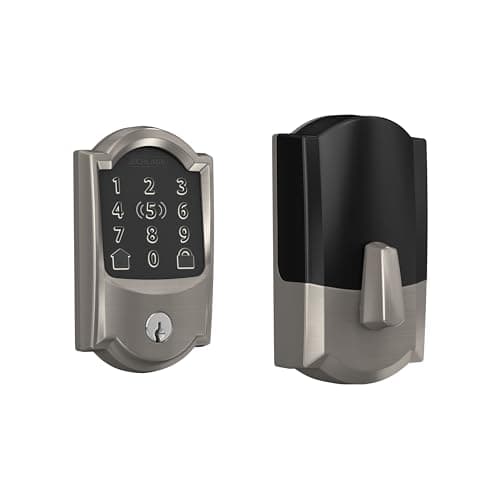
Schlage Encode Plus Wi-Fi Deadbolt
The one with the strongest published hardware pedigree. Schlage's deadbolt line is the reference point for BHMA Grade 1 in residential locks, and the Plus adds Apple Home Key so you tap a phone or watch instead of typing.

Best overall smart lock
Yale Assure Lock 2 (Wi-Fi, keyed)
The modular one. Yale sells the same lock body in keyed and key-free, touchscreen and keypad, with the radio as a swappable module — so you buy the connectivity you want instead of the connectivity that shipped.
Best for Home Assistant and Z-Wave
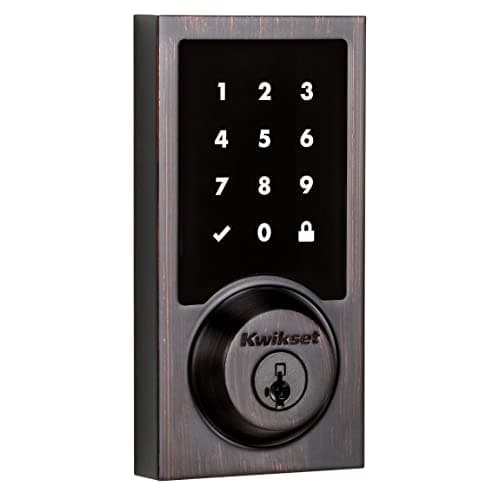
Kwikset SmartCode 916 Z-Wave Touchscreen Deadbolt
The Z-Wave workhorse. No Wi-Fi, no manufacturer cloud — it joins a Z-Wave hub such as Home Assistant, Hubitat or SmartThings and is controlled entirely on your own network.
#ad · As an Amazon Associate we earn from qualifying purchases.
Questions
Frequently asked
Are smart locks more secure than regular deadbolts?
Can someone open my smart lock with a phone app?
What happens to my smart lock if the company goes out of business?
Do smart locks work in a power cut?
Is a key-free smart lock safer than one with a keyhole?
Keep reading
Related
- Best smart locksThe ranked field, with published grades and running costs.
- Do smart locks need wifi?What each protocol keeps working when the router is down.
- Best door and window sensorsThe rest of the perimeter, which is where the gap usually is.
- How we compile our rankingsPublished specs, standards and manuals. No test lab.
Receipts
Sources
- BHMA — ANSI/BHMA standards and grading for residential door hardware
- American National Standards Institute (ANSI)
- UL Solutions — product safety and security certification
- Schlage — published BHMA grades and deadbolt documentation
- Kwikset — SmartKey and SmartCode product documentation
- Yale Home — Assure Lock 2 support and firmware notes
- Connectivity Standards Alliance — Matter security model
- Home Assistant — local control documentation
We do not run a testing lab and we do not pretend to. Specifications come from the manufacturer's own published documents and from published standards; prices come from the live Amazon API. Where a figure is not published, the page says “not published” rather than guessing. Read the full method.