HUB 06 · Guides
Do Smart Locks Work in a Power Outage? Yes, Because They Run on Their Own Batteries
A house power cut does nothing to a battery-powered lock, and a physical key or emergency terminal covers the separate case of the internal cells dying. Two different questions, both with reassuring answers.
We earn a commission if you buy through our links. It does not change the price you pay, and it does not decide our picks — our selection criteria are published in full. How this works.
Do smart locks work in a power outage?
Yes. Residential smart locks run on their own batteries, not household mains, so a power cut does not affect them — the lock keeps its codes and its motor. And for when the internal batteries themselves die, virtually every quality smart lock keeps a physical key or an emergency 9-volt terminal, so a flat pack never strands you outside.
Two different questions get tangled together here. One is your home losing power— a blackout, a tripped breaker, a storm. The other is the lock's own batteries running down. They are unrelated events with different answers, and almost every worried search on this topic is really one of the two. Separate them and the whole thing gets simple.
A household power cut: what keeps working, what stops
A smart deadbolt is not plugged into the wall. It carries its own power source in the door — typically four AA cells in a full deadbolt replacement like the Yale Assure Lock 2 or the Schlage Encode Plus, or a couple of lithium photo cells in a slimmer retrofit. Because the lock never depended on the mains, cutting the mains changes nothing about the lock itself. The motor still turns the bolt, the keypad still lights up, and a code you have programmed still opens the door. In the most literal sense the lock does not know the power is out.
What a blackout can take down is the equipment aroundthe lock. A built-in Wi-Fi lock reaches the internet through your router and modem, and those do run on mains power. When the power goes, they go with it — so remote unlocking from your phone, push notifications, and any cloud voice assistant stop until the router comes back. That is a loss of remote control, not a loss of the lock. Standing at your own door, you still have the keypad and the thumbturn; it is only the from-anywhere features that pause. This is the same split covered from the connectivity side in whether a smart lock needs Wi-Fi: the radio only ever carried remote access, so losing it never locks the door in place.
A lock that speaks Bluetooth or a low-power mesh radio to a hub is even less bothered, because it was doing less over the network to begin with — but the practical upshot is identical at the door. During a power cut, a smart lock is a lock that works by code and by hand, minus the ability to check it from the office. For most people that is the exact reassurance they were looking for.
| Event | Opens by code or thumbturn? | Remote app control? | What you rely on |
|---|---|---|---|
| Household power cut (lock batteries fine) | Yes, normally | No, once the router loses power | Keypad codes and the interior thumbturn |
| Internet or Wi-Fi down (power still on) | Yes, normally | No remote; local Bluetooth may still reach it | Codes, thumbturn, on-door controls |
| Lock's own batteries dead | No — the motor cannot run | No | Physical key, or a 9-volt jump terminal |
When the batteries themselves die: the failsafes
The genuinely important scenario is the third row of that table: not a blackout, but the lock's own cells running flat. A motor needs power to move a bolt, so a truly dead pack means the lock will not open electrically — and this is where a well-designed lock earns its keep, because it has a mechanical or emergency backup precisely for this moment. Two designs dominate, and it is worth knowing which one your lock uses before you ever need it.
The keyed override
Many smart deadbolts keep a physical key cylinder alongside the electronics. The keyed version of the Yale Assure Lock 2 does this deliberately, and every retrofit that clamps onto an existing deadbolt — an August or a SwitchBot, for instance — keeps the original key working on the outside because it never replaced the cylinder in the first place. If the batteries are flat, you use the key exactly as you would on any ordinary lock. The trade-off is that a keyway is one more thing on the door that can be picked or bumped, which is why some buyers deliberately choose a key-free lock and accept that they must rely on the electronic failsafe instead.
The 9-volt emergency terminal on keypad locks
Key-free keypad locks solve the dead-battery problem a different way: two small metal contacts, usually on the underside of the exterior keypad. Hold a 9-volt battery against them and it feeds the motor just enough power to wake the lock so you can enter your code and get in. It is a jump start, not a repair — once inside you replace the internal cells — but it means a key-free lock is not a lockout waiting to happen. Check your own model's manual for exactly where the terminals sit and which way the battery goes, because the detail varies by brand and you do not want to be learning it in the rain.
Keyed versus key-free: the outage trade-off
This is the decision the outage question really turns on. A keyed lock gives you the most familiar backup — a physical key anyone can use with no instructions — at the cost of a pickable cylinder. A key-free keypad lock removes that cylinder as an attack surface but leans on a 9-volt jump start that you have to know about in advance and keep a battery handy for. Neither is wrong. If several people need reliable backup access and some of them will never read a manual, keyed is the pragmatic choice; if you want the cleanest exterior and will keep a 9-volt in a drawer, key-free is fine. The wider security argument around cylinders and bump resistance sits in our keypad door locks roundup, which is the right shortlist if you have decided to go key-free.
Low-battery warnings: you get weeks of notice
A dead-battery lockout is almost always avoidable, because smart locks are noisy about a failing pack long before it quits. Most give you weeks of warning through an app alert, a colored flash on the keypad, or a changed beep on each use once the cells drop below a threshold. The failure mode to plan for is therefore not a surprise death — it is ignoring a warning you have been getting for a fortnight. How long that pack lasts in the first place is set more by the radio than the motor, which is the whole subject of how long smart lock batteries last; a Wi-Fi lock that stays reachable around the clock burns through a set faster than a Bluetooth or Thread lock on the same door, so it warns you more often.
The Schlage Encode Plus adds a wrinkle worth naming for Apple households: its support for Apple Home Key means an iPhone or Apple Watch tap unlocks it, and that tap still works from a phone's low-power reserve for a while after the phone appears dead. That is a convenience feature, not a substitute for the lock's own failsafe — if the lock'sbatteries are flat, you are still back to the key or the 9-volt terminal — but it removes one of the everyday ways people get caught at the door.
The short version
A power cut does not stop a smart lock, because the lock was never on your mains; it only pauses the remote features that ride on a router. The scenario worth preparing for is the lock's own batteries dying, and every lock worth buying answers that with a key or a 9-volt jump start. Decide which failsafe you want, keep the right spare on hand, and heed the low-battery warning, and an outage is a non-event. When you are ready to choose the hardware, start from the best smart locks roundup.
How to make sure an outage never locks you out
Everything above reduces to a few habits. None of them is expensive, and together they turn the whole category of worry into a solved problem.
Choose your failsafe on purpose, not by accident
Before you buy, decide whether you want a keyed cylinder or a key-free lock with a 9-volt terminal, because that choice is hard to reverse once the lock is on the door. A keyed lock is the most foolproof backup for a household where several people need access and not everyone will remember a procedure. A key-free lock gives a cleaner door and removes the cylinder as something to pick, but it asks you to keep a 9-volt battery available and to know where the contacts are. Both are legitimate; the mistake is discovering which one you bought only when the pack is flat.
Keep the right spare where you can actually reach it
A physical key is useless if the only copy is inside the locked house, so a keyed lock wants a spare stored off the property — with a trusted neighbor, in a car, in a proper key safe — not on the same ring you might lock inside. A key-free lock wants a 9-volt battery kept somewhere you can get to from outside, or simply carried, since the whole point is to power the lock when its own cells are gone. Two minutes of planning here is the difference between a shrug and a locksmith call.
Do not ignore the low-battery warning
The single most common cause of a smart-lock lockout is not a fault; it is a person who saw the warning for two weeks and meant to get to it. Treat the first alert as the deadline, replace the whole set of cells at once with the same brand and chemistry, and prefer primary lithium AAs on an exposed or cold exterior door because they hold a flatter voltage under load. The reasoning behind that battery advice is laid out in how long smart lock batteries last.
Understand what a power cut actually pauses
If your lock is Wi-Fi and the power is out, expect the app and notifications to be dark until your router is back, and do not read that as a broken lock — the codes and the thumbturn are unaffected. If keeping some control during outages matters to you, a lock that runs local automations through a hub keeps more of its logic alive than one that depends on a vendor's cloud, a distinction drawn out in whether a smart lock needs Wi-Fi. Either way, the door still opens by hand.
How this guide was compiled
Products we claim to have tested: zero. This guide is built from manufacturer product and support documentation and the plain engineering of battery-powered locks and low-voltage override circuits — sources you can open yourself, listed below. The rubric behind our picks is at our methodology, and the rest of the buyer questions sit across the guides hub. When the failsafe question is settled, the shortlist is the best smart locks roundup.
The hardware
The hardware this guide is about
The products this guide refers to, with prices pulled live from Amazon and dated on every card. Full rankings live in the roundups linked above.

Best overall smart lock
Yale Assure Lock 2 (Wi-Fi, keyed)
The modular one. Yale sells the same lock body in keyed and key-free, touchscreen and keypad, with the radio as a swappable module — so you buy the connectivity you want instead of the connectivity that shipped.
Best build quality
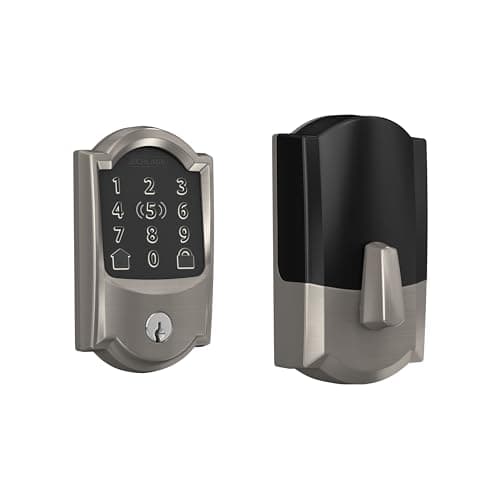
Schlage Encode Plus Wi-Fi Deadbolt
The one with the strongest published hardware pedigree. Schlage's deadbolt line is the reference point for BHMA Grade 1 in residential locks, and the Plus adds Apple Home Key so you tap a phone or watch instead of typing.
#ad · As an Amazon Associate we earn from qualifying purchases.
Questions
Frequently asked
Do smart locks stop working when the power goes out?
Can you open a smart lock with a dead battery?
What happens if my smart lock battery dies while I am away from home?
Will my smart lock still lock the door during a blackout?
Do I still get phone alerts from my smart lock during a power cut?
Is a keyed or key-free smart lock better for outages?
Keep reading
Related
- Best smart locksThe shortlist once you have decided which failsafe you want on the door.
- Best keypad door locksKey-free picks, where the 9-volt terminal is the backup rather than a cylinder.
- How long do smart lock batteries last?Why the radio, not the motor, decides how often you see a low-battery warning.
- Do smart locks need Wi-Fi?What the network actually carries, and what keeps working when it is gone.
Receipts
Sources
- Yale Home — Assure Lock 2 manuals, key override and battery guidance
- Schlage — Encode Plus support, Apple Home Key and 9-volt emergency power documentation
- Kwikset — keypad deadbolt support and emergency power terminal instructions
- August — retrofit lock documentation on keeping the existing key and cylinder
- Ultraloq — U-Bolt Pro battery and emergency access documentation
- UL — safety standards for the batteries used in residential smart locks
We do not run a testing lab and we do not pretend to. Specifications come from the manufacturer's own published documents and from published standards; prices come from the live Amazon API. Where a figure is not published, the page says “not published” rather than guessing. Read the full method.