HUB 06 · Guides
How to Choose a Security Camera: The Four Questions That Decide It
Where it goes, how it is powered, where the footage is stored, and how it connects. Settle those four and the resolution number on the box stops mattering.
We earn a commission if you buy through our links. It does not change the price you pay, and it does not decide our picks — our selection criteria are published in full. How this works.
How do you choose a security camera?
Answer four questions in order and the choice narrows itself. Where does it go — indoor, outdoor, or the doorstep? How is it powered — wired, PoE, battery, or solar? Where is the footage stored — on a card or base you own, or in a cloud you rent? And how does it connect — Wi-Fi or Ethernet? Resolution comes after those, not before.
Buy the design, not the megapixels.Two cameras can both say “4K” and be completely different products: one records to a card with no monthly fee, the other keeps nothing unless you subscribe. The four questions below sort cameras by the things that actually differ. The resolution number is the easiest spec to print and the least likely to decide whether you are happy in a year.
Question one: where does it go?
The mounting position sets almost everything else. An outdoor camera has to survive weather and shoot a wide approach at distance; an indoor camera trades weatherproofing for discretion and a closer field; a doorbell sits at the door and answers one narrow, close question — who is standing here. Decide the position first, because a camera bought for the wrong place fails at basics no spec can rescue.
Resolution and field of view are a pair, not two numbers
Resolution and field of view trade against each other, and reading them together is the whole skill. A wide lens covers more of a yard but spreads its pixels thin, so a face at the far edge is a smudge; a narrower or zoomed lens frames that face large but sees less width. Higher resolution buys back some of the loss — 2.5K on the Wyze Cam v4or 4K on the eufyCam 3 gives you more pixels to spend across the frame — but it does not repeal the trade-off. For a driveway where you want a readable plate, a camera with real optical zoom beats a higher-resolution fixed wide lens every time, because optical zoom moves the pixels to where the detail is instead of cropping into a picture that was never sharp there. Match the lens to the job: wide for a broad approach, longer or zoomed for a choke point, and put the action you care about in the middle third of the frame rather than the distorted edge.
Night vision: infrared, color, or a spotlight
Most of what a security camera records happens in poor light, so how it sees after dark matters as much as its daytime resolution. There are three approaches. Standard infrared gives a monochrome image with invisible illumination and a limited range — push a camera past that range and the far half of the frame goes black. Starlight or color night vision uses a more sensitive sensor to keep some color in ambient light, which makes clothing and vehicles far easier to describe. A spotlight camera simply floods the scene with visible light on motion, which gives the best image but blazes at the neighbors and announces the camera. None is universally right: color night vision suits a street-lit front; a spotlight suits a dark side passage; plain infrared is fine for a garage. What matters is that the zone you care about falls inside whatever range the camera actually reaches.
Question two: how is it powered?
Power is the constraint that most often decides the install, and it is the one buyers underestimate. There are four ways to feed a camera, and each buys something and costs something.
- Wired mains. A plug or hardwired feed near the mounting point. Simple and permanent, it supports continuous around-the-clock recording, but it ties the camera to wherever an outlet already is.
- PoE (Power over Ethernet).One Ethernet cable carries both power and data, so there is nothing to charge and no Wi-Fi in the path. It is the most reliable design and the one serious continuous-recording setups use — and it is the most work, because you have to run Cat6 to each position.
- Battery. No cabling at all, which is why battery cameras sell. The catch is baked into the physics: a battery camera records events, waking on motion and sleeping between them, and periodically needs recharging. No battery camera records continuously — not this one, not any of them.
- Solar.A battery camera with a panel that tops it up, so in practice you stop thinking about charging — the eufyCam 3 kit puts a panel on every camera. The rule attached is that a panel needs genuine direct sun, so the shaded corner that looks perfect for coverage may be the one spot a solar camera cannot sustain itself.
The honest trade-off runs straight down that list: the less cabling a camera needs, the less it can promise about continuous recording. If you need footage of everything, all the time, that is a wired or PoE camera, full stop. If you can live with event clips and want no drilling, battery or solar is the deal, and it is a fair one once you know what it gives up. The connectivity-and-cost side of this same choice is worked through in our PoE versus Wi-Fi guide.
Question three: where does the footage live?
This is the question with the largest bill attached, and the one most buyers skip until it is too late. A camera either keeps its recordings on hardware you own — a microSD card in the camera, or a base station or recorder in the house — or it sends them to the manufacturer's cloud, where retrieving them almost always requires a monthly plan. That single design decision is usually the biggest long-run cost of owning the camera, dwarfing the price on the box over a few years.
Local storage means the camera writes to something in your home. The eufyCam 3 records to a HomeBase that takes a large drive, so retention is a hardware decision rather than a plan tier; the Wyze Cam v4 writes to a microSD card in the camera. Both give you full playback for free. The trade is that footage kept in the house can be stolen with the camera or the base — a genuine limitation eufy's own design carries, and the reason a recorder in a cupboard beats a card in the camera. Cloud storage means the clips live on the vendor's servers, off-site and safe from a thief, but reachable only through the app and, on most hardware, only while you pay. Some cameras do both, mirroring a local copy to the cloud, and those are the most resilient of all. Which pattern a camera uses is the single most important line on its spec sheet; the full decision is laid out in our local-storage versus cloud comparison, and whether you truly need a plan at all in our subscription guide.
Question four: how does it connect?
Connection is the last question because it is downstream of the first three. A wired PoE camera does not touch Wi-Fi at all — its Ethernet cable is its connection — which is exactly why PoE is the reliable choice for a fixed install. Everything else is Wi-Fi, and there the detail that matters is the band. Most budget cameras use only the 2.4GHz band, which reaches further through walls but is the most congested part of the spectrum in a typical neighborhood; better cameras add 5GHz, which is faster and less crowded but shorter-ranged. For a camera at the edge of the property, 2.4GHz range usually wins; for one streaming high-resolution video near the router, dual-band avoids the stutter that congestion causes. Whichever it is, test the signal at the exact mounting point before you drill, because a strong signal at the router says nothing about the far corner of the garden.
| Camera type | Typical power | Records continuously? | Storage | Connection |
|---|---|---|---|---|
| Wired PoE | Ethernet cable | Yes, 24/7 | Card or NVR you own | Ethernet, no Wi-Fi |
| Wired mains | Plug or hardwired | Yes, on capable models | Card, base, or cloud | Wi-Fi |
| Battery | Rechargeable pack | No — events only | Card, base, or cloud | Wi-Fi |
| Solar | Panel + battery | No — events only | Card, base, or cloud | Wi-Fi |
Weatherproofing: read the IP rating, not the word “outdoor”
An outdoor camera has to survive rain, dust and temperature swings, and the spec that says whether it can is the IP rating — two digits after the letters IP, where the first is dust resistance and the second is water resistance. The number you want on an exterior camera is IP65 or better: the 6 means dust-tight, the 5 means protected against low-pressure water jets from any direction, which covers driven rain. IP66 and IP67 add more margin against heavy jets and brief immersion. A camera sold as “outdoor” without a stated rating is asking you to trust a marketing word instead of a standard; look for the digits. Note too that the rating covers the camera body, not the cable entry or the connector, so a well-rated camera can still fail at a badly sealed junction — mount the connections under an eave or in a housing where you can.
Putting the four answers together
By the time you have answered where, how powered, where stored and how connected, the field has narrowed to a handful of cameras and the resolution number is a tiebreaker, not the decision. A subscription-free whole-property system like the eufyCam 3 answers “solar, local base, no plan” in one purchase; a cheap mains camera with a card answers “wired, local, low stakes” for a garage or shed. The full field, sorted by use case, is in our home security cameras roundup, and the exterior-specific picks — where weatherproofing and night range matter most — are in our outdoor cameras roundup. Before any of that, though, plan the positions: where a camera goes decides how well it does its job, and that is worked through in our camera placement guide.
A framework you can run in ten minutes
You do not need a spreadsheet. Answer the four questions for each position you want to cover, in order, and stop when the field is small enough to pick from.
- Where. Indoor, outdoor, or doorstep. This sets weatherproofing, field of view and whether a doorbell is the better tool for that spot.
- Power. Is there a cable at the position, could you run one, or does it have to be battery or solar? Remember that only wired and PoE record continuously.
- Storage. Local card or base you own, or cloud you pay for. This is the biggest long-run cost, so decide it deliberately, not by default.
- Connection.Ethernet for a fixed reliable install, or Wi-Fi — and if Wi-Fi, test the signal at the mounting point and check whether you need dual-band.
What decides the price you pay over time
The sticker price is the small number. The one that compounds is storage: a cloud-only camera keeps charging you for as long as you own it, while a local-storage camera is paid for once. Over a few years the plan can quietly cost more than the hardware did, which is why the storage question sits in the middle of the framework rather than as an afterthought. Resolution, by contrast, is a one-time spend that ages gracefully — a 2.5K camera bought today is still 2.5K in five years. Spend your attention on the recurring cost, not the headline megapixels.
The mistake buyers make
They start with resolution and brand, buy on the box, and discover the design was wrong for the position: a battery camera where they needed continuous footage, a cloud-only camera where they refused to pay a plan, a wide lens where they needed a readable plate, or a Wi-Fi camera at a distance the signal never reached. Every one of those is a question-one-to-four failure, not a resolution failure. Answer the four questions first, let them narrow the field, then choose hardware from the home security cameras roundup or, for a specific exterior spot, the outdoor cameras roundup, and check how those picks are graded in our methodology. The related storage, power and placement questions are covered across the rest of our guides, and the full field of camera categories starts at the cameras hub.
The hardware
The hardware this guide is about
The products this guide refers to, with prices pulled live from Amazon and dated on every card. Full rankings live in the roundups linked above.
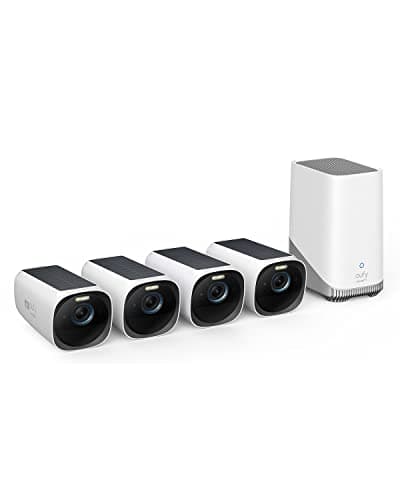
Best subscription-free camera system
eufyCam 3 (S330) 4-camera kit
Four 4K solar cameras and a HomeBase with expandable local storage. This is a whole-property system that never sends you a bill, which is close to unique at this capability level. It is also the previous generation: eufy's flagship is now the eufyCam S3 Pro, and the S330 is what you buy when you want four cameras rather than the newest two.
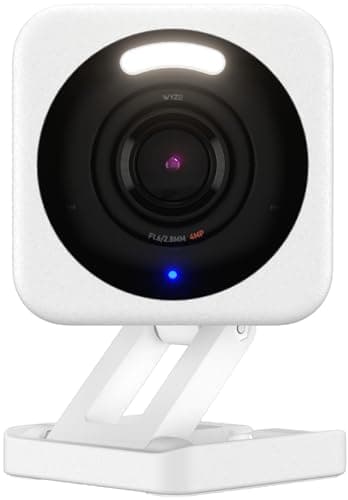
Best cheap camera
Wyze Cam v4 (2.5K)
The cheapest competent camera sold. 2.5K, indoor or outdoor, records to a card without a plan — with a brand history you should read before you put nine of them in your house.
#ad · As an Amazon Associate we earn from qualifying purchases.
Questions
Frequently asked
What is the single most important thing when choosing a security camera?
Do I need a 4K security camera?
What IP rating do I need for an outdoor camera?
Wired, battery, or solar — which should I choose?
Does a security camera need to be on the same Wi-Fi band as my router?
Keep reading
Related
- Best home security camerasThe full field once the four questions have narrowed it.
- Best outdoor security camerasExterior picks where weatherproofing and night range matter most.
- Local storage vs cloud camerasThe storage question — the biggest long-run cost — in full.
- PoE vs Wi-Fi camerasThe power-and-connection trade, with running costs.
Receipts
Sources
- eufy — eufyCam 3 and HomeBase specifications and local-storage documentation
- Wyze — Cam v4 resolution, local microSD and outdoor-use documentation
- Reolink — optical zoom, PoE and camera field-of-view reference
- Ring — camera lineup, power options and video plan documentation
- Ring support — recording, storage and connectivity help articles
We do not run a testing lab and we do not pretend to. Specifications come from the manufacturer's own published documents and from published standards; prices come from the live Amazon API. Where a figure is not published, the page says “not published” rather than guessing. Read the full method.