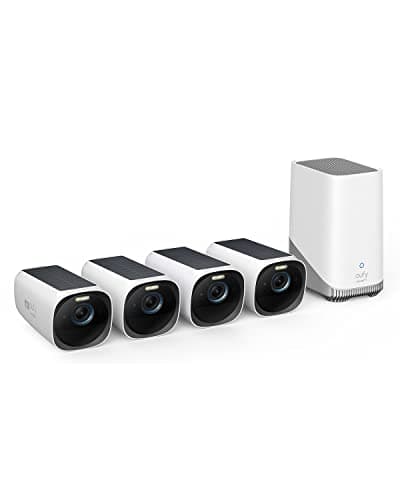
The eufyCam 3 (S330) is our best solar camera for whole-property coverage: 4K cameras with integrated solar that record to a HomeBase 3 in your house, with expandable local storage and no monthly plan. It is not the best singlecamera here — it is the best system, and the reason is the base station in the box. Everything below follows from that, including the one trade-off the marketing does not put on the front of the page.
The 4K-plus-solar combination is the headline
Two features usually pull against each other. A 4K sensor captures more detail and, doing so, draws more power; a solar-powered camera is trying to keep a battery topped up on a modest panel. The eufyCam 3 puts them together: every camera is 4K, and every camera carries an integrated solar panel to feed its own battery. The practical payoff is a system you mount once and largely leave alone — no quarterly ladder trip to swap or recharge a battery, provided each camera's panel gets real, direct sun. That last clause is the whole solar story and it applies here exactly as it does across the solar roundup: the panel tops up the battery, it does not run the camera directly, so a camera on a shaded north wall or under a deep eave can still walk its battery down no matter how good the sensor is. Site each panel for the sun and the 4K-plus-solar combination delivers; site it for the view alone and you are back to recharging by hand.
The HomeBase is what removes the subscription
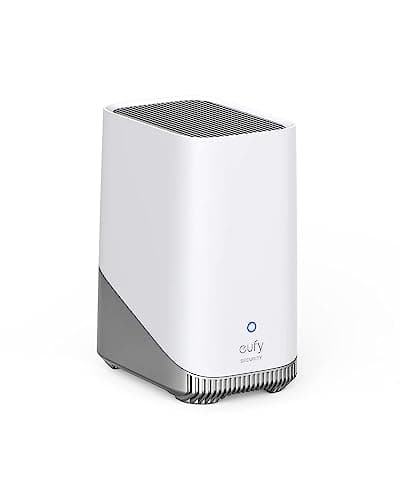
The eufyCam 3 ships with a HomeBase 3, and that base is the single most important thing about the kit. It sits indoors and holds the footage locally, which means the recordings never have to leave your house and there is no monthly fee to keep them, play them back, or be notified about them. On a cloud camera the purchase price is only the entry fee; the subscription is where the real money is, and it runs for as long as you own the hardware. The HomeBase deletes that line item entirely. It also runs the AI — face recognition and detection happen on the base, in your house, not on a manufacturer's server — so the processing stays local along with the video. This is the whole reason the kit exists, and it is why eufy's no-subscription claim is one of the few in the category that holds up when you read the fine print rather than the ad.
It is worth being precise about what “no subscription” does and does not cover. Recording, playback and notifications are free because the base does the work locally. eufy's optional cloud backup is a separate, paid choice for people who want a copy off site, and it is exactly that — optional. You can run the entire system for its lifetime without ever paying eufy a recurring cent, which is the standard we hold hardware to across the best local-storage cameras.
Expandability: retention is a drive decision, not a plan tier
The HomeBase 3 takes a large drive and expands well beyond its base capacity, so how long you keep footage is a hardware decision you make once rather than a subscription tier you pay for forever. Want more history across four 4K cameras? Fit a bigger drive. That is a fundamentally different economic model from cloud storage, where more retention means a higher monthly plan in perpetuity. It also means the system grows with you: the base serves compatible eufy cameras across the property, so the eufyCam 3 kit can be the spine you add a doorbell or a SoloCam to later, all recording to the same local box with no new plan. The trade is that the base serves eufy devices and nothing else — it is not a general-purpose NVR, and it will not adopt a third-party ONVIF camera the way a Reolink or a Home Assistant setup would.
Install: place each cone deliberately
The cameras are fixed rather than pan-and-tilt, which changes how you install them. A pan-tilt camera lets you sweep and re-aim from the app; a fixed camera has to be pointed correctly on the wall, because its cone is its cone. That is not a downgrade — a fixed camera on a well-chosen line is rock-steady and has no motor to age — but it makes placement the job. Walk the property, decide which approaches each of the four cameras owns, and mount each one for both its view and its panel's sun, which are sometimes the same spot and sometimes not. Pair the cameras to the HomeBase indoors, give each panel a stretch of direct sun, and trim the motion zones on day one so the cameras are not firing on the road all day — that last step protects both your storage and your battery. It is a bigger first afternoon than mounting one camera, because you are placing four and a base, but it is a one-time afternoon.
The honest cons
- The up-front cost is high.You are buying a base station and four 4K solar cameras at once, so this is the most expensive way onto the solar page. The saving over a cloud system is real, but it is spread across years rather than felt at the till — if you need the cheapest entry today, this is not it.
- Everything lives on the HomeBase in your house.Local storage is the whole appeal, and it is also a single thing to steal: if a burglar takes the base, the recordings go with it. That is a genuine trade-off against a cloud system, and it is the reason eufy's optional off-site backup exists. Nobody else in this category states it plainly; we will.
- It is a eufy-only ecosystem. The HomeBase records eufy cameras and nothing else. If you want to mix a Reolink or an Amcrest onto the same recorder, this is the wrong architecture and an open-standard NVR is the right one.
- eufy's past cloud-thumbnail disclosures are fair to weigh. The company has published disclosures about how some cloud thumbnails were handled; read them before buying the brand. They are a documented fact to consider, not a rumor.
Who should skip it
Anyone who wants footage off-site by default. This system keeps everything on the HomeBase in your house, which is exactly the appeal for most buyers and exactly wrong for the person whose priority is that the recordings survive if the hardware is taken. If off-site retention is your first requirement, a cloud-led system fits your priorities better, and the trade is laid out at the best 4K cameras.
Anyone who needs a continuous 24/7 timeline.These are solar cameras, and no battery-and-solar camera records continuously — they record events. If you want a rolling record you can scrub second by second, you want a wired camera, which in practice means Power over Ethernet like the Reolink RLC-811A discussed below.
Anyone building a mixed-brand system. If your plan is one recorder holding cameras from several makers, the eufy-only HomeBase is the wrong spine. Buy an ONVIF camera and an open NVR instead.
The thing this system cannot do
Record around the clock. The eufyCam 3 is a superb answer to “cover my whole property on 4K with no monthly bill,” and a non-answer to “give me a continuous timeline of the front of the house.” For the second job the honest recommendation is a wired camera: one cable for power and data, no battery to manage, and a genuine 24/7 record to a card or an NVR. The 4K roundup covers where each approach fits, and the wider category sits on the cameras hub.
How this review was compiled
Products we claim to have tested: zero. We have not mounted four cameras on a house and watched the battery graphs for a season, and we are not going to imply otherwise. What this review is built from is eufy's published product and support documentation for the eufyCam 3 and the HomeBase 3, its install guides, and the general engineering of battery-and-solar cameras — every one of which is a source you can open yourself, and they are listed below. Our scoring rubric and the weightings behind it are published in full at methodology, so you can disagree with our conclusion using the same public material we used to reach it.
The alternatives worth comparing
Reolink RLC-811A — if you need the continuous timeline
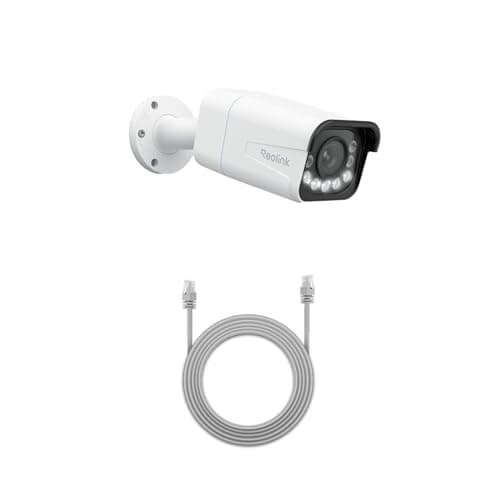
This is the camera for the job the eufyCam 3 cannot do. The RLC-811A is a 4K PoE camera with a real 5x optical zoom and continuous 24/7 recording to a card or an NVR, with published RTSP and ONVIF support that makes it a first-class citizen in Home Assistant, Frigate or Blue Iris. One cable carries power and data, so there is no battery and no panel to site. The compromise is the install: you have to run Ethernet to it and add a PoE switch or injector, which for most houses is the whole project. Where the eufyCam 3 trades continuous recording for a wire-free, solar, no-plan system, the RLC-811A trades convenience for a serious wired one.
eufy HomeBase 3 — the box that makes the no-plan claim true
The HomeBase 3 comes in the eufyCam 3 kit, but it is worth understanding on its own because it is the reason the system has no subscription. It offers a large, expandable local drive and runs on-device AI, so both the footage and the face recognition stay in your house. It is what turns every compatible eufy camera you own into a genuinely plan-free device, and it is the upgrade path if you later add a eufy doorbell or SoloCam to the same base. The catch is stated plainly on its own record: it serves eufy cameras and nothing else, so it is not a general-purpose NVR and it is redundant if you already own one.
Where the eufyCam 3 sits
The eufyCam 3 is the pick when the requirement is whole-property 4K coverage with no monthly bill and no wiring, and you are content for the footage to live locally in your house. Choose the RLC-811A when a continuous 24/7 timeline or open-standard integration matters more than going wire-free. And understand the HomeBase 3 as the piece that makes the eufy side of that choice work at all. The rest of the category is indexed on the cameras hub.