The best wired video doorbell is the eufy Video Doorbell E340. Wired into an existing transformer it has constant power, drives the mechanical chime already in your house, and records locally with no monthly plan — and it adds a second camera aimed straight down at the step, so you see the parcel and not just the person. The transformer is the catch, and checking it is the first thing to do, before you compare a single feature.
This is the companion page to our best battery video doorbells ranking, and the two pages split the category on one question: do you have a doorbell transformer? A wired doorbell runs on a low-voltage circuit that was installed to ring a mechanical bell, fed by a small transformer wired into a junction box somewhere in the house — often in a basement, a closet, or behind the existing chime. If that circuit is present and healthy, wiring is almost always the better choice: it never needs recharging, it can ring the bell you already own, and it opens the door to a continuous recording that a battery unit cannot afford. The whole page below assumes you have that wiring, or can confirm it. If you do not, the honest answer is a battery doorbell, and that argument lives on the companion page.
Do the transformer check first. A mechanical bell drew power for half a second when someone pressed the button. A video doorbell draws power continuously— its camera and radio are awake around the clock — so the transformer behind the button has to meet the doorbell's published minimum voltage and current, not just enough to clang a bell. An old, small transformer that rang a bell reliably for thirty years can sit below that floor. The symptom is not a dead doorbell but an intermittent one: it works, then reboots mid-call, drops the video, or refuses to charge its backup cell. Read the figure printed on your transformer, compare it to the manufacturer's spec, and if it falls short, budget for a replacement transformer or plan to run the doorbell on battery instead.
The best wired video doorbells, compared
Compiled from manufacturer specifications and published support documentation, August 2026. Three of these (the eufy E340, the Tapo and the Aqara) also run on a cell; the Reolink is wired only. Every model here is chosen because it makes proper use of a constant supply — a chime, a card, or a downward lens — when it is wired.| Model | Power | Storage | Plan needed? | Indoor chime | Notable |
|---|
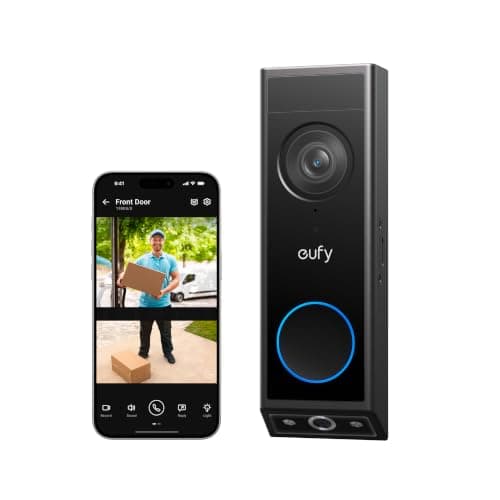
| eufy Video Doorbell E340 | Wired or battery | Local — on-device or a paired eufy HomeBase | No | Drives the existing mechanical chime when wired | A dedicated second camera aimed straight down at the step |
|---|
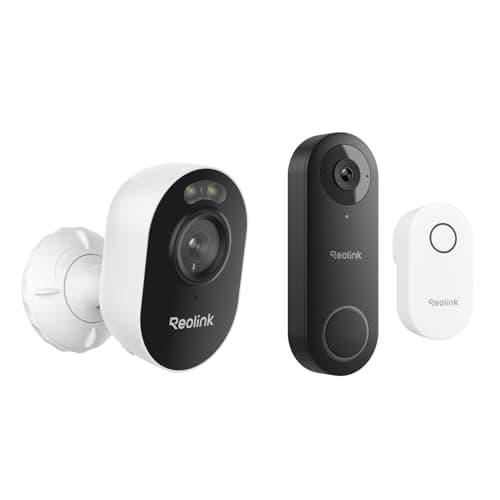
| Reolink Video Doorbell WiFi | Wired only (transformer) | Local microSD, plus RTSP out to an NVR | No | Yes — a plug-in chime is in the box | RTSP support drops it into Home Assistant and Blue Iris |
|---|
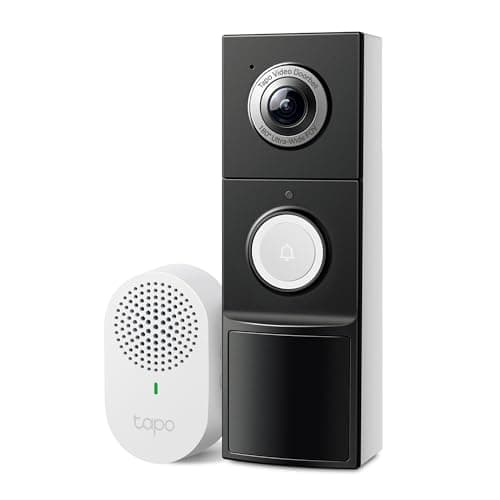
| Tapo 2K+ Video Doorbell | Wired or battery | Local microSD | No | Yes — a plug-in chime is in the box | A tall 180-degree field of view shows the step without a second lens |
|---|
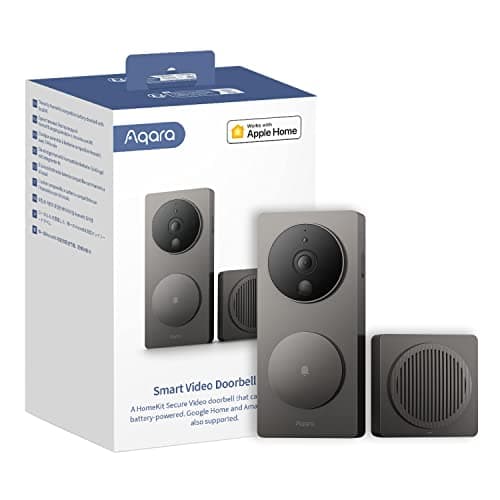
| Aqara Video Doorbell G4 | Wired or battery (AA) | Local, plus HomeKit Secure Video to iCloud+ | Only for HomeKit Secure Video (iCloud+) | Yes — the included chime is also the Wi-Fi bridge | On-device face recognition and HomeKit Secure Video for Apple homes |
|---|
What wired power actually buys you
Wiring is not just the absence of a recharging chore. A constant supply changes what the doorbell can do, and three of those changes are worth the effort of confirming a transformer.
Continuous power, and the option of a real timeline
A battery doorbell sleeps until a motion sensor fires, then wakes, boots the camera, and starts recording — which is why it gives you discrete event clips and a small wake-up delay at the start of each one. A wired doorbell has no reason to sleep. Its camera and radio can stay awake around the clock, which makes a continuous timeline and a pre-roll buffer — the seconds captured beforea motion event — technically possible in a way they never are on a cell. Not every wired doorbell exposes a full 24/7 timeline, and we will not tell you which ones do beyond what each manufacturer publishes; what wiring guarantees is the power budget that makes it an option at all. The Reolink is the most flexible here on that front, because its RTSP output lets a Home Assistant, Blue Iris or a standalone NVR pull a continuous stream and record it however you like, entirely under your own roof. If a rolling record rather than a set of clips is the reason you are shopping, that is a wired feature, and it is one more argument for confirming the transformer.
It can ring the bell you already own
This is the quiet advantage people underrate until the first week with a doorbell. A wired unit sits on the same low-voltage circuit as your existing mechanical chime, so it can ring that chime — the actual bell in the hallway, audible from upstairs and from the kitchen, independent of whether anyone's phone is face-down on silent. A battery doorbell has no such circuit and depends on a plug-in accessory or app alerts. The eufy E340 drives the existing chime when it is wired, which is precisely the capability it losesin battery mode. The Reolink, the Tapo and the Aqara each also include their own chime in the box, so even a house whose old mechanical bell has been removed still gets an audible ring without buying an extra part. The full split — who chimes how — is in the buyer's guide below.
No recharging, ever
The most mundane benefit is the one you feel every month. A wired doorbell is fed continuously, so there is no cell to bring inside and charge and no busy-street calculus about how fast the battery drains. You mount it, connect it, and forget it. For a doorbell facing a public sidewalk — where a battery unit can want a recharge every few weeks because it fires on every passing pedestrian — that difference is the whole reason wired is the default recommendation whenever the wiring exists.
Where the footage goes, and what a plan gates
Wiring solves the power question; it does not touch the storage question, and storage is what decides the running cost. Local storage means a microSD card in the unit or a drive in a base station indoors, paid for once. Cloud storage means a monthly plan, paid for as long as you own the doorbell. The full version of that argument is in do video doorbells need a subscription, and it is worth reading before you buy, because it is the line item that outlives the hardware.
Three of the four picks here keep every core function working with no plan at all. The eufy E340 records to on-device storage or a paired HomeBase; the Reolink records to a microSD card and can push a stream to your own recorder; the Tapo records to a microSD card with person, vehicle and package detection included. None of those three ask for a subscription to record, play back, or send alerts. The Aqara is the one nuance: its local automations and on-device face recognition are free, but if you want HomeKit Secure Video — the Apple feature that is the reason to buy it — that footage is stored in iCloud and needs an iCloud+ plan. That is not a doorbell subscription in the usual sense; it is an Apple storage tier many Apple households already pay for. The distinction matters enough that the G4 gets its own full review.
Which wired doorbell to buy
- You want the best wired doorbell, full stop.eufy Video Doorbell E340. Wired, it has constant power, drives your existing chime, and records locally with no plan — and it adds the one feature nothing else here matches, a dedicated second camera pointed at the step, so a parcel is framed properly instead of smeared into the distorted bottom of a wide shot. Its honest catch is storage: two camera streams take more space than one, so size your HomeBase or card accordingly. The dual-camera design is covered in depth in the E340 review.
- You want the best value and you tinker.Reolink Video Doorbell WiFi. It is wired, 2K, records to a card, includes a chime, and shows the doorstep through a head-to-toe frame rather than a second lens — and its RTSP output makes it the natural pick for a Home Assistant or NVR setup where you keep the footage entirely on your own hardware. The honest cons are that it is wired only, with no battery variant, so a house without a transformer is simply excluded, and the app is functional rather than polished. The head-to-head with eufy is at eufy vs Reolink, and the model is covered end to end in our Reolink Video Doorbell review.
- You want no plan and the most forgiving install. Tapo 2K+ Video Doorbell. It runs wired oron battery, so whatever you find behind the button is unlikely to stop you; it includes a plug-in chime, records to a microSD card, and gives you person, vehicle and package detection free. A single wide 180-degree lens shows the step but with less doorstep detail than eufy's dedicated downward camera, which is its one real compromise if deliveries are the whole reason you are shopping.
- Your house runs on Apple Home. Aqara Video Doorbell G4. It is the strongest HomeKit Secure Video doorbell here, it runs its face recognition on the device rather than in a cloud, and it works wired or on AA cells with a chime that doubles as the Wi-Fi bridge. It ranks last on this general list for one reason and one reason only: it is 1080p where the rest of the group is 2K, so it is the softest image here, and if you are not an Apple household you are paying for integration you will not use. For an Apple home, though, it is the right answer, which is why it wins the Best HomeKit doorbell spot outright.
How we compiled this
Products we claim to have tested: zero. Nearly every other page in this category tells you someone wired up four doorbells and lived with them for a month. We have not, and we would rather say so than imply a lab we do not have. What we do instead is read each manufacturer's published specification, installation guide and support documentation — especially the quiet lines about transformer minimums, what a plan gates, and what a battery mode gives up — work out the running cost, and cite it. Rankings weight storage location, usability with no plan, install flexibility, the image system and the ecosystem, and every pick carries a specific reason to skip it. The full rubric is at methodology, and the rest of the category, wired and battery, is indexed on the doorbells hub. If you are still weighing whether a doorbell earns its place at all, is a video doorbell worth it makes the case both ways.
How to choose a wired video doorbell
First, confirm the transformer — the fifteen-minute check
Before you compare a single feature, find out whether your wiring can feed a video doorbell. A mechanical bell ran on a brief pulse of power; a camera runs on a steady draw, so the transformer has to supply enough voltage and current continuously. Locate the transformer — it is a small block wired into a junction box, often near the main panel, in the basement, in a closet, or tucked behind the existing chime — and read the rating printed on it. Compare that figure to the doorbell's published minimum. If the transformer meets or exceeds it, wire away. If it falls short, or if you cannot find a transformer at all, you have two honest options: replace the transformer (a job for whoever does your electrical work, because the line-voltage side is not a low-voltage circuit), or buy a doorbell that runs on battery instead. Skipping this check is how people end up with the classic complaint — a doorbell that reboots mid-call and nobody can explain why.
What actually decides the price
In rough order: the camera system, where a dedicated second downward lens is the most expensive feature in this group and the one that changes daily use the most; the resolution, which is why the 1080p Aqara reads as a softer image than the 2K models; the ecosystem and on-device processing, meaning HomeKit Secure Video, RTSP output, or face recognition that runs locally; and the included accessories, meaning a plug-in chime in the box rather than sold separately. What does notshow up in the purchase price on a cloud-only doorbell is storage — it is moved into a monthly line item. Every pick on this page keeps its core recording local and free, which is a deliberate filter, not an accident.
The mistake buyers make
The most common one is buying the doorbell before checking the transformer, then discovering the reboot-mid-call symptom of an undersized supply and blaming the doorbell. Check the transformer first. The second is assuming a wired doorbell will automatically ring the old mechanical bell: the eufy E340 does drive it, but the Reolink, Tapo and Aqara ring their own included chimes instead, and if your old bell has been removed you will want that included chime rather than a unit that expects a working bell to drive. The third is mounting height: a doorbell placed at the height of the old button, often around 120cm, frames faces well but the step poorly — unless the doorbell has a downward lens (eufy) or a very tall field of view (Tapo, Reolink) to pull the ground into the shot.
Wired-or-battery is a real advantage even in a wired house
Three of these four run wired oron a cell, and that flexibility is worth more than it looks even when you have a transformer. It means you are not committed before you open the wall: if the transformer turns out to be marginal, you fall back to battery without returning the doorbell; if you move to a rented flat later, the same unit comes with you. The Reolink is the exception — it is wired only, with no battery variant — which is a genuine reason to prefer the eufy, Tapo or Aqara if you are not certain your wiring will pass the check. If you already know you have no wiring, do not buy from this page at all; start on the battery roundup instead.
The five-year number
Compare the hardware plus five years of whatever keeps it working. A local-storage wired doorbell — the eufy, the Reolink or the Tapo — is the purchase price plus a card or the bundled base, and then nothing: no recharging, no plan. The Aqara is the same, unless you use HomeKit Secure Video, in which case add the iCloud+ tier — a tier many Apple households already pay for other reasons. A cloud-only doorbell, by contrast, is the purchase price plus sixty monthly payments, and doorbell plan pricing has moved upward more than once. The general version of that arithmetic is kept current at do video doorbells need a subscription rather than printed here as a figure that would be stale within a quarter.
What a doorbell still will not tell you
A doorbell watches one approach — the front step. It has nothing to say about the back door, a ground-floor window, or the garage side door, and it cannot tell you a door has been opened, only that something moved in front of a lens. A few contact sensors cover those openings for a fraction of the price per point and report a plain binary fact instead of a judgment about pixels. Those are ranked at best door and window sensors, and they pair naturally with any doorbell on this page.