HUB 06 · Guides
Self-monitored home security: what it means and who it suits
Nobody is watching your house but you. That removes a monthly bill and a contract, and it puts the response entirely on whoever is holding the phone.
We earn a commission if you buy through our links. It does not change the price you pay, and it does not decide our picks — our selection criteria are published in full. How this works.
What is self-monitored home security?
Self-monitored means the alarm sends its alerts to you, not to a monitoring company. When a sensor trips, your phone rings and the siren sounds; you decide whether it is the cat, and you make the call if it is not. There is no monthly fee, no contract and no call center — and no one else who will act if you do not see the notification.
The honest trade in one line. Professional monitoring buys you somebody whose job is to notice at four in the morning. Self-monitoring buys you everything else the system does, for nothing per month, and makes noticing your problem.
What actually differs between the two
The hardware is usually identical. The same base station, the same contact sensors, the same keypad and siren can run either way, and on several systems the difference is a setting rather than a product. What changes is who receives the alarm and what happens next.
Under professional monitoring, a trip goes to a staffed center. Someone tries to reach you, works through your contact list, and dispatches police or a keyholder if they cannot clear it. That is the service, and it runs day and night whether or not you are awake, on a plane, in a meeting or out of signal. Under self-monitoring, the same trip produces a push notification, an in-app alert, and the siren going off in the house. Everything after that is you.
| Self-monitored | Professionally monitored | |
|---|---|---|
| Who receives the alarm | You, by push notification | A staffed monitoring center |
| Who calls the police | You | The center, on your behalf |
| Monthly cost | None | A recurring fee, often with a contract |
| Works when you are unreachable | No | Yes |
| Cellular backup if broadband fails | Sometimes, usually a paid add-on | Typically included |
| Siren sounds locally | Yes | Yes |
| Insurance discount | Rarely | Sometimes — ask your insurer |
What self-monitoring still gives you
It is easy to describe self-monitoring as the version with something missing, so it is worth being specific about what is present. The siren still sounds, and the siren does most of the practical work of a home alarm: noise at the point of entry ends the great majority of opportunistic attempts long before anybody would have arrived. Entry and exit delays, arming schedules, per-sensor rules and door-left-open alerts all work as normal. So does the log, so you can see exactly which sensor tripped and when.
You also get something a monitoring center cannot: instant, unfiltered information. You see the sensor name, the camera clip and the timestamp within seconds, on your own phone, without anyone phoning you to ask for a passphrase. For most false alarms — and most alarms are false — that is a faster and less stressful path to resolution than the professional one.
Who should not self-monitor
Four situations point clearly to professional monitoring, and it is worth being blunt about them.
- Nobody in the household is reliably reachable. Shift work, frequent flights, poor signal at work, or a habit of sleeping through a phone all break the model, because the entire response depends on somebody seeing the notification.
- The property is often empty for long stretches. A second home, a rental between tenants or a house left for months does not benefit much from an alert nobody is near enough to act on.
- Your insurer requires it. Some policies specify monitored alarms for a discount or, occasionally, for cover on high-value contents. Ask before you decide; the answer is specific to your policy and worth having in writing.
- You would not act on the alert anyway. If you know you would silence it and go back to sleep, the honest choice is to pay somebody who will not.
Making self-monitoring work properly
Self-monitoring fails in predictable ways, and each has a cheap fix. Alerts get missed because they arrive as one more silent notification among fifty, so set the alarm app to break through do-not-disturb and give it a distinct sound — both iOS and Android support this per app, and it is the single most valuable five minutes of setup. Name every sensor for where it is, not what it is, because “back door” tells you something at 3am and “Sensor 4” does not.
Give the alert somewhere to escalate. A second person on the account doubles the chance somebody sees it, and a neighbor with a key is a better first responder than you are from two hundred miles away. Some systems also support email or SMS escalation in addition to push, which survives a phone in silent mode more reliably than a notification does. And check what happens when the broadband drops: a base station with cellular backup keeps alerting, and one without goes quiet at exactly the moment the alert would have mattered most to.
Finally, tune out the false alarms rather than living with them. A motion sensor that fires at a cat, a contact sensor on a rattly door, a camera that alerts on every passing car — each of those trains you to ignore the alerts, which is the only real failure mode of a self-monitored system. Sensitivity settings, detection zones and pet-aware placement exist for exactly this; our motion sensor roundup covers which sensing types cause which false alarms.
What the siren does, and why it matters here
The part of the argument that gets lost is that the loudest component of a home alarm is entirely local. A siren in the hallway does not care who is monitoring the system: it sounds at the moment of entry, in the house, where the person is. That noise is doing the practical work of an alarm long before any human response — professional or otherwise — could arrive, and it works identically on a self-monitored system and a monitored one.
What professional monitoring adds is a response to the alarms nobody hears: the empty house at 2pm on a Tuesday, the second home, the holiday. If your house is generally occupied or overlooked, the marginal value of that service is smaller than the marketing implies. If it sits empty and out of sight for long stretches, the marginal value is large. That is the entire calculation, and it is about your house rather than about the technology.
Write the response plan before you need it
Self-monitoring puts a decision on you at an hour when you will not be at your best, so it is worth deciding in advance what you will actually do. A workable plan has four parts and takes ten minutes to agree with whoever else lives there.
- Verify before you act. Check which sensor tripped and, if there is a camera covering it, look at the clip. Most alarms resolve here: a door not properly latched, a pet, a delivery.
- Decide who calls. Agree in advance which household member is the primary responder for each time of day, so two people do not both assume the other saw it.
- Have a local contact. A neighbor or family member with a key who can look from the outside is a far better first response than driving home, and they should know in advance that this is the arrangement.
- Do not go in. If the alert looks genuine, the plan is to call the police from outside, not to investigate. Writing that down in advance is the point of having a plan at all.
Cameras change the calculation
A self-monitored alarm with no camera gives you a sensor name and a timestamp, which is enough to know something happened and not enough to know what. Add a camera covering the same entry and the alert becomes a decision you can actually make: you see the clip, you know whether it is the cat or a person, and you act accordingly. That is the single largest improvement available to a self-monitored setup, and it is why so many people who start with an alarm kit end up adding cameras rather than adding a monitoring plan. If you are building from nothing rather than adding to a kit, the order matters more than the shopping list, and what to buy first sequences the four layers so each purchase tells you something about the next.
It also reintroduces the running-cost question the alarm avoided, because a camera that keeps its clips in a rented cloud has a monthly bill of its own. Cameras that record to a card or a base station in the house keep the whole arrangement subscription-free, which is the field ranked in our no-subscription camera roundup and argued through in local storage versus cloud.
The systems built for this
Some alarm systems are designed to be self-monitored and some tolerate it while steering you toward a plan. The distinction matters, because a system that treats self-monitoring as the default keeps its useful features on the free tier rather than gating notifications or sensor history behind a subscription.
The eufy 5-Piece Home Alarm Kit is the clearest example of the first kind: keypad, entry sensors, motion sensor and base station, with self-monitoring as the intended arrangement and no monitoring fee of any kind. The Ring Alarm 8-Piece Kit is the strongest example of the second: an excellent, highly expandable system whose app alerts work free, with professional monitoring available as an option you can simply decline. Both are ranked, with their trade-offs, in our roundup of alarm systems without a subscription, and set against each other directly in eufy Alarm versus Ring Alarm.
Whichever you choose, read what the free tier actually includes before you buy. The pattern to watch for is a system where sensor alerts are free but camera clips, event history or cellular backup are not — that is a system that is cheap to own and expensive to use. The full arithmetic of what plans cost over several years is in our subscription cost comparison.
The hardware
The hardware this guide is about
The products this guide refers to, with prices pulled live from Amazon and dated on every card. Full rankings live in the roundups linked above.
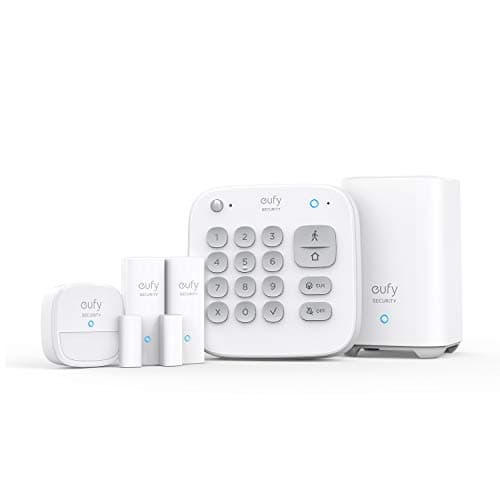
Best subscription-free alarm system
eufy 5-Piece Home Alarm Kit
Keypad, motion sensor and two entry sensors around a HomeBase, with no monitoring plan attached and none required. A self-monitored alarm you own outright.
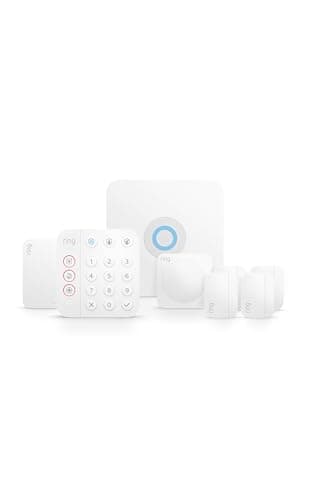
Best expandable alarm kit
Ring Alarm 8-Piece Kit
The most complete starter kit here, with genuinely optional professional monitoring — the alarm, the app alerts and the siren all work without paying, and the plan buys a response rather than the basics.
#ad · As an Amazon Associate we earn from qualifying purchases.
Questions
Frequently asked
Is self-monitored home security worth it?
Will the police come if my self-monitored alarm goes off?
Can I switch between self-monitoring and professional monitoring?
Does a self-monitored alarm work without internet?
Will my insurer accept a self-monitored alarm?
Keep reading
Related
- Best alarm systems without a subscriptionThe kits designed to be self-monitored, ranked.
- eufy Alarm vs Ring AlarmThe two systems named here, head to head, with a decision rule.
- Subscription costs comparedWhat a monitoring plan actually costs over one, three and five years.
- Best door and window sensorsThe sensors that generate the alerts you will be monitoring.
Receipts
Sources
- eufy — Home Alarm Kit documentation, self-monitoring behavior and included features
- Ring — Alarm system documentation and published monitoring plan comparison
- Ring support — what the Ring Alarm does with and without a plan
- UL Solutions — standards for alarm systems and central-station monitoring
We do not run a testing lab and we do not pretend to. Specifications come from the manufacturer's own published documents and from published standards; prices come from the live Amazon API. Where a figure is not published, the page says “not published” rather than guessing. Read the full method.