HUB 06 · Guides
Do Security Cameras Need a Subscription? Only If They Record to the Cloud
A camera that writes to a microSD card or a base station in your house gives you full playback for free. A cloud-only camera keeps nothing you can watch later without a plan.
We earn a commission if you buy through our links. It does not change the price you pay, and it does not decide our picks — our selection criteria are published in full. How this works.
Do security cameras need a subscription?
No — not if you buy a camera that records to local storage. A camera that writes to a microSD card, or to a base station like the eufy HomeBase, gives you full playback for free, forever. It is cloud-only cameras that need a plan: without one they keep no recorded clip you can watch later, only a live view and a notification.
The subscription is about where the footage goes, not the camera.A plan is the price of retrieving recordings from a company's cloud. Buy a camera that keeps its recordings in your house instead — on a card or a base — and there is nothing to subscribe to, because the footage never left. The plan is optional the moment the storage is local.
What a plan actually gates
It is worth being precise about what you are and are not paying for, because “subscription” covers several different things. On a cloud camera a plan typically gates:
- Recorded clips.The headline one. On most cloud-only hardware, no plan means the camera saves nothing — you get a live view and a motion alert, but no recording to open afterward.
- Length of history. How many days of clips are kept before they are deleted. A cheaper plan tier holds a shorter window; a dearer one holds more.
- Smart detection. Person, vehicle and package recognition, and the richer alerts built on them, are often reserved for a plan even when basic motion is free. Wyze, for instance, keeps its smarter detection behind Cam Plus while local card recording stays free.
- Smart alerts and extras. Rich notifications, snapshot previews and similar conveniences frequently sit on the paid side of the line.
The distinction that matters is the first bullet. Losing smart detection without a plan is an inconvenience; losing the recording itself is the whole camera. A camera where therecording is free and only the clever extras cost money is in a completely different category from one where no plan means no footage at all.
Local versus cloud: the mechanism
A camera records to one of two places, and the choice decides whether a bill follows you. Local-storage cameras write to hardware in your home — a microSD card in the camera body, or a base station or recorder sitting in a cupboard. The eufyCam 3 records to a HomeBase that holds the footage locally and takes a large drive, so how much history you keep is a hardware decision, not a plan tier; a Wyze camera writes to a card in the camera; a Reolink PoE camera records to a card or a network video recorder. In every case you own the recordings and can play them back for free. The honest limit is physical: storage that lives in the camera is stolen with the camera, and footage on a base at home goes with the base if someone takes it — a genuine trade-off against a cloud system, and the reason a recorder tucked out of reach beats a card in an exposed camera.
Cloud storage is the opposite design. The clips travel to the manufacturer's servers, where they are safe from a thief but reachable only through the app and, on most hardware, only while you pay. The Ring Stick Up Camis the clearest example in our field: its app, notifications and ecosystem are the best here, but there is no local storage option at all. Without a Ring Home plan it will not save you a single clip — live view and alerts work, playback does not. That is not a criticism of the hardware, which is good; it is the storage model stated plainly, so you can decide with your eyes open. The full local-versus-cloud decision, including the resilience of cameras that do both, is in our local-storage versus cloud comparison.
The five-year cost shape
The reason this question matters is arithmetic, not principle. A subscription is a small recurring number that never stops, and a small number that never stops eventually passes a large number paid once. On a cloud-only camera the plan compounds year after year; over the life of the camera it can quietly cost more than the hardware did, and on a multi-camera household the gap widens. A local-storage camera inverts that shape: you pay more attention up front — a base or a card is part of the purchase — and then nothing recurring. A whole-property system like the eufyCam 3 is expensive on day one for exactly this reason, and the saving is real but spread over years rather than felt at checkout. We do not print dollar figures here, because prices and plan tiers change; the full five-year comparison, laid out plan by plan, is in our subscription costs compared table, which is the place to see the shape in numbers.
Which of our picks are genuinely no-plan
“No subscription” is a claim worth checking against the storage line, not the marketing. The cameras that truly owe you nothing month to month are the ones that record locally by default: the eufyCam 3 records to its HomeBase with no plan for recording, playback or notifications; a Wyze Cam v4 records to a microSD card for free, with only its smarter detection behind Cam Plus; Reolink's local and PoE cameras record to a card or NVR without an account tier. The cameras that are not no-plan, whatever the box implies, are the cloud-only ones — the Ring Stick Up Cam among them — where the recording itself is gated. The complete field of cameras that record with no monthly fee is ranked in our best security cameras without a subscription roundup, which is the right place to start if avoiding a recurring bill is the priority.
One clarification that saves confusion: a camera recording locally can still offeran optional cloud plan without needing one. eufy, for example, sells optional cloud backup on top of local recording. The test is not whether a plan exists — it is whether the camera records without it. If the answer is yes, the plan is a convenience you can decline; if the answer is no, the plan is the camera. Read the storage line, buy accordingly, and the subscription question answers itself.
How to buy a camera that owes you nothing monthly
Avoiding a subscription is entirely a purchasing decision, made once, at the spec sheet. Three checks do it.
Check the storage line before the resolution line
Look for the words microSD, local storage, base station, orNVR. Any of those means the camera keeps its own copy and records without a plan. A listing that mentions only cloud video, or that quotes a monthly plan as the way to save recordings, is telling you the footage lives somewhere you rent. The resolution number tells you nothing about whether a bill follows the camera home; the storage line tells you everything.
Separate “records” from “detects”
Decide which features you actually need before you decide whether the plan is worth it. If all you want is footage you can review after an event, a local-storage camera gives you that for free and the plan is irrelevant. If you specifically want person-and-vehicle recognition and rich smart alerts, some of those sit behind a plan even on cameras that record locally — but that is a plan for the extras, not for the recording, and it is optional in a way a cloud-only plan is not. Know which side of that line your must-have feature falls on.
Weigh the trade-off local storage carries
No-plan is not free of compromise. Footage kept in the house can be stolen with the camera or the base, where a cloud clip survives the theft off-site. If that risk matters to you, prefer a system that stores to a base you can hide rather than a card in an exposed camera, or one that records locally and optionally mirrors a copy to the cloud — the belt-and-braces option that survives both an outage and a thief.
The mistake buyers make
They buy on brand and app polish, discover after an incident that the useful clip was behind a lapsed or never-bought plan, and conclude “security cameras need a subscription.” They do not — that particular camera did. The fix is upstream: read the storage line, choose a local-recording camera if a recurring bill is a dealbreaker, and treat any cloud plan as an optional extra rather than the cost of using hardware you already own. Start from the no-subscription cameras roundup or the broader home security cameras roundup, check the numbers in the subscription cost table, and see how the picks are graded in our methodology. The wider storage and network questions are covered across the rest of our guides, and the full field of camera categories starts at the cameras hub.
The hardware
The hardware this guide is about
The products this guide refers to, with prices pulled live from Amazon and dated on every card. Full rankings live in the roundups linked above.
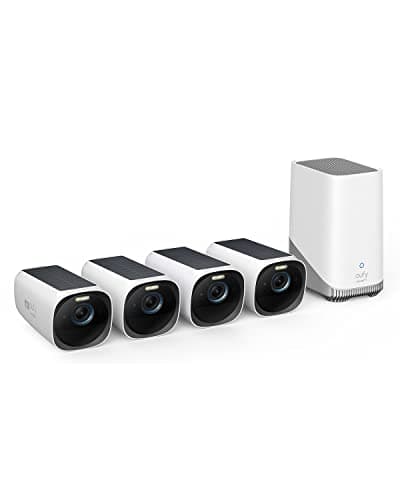
Best subscription-free camera system
eufyCam 3 (S330) 4-camera kit
Four 4K solar cameras and a HomeBase with expandable local storage. This is a whole-property system that never sends you a bill, which is close to unique at this capability level. It is also the previous generation: eufy's flagship is now the eufyCam S3 Pro, and the S330 is what you buy when you want four cameras rather than the newest two.
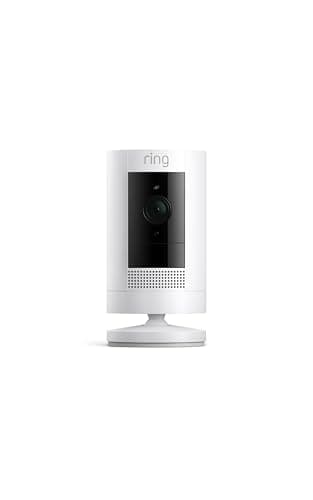
Best app experience
Ring Outdoor Cam (Stick Up Cam)
The most polished app and the most complete ecosystem in the category — attached to the storage model this site exists to warn you about. Without a plan, it will not save you a single clip. Ring has also replaced it: the Outdoor Cam 2K is this camera a generation on, at Retinal 2K.
#ad · As an Amazon Associate we earn from qualifying purchases.
Questions
Frequently asked
Can I use a security camera without paying a monthly fee?
What do you lose without a security camera subscription?
Does the Ring Stick Up Cam work without a subscription?
Is a subscription camera cheaper than a local-storage one?
Which cameras record without any subscription at all?
Keep reading
Related
- Best cameras without a subscriptionThe ranked field of cameras that record with no monthly fee.
- Best home security camerasThe broader field, including the cloud-only picks and what they cost.
- Local storage vs cloud camerasThe storage mechanism that decides whether a plan follows you.
- Subscription costs comparedThe five-year cost shape, laid out plan by plan.
Receipts
Sources
- eufy — eufyCam 3, HomeBase local storage and optional cloud backup documentation
- Ring — Ring Home plan and cloud video storage documentation
- Ring support — what works with and without a subscription
- Wyze — Cam v4 local microSD recording and Cam Plus documentation
- Reolink — local card, NVR and no-account recording reference
We do not run a testing lab and we do not pretend to. Specifications come from the manufacturer's own published documents and from published standards; prices come from the live Amazon API. Where a figure is not published, the page says “not published” rather than guessing. Read the full method.