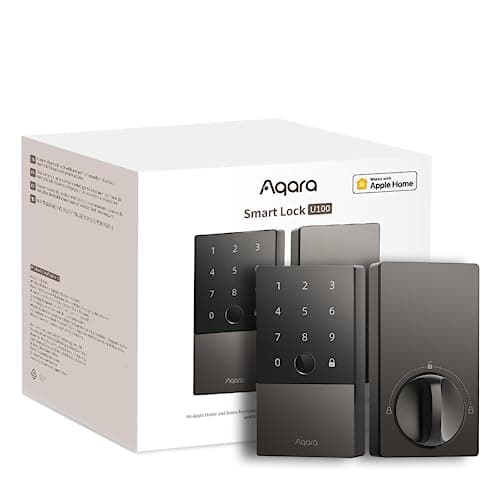
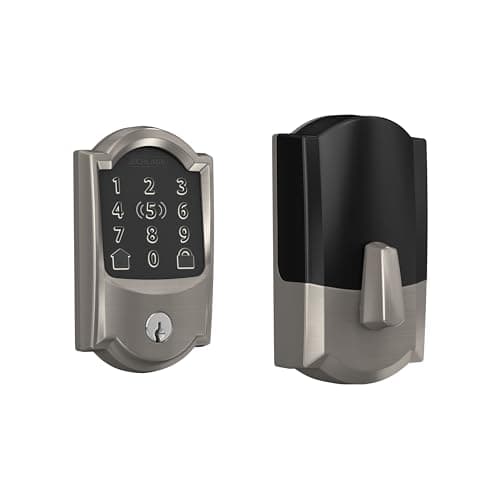
The best Apple Home Key smart lock is the Schlage Encode Plus Wi-Fi Deadbolt. It is the only lock here with a published BHMA grade behind the tap-to-unlock, its Wi-Fi is built into the lock so there is no separate bridge to power and lose, and it keeps a touchscreen keypad for everyone in the house who is not holding an iPhone. The honest catch is that it is one of the most expensive locks in the category, and a large part of that premium is Home Key itself — which is worth nothing to a household without Apple devices.
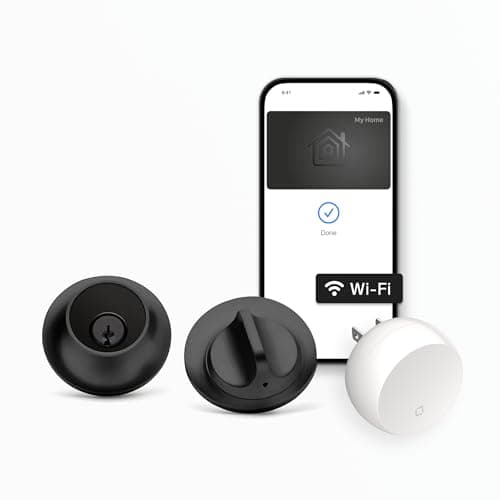
Every lock on this page does one specific thing: it lets you add a key to the Apple Wallet and unlock the door by holding an iPhone or Apple Watch near it, with no app to open. Three locks in our catalog are confirmed to support that feature — the Schlage Encode Plus, the Aqara Smart Lock U100and the Level Lock+ — and this page ranks those three. It is a companion to the wider best smart locks ranking, narrowed to the one feature that only matters if your phone has an apple on the back.
Read this first if you are on Android. Home Key is an Apple-only feature. On the Schlage Encode Plus, a meaningful slice of what you pay over the standard Encode isHome Key, and without an iPhone or Apple Watch that premium buys nothing you will ever use — which is literally the reason to skip it that Schlage's own spec sheet implies. If nobody in the house carries Apple hardware, none of these three is the right lock, and the general field at best smart locks is where to look instead.
The best Apple Home Key smart locks, compared
Once Home Key is a shared feature, the decision stops being about the tap and becomes about the lock around it: a full deadbolt with a keypad, a fingerprint deadbolt, or a mechanism that hides inside the door. The columns below are the ones that actually separate these three.
Compiled from manufacturer specifications, August 2026.| Model | Power | Home Key tap | Other entry methods | Deadbolt style | Subscription |
|---|
| Schlage Encode Plus | 4x AA | Yes — iPhone or Apple Watch | Touchscreen code, mechanical key, app, built-in Wi-Fi remote | Full deadbolt replacement, exterior touchscreen | None — Schlage account for remote, no fee |
|---|
| Aqara Smart Lock U100 | 8x AA | Yes — iPhone or Apple Watch | Fingerprint, code, mechanical key, app (Bluetooth) | Full deadbolt replacement, exterior fingerprint handle | None — hub needed for remote unlock |
|---|
| Level Lock+ | 1x CR2 | Yes — iPhone or Apple Watch | Mechanical key and app only — no keypad, no fingerprint | In-door mechanism, keeps your existing trim | None |
|---|
What Apple Home Key actually is, and what it is not
The two names get used as if they were one thing, and they are not. Apple Home (the framework formerly branded HomeKit) is the smart-home layer: add a compatible lock to the Home app and you can lock and unlock it from your phone, ask Siri, build automations, and reach it from away through a home hub such as an Apple TV or a HomePod. Plenty of locks are Apple Home compatible. Apple Home Keyis a narrower feature layered on top: when a lock supports it, adding the lock to your Home provisions a digital key straight into the Wallet app, and from then on you unlock by holding the phone or watch to the lock over NFC — no app, no Face ID prompt, no waking the screen. Not every Apple Home lock does this; it needs the NFC reader in the hardware and Apple's certification, which is why the Home Key list is short and these three are on it.
The practical difference is the moment at the door. An Apple Home lock without Home Key still needs you to pull the phone out, unlock it, and open something. A Home Key lock is a tap with the phone still mostly in your hand, the way a transit card works. If you have ever tapped your phone through a subway gate, you already know the interaction; Home Key is the same gesture pointed at your front door.
The express-mode tap and the power-reserve window
Two details make Home Key feel different from a normal app unlock, and both come from the Wallet, not the lock. First, the home key is an expresscard by default, so you do not authenticate at the door — you present the device and it opens, which is what makes it faster than typing a code and the reason people who set it up stop using the keypad. Second, express cards keep working in the phone's power reserve: for a window after the battery is too low to use the iPhone normally, the tap still unlocks the door. Both the Schlage and the Aqara call this out in their published documentation, and it is a genuine answer to the oldest objection to phone-based entry — that a dead phone locks you out. It narrows that risk to a hard-dead battery rather than a low one, though a physical key or a code is still the honest backstop, which is one reason the keyless Level Lock+ asks the most trust of the three.
Three locks, three trade-offs
Home Key is the thing they share. Everything that decides which one belongs on your door is the lock wrapped around it.
Schlage Encode Plus — the hardware pedigree
Schlage's deadbolt line is the reference point for BHMA Grade 1 in residential locks, and Schlage is one of the few smart-lock brands that actually publishes a grade for its hardware rather than leaving you to guess. That is the case for putting Home Key on this body specifically: the tap is convenience, but the thing bolted into your door is a deadbolt with a documented pedigree behind it. The Encode Plus also builds its Wi-Fi into the lock, so remote access and notifications do not depend on a separate bridge you have to site and power, and it keeps a touchscreen keypad so a code still works for a guest with an Android phone or no phone at all. The costs are the two you would expect: it is one of the most expensive locks in the category, and it is a full deadbolt replacement, so you are removing and reinstalling the whole thing rather than clamping onto what is there. The head-to-head against a plainer Wi-Fi keypad deadbolt without Home Key is at Schlage Encode vs Kwikset Halo, which is the clearest way to see what the Home Key premium is actually buying.
Aqara Smart Lock U100 — Home Key without the Schlage price
The U100 is the pick for an Apple household that does not want to pay Schlage money. It taps to unlock from the Wallet exactly as the Schlage does, and it adds a fingerprint reader and a keypad on the exterior handle, so the ways into the door are Home Key, a finger, a code, the app, and a mechanical key — the widest set here. It runs on eight AA cells, which is a large reservoir and one of the longer-lived arrangements per battery change, and it speaks to Apple Home, Google Home and Alexa out of the box, so it is not locked to a single vendor cloud for local automations. The honest limits are two. The lock itself is Bluetooth, so remote unlock from work needs a hub — an Aqara hub or a resident Apple home hub — without which it is a very good lock that you can only reach while standing at the door. And eight AAs is a lot of cells to keep matched and change together. Its fingerprint side is compared against a non-Apple fingerprint deadbolt at Aqara U100 vs Ultraloq U-Bolt Pro, and the lock gets a full write-up at our Aqara U100 review.
Level Lock+ — Home Key you cannot see
The Level Lock+ answers a different question: how do you get a smart lock, and Home Key, onto a door where you do not want anything to look smart? The entire mechanism lives inside the bore of the door, so from both sides it reads as an ordinary deadbolt — no keypad, no escutcheon, no visible electronics — and it keeps your existing trim and key because the hardware replaces only the bolt assembly. On a period door or a front elevation you do not want to spoil, nothing else here comes close. Two things pull it to third. It is among the most expensive locks in the category, and the invisibility has a cost written into it: there is no keypad and no fingerprint reader, so the only ways in are a phone, a watch, or the physical key. A dog walker with an Android phone and no key has no way through, and a single CR2 cell doing motor work is a smaller reservoir than the four or eight AAs the others carry. Buy it because it disappears, not because it does the most.
The honest catch: you can only spend Home Key inside Apple
It is worth stating once more, plainly, because it is the single fact that decides whether any of this applies to you. Home Key is not a general tap-to-unlock standard — it is Apple's, and it works only with an iPhone or an Apple Watch. There is no Android equivalent that these locks answer to. The cross-ecosystem standard that isdesigned to be vendor-neutral is Matter, and it is a different thing entirely: Matter decides which apps and hubs can control the lock, not whether you can tap a phone to it. If your household is mixed, the members on Android will use the keypad or fingerprint on the Schlage and the Aqara and get nothing extra from Home Key; on the keyless Level they will be back to a physical key. That is not a defect — it is the deal — but it means a Home Key lock only earns its premium in a home where the phones are Apple phones. If yours are not, the money is better spent on the fingerprint and keypad locks in the wider roundup.
If Matter rather than Home Key is what you are actually shopping for — because the household is mixed, or because you want the lock to answer to more than one platform — that is a separate field with separate winners, ranked in the best Matter smart locks.
Which Home Key lock to buy
- You want the best Home Key lock, full stop. Schlage Encode Plus. A deadbolt with a published grade, Wi-Fi built in so there is no bridge to lose, and a touchscreen keypad so the non-Apple people in the house are not stuck. It is the most expensive way onto this page, and that is the catch.
- You want Home Key plus every other way in, for less. Aqara Smart Lock U100. Fingerprint, code, key, app and the Wallet tap, on a long-lived eight-AA lock that works with all three big ecosystems. Budget for a hub if you need to unlock it from away, because the lock itself is Bluetooth.
- You want the lock to be invisible. Level Lock+. It hides completely inside the door and keeps your existing trim, which is the whole reason to buy it. Accept that there is no keypad and no fingerprint reader, so a phone or a key is the only way through, and that it is a premium price for a deliberately minimal feature set.
How we compiled this
Products we claim to have tested: zero. We have not bolted these three to a door, and we would rather say so than imply a lab we do not have. What we do instead is read each manufacturer's published specification, Home Key support page and install guide — especially the quiet lines about what needs a hub, what a keypad-free lock gives up, and what the power-reserve window actually covers — work out the running cost, and cite it. Rankings weight the hardware behind the tap, how many ways the door opens, offline behavior and the ecosystem, and every pick carries a specific reason to skip it. The full rubric is at methodology, and if you are still deciding between form factors before you get to Home Key, the framework is in how to choose a smart lock. The rest of the category is indexed on the smart locks hub.
How to choose an Apple Home Key lock
First, confirm you are actually in the Apple ecosystem
Home Key is the entire reason to shop this shortlist, and it is worth nothing on an Android phone. Before you weigh anything else, count the phones in the house. If everyone carries an iPhone or an Apple Watch, Home Key is a real daily upgrade and these three deserve the look. If the house is mixed or Android, the tap only works for some people and never for the others, and you are paying a premium for a feature half the household cannot use — at which point the fingerprint and keypad locks on best smart locks give more people more ways in for less money.
What decides the price
In rough order: the deadbolt hardware and its published grade, which is why the Schlage costs what it does and why a graded body is worth paying for on a door that matters; the number of entry methods, where the Aqara's fingerprint and keypad add real cost and real flexibility over the keyless Level; the form factor, where Level's hide-in-the-door engineering is a premium you pay for looks rather than features; and whether Wi-Fi is built in or you need a separate hub to reach the lock remotely. What does notchange the price meaningfully is Home Key support on its own — it is a certification and an NFC reader, common to all three — so do not let the feature name talk you into the most expensive lock when a cheaper one on the list also has it.
The mistake buyers make
The most common one is buying a Home Key lock for a house full of Android phones because the feature sounded modern, then discovering nobody can use the headline feature. The second is assuming Home Key means you never need a hub or a bridge: it does not — the tap is local, but reaching the lock from work is a separate capability, built into the Schlage's Wi-Fi but dependent on a hub for the Bluetooth Aqara. The third is choosing the invisible Level for a busy household and forgetting it has no keypad, so every guest, cleaner and dog walker needs either your phone-based access or a cut key. Match the entry methods to the people who use the door before you fall for the form factor.
Home Key is not the same as offline operation
A tap unlock is convenient, but plan for the day the phone is genuinely dead and the Wi-Fi is down. The Schlage and the Aqara both keep a keypad, so a code works with no phone and no network, and both keep a mechanical key. The Level keeps the key but nothing else, so on that lock the physical key is not a nicety, it is the offline plan. Whichever you choose, enroll a code where one exists and keep a physical key somewhere sensible; Home Key is the fast path, not the only path.
What a lock still will not tell you
A smart lock reports the bolt, not the door. It tells you the deadbolt threw; it does not tell you the door is actually shut, or that a ground-floor window is open, or that the back door moved. A few contact sensors cover those openings for a fraction of the price per point and report a plain binary fact instead of an inference. They are ranked at best door and window sensors, and pairing one lock with a handful of sensors is usually a better spend than buying a second, fancier lock.