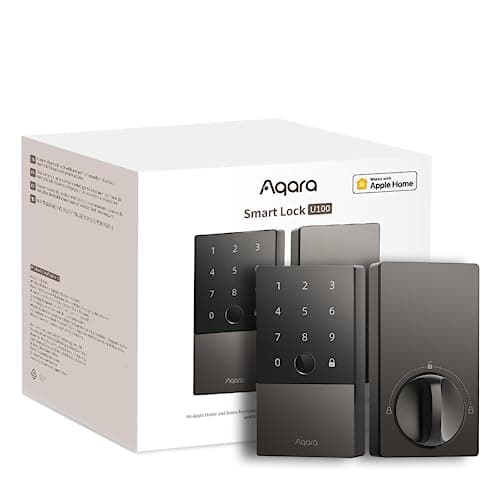
The Aqara Smart Lock U100 is the pick for an Apple household that wants tap-to-unlock without paying a Schlage price. It is a full deadbolt with Apple Home Key in the Wallet, a fingerprint reader, a numeric keypad and a mechanical key, and it joins Apple Home, Google Home and Alexa out of the box. The catch is the last line of the spec sheet: remote unlock needs a hub, and it runs on eight AA cells. Everything below follows from those facts.
Four ways in, and one of them is a phone tap
Most of what you are buying is choice. The U100 gives every member of the household a way through the door that suits them: a fingerprint on the reader for the people who live there, a code on the keypad for a cleaner or a dog walker, a mechanical key in the cylinder for the day a phone is flat and a battery is dead at the same time, and — the reason this lock exists — Apple Home Key, where you hold an iPhone or Apple Watch near the lock and it opens. The key is the fallback that never runs out of charge; the Home Key tap is the one people use every day once they have it. This is our pick for best Apple Home Key value for exactly that reason, and it sits inside the wider smart locks hub with the rest of the category.
Apple Home Key is the reason to buy this lock
Home Key is a credential Apple stores in the Wallet, next to a transit pass or a card. Once you add the lock to Apple Home, a copy of the key lives on your iPhone and your Apple Watch, and you unlock by holding the device near the reader over NFC — no app to open, no screen to wake. The detail that matters is what happens when the phone is nearly dead: Home Key keeps working on an iPhone's low-power reserve for a window after the screen goes black, so a flat battery in your pocket does not lock you out of your own door.
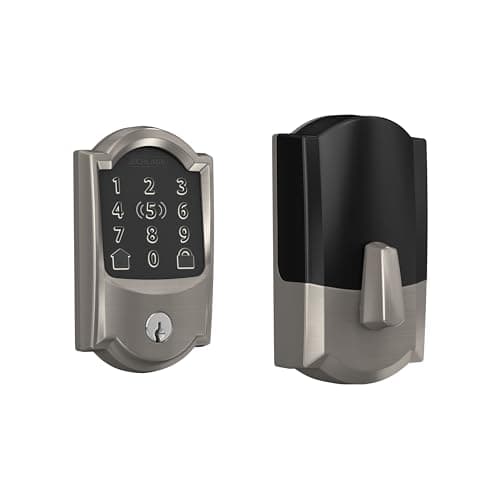
The comparison worth making is with the Schlage Encode Plus, the other full deadbolt here that does Home Key. Schlage brings a published hardware pedigree — it grades its deadbolts to the BHMA scale, which most smart-lock brands do not — and built-in Wi-Fi, and it is one of the most expensive locks in this category. The U100 delivers the same tap-to-unlock at a materially lower price band. What you give up for the saving is the built-in radio: where Schlage joins your Wi-Fi directly, the Aqara is a Bluetooth lock at the door and leans on a hub for anything remote. Whether that trade is worth it is the whole point of the section below.
Eight AA cells: a big reservoir with a catch
The U100 takes eight AA batteries, which is an unusual number — most deadbolts here take four. That cuts both ways, and both directions are worth stating in plain terms because neither is a dollar figure. On the upside, eight cells is a large reservoir of power, so this is one of the longer-lived locks per battery change in the category; a Home Key tap and a fingerprint read are both cheap operations, and the pack lasts. On the downside, eight cells is a lot to keep matched and to replace together. Good practice with any battery lock is to swap the whole set at once with fresh cells of the same type rather than topping up one or two, because a mixed pack of old and new cells sags under the motor's load and can report a false low-battery warning; with eight in the door, that is eight to buy and fit each time. The running cost is still just alkaline cells and nothing else — there is no subscription on this lock for any function — but budget for a slightly bigger handful of batteries when the day comes. How to make any lock's cells last is covered in how long smart lock batteries last.
Installing it as a full deadbolt replacement
This is not a retrofit that clamps onto your existing thumbturn. The U100 replaces the whole deadbolt, inside and out, so the practical questions are physical rather than electronic. Before ordering, check the three numbers that decide whether any deadbolt fits: the door thickness, the backset (the distance from the edge of the door to the center of the bore), and the bore diameter of the existing hole. Aqara publishes the ranges the U100 accepts, and a standard exterior door usually falls inside them, but a thick slab, an unusually narrow stile or a non-standard bore is the kind of thing worth confirming before the box arrives rather than after. The general version of this check is in will a smart lock fit my door, and the step-by-step is in how to install a smart lock.
Because it swaps the entire deadbolt, this is a lock for a door you own or a landlord who has said yes in writing. You are removing the existing hardware and keeping it to reinstall on move-out, and a rented door where that is not allowed wants a retrofit that leaves the deadbolt in place instead. If that is you, the renter-friendly options are on the no-drilling smart locks for renters list, not this page.
What works with the internet down, and what needs the hub
This is the line to read twice before buying, and it is the honest weakness Aqara does not put on the front of the box. At the door, the U100 is a Bluetooth lock. The fingerprint reader, the keypad code, the mechanical key and the Home Key tap all work locally, with no internet and no hub in the house at all — Home Key runs over NFC between the phone and the lock, so it does not need your router to be up. What the lock cannot do on its own is reach you when you are not there. Remote unlock from the office, a notification that a code was used, and cloud-side automations all require a hub: an Apple Home hub such as an Apple TV or HomePod, or an Aqara hub. Without one, everything you can do is done standing at the door, and the lock is unreachable from anywhere else.
For a lot of Apple households that is a non-issue, because a HomePod or Apple TV is already on the network and quietly acts as the hub. For a household with no such device and no plan to add one, it is the difference between the lock this looks like and the lock you actually bought. There is no subscription attached to any of this — a hub is a one-time piece of hardware, not a monthly plan — but it is a purchase, and it needs to be in the math before you decide the U100 is cheaper than a lock with the radio built in.
The honest cons
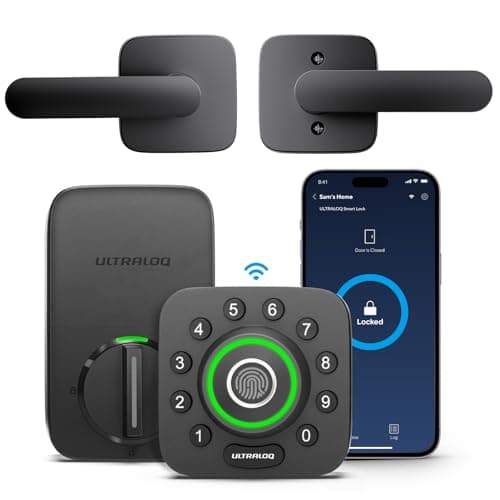
- Remote access needs a hub. The lock itself is Bluetooth, so a work-hours unlock or an away-from-home notification depends on an Apple TV, HomePod or Aqara hub being present. A lock with built-in Wi-Fi, like the Ultraloq U-Bolt Pro, does the remote part with nothing extra.
- Eight cells to keep matched.The large reservoir is a genuine strength for longevity, but replacing eight AAs together — and not mixing old with new — is more fiddly than a four-cell lock at change time.
- Home Key is Apple-only. The headline feature does nothing for an Android phone. Android households still get fingerprint, code, key and Google Home or Alexa control, but they are paying for a marquee feature they cannot use.
Who should skip it
Anyone with no Apple TV, HomePod or Aqara hub, and no plan to add one. Without a hub this is a Bluetooth lock: excellent when you are standing at the door, and completely unreachable from work. If remote access matters and you will not add a hub, a lock with the radio built in serves you better for less total outlay.
An Android-only household chasing remote unlock on a budget. You would be buying Home Key and then never touching it, and still needing a hub for remote. A built-in Wi-Fi fingerprint lock such as the U-Bolt Pro or the eufy C220 gives you the entry methods and the remote access without the Apple premium or the hub.
Anyone who wants the strongest published hardware grade. The U100 is a capable lock, but Schlage is the brand that publishes BHMA grades for its deadbolts. If a graded body is the number you are shopping on, the Encode Plus is the pick, at its higher price.
The thing this lock cannot tell you
Whether a door or window elsewhere in the house is open. A smart lock knows one thing about one door: whether its bolt is thrown. It has nothing to say about the back door, a ground-floor window or the garage side door, and even at its own door a thrown bolt is not proof the door is shut — only that the motor turned. A few contact sensors report that plain binary fact for a fraction of the price per opening, and they are ranked at best door and window sensors. The full lock category, retrofit and deadbolt, is indexed on the smart locks hub.
How this review was compiled
Products we claim to have tested: zero. We have not fitted this lock to a door, and we are not going to imply otherwise. What this review is built from is Aqara's published product and support documentation, its installation guide and battery notes, the way Apple Home Key works as a Wallet credential, and the general engineering of battery-powered deadbolts — every one of which is a source you can open yourself, and they are listed below. Our scoring rubric and the weightings behind it are published in full at methodology, so you can disagree with our conclusion using the same public material we used to reach it.
The alternatives worth comparing
Schlage Encode Plus — if you want Home Key with a graded body and built-in Wi-Fi
The same Apple Home Key tap-to-unlock, on a deadbolt from the brand that actually publishes BHMA grades, with Wi-Fi built into the lock so remote access needs no separate hub. The catch is the price: it is one of the most expensive locks in this category, and a large share of what you pay over a standard Encode is the Home Key feature itself. If a published hardware grade and a built-in radio are worth the premium to you, this is the pick; its full write-up is at the Schlage Encode Plus review.
Ultraloq U-Bolt Pro — if you want fingerprint entry and remote with no hub
A different answer to the same door. The U-Bolt Pro drops Apple Home Key but adds a fingerprint reader on the knob and packs Wi-Fi into the lock, so remote unlock works from anywhere with nothing else to power. For an Android household, or anyone who values a thumbprint over a phone tap and does not want to own a hub, it is often the more practical buy; the head-to-head is at Aqara U100 vs Ultraloq U-Bolt Pro.
Where the U100 sits between them
The Encode Plus is the premium Home Key lock with the graded body and the built-in radio. The U-Bolt Pro is the fingerprint-and-Wi-Fi lock that skips Home Key entirely. The U100 is the one to buy when Home Key is the feature you want, you are already inside the Apple ecosystem with a HomePod or Apple TV on the network, and you would rather not pay a Schlage price for the privilege. That is a specific buyer — and for that buyer it is the best value here. The rest of the category is on the smart locks hub.