HUB 06 · Guides
Matter and Thread, Explained for Home Security
Matter is the application layer. Thread is one of the networks it runs over. Confusing the two is why half of these purchases go wrong.
We earn a commission if you buy through our links. It does not change the price you pay, and it does not decide our picks — our selection criteria are published in full. How this works.
What is Matter, and how is it different from Thread?
Matter is the language devices speak; Thread is one of the networks it can speak over. Matter runs on Thread, Wi-Fi and Ethernet. Thread is a low-power mesh that needs a border router to reach the rest of your network. Buying a Thread device without a border router is the single most common mistake in this category.
Almost every explanation of Matter in the mainstream coverage is written as though it were a product. It is not. It is a specification published by the Connectivity Standards Alliance, and the practical thing it does is stop your smart home from being a collection of separate apps that cannot talk to each other. A Matter contact sensor reports to Apple Home, Google Home, Amazon Alexa, SmartThings and Home Assistant using the same mechanism, and you can use several of them at once.
That is worth writing plainly because the category largely does not. Forbes never names Matter in its smart home security coverage. Home Assistant appears in none of the major published roundups we reviewed for this site. And yet, on the query that this site was built around, two of the top results are literally a Home Assistant forum thread and a SmartThings community thread — because that is where the people asking the real questions actually go. This page is written for those people.
The layer diagram, without the jargon
Think of it as a postal system. Thread, Wi-Fi and Ethernet are the roads: how a message physically travels. Matter is the language the letter is written in, so any recipient can read it. Your controller — an Apple TV, a Google Nest Hub, an Echo, a SmartThings hub, a Home Assistant box — is the person who reads the letters and decides what to do.
A device is described as “Matter over Thread” or “Matter over Wi-Fi.” Both are Matter. The difference is entirely about the road, and the road determines the power budget: a Matter-over-Wi-Fi device is generally mains powered, because Wi-Fi is expensive to keep alive, while Matter-over-Thread is what makes a battery sensor last years on a coin cell.
| Layer | What it is | Examples | What it decides |
|---|---|---|---|
| Application | The shared language and device model | Matter | Which ecosystems can control the device |
| Network | How packets physically move | Thread, Wi-Fi, Ethernet | Battery life, range, whether a border router is needed |
| Bridge | Translates non-Matter devices into Matter | Aqara hubs exposing Zigbee sensors as Matter | Whether your existing Zigbee kit joins the fabric |
| Controller | The thing that runs automations and holds the fabric | Apple Home, Google Home, Alexa, SmartThings, Home Assistant | Where automations execute, and whether remote access exists |
What a Thread border router is, and which devices are one
A Thread border router is a mains-powered device that sits on both networks at once: it speaks Thread to your battery sensors and Wi-Fi or Ethernet to everything else. Without one, Thread devices form a mesh among themselves and reach nothing. This is not a soft requirement or a nice-to-have. A Thread sensor with no border router in the house will not join anything, and nothing on the packaging tells you that clearly enough — which is exactly what the Aqara P2's skip-this-if line on this site says.
The good news is that you may already own one. Devices that act as Thread border routers include:
- Apple TV 4K — the 2021 model, and the 2022 and later Wi-Fi plus Ethernet models. Note the exception: the cheaper Wi-Fi-only Apple TV 4K variant does not include Thread. This catches people out constantly.
- HomePod mini and the full-size HomePod (2nd generation).
- Google Nest Hub (2nd generation), Nest Hub Max and Nest Wifi Pro.
- Amazon Echo (4th generation)and several later Echo models — check the specific model, as Amazon's radio complement varies within a generation.
- SmartThings Station and the SmartThings-branded hubs, plus some Samsung TVs and appliances that embed a hub.
- Aqara Hub M3 and Hub M100 — both are Matter controllers, Thread border routers and Aqara Zigbee hubs in one box, which is why they appear so often on this site.
- Aqara Camera Hub G5 Pro — a PoE camera that is also a border router and a Zigbee hub, which is a genuinely unusual combination.
- eero mesh routers from the 6+ generation onward.
- Home Assistant with a Thread-capable radio dongle, or Home Assistant Yellow. Home Assistant runs an OpenThread border router directly.
Firmware changes what a device supports, so verify on the manufacturer's current specification page rather than on a forum post from two years ago. And note that having two border routers on different ecosystems is normal and generally fine — they can share a Thread network — but it is also where the more obscure connectivity problems come from, so add them one at a time.
The practical rule. If you own an Apple TV 4K with Ethernet, a HomePod mini, a Nest Hub (2nd gen) or a recent eero, you have a border router and Thread sensors will work. If you own none of those, budget for one before you buy a single Thread device. An Aqara Hub M100 covers Thread and Aqara Zigbee at once, which is the cheapest route to both halves of a sensor estate.
What Matter genuinely buys you
Local control
A Matter device is controlled over your own network. When your automation says “if the back door opens after midnight, turn on the hall light,” that decision is made and executed inside your house. No packet leaves the building. This matters most precisely when it is least convenient: during an internet outage, when a cloud-dependent sensor stops being a sensor and starts being a plastic rectangle.
Cross-ecosystem, and multi-admin
Matter supports multiple fabrics simultaneously, which means one physical device can be shared with Apple Home for one person and Google Home for another, at the same time, without either being a guest of the other. In a household where people carry different phones, this is the single most useful property Matter has, and no previous standard offered it.
No vendor cloud in the path
This is the argument that connects Matter to the rest of this site. A Matter-over-Thread sensor reports to your controller; the manufacturer's servers are not involved in the sensor doing its job. If the manufacturer discontinues the product line, shuts down the app, or starts charging for a feature that used to be free, your device keeps working, because the vendor was never in the loop. That is the same structural argument we make about subscription-dependent security hardware, applied to protocols rather than to storage.
The clearest illustration of that argument is the garage, where the market leader discontinued its HomeKit bridge, dropped Google Assistant and then blocked third-party API access outright — without changing the hardware in anyone's garage. Which controllers survive that and which do not is the whole of our smart garage door opener rankings.
Setup that mostly works
Commissioning a Matter device is scanning a QR code. There is no per-brand app account required to get the device onto your network, no separate hub pairing dance, and no brand-specific onboarding flow. This sounds minor until you have set up a dozen sensors.
What Matter does not cover
Being honest about the gaps is more useful than the enthusiasm.
Cameras. This is the big one for a security site. Matter was built around device types with simple, well-defined behavior — lights, switches, locks, contact sensors, occupancy sensors, thermostats, blinds. Video is an entirely different problem, and camera support was not part of Matter for its first several specification releases. Support has been added to the specification more recently, but shipping implementations remain scarce and ecosystem support lags the spec by a long way. For purchasing decisions today, treat cameras as outside Matter: choose them on their storage architecture and their RTSP or ONVIF support instead, which is what our camera roundupranks on. Check the CSA's current specification release notes if you want the state of play at the moment you are reading this.
Vendor-specific features.Matter exposes a standard set of capabilities. Anything a manufacturer does beyond that standard — a lock's anti-peek code entry, a sensor's ten sensitivity levels, a camera's detection zones — generally still lives in the manufacturer's own app. Matter makes devices interoperable; it does not make them featureless-but-equal.
Range and radio physics. Matter changes nothing about how far a signal travels. Thread meshes through mains-powered Thread devices, so a house with one border router and nothing else has no mesh to speak of.
Alarm panels and professional monitoring. Matter has no concept of a monitored alarm system with a central station. If professional response is what you want, that is a different product category and we say so rather than pretending otherwise.
Versions, firmware and the thing that goes wrong
Matter is versioned, and the specification has moved quickly since its first release. What a device supports depends on three things that can each lag the others: the specification version the device was certified against, the firmware actually installed on it, and the version your controller implements. A sensor certified against a newer release can expose a capability that your controller does not yet understand, and it will simply not appear. This is the most common cause of “it paired but half the features are missing.”
The practical handling is unglamorous. Update the controller before commissioning new devices, not after. Commission one device at a time rather than a boxful, so that when something behaves oddly you know which change caused it. And when a device will not commission at all, the cause is usually the border router rather than the device: a Thread network with a single border router and no mains-powered Thread nodes has no mesh to extend it, so a sensor at the far end of the house may be genuinely out of range even though a Wi-Fi device in the same spot works fine.
Certification is worth checking before purchase rather than trusting the packaging. The Connectivity Standards Alliance maintains a public record of certified products, and a device that claims Matter support without appearing there is making a claim rather than holding a certification.
Thread versus Zigbee versus Z-Wave
All three are low-power mesh networks for battery devices, and for a buyer the practical differences are small enough that the deciding factor is usually what you already own.
| Property | Thread | Zigbee | Z-Wave |
|---|---|---|---|
| Frequency | 2.4 GHz | 2.4 GHz | Sub-GHz (908.42 MHz in the US) |
| Needs | Thread border router | Zigbee coordinator or hub | Z-Wave hub |
| Speaks Matter natively | Yes | Only through a bridge | Only through a bridge |
| Wall penetration | Good, mesh dependent | Good, mesh dependent | Best of the three |
| Wi-Fi interference risk | Shares the 2.4 GHz band | Shares the 2.4 GHz band | Different band entirely |
| Device cost | Highest of the three | Lowest | Middle |
| Local control | Yes | Yes, via your hub | Yes, via your hub |
The practical reading: Thread if you are starting now and want devices that join any ecosystem, and you have or will buy a border router. Zigbee if per-sensor cost is the constraint and you accept one hub — the Aqara three-packs and THIRDREALITY sensors in our sensor roundup are Zigbee for exactly that reason. Z-Wave if you have thick walls or a large house, or you already run Home Assistant or Hubitat with a Z-Wave stick.
You do not have to choose one. An Aqara Hub M3 or M100 is a Zigbee hub and a Thread border router and a Matter controller simultaneously, which lets you buy cheap Zigbee sensors for the windows, a Thread sensor where you want ecosystem independence, and expose all of it as Matter to whichever app the household uses. Both pair Aqara Zigbee devices only, so plan the Zigbee half of that estate around Aqara hardware.
Where Home Assistant fits
Home Assistant is free, open-source home automation software that runs on hardware you own. It is not a Matter alternative; it is a Matter controller, and one of the more capable ones. It also acts as a Thread border router with a compatible radio dongle, a Zigbee coordinator, a Z-Wave controller, and an RTSP client for cameras that speak it.
For a subscription-free security setup it does three things nothing else does. It unifies protocols, so a Zigbee window sensor, a Z-Wave deadbolt and a PoE camera appear in one interface without any of their manufacturers cooperating. It keeps everything local, including automations, notifications and video, with no vendor account required. And it outlives products: when a manufacturer discontinues an app, a Home Assistant integration usually keeps the hardware working.
The cost is your time. Home Assistant is genuinely more work than opening an app, it expects you to update it, and a badly configured install is less reliable than a consumer hub, not more. It is the right answer for a particular kind of person and the wrong answer for everyone else, and we would rather say that than pretend a hobby platform is a consumer product. The Kwikset SmartCode 916 and the THIRDREALITY sensors on this site are here largely because they are the well-documented defaults in that community.
What to actually buy
If you own an Apple TV 4K with Ethernet, a HomePod mini or a Nest Hub: you have a border router already. Buy Matter-over-Thread sensors like the Aqara P2 and they will join in about a minute. The full field is in the best door and window sensors roundup, and the P2 has its own detailed review.
If you own none of those: an Aqara Hub M100 is the cheapest route to Thread and Aqara Zigbee together, with the M3 as the higher-capacity version for a large estate. Buying either as your first purchase makes every subsequent sensor decision easier and cheaper.
If you want a Matter lock:the Aqara U100 does Matter and Apple Home Key and still has a keypad and a key, and the Yale Assure Lock 2's swappable module system means you can change protocol later without changing the lock. Both are in the smart locks roundup, and do smart locks need wifi covers which radio to pick.
If you want Matter cameras: wait, or buy on storage architecture instead. Read local storage versus cloud and choose a camera with local recording and RTSP support, which will integrate with Home Assistant today regardless of what Matter does next. The rest of our explainers are indexed on the guides hub, and our methodology sets out how these judgments are compiled from published specifications.
The hardware
The hardware this guide is about
The products this guide refers to, with prices pulled live from Amazon and dated on every card. Full rankings live in the roundups linked above.
Best door and window sensor
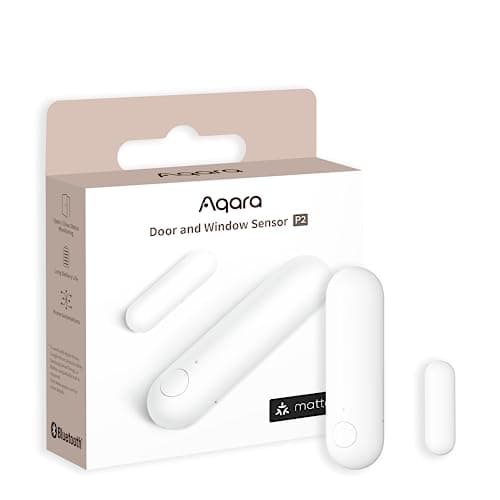
Aqara Door and Window Sensor P2
Thread, and that is the whole point. It joins a Matter fabric directly, so it reports to Apple Home, Google Home, SmartThings or Home Assistant without Aqara's cloud anywhere in the path.
Best smart home hub for security
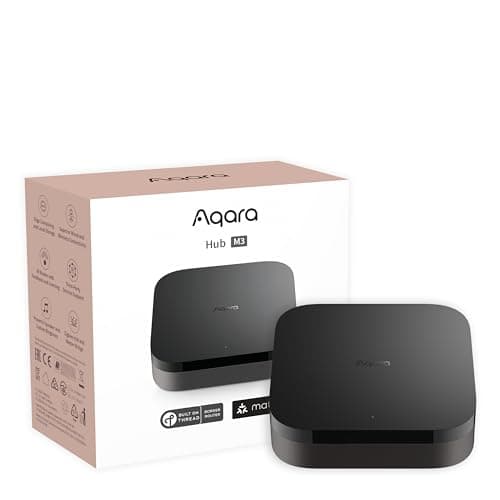
Aqara Hub M3
Matter controller, Thread border router, Zigbee coordinator, PoE and an IR blaster in one box — the single most useful purchase for anyone building a local, subscription-free sensor estate.
Best value hub
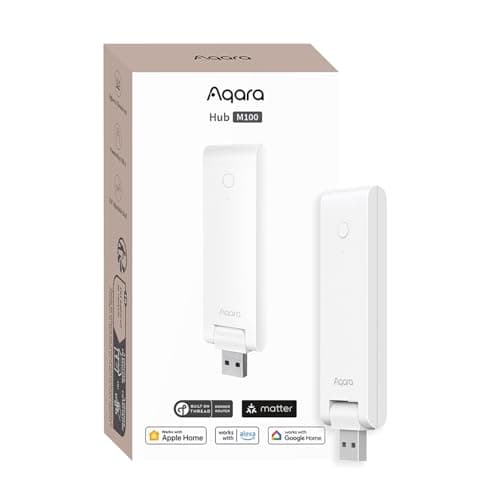
Aqara Hub M100
A USB stick that is a Matter controller, a Thread border router and an Aqara Zigbee hub at once, for about the price of one sensor. For a normal house this is the hub to buy, not the flagship.
Best for Apple Home
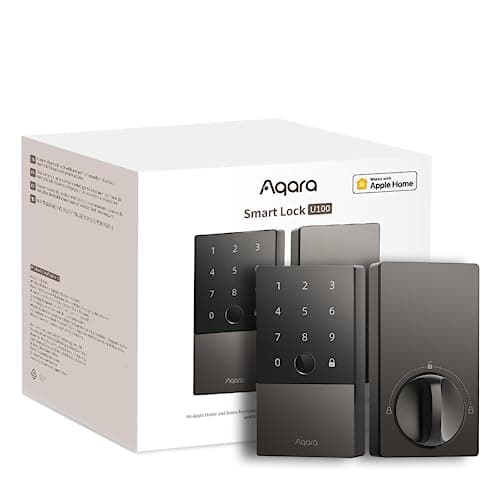
Aqara Smart Lock U100
The Apple-household pick that is not a Schlage price. Home Key tap-to-unlock, a fingerprint reader, a keypad and a mechanical key, and it speaks to Apple Home, Google Home and Alexa out of the box.
#ad · As an Amazon Associate we earn from qualifying purchases.
Questions
Frequently asked
Is Matter the same as Thread?
Do I need a hub for Matter?
Does Matter support security cameras?
Can I use Matter devices with more than one ecosystem at once?
Is Zigbee obsolete now that Thread exists?
Does Home Assistant work with Matter?
Keep reading
Related
- Smart home hubs for securityWhich hub does which job, and when you can skip one entirely.
- Best door and window sensorsWhere Thread, Zigbee and Z-Wave actually get bought.
- Aqara Door and Window Sensor P2 reviewThe Thread sensor, and the border router it requires.
- Do smart locks need wifi?Protocol by protocol, what survives an outage.
- Best no-hub door sensorsFor when you do not want a border router at all.
- Best smart home ecosystem for securityHow much of Matter each platform actually exposes, and what else separates them.
Receipts
Sources
- Connectivity Standards Alliance — Matter specification, device types and releases
- Connectivity Standards Alliance — organization and certification
- Thread Group — Thread specification and border router requirements
- Connectivity Standards Alliance — Zigbee
- Z-Wave Alliance — protocol and certification
- Home Assistant — Matter integration documentation
- Home Assistant — Thread integration documentation
- Aqara — hub, border router and Matter product documentation
We do not run a testing lab and we do not pretend to. Specifications come from the manufacturer's own published documents and from published standards; prices come from the live Amazon API. Where a figure is not published, the page says “not published” rather than guessing. Read the full method.