HUB 06 · Guides
How Much Sun Does a Solar Security Camera Need?
eufy states two hours of direct sunlight a day. Reolink declines to give a number. Both are being honest, because the figure that decides it is not hours of daylight - it is hours of unshaded, direct, roughly-perpendicular sun.
We earn a commission if you buy through our links. It does not change the price you pay, and it does not decide our picks — our selection criteria are published in full. How this works.
Verdict
The bottom line
The published answer is about two hours of direct sunlight a day, and it comes from eufy: its own support documentation for the SoloCam line states the panel should receive at least two hours of direct sunlight per day for sufficient charge under normal use, and its product pages repeat the two-hour figure. Reolink, by contrast, publishes no number — its solar panel documentation says only that the panel needs “a few hours of direct sunlight” and that output depends on weather, season and location. Both positions are defensible, because the number that matters is not hours of daylight. It is hours of direct, unshaded sun falling at a useful angle, and a south-facing wall with a tree in front of it can deliver less usable charge in June than a bare east-facing wall. If the mounting spot gets under two hours of genuine direct sun, do not buy a solar camera for it — buy a mains or PoE camera and stop managing a battery.
Solar cameras are sold on a promise of install-once-and-forget, and when they fail it is almost never the camera that was wrong. It was the wall. This page is about choosing the wall, which is the only part of the purchase you control and the one no product page talks about.
What the makers actually publish
It is worth being precise about who says what, because the internet averages them into a number nobody published:
- eufy states a figure. Its support article on powering the SoloCam says the integrated panel needs at least two hours of direct sunlight per day to keep up under normal use, and the same two-hour claim appears on its product pages for the solar cameras.
- Reolink declines to. Its solar panel quick-start guide and support article say the panel needs only a few hours of direct sunlight to power the camera daily, and that the amount generated depends on weather, season and location. A Reolink blog post offers a general two-to-four-hour range as guidance, which is a rule of thumb rather than a specification for any particular model.
Treat two hours as the floor for a well-sited camera on a light event load, and treat three to four as what you want in a northern winter or on a busy driveway. Nobody can give you a single honest number, because the camera's consumption is set by how often it wakes up.
“Direct sunlight” is doing a lot of work in that sentence
A photovoltaic panel produces power roughly in proportion to the light actually striking its face, and three things reduce that far more than people expect:
- Shade, including partial shade. A branch, a gutter, a neighbouring roof or a satellite dish crossing the panel cuts output hard — and because panels are wired in series, shading part of a panel is not a proportional loss. A spot that is “mostly sunny” with a bare branch across it at 2pm can be a poor spot.
- Angle. Output falls as the sun moves away from perpendicular to the panel. A panel mounted flat against a vertical wall sees the sun square-on for a short part of the day; one tilted up toward the sun's average path sees it for longer. Most solar cameras have an adjustable panel mount, and most people never touch it.
- Glass and overhangs. Behind a window, under a deep porch, or beneath a soffit, the panel is in permanent shade for practical purposes. This is the single most common siting mistake, and the eufy SoloCam's own entry names it as a disqualifier: under a deep porch overhang or on a shaded north elevation you have bought an expensive battery camera that you now have to climb up to charge.
Do the survey before you drill, not after. Pick the proposed spot and look at it three times in one day — mid-morning, midday, mid-afternoon — and note whether the sun is landing on the exact square where the panel will sit, not on the wall generally. Do it in winter if you can, because a deciduous tree that is irrelevant in February is a wall in July and the sun is far lower in December. Twenty minutes of looking beats a season of flat batteries.
Which way should it face?
In the northern hemisphere, south. A south-facing panel sees the sun for the longest usable part of the day and at the best average angle. East and west both work and deliver roughly half a day each, which is frequently enough for a light load. North is the one to avoid: a north-facing vertical wall in the northern hemisphere receives almost no direct sun at all for much of the year, and no panel size fixes that.
Two practical notes. The camera's best view and the panel's best aspect are frequently not the same direction — which is the argument for a model with a separate panel on a lead, so the camera can watch the north-facing side gate while the panel sits around the corner in the sun. And pointing a camera due south means shooting into the sun for part of the day, which washes out the image regardless of how well the battery is doing; angling the camera slightly off south is usually the better compromise.
The other half of the equation: how hard the camera works
Charge is only half the arithmetic. A battery-and-solar camera spends its day asleep and wakes to record an event, so consumption is set by how many events it sees and what it does about them. The same camera on the same wall can be permanently full or slowly dying depending on settings:
- Event count. A camera facing a quiet garden fires a few times a day. One facing a pavement fires every time somebody walks past, and a tree in frame fires every time it is windy. Trim the detection zone to the area you care about — this is the single most effective battery fix there is.
- Night-time spotlight and colour night video. Lighting a scene costs far more power than recording it. If a camera is draining only overnight, this is usually why.
- Live viewing. Opening the app to watch a live stream is the most expensive thing you can ask of one of these cameras. Checking in ten times a day is a habit that will flatten a well-sited camera.
- Pan and tilt. A motor that tracks movement is a motor running on your battery. Useful, and not free.
Which is why the honest version of the answer to this page's question is conditional: two hours of direct sun is enough for a quiet wall with a trimmed detection zone, and not enough for a busy frontage with the spotlight on, tracking enabled and an owner who watches the live feed.
What a solar camera cannot do, whatever the sun does
Record continuously. A battery-and-solar camera records events, not a continuous stream — that is stated plainly in the Reolink Argus PT Ultra's own entry and it applies to the whole class. If you need 24/7 footage, no amount of sunlight produces it and you want a mains or PoE camera; the retention arithmetic for continuous recording is in our continuous recording guide.
And it cannot charge in the cold. Lithium cells refuse a charge below freezing as a protection, so a camera that ran all summer can drift down through January even on a sunny wall — that is a separate problem with separate fixes, and it is covered in our winter guide.
If the spot does not get the sun
Then take the honest exit. Four options, in order of how well they work: move the camera to a wall that does get sun and accept a slightly worse view; buy the variant with a separate panel on a lead and site the panel somewhere else; run mains power or PoE to the position you actually want; or accept a manual charge a couple of times a year and treat it as a battery camera. All four are better than leaving a solar camera on a north wall and being surprised. The full set of power paths, ranked, is in our outdoor camera power guide, and the PoE-versus-Wi-Fi decision is in our PoE guide.
The siting checklist
- Look at the exact spot three times in one day. Mid-morning, midday, mid-afternoon. You are looking for direct sun on the panel's square, not on the wall.
- Count the hours honestly. Under two, do not buy solar for that position. Two to three, buy solar and trim the detection zone. Over four, you have a good spot and can afford the spotlight.
- Check for winter shade and summer leaves. The December sun is far lower, and a bare tree is a different object in July.
- Face the panel south if you are in the northern hemisphere. East or west if you must. Never north.
- Tilt the panel. It almost certainly adjusts. Aim it up toward the sun rather than leaving it flat on the wall.
- Decide whether the camera and the panel need to be in different places. If yes, buy a model with a separate panel rather than an integrated one.
- Then set the camera up to work less. Trim the zone, lower the sensitivity on a windy frontage, and leave the spotlight on motion only.
What decides the price
Panel integration and storage, mostly. An integrated panel is neater and cheaper to install and it welds the camera's position to the panel's aspect; a separate panel on a lead costs more and buys you the freedom to put each where it belongs. Beyond that you are paying for resolution, a pan-and-tilt motor and whether the footage lands on a card you own or in a plan you rent — and on that last point the cameras we rank keep the footage local, with no subscription. The ranked field is in our solar camera roundup.
The mistake buyers make
Buying solar to avoid wiring, then mounting it where the wiring would have been easy — under the eaves, in the porch, beside the door. Those are shaded positions, which is why they are convenient. Solar is a trade: you get to put the camera where there is no power, and in exchange the camera has to go where there is sun. If the position you want has neither, the honest answer is a cable, and our driveway roundup and our shed and barn roundup both cover positions where that trade usually works out.
The hardware
The hardware this guide is about
The products this guide refers to, with prices pulled live from Amazon and dated on every card. Full rankings live in the roundups linked above.

Best subscription-free outdoor camera
eufy SoloCam S340 (solar, dual camera)
Solar panel, pan and tilt, dual lenses and onboard storage — no wire, no monthly fee, and no recording leaving the device unless you choose to send it.
Best value 4K camera
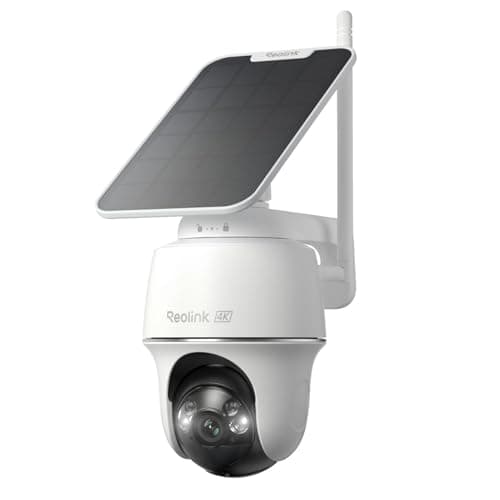
Reolink Argus PT Ultra (4K solar)
4K, pan-tilt and solar with an SD card slot and no account required to record. Reolink is the brand that keeps not charging for basic functionality, and that is the entire reason it is here.
Best subscription-free camera system
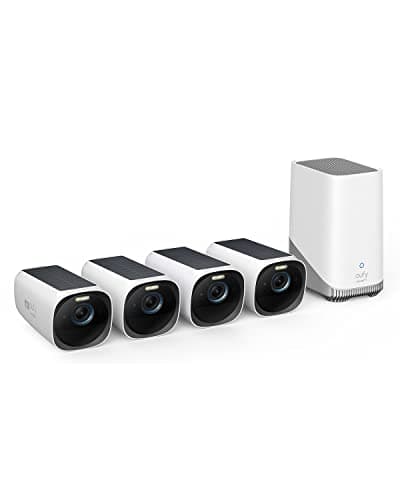
eufyCam 3 (S330) 4-camera kit
Four 4K solar cameras and a HomeBase with expandable local storage. This is a whole-property system that never sends you a bill, which is close to unique at this capability level. It is also the previous generation: eufy's flagship is now the eufyCam S3 Pro, and the S330 is what you buy when you want four cameras rather than the newest two.
Best budget wired camera
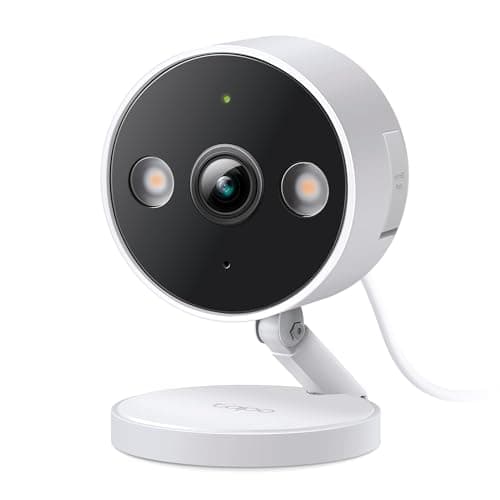
TP-Link Tapo 2K+ Indoor/Outdoor Wired Camera
The cheapest camera here that does continuous recording. Plug it into a socket, put a card in it, and it records all day without ever asking for a card number.
#ad · As an Amazon Associate we earn from qualifying purchases.
Questions
Frequently asked
How many hours of sunlight does a solar security camera need per day?
Do solar security cameras need direct sunlight, or is daylight enough?
Will a solar camera work behind a window or under a porch?
Which direction should the solar panel face?
Why is my solar camera battery dropping even though it is sunny?
Keep reading
Related
- Best solar security camerasThe ranked field, once you know the spot works.
- Do solar cameras work in winter?The cold-charging problem, which is separate from siting.
- How to power an outdoor security cameraEvery power path ranked, for when the sun is not an option.
- Where to place security camerasSiting for coverage rather than for charge.
Receipts
Sources
- eufy / Anker support — Methods to power the eufy SoloCam, including the two hours of direct sunlight statement
- Reolink support — Getting started with the Reolink solar panel ('a few hours of direct sunlight', output varies by weather, season and location)
- Reolink — Solar panel quick start guide (PDF)
- Reolink blog — how much sunlight an outdoor solar security camera needs (general two-to-four-hour guidance)
We do not run a testing lab and we do not pretend to. Specifications come from the manufacturer's own published documents and from published standards; prices come from the live Amazon API. Where a figure is not published, the page says “not published” rather than guessing. Read the full method.