HUB 06 · Guides
Smart lock troubleshooting: the five failures and what fixes them
Almost every smart lock problem is one of five things, and three of them are mechanical rather than electronic. Work through them in this order.
We earn a commission if you buy through our links. It does not change the price you pay, and it does not decide our picks — our selection criteria are published in full. How this works.
My smart lock is not working. What do I check first?
Start with the batteries, then the bolt, then the radio — in that order. Weak batteries cause symptoms that look like every other fault, from a dead keypad to a lock that drops off wifi, and a bolt that binds against a misaligned strike plate causes most of the rest. Fresh cells and a strike-plate check resolve the majority of smart lock complaints.
Before anything else: how do you get in without it? Know where your physical key is, or that your keypad code works, before you start pulling batteries or resetting anything. A troubleshooting session that ends with you locked out is a much worse problem than the one you started with.
The ten-minute diagnostic order
Work through these in sequence rather than jumping to the symptom that annoys you most. Each step rules out a cause of the ones below it, which is why the order matters more than the individual checks.
- Fresh batteries, all of them, same pack. Weak cells imitate almost every other fault on this page, so eliminating them first saves you diagnosing a fault that does not exist.
- Bolt test with the door open. Twenty seconds, and it separates mechanical problems from electronic ones definitively.
- Manual operation. Thumbturn and key, if there is one. If those are stiff, nothing electronic will be reliable.
- Radio last. Wifi and Bluetooth faults are real but far less common than the three above, and they are the only ones that cannot lock you out.
1. The keypad is dead or unresponsive
Nine times out of ten this is power. Smart locks draw their heaviest current when the motor turns, so a battery pack with just enough charge to light the keypad often has too little to drive the bolt — which produces the confusing symptom of a lock that beeps and blinks but does nothing. Fit a full set of fresh cells of the correct chemistry, all at once, and from the same pack.
Two details matter here more than they should. Do not mix old and new cells or brands: an uneven pack sags under load and behaves exactly like a flat one. And be careful with lithium AAs unless your manufacturer explicitly approves them — several do not, because their higher voltage and different discharge curve confuse the lock's battery meter and can hide a genuinely low pack until the moment the motor stalls. Alkaline is what most manufacturers specify, and the reasoning is set out in our smart lock battery guide.
If fresh cells change nothing, check the battery contacts for corrosion or a bent tab, and reseat the pack firmly. On a lock whose keypad is a separate module, confirm that module has its own battery — it usually does, and it usually is not the one you just changed.
2. The bolt jams, stalls or only works if you push the door
This is a door problem, not a lock problem, and no amount of resetting will touch it. Test it with the door wide open: retract and extend the bolt using the thumbturn. If it moves freely with the door open and binds when the door is shut, the bolt is catching the strike plate rather than passing through it. Houses move seasonally, and a door that was fine in March can bind in August.
The fix is alignment, in increasing order of effort: tighten the hinge screws, which often lifts a dropped door back into position; enlarge or file the strike plate opening slightly in the direction the bolt is catching; reposition the strike plate; or fit a longer strike screw into the frame stud. A motor is weaker than a wrist, so a bolt that needs a nudge from you will defeat the lock every time. This is also the failure that most often follows a retrofit install, because a retrofit inherits whatever your existing deadbolt was already doing — the reason it is the first check in our retrofit versus replacement guide.
One more mechanical cause: a lock that was installed with the tailpiece or torque blade slightly misaligned will work for months and then start stalling as it wears. If the lock is new and jamming from day one, take it off and refit it following the installation steps rather than fighting it in software.
3. It has dropped off wifi and will not reconnect
First, confirm what you have actually lost. On most smart locks the wifi radio carries remote access and notifications, not the act of locking — so a lock off the network still works by keypad, key and usually Bluetooth. That is worth knowing before you panic, and it is explained in do smart locks need wifi.
The usual causes, in order of likelihood. Weak signal at the door: a lock is a small antenna inside a metal door in the least convenient corner of the house, and a signal that is fine on your phone at head height may not be fine at lock height. Test at the lock, not at the door. The 5GHz problem: many locks connect only to 2.4GHz, and a router publishing both bands under one name can hand the lock a band it cannot use — separating the bands temporarily during setup solves a great many failed pairings. Weak batteries again, because the wifi radio is the second-hungriest thing in the lock after the motor. And a changed wifi password or a replaced router, which requires re-adding the lock rather than waiting for it to recover.
4. Codes are rejected, or a code stopped working
Check the obvious causes first: a code that was set to expire, a schedule that limits it to certain hours, a code deleted by another user on the account, or a lock in a privacy or vacation mode that disables code entry entirely. All four are common and none is a fault.
If every code is rejected, the lock has usually lost sync with the app — codes are stored on the lock, and if the app pushed a change while the lock was offline, the two can disagree. Reconnecting the lock and letting it sync generally resolves it. Failing that, most manufacturers document deleting the code and re-adding it, which forces a rewrite.
A factory reset is the last resort, not the first move, because it wipes every user, code and setting and requires re-enrolling the lock from scratch. The general shape of the procedure is the same across brands — remove the battery pack, hold the interior reset or program button while restoring power, then follow the tones or lights — but the exact sequence, the button, and the timing are model-specific, and getting them wrong wastes a cycle. Use the manual for your exact model from the manufacturer's own support site; the roots for the brands we cover are in the sources below.
5. The batteries drain far faster than they should
A lock eating cells in weeks rather than months is telling you something specific, and it is almost always one of four things. A binding bolt, from problem two above, makes the motor work several times harder on every cycle — this is the most common cause by a distance and the reason alignment is worth fixing even when the lock still works. Poor wifi, because a lock at the edge of coverage keeps retrying and each retry costs power. Auto-lock set to a very short delay, which multiplies the number of motor cycles a day. And cold: alkaline cells lose capacity in low temperatures, so an exterior door in winter genuinely does run down faster.
The arithmetic and what a reasonable cycle count actually costs is in the battery guide, and how a lock behaves when the pack finally dies — which is not the same as being locked out — is in do smart locks work in a power outage.
When to stop fixing it
Three signs it is time to replace rather than repair. The motor stalls even with fresh batteries on a properly aligned, freely moving bolt — that is a worn mechanism, and it will get worse. The manufacturer has stopped issuing firmware for the model, which for a connected lock is a security question rather than a convenience one. Or the lock keeps dropping off the network in a position where the signal is genuinely fine, which usually means a failing radio.
If you get there, buy for the failure you had. Chronic connectivity trouble points to a lock with a better radio and a keypad that works entirely offline, which is the case for the Yale Assure Lock 2 in our main ranking. Mechanical trouble points to build quality, where the Schlage Encode Plus is our pick and is written up in its own review. And if the underlying issue was that the retrofit inherited a poor deadbolt, the answer is a full replacement rather than another retrofit. The whole field is at the smart locks hub.
The hardware
The hardware this guide is about
The products this guide refers to, with prices pulled live from Amazon and dated on every card. Full rankings live in the roundups linked above.

Best overall smart lock
Yale Assure Lock 2 (Wi-Fi, keyed)
The modular one. Yale sells the same lock body in keyed and key-free, touchscreen and keypad, with the radio as a swappable module — so you buy the connectivity you want instead of the connectivity that shipped.
Best build quality
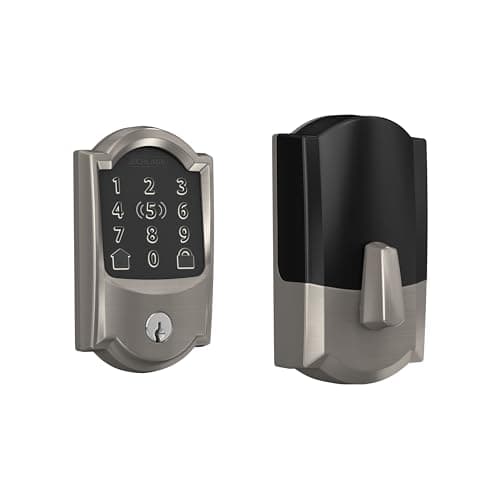
Schlage Encode Plus Wi-Fi Deadbolt
The one with the strongest published hardware pedigree. Schlage's deadbolt line is the reference point for BHMA Grade 1 in residential locks, and the Plus adds Apple Home Key so you tap a phone or watch instead of typing.
#ad · As an Amazon Associate we earn from qualifying purchases.
Questions
Frequently asked
Why is my smart lock keypad not responding?
How do I reset a smart lock?
Why does my smart lock jam or fail to lock?
Why does my smart lock keep disconnecting from wifi?
Can I still get in if the smart lock stops working?
Why do my smart lock batteries drain so fast?
Keep reading
Related
- How long smart lock batteries lastThe arithmetic behind cycles, cells and the figures on the box.
- Do smart locks work in a power outage?What happens when the pack dies, and how not to be locked out.
- How to install a smart lockRefitting a lock properly, which fixes most day-one jamming.
- Best smart locksWhere to go when repairing stops being worth it.
- Sensors that keep going offlineThe sensor-side companion to this page, where the causes are mesh and radio rather than mechanical.
Receipts
Sources
- Schlage — support, manuals and programming documentation for Encode and Encode Plus locks
- Yale — Assure Lock 2 support articles, manuals and reset documentation
- August — troubleshooting and reset documentation for retrofit locks
- Kwikset — support and programming manuals for smart deadbolts
- Builders Hardware Manufacturers Association — ANSI/BHMA standards for locks and strike plates
We do not run a testing lab and we do not pretend to. Specifications come from the manufacturer's own published documents and from published standards; prices come from the live Amazon API. Where a figure is not published, the page says “not published” rather than guessing. Read the full method.