HUB 06 · Guides
How Long Do Smart Lock Batteries Last? The Radio Decides, Not the Motor
Manufacturers quote six months to a year, but the number that actually moves battery life is which radio the lock keeps awake, not how often the bolt turns.
We earn a commission if you buy through our links. It does not change the price you pay, and it does not decide our picks — our selection criteria are published in full. How this works.
How long do smart lock batteries last?
Manufacturers quote roughly six months to a year on a set of cells, but the honest answer depends far more on the radio than the motor. A Wi-Fi lock that stays reachable around the clock can flatten a set in a season, while a Bluetooth or Thread lock on the same door, cycled the same number of times, runs a year or more.
The one sentence that explains every battery complaint. Turning the bolt is a few seconds of motor work a day; staying reachable is a radio listening every minute of every hour. The motor is the visible job, so people blame it, but the radio is where the energy goes.
The radio is the drain, not the motor
It is worth doing the arithmetic in rough terms, because it reframes the whole question. A household unlocks and locks a front door on the order of ten to twenty times a day. Each motor cycle is a second or two of a small geared motor turning a bolt. Add that up and the motor is awake for well under a minute in a twenty-four hour day. Everything else — the other twenty-three hours and fifty-nine minutes — the lock is either fully asleep or listening for a signal. That listening is the load that decides when you next climb a stepladder with a fresh pack of AAs.
A motorized deadbolt only draws heavily during a cycle if it is fighting the door. A bolt that throws cleanly by hand costs the motor almost nothing; a bolt that has to be persuaded past a misaligned strike makes the motor stall, back off and retry on every single lock, and that is a battery problem masquerading as a firmware problem. If your runtime is genuinely dreadful and the radio is modest, suspect the strike before the cells — the diagnosis and fix are in our door-fit guide, because a lock that cannot throw its bolt freely is the most expensive way to waste a battery.
Why the radio is so hungry by comparison
A radio that has to be reachable from your phone while you are away cannot simply switch off between uses. Depending on the protocol it either holds an association with your Wi-Fi access point and answers keep-alive traffic, or it wakes on a schedule to poll a hub. The more often it has to be awake and the more power its transmitter uses to reach the router, the faster the cells go. This is why two locks with identical motors, identical bolts and identical daily use can differ by a factor of three or four in battery life: the difference is entirely in how their radios behave when nothing is happening.
Why manufacturer figures are not comparable
Every smart lock box quotes a battery life, and almost none of them state the one number that would make the figure mean something: the duty cycle. A quoted “up to twelve months” is only interpretable if you also know how many lock cycles a day it assumes, whether the radio was on the whole time, whether auto-lock was running, whether the keypad backlight and any voice prompts were enabled, and what the ambient temperature was. Change any of those and the same lock produces a very different number.
So treat the printed figure as a ceiling reached under favorable, unstated conditions, not as a promise. It is useful for ranking locks within a single brand's own line, where the test conditions are at least consistent, and close to useless for comparing across brands. The comparison that does hold up is architectural: a lock that keeps a Wi-Fi radio awake will always trail a lock that sleeps between short Bluetooth or Thread exchanges, whatever the two boxes claim. That is a mechanism you can reason about; the marketing number is not.
AA reservoirs versus coin and CR cells
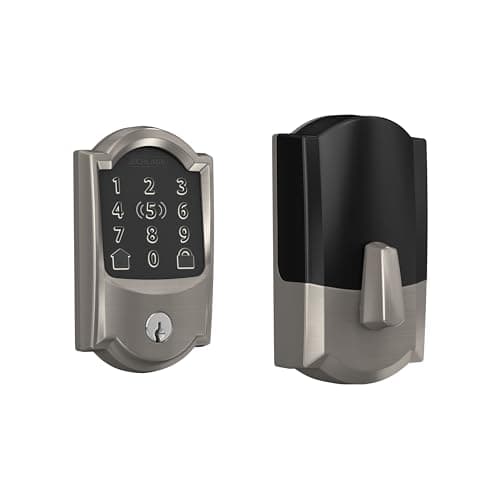
The physical size of the battery compartment is a spec that quietly decides how often you are involved. Most full deadbolt replacements — the Yale Assure Lock 2, the Schlage Encode Plus, the eufy Smart Lock C220 and the Ultraloq U-Bolt Pro all do this — carry four AA cells inside the interior escutcheon. Four AAs is a large energy reservoir, which is the real reason those locks tolerate a power-hungry Wi-Fi radio and still post respectable runtimes: they are burning a big tank.
Retrofit and low-profile locks often trade that reservoir for a smaller one — a couple of CR123A photo-lithium cells, or in the most compact designs a single CR2 coin cell doing motor work. A smaller cell is not automatically worse, because these designs usually pair it with a lean Bluetooth radio rather than Wi-Fi, so the smaller tank feeds a smaller engine. But it does change the maintenance rhythm and the running cost: lithium photo cells are more expensive per swap than a bulk pack of alkaline AAs, and a coin cell has less margin, so a cold snap or a stiff bolt eats into it faster. When you are weighing a slim, hidden lock against a bulkier one, the battery format is part of what you are choosing, not an afterthought.
Wi-Fi versus Bluetooth versus Thread
The single biggest lever on battery life is which radio carries remote access. This is the same trade-off covered from the connectivity angle in our guide on whether a smart lock needs Wi-Fi; here it matters purely for what it costs the cells.
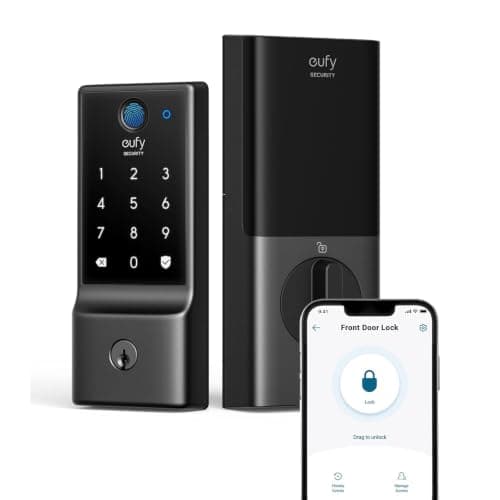
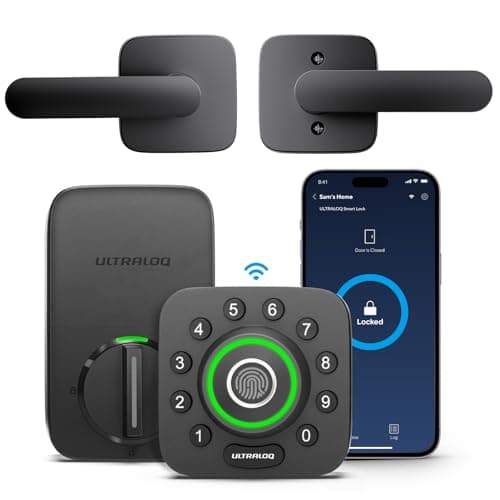
- Built-in Wi-Fiis the most convenient and the heaviest draw. The radio must reach your router directly, which takes more transmit power, and it stays associated so it can answer at any moment. Locks that put Wi-Fi in the lock body, like the eufy C220 and the Ultraloq U-Bolt Pro, lean on their four AA reservoir to absorb it — eufy's own literature is candid that a built-in Wi-Fi lock is the heaviest power profile in a battery lock.
- Bluetooth to a bridgesplits the work. The lock speaks low-power Bluetooth over a short hop to a plugged-in bridge, and the bridge — on mains power — does the Wi-Fi talking to the internet. The lock's radio is doing far less, so the cells last longer, at the cost of one more powered box to site.
- Thread is a low-power mesh built for exactly this. A Thread lock joins a mesh of mains-powered routers in the home and can sleep deeply between brief exchanges, which is why Thread and the Matter ecosystem built on it are the direction of travel for battery devices. A lock with a swappable radio module, like the Yale Assure Lock 2, can be moved onto Thread later without buying a new lock.
| Radio approach | Where the radio load lives | Relative battery drain | Needs a bridge or hub? |
|---|---|---|---|
| Built-in Wi-Fi | In the lock, reaching the router directly | Highest | No |
| Bluetooth + plug-in bridge | Bridge does the internet work on mains power | Low | Yes, a powered bridge |
| Thread mesh | Mesh routers carry traffic; lock sleeps between hops | Lowest | Yes, a Thread border router |
| Bluetooth only (no remote) | Short local exchanges, nothing listening for the cloud | Very low | No |
Read that table before you read any battery claim on a box. A lock that keeps Wi-Fi in the door is buying you the convenience of no bridge and paying for it in cells; a lock on Bluetooth-to-a-bridge or Thread is spending an extra powered box to buy back most of the runtime. Neither is wrong. But it does mean a Wi-Fi lock and a Thread lock quoting the same twelve months are not making the same promise. If runtime is the thing you care about most, start from the budget smart locks roundup, where several picks run leaner radios, rather than the flagship Wi-Fi models.
Getting the most out of a set of cells
Once you understand where the energy goes, extending runtime is mostly about not sabotaging it. A handful of habits do almost all the work.
Use lithium AAs, not rechargeables, in a door
Primary lithium AA cells hold a higher, flatter voltage across their life and shrug off cold far better than alkaline, both of which matter on an exterior door in winter. That is worth doing on any lock and close to mandatory on a north-facing or exposed entry. Standard rechargeable NiMH AAs are the one thing to avoid: they sit at a lower nominal voltage and sag under the motor's current draw, which can make a healthy pack read as low and trip the low-battery warning early. Alkaline is a fine middle option for a sheltered door; lithium is the upgrade when temperature or runtime is the priority.
Replace all the cells at once, always
A four-AA lock wires its cells together, and the pack is only as strong as its weakest member. Mixing a fresh cell with three tired ones, or mixing brands and chemistries, drags the whole pack down to the level of the worst one and can push current backward into the weak cell. When the warning comes up, swap the entire set, keep them the same brand and chemistry, and do not keep a “good” old one in reserve. Cells are cheap; a lock that lets you out but not back in is not.
Know what your lock does at low battery
This is the difference between an inconvenience and a lockout, and it is worth checking before you ever see the warning. Most locks give you weeks of notice: an app alert, a colored keypad flash, or a distinct beep pattern on each use once the pack drops below a threshold. The genuinely important detail is the failsafe. Nearly every quality smart deadbolt keeps a mechanical key override or emergency contacts, so a dead pack does not strand you — a keyed model such as the Yale Assure Lock 2 keeps a physical cylinder precisely for this, and many keypad locks expose two contacts you can touch with a 9-volt battery to wake the motor long enough to unlock. Confirm which of these your lock offers on day one, not at the door in the rain.
The mistake buyers make
They shop the printed battery number as if it were comparable across brands, then feel cheated when a Wi-Fi lock does not hit it. The number was never a like-for-like figure. Buy the lock for its fit, its entry methods and its ecosystem, understand from the radio which battery rhythm you are signing up for, and stock the right cells. If you want the longest runtime with the least thought, a Bluetooth-to-bridge or Thread lock on lithium cells is the answer; if you want no bridge on the wall and will trade some runtime for it, a built-in Wi-Fi lock on four AAs is a reasonable deal you now understand. Either way, start from the best smart locks roundup with the radio question already settled in your head, and lean on our methodology for how those picks are compiled from published specs rather than a bench. For the connectivity and security questions that sit alongside battery life, browse the rest of our guides.
The hardware
The hardware this guide is about
The products this guide refers to, with prices pulled live from Amazon and dated on every card. Full rankings live in the roundups linked above.

Best overall smart lock
Yale Assure Lock 2 (Wi-Fi, keyed)
The modular one. Yale sells the same lock body in keyed and key-free, touchscreen and keypad, with the radio as a swappable module — so you buy the connectivity you want instead of the connectivity that shipped.
Best build quality
Schlage Encode Plus Wi-Fi Deadbolt
The one with the strongest published hardware pedigree. Schlage's deadbolt line is the reference point for BHMA Grade 1 in residential locks, and the Plus adds Apple Home Key so you tap a phone or watch instead of typing.
Best budget fingerprint lock
eufy Smart Lock C220
Fingerprint plus built-in Wi-Fi at the bottom of the price band that includes both. eufy's whole pitch is no monthly fee, and the lock line holds to it.
Best fingerprint lock
Ultraloq U-Bolt Pro Wi-Fi (with Handle)
The most entry methods for the money: fingerprint, code, app, Bluetooth, auto-unlock and a mechanical key, with built-in Wi-Fi rather than a bridge. If you want every door to open every way, this is the cheapest route there — and the listing we link ships the matching handle set with the deadbolt.
#ad · As an Amazon Associate we earn from qualifying purchases.
Questions
Frequently asked
Do smart locks die suddenly or warn you first?
Why does my Wi-Fi smart lock drain batteries so fast?
Should I use lithium or alkaline batteries in a smart lock?
Can I replace just the dead battery in a smart lock?
What happens if my smart lock battery dies completely?
Keep reading
Related
- Smart lock troubleshootingWhen fast battery drain is really a bolt catching the strike plate.
- Best smart locksWhere to buy once the radio and battery trade-off is settled.
- Best budget smart locksSeveral picks run leaner radios for longer runtime.
- Do smart locks need Wi-Fi?The same radio choice, from the connectivity angle.
- Yale Assure Lock 2 reviewFour AAs, a swappable radio module, and a key override.
- Can smart locks get wet?Why the bolt stalls in January: cold, alkaline cells and the interior half that is never rated.
Receipts
Sources
- Yale Home — smart lock battery guidance and installation manuals
- Schlage — support center and battery documentation for Encode deadbolts
- eufy — smart lock specifications and no-subscription documentation
- Ultraloq — U-Bolt Pro specifications and support
- Thread Group — low-power mesh networking overview
- Connectivity Standards Alliance — Matter overview
- August — retrofit lock and bridge documentation
We do not run a testing lab and we do not pretend to. Specifications come from the manufacturer's own published documents and from published standards; prices come from the live Amazon API. Where a figure is not published, the page says “not published” rather than guessing. Read the full method.