The best wireless security camera for most homes is the eufy SoloCam S340. An integrated solar panel keeps it charged in a spot with real sun, it pans and tilts across a dual-lens 3K view, and it records to storage on the camera with no monthly fee — genuinely install-once, no ladder every three months, and no plan gating access to your own footage. If the mounting spot gets direct sun, start there.
“Wireless” is the most misread word in this category. It does not mean the camera has no wires because it is clever; it means it has no data cable and often no power cable either, and everything that makes a battery or solar camera different from a wired one follows from that. No continuous supply means the camera sleeps to save power, which means a wake-up delay and no rolling timeline. No cable also means you are responsible for keeping it charged, and how often you climb up to do that is decided by how much traffic passes the lens. So this page is ranked on the power source, where the footage is stored, whether a plan is required to record, resolution, and the weather rating that decides whether it survives where you mount it.
Wireless is not the same as wifi-free.Almost every camera here still needs your Wi-Fi to send you a notification or a live view; the “wireless” refers to power and data cabling, not the network. A camera that keeps working with no internet is a separate question, answered in do security cameras work without Wi-Fi. If a cable-free install is the goal, read the trade-off section before the spec sheet.
The best wireless security cameras, compared
Compiled from manufacturer specifications, August 2026. IP weather ratings are the manufacturer-published figures; confirm the rating for the exact variant you order, as some ship in kit and non-kit forms with different accessories.| Model | Power | Storage | Plan needed to record? | Resolution | Weather rating |
|---|
| eufy SoloCam S340 | Integrated solar plus battery | Local, on the camera | No | 3K dual camera, pan and tilt | IP67 |
|---|
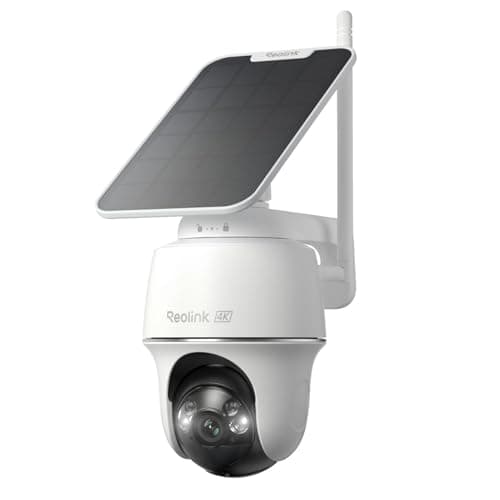
| Reolink Argus PT Ultra | Solar plus battery | Local microSD; RTSP / ONVIF | No | 4K, pan and tilt | IP65 |
|---|
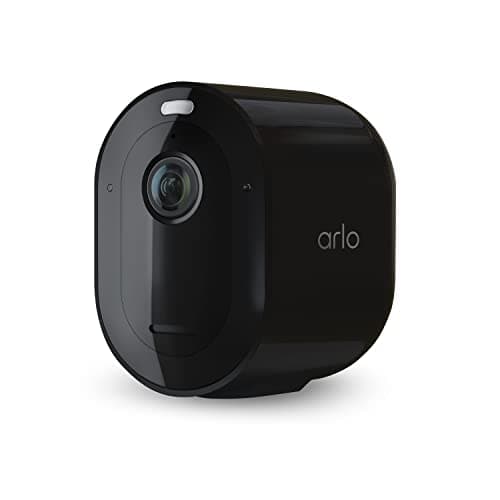
| Arlo Pro 5S | Rechargeable battery (solar optional) | Cloud; local needs an Arlo base station | Yes — recorded video needs Arlo Secure | 2K HDR | IP65 |
|---|
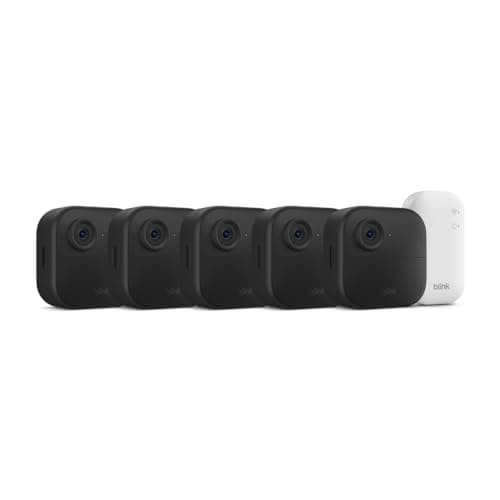
| Blink Outdoor 4 | 2x AA lithium, up to 2-year life | Cloud; local needs a Sync Module 2 (not the bundled Core) and a USB drive | Cloud clips need a plan; local is plan-free | 1080p | IP65 |
|---|
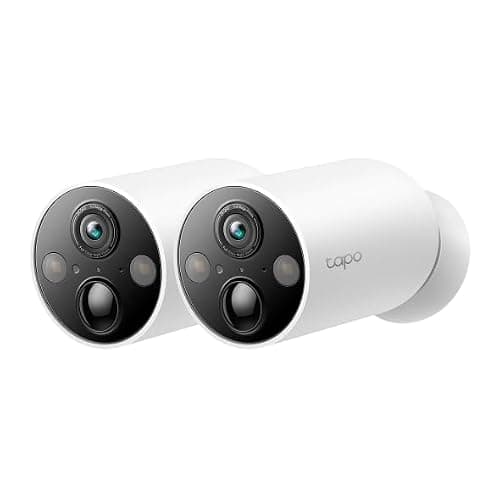
| Tapo MagCam (C425) | Rechargeable battery (solar optional) | Local microSD | No | 2K QHD, magnetic mount | IP66 |
|---|
What “wireless” actually costs you
A wire-free camera buys you a two-minute install and no trench across the garden. Three things go with it, and any honest page names them before the resolution.
A wake-up delay and no continuous pre-roll
A battery or solar camera sleeps until its motion sensor fires. Waking the radio, spinning up the sensor and starting to record takes a moment, so the first second or two of an event is often missed, and there is no rolling timeline you can scrub back through. A wired camera with a constant supply can hold a pre-roll buffer that captures the moment before the trigger; a battery one largely cannot. This is not a defect in any one model, it is the physics of running on a cell, and it applies to every camera on this page including the winner. If an unbroken 24/7 timeline is what you actually need, that means a wired camera, and in practice that means Power over Ethernet — the case is on our best outdoor security cameras page.
A recharge cadence set by traffic, not by a headline number
Every manufacturer prints a battery life, and every one of them assumes a quiet camera. The real figure is set by how often the camera wakes, because each wake event records, encodes and transmits, and that is where the charge goes. A camera on a still cul-de-sac may run for months; the same camera facing a public sidewalk, triggered by every passing pedestrian, can need charging every few weeks until you tune the detection zones. The first thing to do after mounting any wire-free camera is trim the motion zones to exclude the pavement and the road — it is usually the difference between charging seasonally and charging monthly. This is also why solar is worth so much: on the eufy SoloCam S340 and the Reolink Argus PT Ultra, a spot with real sun turns the recharge chore into something the panel handles, and you never take the ladder out at all.
Batteries that do not recharge, and batteries that do
The Blink Outdoor 4 takes a different bet: two AA lithium cells and a published two-year life. There is nothing to plug in and nothing to climb up and swap for two years, which is a real engineering achievement — and it is the direct reason the camera is 1080p and event-only, because that battery budget does not stretch to a 4K sensor running hard. The rest of the field uses a rechargeable pack. Neither is wrong; they are different answers to the same problem, and the AA route trades resolution for the longest hands-off interval here.
Where the footage goes still decides the bill
This is the same question as the rest of the camera category and it splits this page cleanly. The eufy SoloCam S340, the Reolink Argus PT Ultra and the Tapo MagCam all record to storage on the camera with no plan — a card or onboard memory, paid for once, with full access to your own footage. The Reolink goes further and publishes RTSP and ONVIF support, which is what lets it drop into Home Assistant, Frigate or Blue Iris rather than being locked to one app. The two solar picks are close enough that they get their own head-to-head at eufy vs Reolink.
The other two are where the ongoing cost hides. The Arlo Pro 5S has excellent hardware — 2K HDR, dual-band Wi-Fi, a real spotlight and a 12x zoom — wrapped in the most aggressive subscription model in the category: without Arlo Secure you lose recorded video, and Arlo has raised that plan's price more than once. The Blink Outdoor 4 sits in between: out of the box, saved clips go to Blink's cloud on a plan, but you can add a Sync Module 2 and a USB drive to store locally and skip the subscription entirely. That is an extra purchase, and a larger one than it used to be: current Blink kits ship the Sync Module Core, which Blink's support documentation says does not support local storage or clip backup, so the Sync Module 2 is bought separately. Budget for it if plan-free is the point. The full argument for why this matters over years is in local storage vs cloud security cameras, and the filtered no-subscription field is at best security cameras without a subscription.
Weather rating: what IP65 versus IP67 means outdoors
A wire-free camera is almost always an outdoor camera, so the IP rating is a real spec here rather than a footnote. The first digit is dust, the second is water. IP65 means fully dust-tight and protected against low-pressure water jets from any direction — fine for rain, which is what most cameras face. IP67 adds protection against temporary immersion, which is a margin most owners never use but is a fair proxy for a more sealed housing. The eufy SoloCam S340 is IP67, the Tapo MagCam is IP66, and the Reolink, Arlo and Blink cameras are IP65. None of these should be mounted where water pools or pressure-jets hit them, and one honest caveat applies to all of them: several manufacturers note that the rating holds only with the charging port cover in place, so a camera left on a trickle charge through an open port is no longer sealed. Mount under an eave where you can, whatever the number on the box.
Which one to buy
- You have a mounting spot with real sun and want no bill. eufy SoloCam S340. Integrated solar, dual-lens 3K with pan and tilt, local storage, IP67, and it is install-once. There is a full write-up at our eufy SoloCam S340 review.
- You want 4K and the option to run it in Home Assistant. Reolink Argus PT Ultra. Solar, pan and tilt, local microSD with no plan, and RTSP / ONVIF so it is not locked to one app. The best value 4K on this page.
- You want the strongest hardware and will pay the plan.Arlo Pro 5S. 2K HDR, dual-band Wi-Fi, spotlight and 12x zoom — but recorded video needs Arlo Secure, so only buy it if the subscription is not the thing you are trying to escape.
- You want the longest hands-off interval.Blink Outdoor 4. Two years on AA lithium is unmatched here; accept 1080p and add a Sync Module 2 — not the Sync Module Core that comes in the kit, which has no USB port — if you want to skip the cloud plan.
- You want to reposition after living with the view.Tapo MagCam. The magnetic mount makes siting a two-minute decision you can redo, it records locally with no plan, and it is IP66 — just mount it out of arm's reach, because a magnet holds it for you and for anyone else.
If a spot gets no direct sun, do not buy the solar value proposition and then have to climb up to charge it — that is exactly the eufy's own skip line. A shaded north wall wants a long-life AA camera like the Blink, or a wired camera on our main camera rankings. The indoor half of the problem is on our best indoor security cameras page.
How we picked
Products we claim to have tested: 0. We have not lived with these on a wall for a season, and we say so rather than imply a test lab we do not have. What we do is compile the published specification, read each manufacturer's own support and spec documentation for the storage, plan and IP terms they state, work out the running cost, and cite it. Rankings weight power source and how hands-off it really is, storage location, plan-free operation, resolution and weather rating, and every pick carries a specific reason to skip it. The rubric is at methodology, and the rest of the category is on the cameras hub.
How to choose a wireless camera
Battery or solar: decide by the mounting spot, not the spec
Solar is the best answer when, and only when, the mounting position gets real direct sun for part of the day. A panel under a deep porch overhang or on a shaded north elevation collects almost nothing, and you have bought an expensive battery camera you now have to climb up and recharge. Stand where the camera will go, at the time of day it matters, and look at the sky the panel will see. If it is shaded, choose a long-life battery camera such as the Blink, or run a cable and buy a wired camera instead. If it is sunny, solar turns the whole recharge problem into something you never think about again.
What actually decides the price
In rough order: the sensor and lens system (4K, HDR, a second telephoto lens, or an optical zoom are the expensive parts), the power hardware (a solar panel and the charging electronics cost real money, which is why the solar picks sit above the bare-battery ones), and the on-device detection for people and vehicles. What does not appear in the shelf price on the Arlo and, by default, the Blink is storage — it has been moved into a monthly plan. Two cameras with the same sticker can be very different purchases once you add five years of whatever keeps the footage.
The mistake buyers make
Buying a solar camera for a shaded spot is the most common, and it is entirely avoidable by standing where the camera will go for two minutes first. The second is not budgeting for the extra hardware that makes a “no-subscription” camera actually subscription-free: the Blink needs a Sync Module 2 and a USB drive, and the Arlo needs a base station, before either stores locally. The third is leaving the motion zones at their factory setting, so a camera facing a sidewalk drains its battery on every passing stranger; trimming the zones is the first job after mounting, not an afterthought. One constraint changes the order of this whole page: if you do not own the wall, the mounting method outranks every specification on it, and the renter rankings sort the same field by what goes up and comes down without leaving a mark.
Placement, and the recharge trade you are making
Mount high enough to be out of easy reach — a wire-free camera, and especially a magnetically mounted one like the Tapo, is a camera someone can walk off with, and a local recording leaves with the hardware. Aim it so the useful zone is in the center of the frame where detail is best, and exclude the road and pavement from the detection zones so the camera is not woken by traffic it cannot act on. The full logic, including height and angle, is in where to place security cameras. If you want the recordings to survive the camera being taken, that is the argument for a base-station or cloud model rather than a card-only one — a genuine trade-off against the no-plan cameras.
The five-year number
Compare the hardware plus five years of whatever keeps it working, and include the extras. A local-storage solar camera is close to the purchase price alone once it is on the wall. A plan-gated camera is the purchase price plus sixty monthly payments, and the plans in this category are among the ones that have risen most. We keep that comparison as a maintained table at subscription costs compared rather than printing a figure that would be stale within a quarter, and the local-first shortlist is at best local-storage security cameras.
What a wireless camera still will not do
It will not record continuously, it will not survive with a dead battery on a sunless week, and it will not tell you a door was opened — only that something moved in front of the lens. A few contact and motion sensors cover openings and rooms for a fraction of the price per point and report a plain binary fact. Pairing one or two well-placed cameras with a handful of sensors is usually a stronger, cheaper system than ringing a property in cameras you then have to keep charged.