There is no universal winner here, and any page that declares one is not comparing the same thing you are choosing between. A connected lock and a plain keypad deadbolt do the same mechanical job. The question is whether the radio earns its place on your door - and for a substantial number of households, honestly, it does not.
The two things being compared
A smart lock is a deadbolt with a motor, a small computer and a radio. Represented here by the Yale Assure Lock 2, which is the best-executed version of the idea: full deadbolt replacement, touchscreen keypad, four AA cells, and a connectivity module you can swap.
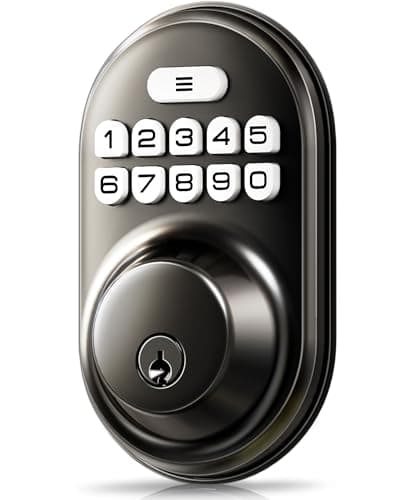
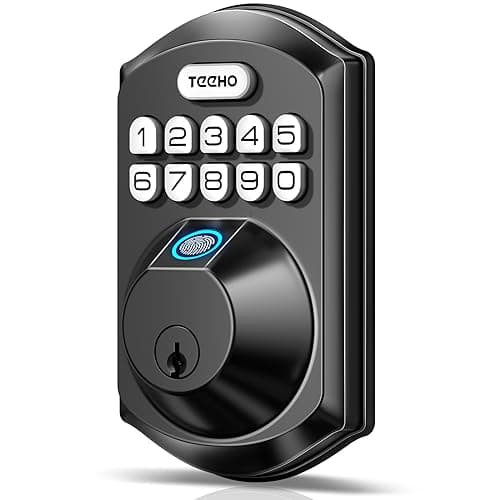
A keypad deadbolt is a deadbolt with a motor and a small computer, and no radio at all. Represented by the Veise Keypad Deadbolt - code and key, auto-lock, anti-peek entry - and the TEEHO TE002, which adds a fingerprint reader and nothing else.
Notice what both sides share. Both are keyless. Both auto-lock. Both let you hand out entry without cutting metal. Both replace the same deadbolt in the same hole using the same three measurements from our door fit guide. The convenience most people think they are buying when they buy a smart lock is not, in fact, the radio - it is the keypad, and the keypad is available without a radio for a fraction of the money.
Head to head
Compiled from manufacturer product and support documentation, July 2026. Both categories are full deadbolt replacements requiring the same door measurements.| Capability | Connected lock (Yale Assure Lock 2) | Keypad deadbolt (Veise, TEEHO) |
|---|
| Keyless entry | Yes - touchscreen code | Yes - code, plus fingerprint on the TEEHO |
|---|
| Auto-lock behind you | Yes | Yes |
|---|
| Unlock from away | Yes | No, and it never will |
|---|
| Tells you the bolt moved | Yes - push notification | No |
|---|
| Time-limited or scheduled codes | Yes, from the app | No - codes are set at the keypad and stay set |
|---|
| Works in a home automation routine | Yes | No |
|---|
| Attack surface beyond the mechanism | Radio, firmware, vendor cloud account | None - there is nothing to reach |
|---|
| Battery draw | Motor plus an always-on radio | Motor only |
|---|
| Depends on a company continuing to exist | Yes, for the remote half | No |
|---|
| Published BHMA/ANSI grade | Grade 2 (Yale) | Not published by either brand |
|---|
| Battery | 4x AA | 4x AA |
|---|
What the radio actually buys you
Four things, and it is worth being precise, because the marketing tends to blur them into a general sense of modernity.
Unlocking from somewhere else. A neighbor at your door while you are at work. A relative who arrived early. Most households use this a handful of times a year and value it highly on each of those occasions.
Knowing. A notification when the bolt moves, and a log of which code was used. For a household with teenagers, a cleaner, or a rental unit, the log is often the real reason to buy, and it is a capability a keypad deadbolt cannot approximate.
Codes that expire. Issuing a code that works Thursdays between nine and eleven, then stops, is only possible with a clock and a management interface. A plain keypad has codes that exist until someone deletes them, which in practice means forever.
Being part of something. The lock as a trigger and a target in automations: lock the door when the last person leaves, turn the porch light on when a code is entered at night, or arm a routine that also involves your sensors. If you are already running a smart home, this is where the value concentrates - and our Matter explainer covers how those pieces are supposed to interoperate.
What the radio costs you
Battery.Both sides run four AA cells. On the connected lock, the motor fires a few times a day and the radio draws continuously; on the keypad deadbolt only the motor and the pad draw at all. The always-on term usually dominates, which is why a radio-free deadbolt will go substantially longer between battery changes from an identical reservoir. That is arithmetic, not a measurement, and you can reproduce it from any cell datasheet and the lock's stated radio.
Attack surface. Not a large one, and not the one people imagine - the realistic threat to a residential door remains force applied to the frame, not a remote exploit. But a connected lock adds firmware that can carry a bug, a pairing process that can be misconfigured, and an account that can be phished. A keypad deadbolt with no radio has precisely none of that: there is nothing to reach from outside your street. Our full treatment of that comparison is in are smart locks safe.
A vendor who can change the terms.This is the cost people underweight. The remote half of a connected lock runs through somebody's servers. Those servers can be retired, rearchitected, sold, or moved behind a monthly fee, and none of that is in your control. It has happened repeatedly across the smart home. A radio-free deadbolt cannot be changed by anyone after you have bought it - which is a real feature, and one reason we keep a whole section on hardware that does not require a plan.
Complexity in the failure case. When a keypad deadbolt misbehaves, the fault is mechanical or the batteries are flat. When a connected lock misbehaves, it might be the bolt, the batteries, the Wi-Fi, the firmware, the app, the account, or the bridge. More things to check is a real cost even though it never appears on a spec sheet.
The five-year question
Buy either lock and ask what the door looks like in five years, because that is the horizon on which these two categories genuinely diverge.
The keypad deadbolt in five years is the keypad deadbolt you bought. It has had batteries in it, possibly twice. Its codes work. Nothing has been updated, deprecated, migrated or rebranded, because there is no service behind it to do any of those things. If the company that made it ceased trading tomorrow, the only consequence would be spare parts.
The connected lock in five years depends on decisions somebody else makes. The app will have been redesigned at least once. The account may have been merged into a parent company's. The remote features may have been reorganized, and features that shipped free are sometimes moved behind a plan later - which is the pattern that this entire site exists to document, and our subscription cost comparison shows what that shape costs across a whole security setup. None of this affects the keypad, the codes or the bolt, which are local. It affects the half you paid extra for.
There are two ways to reduce that exposure without giving up the radio. Choose a lock whose local control does not route through a vendor cloud - a Z-Wave or Matter design answering to a hub you own. Or choose a lock whose radio can be replaced when the arrangement stops suiting you, which is the argument for the modular Yale. Neither eliminates the dependency. Both make it smaller, and being clear-eyed about it is more useful than pretending the choice is only about features.
What neither of them does
Neither knows whether your door is shut. Both report the bolt. Throw the bolt with the door standing open and a connected lock will happily tell you the door is locked. This is the single most common misunderstanding in the category, and the fix is the same either way: a contact sensor on the frame, from our door and window sensor ranking. It is also the cheapest thing on this site, and it pairs equally well with the least expensive keypad deadbolt here and the most expensive connected lock.
Neither makes the frame stronger. The published BHMA grade describes the lock, not the jamb, and residential forced entry overwhelmingly goes through the jamb. Long screws into the stud behind the strike plate improve your door more than any purchase on this page.
The decision rule
Do not average these into a preference. Answer the questions, and the answer picks the category for you.
Buy a connected lock if any of these is true
- You need to let someone in while you are not there. Not hypothetically - a cleaner, a contractor, a dog walker, a family member with an unpredictable schedule. This is the one capability a keypad deadbolt cannot fake.
- You want to know when the door was used, and by which code. Households with teenagers, shared houses, and short-term rentals all fall here.
- You need codes that expire on their own. A code you have to remember to delete is a code that does not get deleted.
- The lock has to participate in a wider setup - a Matter fabric, Home Assistant, or routines involving lights and sensors.
- You are away from home oftenand want the door's state to be something you can check rather than something you hope about.
If that is you, the shortlist is on best smart locks, and the full-replacement subset is on best smart deadbolts. The Yale Assure Lock 2 is the pick for most people; the full review is here.
Buy a plain keypad deadbolt if all of these are true
- The problem you are solving is keys, not visibility. You are tired of carrying, hiding or losing them.
- Everyone who needs in is either in the household or gets a code you set at the door.
- You do not want a firmware image, an account or a company between you and your front door. This is a legitimate position, not a paranoid one.
- Battery intervals matter to you more than remote access does.
- It is a secondary door - a garage side door, a shed, an internal office, a basement entrance - where the radio would be paying rent for nothing.
If that is you, the Veise Keypad Deadbolt does the job at the lowest price on this site, and the TEEHO TE002 adds a fingerprint reader while keeping the no-radio property. Both are ranked in context on the smart deadbolts page. Both are missing a published BHMA grade, which is the honest gap in this side of the argument and the main reason we would not put either on a primary front door where the grade matters to you.
The hybrid nobody suggests
A radio-free keypad deadbolt on the door, plus a contact sensor on the frame, gets you keyless entry and away-from-home notifications for less than most connected locks cost on their own. What you do not get is remote unlocking or a per-code log. For a household whose honest requirement is “stop carrying keys, and tell me if the door opens,” this is frequently the correct answer, and nobody sells it because there is no single product to sell. The sensors that make it work are ranked at the sensors hub.
What we did not weigh
We have not tested either category on a door. Products we claim to have tested: zero. This comparison is compiled from manufacturer documentation, published cell datasheets and the BHMA grading scheme, and the rubric behind it is published in full at methodology so you can disagree with the weightings using the same public sources. Every lock we have written up sits in the smart locks hub.