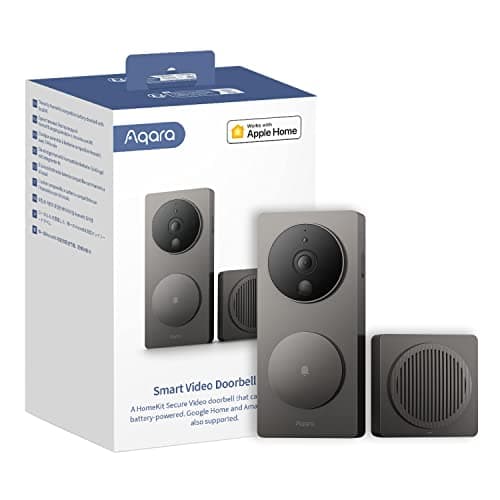
The Aqara Video Doorbell G4 is our pick for the best HomeKit doorbellfor one concrete reason: it is the strongest Apple HomeKit Secure Video doorbell we cover, it runs its face recognition on the device rather than in a cloud, and it works wired or on AA cells. If your house runs on Apple Home, that combination is the argument. If it does not, almost everything below is a reason to buy something else — and we will say so plainly.
HomeKit Secure Video is the whole point
Most doorbells route their footage and their app through the manufacturer's own cloud. The G4's reason to exist is that it does not have to: it supports HomeKit Secure Video, Apple's framework where the doorbell's clips are encrypted and stored in your own iCloud account, viewable in the Apple Home app alongside every other HomeKit device in the house. Notifications, two-way talk, recorded events and automations all live inside Apple Home rather than a separate app you have to check. For a household that has already standardized on Apple — iPhones, an Apple TV or HomePod acting as a home hub, iCloud for photos — that is not a novelty; it is the difference between a doorbell that fits the system and one that bolts an extra app onto it. Nothing else in our wired doorbell roundup does HomeKit Secure Video as its headline act.
What HomeKit Secure Video actually needs
This is the part to understand before you buy, because HomeKit Secure Video has two requirements the box does not shout about, and a buyer who lacks either will not get the feature they are paying for.
An Apple home hub.HomeKit Secure Video needs a resident Apple device acting as the home hub — an Apple TV or a HomePod that stays on and at home to process and route the encrypted recordings. If you have no such device, you can still see a live view, but the secure recording feature has nothing to run on. This is an Apple requirement, not an Aqara one, and it is the single most common reason a G4 buyer is disappointed.
An iCloud+ plan.The encrypted clips are stored in iCloud, which means an iCloud+ subscription — Apple's paid storage tier. The reassuring part is that HomeKit Secure Video cameras do not count against your iCloud storage the way photos do, and the tiers support a set number of cameras each, so many households already on iCloud+ for other reasons pay nothing extra. But it is a plan, and if never paying a subscription is your hard rule, weigh it honestly against the local-first alternatives. The general argument is in do video doorbells need a subscription.
Local face recognition, and why on-device matters
The G4 runs face recognition on the doorbell itself, not on a distant server. Practically, that means it can tell a familiar face from a stranger and trigger an automation locally — announcing a named person on your HomePods, say — and the processing that makes that decision never leaves the house. That is a meaningfully different privacy posture from a doorbell that uploads every frame to a cloud to be analyzed. It also means the useful behavior — the recognition and the automations built on it — keeps working as a local function; it is the HomeKit Secure Video storage, not the recognition, that leans on iCloud+. If keeping the processing under your own roof is part of why you are shopping, this is the standout feature in the category, and it is one Aqara has leaned into across its ecosystem.
Wired or battery, and the chime that bridges it
The G4 runs either way. Wiredinto an existing doorbell transformer it has constant power, so there is nothing to recharge and it behaves like a permanent fixture. The usual wired caveat applies and is worth repeating: a video doorbell draws power continuously where a mechanical bell drew it for half a second, so the transformer has to meet Aqara's published minimum, and an undersized one shows up as an intermittent doorbell that reboots mid-call rather than a dead one. Check the rating before you order. On batteryit runs on AA cells, which is an unusual and quietly practical choice — no proprietary pack to recharge, just cells you can swap in minutes from any shop — and it makes the G4 an option for a rented door or a house with no transformer.
Either way, the chime is included, and it is cleverer than most: the G4's chime unit also acts as the Wi-Fi bridge for the doorbell. You plug it into a socket indoors, it rings audibly when someone presses the button — independent of anyone's phone — and it is the piece that connects the doorbell to your network. That is one included accessory doing two jobs, and it means you are not buying a separate chime the way you are with some battery doorbells. The trade-off is that the bridge needs a sensible indoor location within range of both the doorbell and your router.
Where it sits next to Matter
The G4 speaks HomeKit today, and HomeKit is an Apple-controlled ecosystem — which is exactly the point for an Apple household and exactly the limitation for everyone else. If you would rather buy into a cross-ecosystem standard than a single vendor's walled garden, the direction the whole smart-home world is moving is Matter, and it is worth understanding before you commit to any doorbell: Matter smart home security explained lays out what it does and does not yet cover. Cameras and doorbells came to Matter later than locks and sensors, so for now a HomeKit doorbell like the G4 remains the pragmatic way into Apple Home rather than a Matter purchase — a distinction worth being clear-eyed about.
The honest cons
- 1080p, where the rest of the group is 2K. This is the softest image in our doorbell coverage. It is perfectly legible for identifying a visitor, but if you want to read a license plate at the curb or crop into fine detail, the 2K eufy and Tapo do it better. You are buying the G4 for the Apple behavior, not the pixels.
- The feature that sells it needs Apple gear. HomeKit Secure Video wants a home hub and iCloud+. If you do not already have an Apple TV or HomePod at home, factor that into the real cost, because without it you lose the reason to choose this doorbell.
- Ecosystem-locked. The G4 is at its best inside Apple Home and considerably less compelling outside it. A mixed-platform or Android household gets far less from it than from a local-first doorbell that does not assume an ecosystem.
Who should skip it
Any household not on Apple Home. This is the big one. If you do not run iPhones and do not have an Apple home hub, the single reason to buy the G4 evaporates, and you are left with a 1080p doorbell that costs more than a sharper 2K one. Buy the eufy E340 or the Tapo instead.
Anyone for whom resolution is the deciding number.At 1080p this is the softest image in the group. If you want the most detail on the step or at the curb, the eufy E340's dual 2K cameras or the Tapo's 2K+ single lens are the better buys, and both also record locally with no plan.
Anyone who refuses any recurring cost and wants the Apple feature.HomeKit Secure Video needs iCloud+. If you want the doorbell's recorded footage but will not pay for any storage tier, the G4's marquee feature is not for you — though its local automations and face recognition remain free, and a fully local-first doorbell may suit you better.
The thing this doorbell cannot tell you
Whether a door or window elsewhere on the house is open. A doorbell watches one approach, the front step, and reports motion in front of a lens — it has nothing to say about the back door, a ground-floor window or the garage side door, and it cannot report that a door was actually opened. A few contact sensors close that gap for a fraction of the price per opening and report a plain binary fact instead of a judgment about pixels. They are ranked at best door and window sensors— and Aqara's own sensors slot into the same Apple Home the G4 lives in. The wider doorbell category, wired and battery, sits on the doorbells hub, and the full field, HomeKit and otherwise, is on the best video doorbells ranking.
How this review was compiled
Products we claim to have tested: zero. We have not put this doorbell on a door, and we are not going to imply otherwise. What this review is built from is Aqara's published product and support documentation, Apple's published requirements for HomeKit Secure Video, and the general engineering of low-voltage doorbell circuits and battery-powered cameras — every one of which is a source you can open yourself, and they are listed below. Our scoring rubric and the weightings behind it are published in full at methodology, so you can disagree with our conclusion using the same public material we used to reach it.
The alternatives worth comparing
eufy Video Doorbell E340 — if you want the sharpest step, not Apple Home
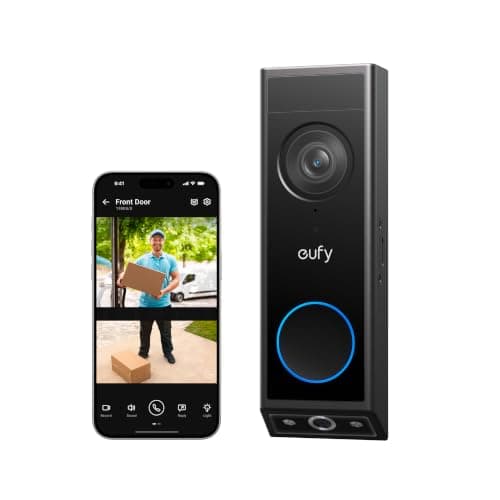
The E340 is our overall pick for a reason: two 2K cameras, one on the visitor and one aimed straight down at the step, so a parcel is framed properly rather than smeared into a wide-angle corner. It records locally with no plan, wired or on battery, and it is a sharper image than the G4 across the board. What it does not do is live natively inside Apple Home the way the G4 does. If integration with an Apple house is not your priority, the E340 is the stronger doorbell, and it heads the wired roundup for that reason.
Tapo 2K+ Video Doorbell — if you want no plan and a forgiving install
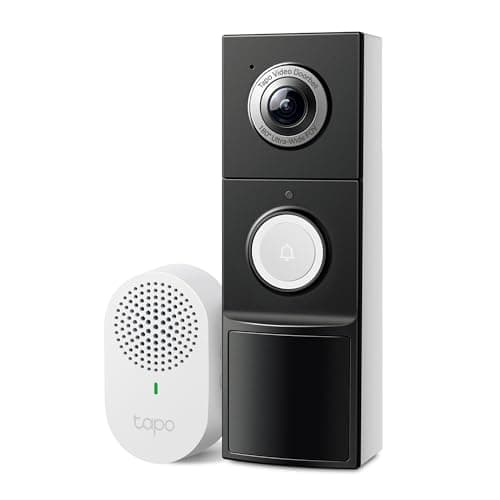
The Tapo runs wired or on battery, includes a plug-in chime, and records to a microSD card with person, vehicle and package detection free — no subscription, no iCloud+, no home hub. Its 180-degree lens shows the doorstep without a second camera, and its 2K+ sensor is sharper than the G4's 1080p. It is the more honest recommendation for a household that simply wants a capable local doorbell and is not committed to any one ecosystem. Where the G4 wins is Apple integration; where the Tapo wins is being ecosystem-neutral and plan-free.
Where the G4 sits between them
The eufy E340 is the sharper, dual-camera pick and our overall winner; the Tapo is the forgiving, plan-free, ecosystem-neutral pick. The G4 is neither of those and does not try to be — it is the doorbell you buy specifically because your house runs on Apple Home and you want HomeKit Secure Video with on-device face recognition. Judge it on that axis and it is the best in the group; judge it on resolution or ecosystem-neutrality and it is not, which is exactly why it wins the HomeKit award rather than the overall one. The full category is indexed on the doorbells hub.