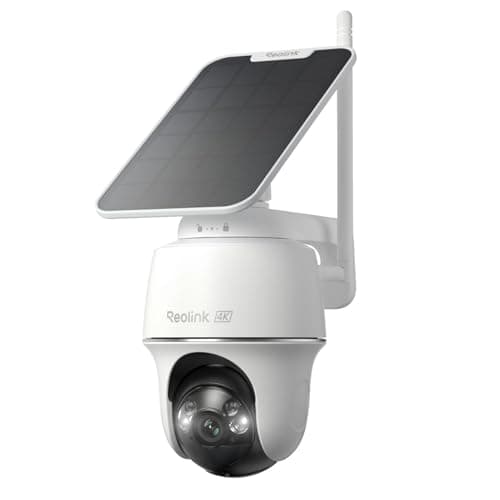
The best solar security camera is the eufy SoloCam S340. It carries its own solar panel, pans a full 360 degrees, pairs a wide lens with a zoom lens, and keeps the footage on the camera itself with no monthly plan — so once it is on the wall in the sun it is close to install-and-forget. It records at 3K rather than the 4K the Reolink manages, and that is the one honest catch you trade for the all-in-one design.
This is a spoke off the main wireless security camera roundup, and it exists because “solar” is the single feature people most often misunderstand when they shop for a wire-free camera. A solar camera is not a camera that runs on sunlight. It is a battery camera with a small photovoltaic panel bolted to it, and the panel's only job is to put charge back into the battery during the day. Get that one distinction right and the whole category makes sense; get it wrong and you buy an expensive battery camera that you now have to climb up and recharge by hand, which is exactly the chore the solar panel was supposed to end.
What decides a solar camera is not the camera — it is the sun where you mount it. The panel tops up the battery; it does not power the camera directly. So the numbers on the box matter less than one question the marketing photos never answer: will the spot you have in mind get enough hours of real, direct sun to harvest more than the camera draws? Answer that first, then pick the model.
The best solar security cameras, compared
Compiled from manufacturer specifications and published support documentation, August 2026. Every camera here runs on a rechargeable battery with an attached solar panel; none of them draws mains power, and none requires a subscription to record.| Model | Resolution | Solar | Pan / tilt | Storage | Subscription |
|---|
| eufy SoloCam S340 | 3K, dual lens | Integrated panel on the camera | 360-degree pan | Onboard local storage in the camera | None for local recording |
|---|
| Reolink Argus PT Ultra | 4K | Attached solar panel | Pan and tilt | microSD card in the camera | None for local recording |
|---|
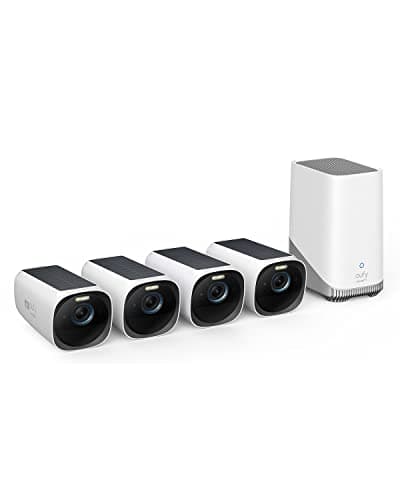
| eufyCam 3 (S330) | 4K | Integrated panel on each camera | Fixed (no pan or tilt) | Included HomeBase 3, expandable local drive | None for local recording |
|---|
How a solar security camera actually works
Every camera here runs off a rechargeable battery around the clock. The solar panel never powers the camera directly — it feeds the battery. Think of it as a slow trickle back into a tank that every motion event drains a little. The camera is healthy when the day's harvest is bigger than the day's draw, so the battery either holds steady or creeps up over a week. It is in trouble when the draw is bigger than the harvest, because then the panel only slows the decline instead of reversing it, and the battery walks down to empty over a month or two. Nothing on the spec sheet tells you which of those two situations you are in. Your mounting spot does.
The panel needs hours of direct sun, not daylight
A photovoltaic panel harvests almost nothing from ambient shade or north-facing sky light. It wants the sun's disc on its face, and it wants it for a stretch of hours, because a panel angled away from the sun or shaded for most of the day collects a small fraction of what the same panel collects in the open. This is why siting the panel is the real install decision. A camera under a deep porch overhang, tucked below an eave, behind a tree that leafs out in summer, or on a shaded north elevation can look perfectly placed for watching and be a poor place for charging. On several of these the panel is a short lead away from the camera on the eufy models and attached to the Reolink, so you can often mount the camera in the shade and route the panel a short distance to a sunny patch — that flexibility is worth using.
A busy motion zone in a shaded spot can outrun the panel
The draw side of the equation is set by how often the camera wakes. Every motion event boots the camera, records, encodes and often transmits, and that is where the charge goes. A camera watching a quiet side return that fires a handful of times a day will stay topped up on very little sun. The identical camera aimed at a public sidewalk or a busy driveway, triggering on every pedestrian, passing car and swaying branch, draws far more — and if that busy camera is also in a shaded spot, the draw can simply outrun what the panel harvests. Same hardware, same panel, opposite outcome, and the two variables are your traffic and your sun, neither of which is printed on the box. The fix is the same first step you would take on any battery camera: trim the motion zones so the road and sidewalk fall outside them, which cuts the draw and lets a modest amount of sun keep up.
Short winter days are the real test
A solar camera that sails through July can still sag in December, because the harvest side collapses when the days are short, the sun sits low, and the panel spends more of its short day in shadow. A camera that runs net-positive in summer but slightly net-negative across the darkest weeks is normal, and the battery is the buffer that carries it — it draws down over winter and refills in spring. The practical consequence is that you judge a solar install by its worst month, not its best, and you site the panel for the low winter sun, not the high summer one. None of this makes solar the wrong choice; it makes an honest one depend on where you live and where you mount it.
The picks in detail
eufy SoloCam S340 — the all-in-one that wins
The S340 is the pick because it does the most in one unit. The solar panel is integrated, so there is no separate accessory to buy or lose; it pans a full 360 degrees, so a single camera can sweep a whole corner of a property instead of staring at one fixed cone; and it carries two lenses, a wide one for context and a zoom for detail on the same scene. The footage lives on the camera itself with no plan gating access to your own recordings, which is the running-cost story that runs through this whole page. It sits at the premium end of a single-camera purchase, and the honest limitation is resolution: it records at 3K, a genuine step below the Reolink's 4K, so if the last word in fine detail is what you are buying, this is not the sharpest option here. For most people the pan, the dual lens and the onboard storage matter more day to day than the pixel count, which is why it still leads. Its published weakness is the one every solar camera shares — it needs a mounting spot with real direct sun, and under a deep overhang the panel cannot keep it charged.
Reolink Argus PT Ultra — the sharpest image
The Argus PT Ultra is the one to buy when resolution is the priority. It is a genuine 4K camera with pan and tilt and a solar panel, and it records to a microSD card in the camera with no account tier and no feature gating — Reolink is the brand that keeps not charging for basic functionality, and that is the entire reason it earns a place here. The extra vertical axis matters more than it sounds: pan-and-tilt lets you angle the view down a slope or up a drive as well as sweep side to side, where the eufy's 360-degree pan is a horizontal sweep. The honest cons are Reolink's, published and fair to weigh: the app is less polished than eufy's or Ring's, and like every battery-and-solar camera it records events rather than a continuous 24/7 stream — if a rolling timeline is what you need, no solar camera does it and the answer is a wired camera. Reolink also publishes RTSP and ONVIF support across much of its range, which is what makes its cameras usable in Home Assistant or Blue Iris; if that is your world, start at eufy vs Reolink, which sets the two brands side by side.
eufyCam 3 (S330) — the best multi-camera local system
The eufyCam 3 is a different shape of purchase: not one camera but a 4K solar kit that records to an included HomeBase 3 sitting indoors, with expandable local storage. It ranks third here only because it answers a different question — not “what is the best single solar camera” but “how do I cover a whole property on 4K with no monthly bill.” For that job it is close to unique: retention becomes a drive-size decision rather than a plan tier, and four solar cameras cover a typical detached home's approaches in one buy. The cameras are fixed rather than pan-and-tilt, so you place each one on its cone deliberately instead of sweeping. Two honest cons: the up-front cost is high, because you are buying the base and four cameras at once even though the saving is real over years; and everything lives on the HomeBase in your house, so if a burglar takes the base the recordings go with it — a genuine trade-off against a cloud system that nobody in this category states plainly. It gets its own full review because the local-system argument deserves the space.
Which solar camera to buy
- You want the best single solar camera, full stop. eufy SoloCam S340. The integrated panel, 360-degree pan, dual lens and onboard storage do the most in one unit, and nothing is gated behind a plan. Accept 3K instead of 4K and give it a spot with real sun.
- You want the sharpest picture and open-standard access. Reolink Argus PT Ultra. True 4K, pan and tilt, microSD recording with no gating, and published RTSP/ONVIF support for Home Assistant and Blue Iris. The app is less polished and it records events, not a continuous stream.
- You want to cover a whole property on 4K with no bill. eufyCam 3 (S330). Four 4K solar cameras and an included HomeBase with expandable local storage. It is the most expensive way in and the cameras are fixed, but the no-subscription whole-home story is close to unmatched.
How we compiled this
Products we claim to have tested: zero. Most pages in this category imply someone bolted five solar cameras to a fence and watched the battery graphs for a season. We have not, and we would rather say so than pretend a lab we do not have. What we do instead is read each manufacturer's published specification, solar-panel and battery documentation, and support pages — especially the quiet lines about resolution, what a plan gates, and how the panel connects — work out the running cost, and cite it. Rankings weight storage location, usability with no plan, the image system, the panel and power design, and the ecosystem, and every pick carries a specific reason to skip it. The full rubric is at methodology, the rest of the category sits on the cameras hub, and if you are still deciding what kind of camera you need, start with how to choose a security camera.
How to choose a solar security camera
First, prove the spot gets sun before you pick a model
The most useful thing you can do costs nothing: stand where the camera will go, at the height it will sit, and watch how the sun moves across that face over a day. If the panel will get a few hours of direct sun through the year — including the low winter sun, not just the high summer one — solar is a good fit and you can choose on features. If the spot is shaded most of the day by an eave, a wall, or a tree that leafs out, then either route the panel on its lead to a sunnier patch nearby, or accept that you are really buying a battery camera you will recharge by hand and choose on that basis instead. The camera watches one thing and the panel needs another; they do not have to be the same square foot of wall.
What actually decides the price
In rough order: resolution and the lens system, where 4K and a second zoom lens cost more than a single 3K sensor; whether it pans and tilts, since a motor and a second axis add cost over a fixed camera; and above all the storage architecture. A single camera with onboard or microSD storage — the S340 and the Argus — is a one-time buy with nothing after it. A kit with an included base station — the eufyCam 3 — costs more up front because you are buying the HomeBase and several cameras together, and that base is exactly what turns the whole set into a plan-free system. What does not show up in the purchase price on any of these is a subscription, because none of them needs one to record locally; that is the entire point of the category and the reason it appears on our no-subscription camera shortlist.
The mistake buyers make
The most common one is treating solar as a resolution or feature decision and mounting the camera wherever the view is best, then wondering in November why the battery is walking down. Solar is a siting decision first. The second most common mistake is leaving the motion zones wide open so the camera fires on the road all day, which drains the battery faster than a modest panel can refill it — trim the zones on day one so the draw drops to what your sun can cover. The third is buying 4K and expecting a continuous 24/7 timeline from it: no solar camera records continuously, they record events, and if a rolling timeline is non-negotiable you want a wired camera instead, which the eufyCam 3 review and our comparisons spell out. The mechanism behind that limit, and the arithmetic for what continuous capture costs in disk space, is in do security cameras record all the time.
The November problem has a specific cause worth knowing before you buy rather than after: the panel harvests a fraction of its rating on short low-angled days, and the lithium cell is not permitted to charge below freezing at all, which is a protection rather than a fault. Do solar security cameras work in winter has the published cut-off figures and the four fixes in order of how well they work. And if the camera is going on an outbuilding rather than the house — a shed, a barn, a detached garage, where there is no socket and the signal is marginal — that case is ranked separately in the best cameras for sheds and barns.
If you have narrowed it to the top two
The first two picks on this page are close enough that the choice between them is not really a specification question. Both are solar, both pan, both record locally and neither needs a plan, so the decision turns on the storage medium and on whether anything other than the maker's own app can read the stream — which is the whole subject of eufy SoloCam versus Reolink Argus.
The five-year number
Compare the hardware plus five years of whatever keeps it running. Every camera on this page is the purchase price and then, for local recording, nothing — solar handles the power and a card or the included base handles the storage, so there is no monthly line item to multiply out. That is the quiet advantage of a solar-plus-local design over a cloud camera, where the purchase price is only the entry fee and the subscription runs for as long as you own the hardware. We keep the running-cost math as a maintained comparison rather than printing a figure here that would be stale within a quarter; the cloud-versus-local trade-off across brands is set out at eufy vs Arlo, which is the cleanest example of a no-plan local system against a subscription-led one.
What a camera still will not tell you
A camera reports motion in front of a lens; it cannot tell you a door or window has been opened, only that something moved. It watches an approach, not an opening. A few contact sensors cover the back door, a ground-floor window and the garage side door for a fraction of the price per point and report a plain binary fact instead of a judgment about pixels. Those are ranked at best door and window sensors, and the two together — a solar camera on the approach and sensors on the openings — cover a house far better than either alone.