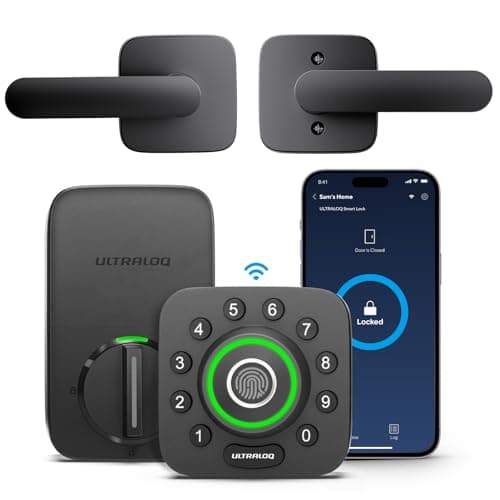
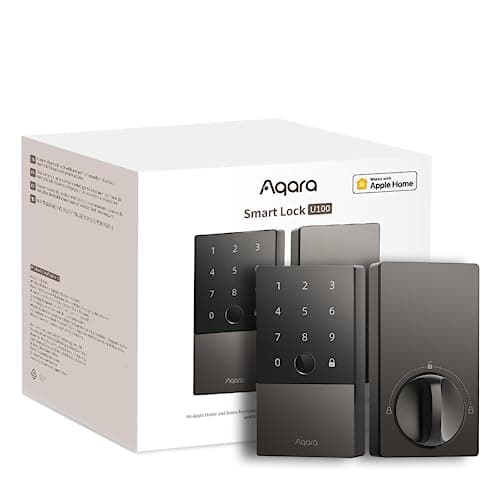
Both of these are fingerprint deadbolts with a keypad and a mechanical key, and on the door they feel almost the same. The one difference that decides the purchase is how each reaches your phone: the Aqara Smart Lock U100 adds Apple Home Key and speaks to Apple Home, Google Home and Alexa, but leans on a hub for anything remote; the Ultraloq U-Bolt Pro has Wi-Fi built into the lock and needs no bridge, at the cost of Home Key.
This is a straight head-to-head between two locks that land in the same price band and get bought by the same person — someone who wants a print reader on the door and does not want to pay a Schlage price for it. Neither charges a subscription for any lock function, so this comparison is not about recurring cost. It is about one fork in the road (Home Key plus a hub, or built-in Wi-Fi and no hub) and two smaller trade-offs that follow from it: batteries and the keypad. The wider field is on the best fingerprint door locks roundup; this page is just the two-way call.
Aqara Smart Lock U100 vs Ultraloq U-Bolt Pro, side by side
Compiled from manufacturer specifications, August 2026.| Model | Entry methods | Remote access | Hub needed? | Batteries | Ecosystem |
|---|
| Aqara Smart Lock U100 | Apple Home Key, fingerprint, code, key, Bluetooth | Through an Aqara hub or an Apple Home hub | Yes, for remote — the lock itself is Bluetooth | 8x AA | Apple Home, Google Home and Alexa; Home Key |
|---|
| Ultraloq U-Bolt Pro Wi-Fi | Fingerprint, code, app, Bluetooth, auto-unlock, key | Built-in Wi-Fi, no bridge | No | 4x AA | Ultraloq app; smaller integration range; no Home Key |
|---|
The decision rule. Buy the Aqara U100if you live in Apple Home and want tap-to-open Home Key, or you want one lock that answers to Apple Home, Google Home and Alexa — and you already own, or will add, an Apple TV, HomePod or Aqara hub for remote access. Buy the Ultraloq U-Bolt Pro if you want remote unlock with no extra box to buy, an anti-peep keypad, and you do not care about Home Key. If you have no hub and refuse to buy one, the Aqara becomes a Bluetooth lock at the door and unreachable from work, and the Ultraloq is the clear pick.
The entry methods overlap more than they differ
Start with what is the same, because it is most of the lock. Both open by fingerprint, by a code on the keypad, and by a physical key in an emergency, and both keep those working with the internet down — the radio only carries remote access and notifications, not the act of unlocking. If your household is a mix of people who like a print, people who like a code, and one person who insists on a key, either lock satisfies all three.
The differences at the door are small. The Ultraloq puts its fingerprint reader on the outside knob, where your hand already lands, and adds an auto-unlock that opens as your phone approaches over Bluetooth. The Aqara adds the one credential the Ultraloq does not have: Apple Home Key, a tap-to-open card that lives in the iPhone Wallet and works even when the phone has dropped into low-power reserve. That is a genuinely nicer daily unlock — if, and only if, the phones in the house are iPhones. On Android it is a feature you will never use, and the comparison collapses back to fingerprint-versus-fingerprint.
One caveat applies to both, because it applies to every fingerprint lock: capacitive print readers misread wet, cold or worn fingers, so enroll a code as a backup on whichever you buy. On a door that faces weather with no overhang, you will fall back to the code often enough that the fingerprint reader stops being the reason you bought the lock — a point the Ultraloq's own record makes plainly, and one that argues for a plain keypad lock on a fully exposed door.
Remote access is the real fork
This is the sentence that should decide the purchase. The Aqara U100 is, at heart, a Bluetooth lock. Home Key is a proximity credential, not a remote one — it opens the door when your phone is against it, and does nothing from the office. For remote lock, unlock and notifications, the U100 has to talk through an Aqara hub or an Apple Home hub such as an Apple TV or a HomePod. If you already run an Apple Home or Aqara household, that hub is a box you already own, and the U100's remote features cost you no extra hardware. If you own no such box, the U100 is excellent while you are standing at the door and simply unreachable when you are not.
The Ultraloq answers the same question by putting the Wi-Fi radio inside the lock. There is no bridge to buy, site and power — the lock joins your network directly and you reach it from anywhere. That is the cleaner remote story for anyone who does not want to build a smart-home hub around one deadbolt, and it is the U-Bolt Pro's strongest single argument. The cost of that convenience shows up in the next section, at the battery compartment.
Batteries: eight AA against four AA
The Aqara carries eight AA cells; the Ultraloq carries four. That is not just a bigger number — it points to a real difference in how often you are at the door with a screwdriver. The Aqara pairs a large cell reservoir with a Bluetooth radio that only wakes to talk to a nearby hub, which is a light electrical load. The Ultraloq pairs half the cells with a Wi-Fi radio in the lock, and keeping a Wi-Fi connection fed is the heaviest draw a battery lock takes on. The spec sheet therefore points the same way common sense does: the U100 is the one you should expect to open less often for a battery change, and it is one of the longer-lived locks per change on that count.
There are two honest asterisks. Battery life on any lock is set by how much you use it, so a busy front door narrows the gap, and neither manufacturer's headline figure survives contact with a real household unchanged. And the Aqara's advantage comes with its own chore: eight cells are eight cells to keep matched and replace together, where the Ultraloq asks for four. Fewer, more often, against more, less often — that is the trade, and neither answer is wrong.
Ecosystem, and the anti-peep keypad
On integrations the Aqara is the broader lock. It joins Apple Home, Google Home and Alexa out of the box, and it can run local automations without a manufacturer cloud account, which matters if you want the house to keep reacting with the internet down. The Ultraloq's world is smaller and more app-centric; its third-party integrations lag the bigger ecosystem brands, so if you want the lock to be one node in a large multi-vendor smart home, the Aqara is the safer long-term bet.
The Ultraloq answers with two features the Aqara's spec does not headline. Its keypad is anti-peep: you can pad a real code with junk digits in front of a stranger, so the person watching over your shoulder in a shared hallway learns nothing usable. And it bundles a door sensor that tells you the door is actually shut, not merely that the bolt threw into thin air because the door was ajar. Both are small, practical, everyday-security touches, and they are part of why the U-Bolt Pro earns its place opposite a lock with a flashier ecosystem story.
How we compiled this
Products we claim to have tested: zero. We have not mounted either of these on a door, and we are not going to imply a lab we do not have. What this comparison is built from is each manufacturer's published specification and support documentation — the entry methods, the hub and Wi-Fi requirements, the cell counts and the ecosystem lists — read against the general engineering of battery locks and fingerprint readers, and cited below so you can check every claim yourself. Where the two locks are ranked against the rest of the field, it is on the best fingerprint door locks roundup, and the full slate of two-way calls sits on the comparisons index.
How to choose between them
Start with the phone in your pocket
If the household runs iPhones, Apple Home Key is a real, everyday upgrade — a tap on the lock with a phone you are already holding, no app to open — and that pulls hard toward the Aqara U100. If the household is Android or mixed, Home Key is a feature nobody will use, and the decision collapses to the simpler remote story, which is the Ultraloq's built-in Wi-Fi. Do not pay for a credential your phones cannot present.
Then count the boxes on your network
The Aqara only becomes a remote lock once there is an Apple TV, a HomePod or an Aqara hub on the network to carry it. If one of those is already there, the U100's remote access is effectively free of extra hardware and the Home Key advantage comes with no catch. If none of them is there and you have no intention of buying one, the U100 is a Bluetooth lock from anywhere past the doorstep, and the Ultraloq — which needs nothing but your Wi-Fi — is the honest pick.
What actually decides the price
In rough order: the breadth of the ecosystem and the Home Key credential on the Aqara side; the built-in Wi-Fi radio and the bundled door sensor on the Ultraloq side; and the size of the battery reservoir. Neither of these is a premium lock, and neither gates a single function behind a subscription, so the number you are comparing is the purchase price plus batteries and nothing else. If you want to see where both sit against cheaper and dearer rivals, the best fingerprint door locks roundup places them in the full field.
The mistake buyers make
The most common one is buying the Aqara for remote access without owning a hub, then discovering it will not open from work — the fix is to budget for an Apple TV, HomePod or Aqara hub at the same time, or to buy the Ultraloq instead. The second is putting either fingerprint lock on a fully exposed, weather-facing door with no overhang and expecting the print reader to be the primary way in; wet and cold fingers defeat any capacitive sensor, so enroll a code, and on a truly exposed door consider whether a plain keypad lock does the same job for less. Read each lock's own review before you commit: the Aqara Smart Lock U100 review and the Ultraloq U-Bolt Pro review each go deeper than a comparison can.