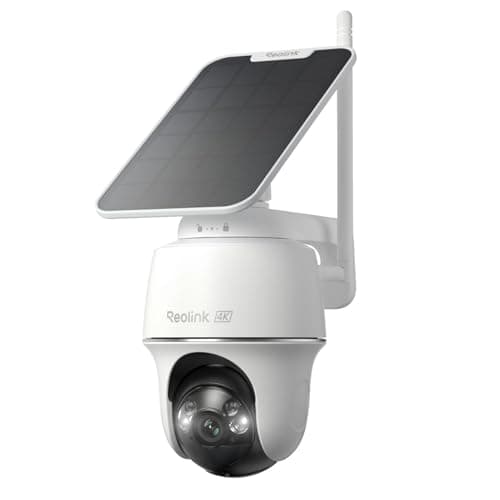
The Reolink Argus PT Ultra is our pick for the best 4K wireless camera. It records 4K, charges off a solar panel, sits on a pan-and-tilt head that re-aims from the app, and writes to a microSD card in the camera with no account and no feature gating. Reolink's habit of not charging for basic functionality is the whole reason it is here — and the catches that come with a 4K camera running off a battery are exactly what this review is about.
What it is
Strip the marketing and this is a wire-free outdoor camera built around three decisions. First, resolution: it captures 4K, so you can crop into a recorded frame and still resolve detail at the distances a yard or a drive puts a subject. Second, power: an integrated solar panel keeps an onboard battery topped up, so there is no cable to run and, in a sunny spot, no ladder every few months to recharge. Third, movement: a motorized pan-and-tilt head lets you swing the camera across a wide arc and re-point it at a subject from the app, so one mount covers ground that a fixed lens would need two cameras to watch. Put together, that is a camera you can site almost anywhere the sun reaches and still get high-resolution coverage of a wide area, with the footage kept on a card you own. It sits in the solar field on the best solar security cameras roundup for the same reasons.
The pan-and-tilt head is the point
A fixed camera sees one cone and nothing outside it; to widen the view you either accept more lens distortion or you buy a second camera. The Argus PT Ultra's pan-and-tilt head answers that mechanically. You can pan it left and right and tilt it up and down from the app, so a single unit on the corner of a house can be aimed down the drive in the morning and across the yard in the afternoon, and Reolink's pan-tilt line includes motion tracking that swivels the camera to keep a moving subject in frame rather than letting it walk out of the shot. That is genuinely useful on a wide approach, and it is the feature that separates this from an ordinary fixed solar camera.
Two honest qualifications. A pan-and-tilt camera only points one direction at a time, so while it is aimed down the drive it is not watching the yard — tracking helps, but a moving head is not the same as two fixed cameras covering both approaches at once. And the head reframes the scene; it does not magnify it. There is no optical zoom here, so for reading a plate at a fixed distant point, an optically zoomed wired camera resolves more detail than this one repositioning and digitally cropping. The Argus PT Ultra trades that long-distance sharpness for coverage and no wiring, which is the right trade for a lot of houses and the wrong one for a few.
Solar and battery: siting the panel is the whole job
The power story is the best thing about this camera and the easiest to get wrong. The integrated solar panel trickle-charges an onboard battery, and in a position that catches a few hours of direct sun a day it is genuinely install-once: mount it, point the panel at the sky, and you stop thinking about power. That is the promise, and it holds — but only if the panel actually sees the sun.
The mistake that undoes it is mounting for the view and forgetting the panel. A north-facing wall under a deep eave, a spot shaded by a tree that leafs out in spring, or a corner that only catches an hour of low winter sun will not keep the battery topped up, and you are back to hauling a ladder out to recharge a camera you bought specifically so you would not have to. Before you drill, watch where the sun falls on the mounting spot across a day, and remember that many solar cameras let you site the panel a short run away from the camera itself — so you can put the lens where the view is and the panel where the light is. Get that right and the running cost of this camera is close to nothing; get it wrong and you have bought an expensive battery camera with a charging chore.
4K on a wireless camera: the trade-offs
Running 4K off a battery, rather than a constant PoE supply, forces two compromises that are worth understanding before you buy, because they are the same compromises every battery camera makes and Reolink does not hide them.
It sleeps, so there is a wake-up delay and no continuous timeline.A wired camera keeps its sensor awake around the clock and can hold a scrubbable 24/7 record. A battery camera cannot afford that; it sleeps until a motion sensor fires, then wakes, boots the sensor and starts recording. The result is a fraction of a second between the trigger and the first frame — occasionally enough that a fast subject is half out of frame at the start of a clip — and discrete event clips rather than a rolling timeline. For most yards and drives that is fine. If you specifically need a continuous 4K record you can scrub through, that is a wired camera, and no battery model does it, this one included.
4K clips are large, and the storage is a single card.The Argus PT Ultra records to a microSD card in the camera, and 4K frames are heavy — roughly four times the bytes of 1080p — so a card fills faster than people expect. That is a fine design for event-based recording, where the camera only writes when something moves, but it is not a place to keep weeks of continuous 4K, and there is no base station or NVR here to offload to. Size the card generously, and lean on person and vehicle filtering so the camera is not burning the card on every passing cloud.
Local microSD, and what it means for the bill
Here is the part that makes Reolink Reolink. The footage lives on a card in the camera, and recording, playback and notifications work with no account tier and no subscription — nothing is gated behind a plan. Set against a cloud-only rival, the arithmetic is simple: this camera is the purchase price plus a card, paid once, and then nothing, where a cloud camera is the purchase price plus a monthly fee for as long as you want to keep the clips, and 4K plan tiers sit at the top of the price list because the files are big. Over the years you will own the camera, that gap is usually larger than any difference in sticker price. The full version of that argument is in the 4K roundup, which lays the cloud-versus-local cost out across the whole resolution field.
Reolink also publishes RTSP and ONVIF support across much of its range, which is what makes a camera usable in Home Assistant, Frigate or Blue Iris rather than trapped in one app. If you run your own recorder, that matters, and it is a real point in this camera's favor over the more closed budget field.
Fit and install: what to check before you order
Because it is wire-free, the physical questions are about mounting and sun, not cabling. Pick a spot high enough to be out of easy reach — a wire-free camera within arm's length is a camera that can be unclipped and walked off with, and because the recording is local, taking the camera takes the footage. Confirm the mount surface will hold the bracket, and if you are on brick expect a masonry bit. Then do the sun check above: watch where light falls across a day and site the panel for it, using a separate panel run if the best view and the best light are not the same spot.
After mounting, the first configuration job is the motion setup. Trim the detection zones so a public sidewalk or a busy road falls outside them, and turn on person and vehicle filtering, because on a battery camera every false trigger is a wake event that records, encodes and transmits — a small withdrawal from the battery and a chunk of the card. A camera tuned to record people and vehicles rather than every leaf is the one that runs for months on solar; one left on factory defaults facing traffic is the one people complain about online. Most of that difference is configuration, not hardware.
The honest cons
- The app polish is behind eufy's and Ring's.The camera does what it says, but Reolink's software is more utilitarian than the big-brand apps. If a polished, hand-holding app is a priority, weigh that.
- No continuous recording. Like every battery-and-solar camera, it records events, not a 24/7 timeline, and there is a brief wake-up delay before the first frame. If a continuous record is the requirement, this is the wrong tool.
- No optical zoom, and one card for storage. It reframes with the pan-and-tilt head rather than magnifying, so it does not resolve distant fixed detail the way an optically zoomed wired camera does, and 4K clips fill a single microSD card faster than a lower-resolution camera would.
- Local storage travels with the camera.The footage is on a card in the unit, so a stolen camera takes its own recordings — the direct trade-off for never paying a cloud bill. Mount it out of reach and it is a non-issue.
Who should skip it
Anyone who needs 24/7 continuous recording. No battery camera does it, and this one is no exception. Continuous recording means a wired camera, which in practice means PoE, and that field is a different page.
Anyone whose mounting spot gets no real sun.The solar panel is most of the value here. Under a deep porch overhang or on a permanently shaded elevation, and with no way to run the panel to a brighter spot, you are buying an expensive battery camera you will have to climb up and recharge — at which point a wired camera or a different design makes more sense.
Anyone whose one job is a plate at long range.With no optical zoom, this camera reframes but does not magnify. For reading detail at a fixed distant point, an optically zoomed wired camera captures more. Coverage of a wide area is this camera's strength; pinpoint long-distance detail is not.
The thing this camera cannot tell you
Whether a door or window has actually been opened. A camera reports motion in front of a lens and leaves you to judge the pixels; it says nothing definite about an entry point, and while this one is pointed down the drive it is not watching the back door. A few contact sensors report a plain binary fact — open or closed — for a fraction of the price per point, and they pair naturally with a camera rather than competing with it. The wider camera category, wired and wireless, is indexed on the cameras hub, and our full scoring rubric is at methodology.
How this review was compiled
Products we claim to have tested: zero. We have not mounted this camera on a wall, and we are not going to imply otherwise. What this review is built from is Reolink's published product and support documentation — the 4K specification, the solar and battery notes, the pan-and-tilt and tracking behavior, and the RTSP and ONVIF support — together with the general engineering of solar-charged battery cameras, every part of which is a source you can open yourself and all of which are listed below. Our scoring rubric and the weightings behind it are published in full at methodology, so you can disagree with our conclusion using the same public material we used to reach it.
The alternatives worth comparing
eufy SoloCam S340 — if you want dual lenses and onboard storage
The SoloCam S340 is the closest sibling in spirit: solar, wire-free, a pan capability and local onboard storage, with no subscription for recording, live view or notifications. It runs a 3K dual-camera system rather than a single 4K sensor, pairing a wide lens with a zoomed detail view of the same scene, and it keeps the footage on the camera itself. Choose it over the Argus PT Ultra if the dual-lens wide-plus-detail framing appeals more than the single 4K sensor and the motorized head; it carries the same solar caveat — a north wall under an eave will not keep it charged. It has its own full review.
TP-Link Tapo MagCam 2K+ — if easy repositioning matters more than 4K
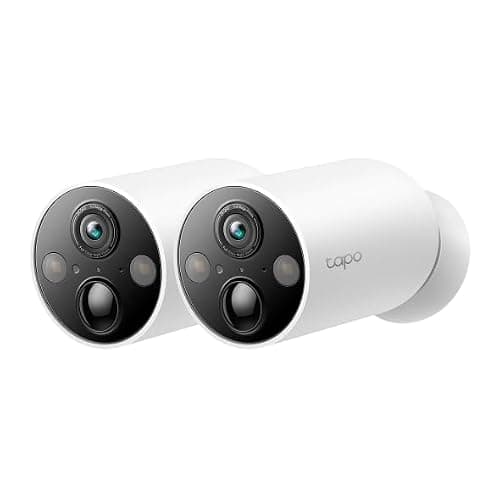
The MagCam trades resolution for placement. It is a 2K+ wire-free battery camera on a magnetic mount, so siting it is a two-minute decision rather than a drilling project, and you can move it after living with the view for a week — something almost nobody does with a drilled bracket. It still records to a microSD card with no plan. The compromises are the ones a magnet implies: a camera within reach is a camera that can be lifted, so mount it high, and 2K resolves less distant detail than the Argus PT Ultra's 4K. Choose it when flexible mounting and quick repositioning matter more than the highest resolution or a moving head.
Where the Argus PT Ultra sits between them
The SoloCam S340 is the dual-lens onboard-storage pick; the MagCam is the reposition-anywhere pick; the Argus PT Ultra is the one to buy when you want a single high-resolution 4K sensor and a motorized head that can sweep and track across a wide approach, with the footage on a card you own and no plan attached. All three keep every core function working with no subscription, which is the standard the whole solar camera roundup is held to, and the resolution question specifically is settled on the 4K roundup.