HUB 06 · Guides
Do Smart Locks Need Wi-Fi? What Each Protocol Costs You Offline
Most smart locks do not need an internet connection. Losing it costs you remote unlocking and away-from-home alerts, not the lock.
We earn a commission if you buy through our links. It does not change the price you pay, and it does not decide our picks — our selection criteria are published in full. How this works.
Do smart locks need wifi?
Most do not. Bluetooth, Zigbee, Z-Wave and Thread locks all operate without an internet connection — you lose remote unlocking and away-from-home notifications, not the lock. Only Wi-Fi-native locks stop being useful when the connection drops. Here is what each protocol costs you when the router goes down.
The confusion comes from a genuine ambiguity in the question. “Needs wifi” can mean three different things: does the lock join my wireless network, does it need the internet to function, and does it need a working connection to open the door. The answers are usually no, no and definitely not, in that order — but the marketing on most listings does not distinguish between them, so buyers assume the worst.
Start from the mechanism. Every lock on this site is, underneath the electronics, a motor turning a bolt. The keypad is wired to that motor. The battery is in the door. Nothing about entering a code and having the bolt retract involves a network of any kind. That is true of the Wi-Fi locks too. What the radio carries is everything except opening the door from where you are standing: remote unlock, push notifications, guest code management from away, voice assistants, and automation triggers.
The protocol table
| Protocol | Needs a hub or bridge? | Works with internet down | What you lose | Battery draw |
|---|---|---|---|---|
| No radio at all | No | Everything, always | Nothing, because there was never anything remote | Lowest |
| Bluetooth (BLE) | Only for remote access | Codes, app unlock at the door, auto-unlock | Remote unlock and away-from-home alerts | Low |
| Thread (Matter) | Thread border router required | Codes, local automations, hub control on your own network | Access from outside the house, unless your controller offers remote | Low |
| Zigbee | Zigbee hub or coordinator required | Codes, local automations, hub control | Access from outside the house | Low |
| Z-Wave | Z-Wave hub required | Codes, local automations, hub control | Access from outside the house | Lowest of the mesh radios |
| Wi-Fi (built in) | No, joins your router directly | Codes, fingerprint, key. Nothing networked. | All app control, all notifications, all remote access | Highest |
| Wi-Fi via a bridge | Bridge plugged in near the door | Codes and Bluetooth at the door | Remote access and notifications | Low at the lock, mains at the bridge |
Read that table one column at a time. Every single row says the keypad keeps working. The differences are entirely about what happens away from the door. If you never intend to unlock the house from your office, the protocol question collapses into a battery-life question, and the answer is Z-Wave, Thread, Zigbee or no radio at all.
If you have already reached that conclusion and want the shortlist rather than the mechanism, the deadbolts built to run with no Wi-Fi at the door — on Thread, on Z-Wave, on Bluetooth, or with no radio whatsoever — are ranked in the best smart locks that work without Wi-Fi, with what each one gives up stated against it.
What each protocol is actually doing
No radio: the honest baseline
A keypad deadbolt with no wireless of any kind — the TEEHO TE002 is the example on this site — is a smart lock in the sense that matters to most households: you stop carrying a key, you can give a cleaner a code, and the door locks itself behind you. There is no app, no account, no firmware, no cloud, and nothing that can be remotely attacked or discontinued. What you give up is knowing anything about the door when you are not standing at it. It cannot tell you it was opened. If you want that, a door sensor next to it does that job for a fraction of what a connected lock costs.
Bluetooth: the door-range default
Bluetooth Low Energy has a practical range of roughly a room, so it is the right radio for “my phone is in my hand and I am at the door.” Auto-unlock — the lock opening as you approach — is a Bluetooth feature and is the single feature people report still using a year later. It costs very little power because the lock advertises intermittently rather than maintaining a connection.
Bluetooth locks reach the internet, when they do, through a bridge or hub: the SwitchBot Lock Ultra needs a SwitchBot hub for remote access, and the Aqara U100 needs an Aqara hub or an Apple home hub. That hub is hardware, not a subscription. Some listings bundle it and some do not, so check what is actually in the box before you compare prices.
Z-Wave: the lowest-power option that still does automations
Z-Wave is a low-power mesh on sub-GHz frequencies, which gives it better wall penetration than 2.4 GHz radios and much lower power draw than Wi-Fi. A Z-Wave lock joins your hub — Home Assistant, Hubitat, SmartThings — and answers only to that hub. There is no manufacturer cloud in the path at all, which means there is nothing to shut down and nothing to start charging for.
The Kwikset SmartCode 916 is the example here, and its trade-off is stated plainly in its record: it is useless without a Z-Wave hub, because there is no app-only mode. Buying a hub to run a single lock is a poor trade. Buying a lock that joins the hub you already run is one of the best trades in this category, and it is why the SmartCode keeps appearing in Home Assistant setups long after flashier locks have been retired.
Zigbee: cheap endpoints, one hub
Zigbee is the other established low-power mesh, and it dominates the sensor side of the house rather than the lock side. Zigbee devices are cheap, tiny and long-lived on coin cells. Like Z-Wave, everything runs locally through a coordinator you own, so internet loss costs you remote access and nothing else.
Thread and Matter: local by design
Thread is a low-power IPv6 mesh, and Matter is the application layer that runs on top of it. A Matter-over-Thread lock joins your smart home fabric directly and is controlled by a controller in your house, not by the manufacturer's servers. Automations execute locally, so they keep running during an outage — which is exactly when you want a door to behave predictably.
The requirement people miss is the Thread border router. Thread devices cannot reach your network without one. Several devices you may already own are border routers, and several are not, and the box never tells you. That distinction is covered in full in our Matter and Thread explainer.
Wi-Fi: the only one that genuinely stops being useful
A Wi-Fi-native lock joins your router directly, with no hub to buy and no bridge to site. That is the entire appeal, and it is a real one — a Wi-Fi lock is running ten minutes after it comes out of the box and it works from anywhere with a data connection.
The costs are two. When the connection drops, everything networked about the lock stops: no app, no notifications, no remote unlock, no voice control. You still have the keypad, which is why nobody is ever locked out by this — but the feature you paid extra for is the feature that goes away. And the power draw is significant, which is the subject of the next section.
Battery consequences: why Wi-Fi is the heaviest possible draw
A radio's power cost is a function of how often it transmits, how much power each transmission takes, and how much of the time it must stay awake to be reachable. Wi-Fi is the worst on all three counts. To be reachable for a remote unlock at any moment, a Wi-Fi lock must maintain an association with the access point, wake regularly to check for traffic, and transmit at power levels designed for laptop-class devices. A Thread, Zigbee or Z-Wave endpoint transmits short frames at low power and sleeps between them, and relies on mains-powered mesh nodes to hold the network together.
The practical effect shows up in the product records themselves rather than in any measurement of ours. The Kwikset SmartCode 916's Z-Wave radio is why its published battery expectation is the strongest of the connected locks here on the same 4x AA cells that the Wi-Fi models use. The eufy C220's record states the trade directly: built-in Wi-Fi in a battery lock is the heaviest possible power draw, so expect shorter runs than a Bluetooth or Thread lock. The Aqara U100 goes the other way and simply fits more reservoir — eight AA cells rather than four — which is a legitimate solution and also eight cells to buy and replace together.
Do the arithmetic on your own use before deciding it does not matter. A front door on a household of four is perhaps ten to fifteen lock-unlock cycles a day. The motor draw is roughly fixed per cycle regardless of protocol; what varies is the standby cost of being reachable, which runs 24 hours a day whether anyone uses the door or not. That standby cost is where a Wi-Fi lock spends most of its battery, and it is why a lock that is only reachable when you are standing next to it lasts so much longer.
What “works offline” actually means on a spec sheet
The phrase is used loosely, so it is worth pinning down. There are four separate things a lock can do without an internet connection, and a product can support any subset of them:
- Open the door. Every lock here does this offline, always. Keypad, fingerprint, thumbturn, key. This is not a differentiator and any listing that advertises it is padding.
- Accept new credentials. Adding a guest code while standing at the door works over Bluetooth on most locks and works on the keypad itself on many. Adding one remotely does not.
- Run automations.“Lock at 11pm” or “lock when the back door sensor closes” keeps executing on a Z-Wave, Zigbee or Thread lock because the hub deciding it is in your house. On a Wi-Fi lock whose automations live in the manufacturer's cloud, they stop.
- Report state. Knowing the door is locked, from another room, needs a local hub. Knowing it from another city needs the internet, on every protocol without exception.
The third item is the one that separates products, and it is almost never on the box. If local automations matter to you, the question to ask about any lock is not “does it work offline” but “where does the automation execute” — and the answer is your hub for Z-Wave, Zigbee and Thread, and the vendor for most Wi-Fi designs.
So which should you buy?
Buy Wi-Fi if remote unlocking is a real need — a rental property, a dog walker who arrives at unpredictable times, a family member who locks themselves out — and you accept changing batteries more often. The Yale Assure Lock 2 is the version of this we point people to most, because its radio is a swappable module: if Wi-Fi turns out to be the wrong choice, you change a card rather than a lock.
Buy Z-Wave, Zigbee or Thread if you already run a hub, or intend to. You get local control, much better battery life, no vendor cloud in the door-opening path, and automations that survive an outage.
Buy a no-radio keypad lock if what you actually wanted was to stop carrying a key. It is the cheapest honest answer, it never needs an update, and paired with a cheap contact sensor it tells you as much about the door as a connected lock does.
The ranked field, with each lock's protocol and published running cost stated, is in the best smart locks roundup, and the rest of the explainers are on the guides hub. Those protocol and battery judgments are compiled from manufacturer manuals and the published protocol specifications rather than from a bench, and our methodology sets out exactly how. If you have not confirmed the lock will physically fit yet, do that first with our door measurement guide.
The same question has a different answer for each kind of device. Cameras are in do security cameras work without Wi-Fi, and doorbells — where the ringing and the talking are the whole product rather than an extra — are in do video doorbells need Wi-Fi.
The hardware
The hardware this guide is about
The products this guide refers to, with prices pulled live from Amazon and dated on every card. Full rankings live in the roundups linked above.
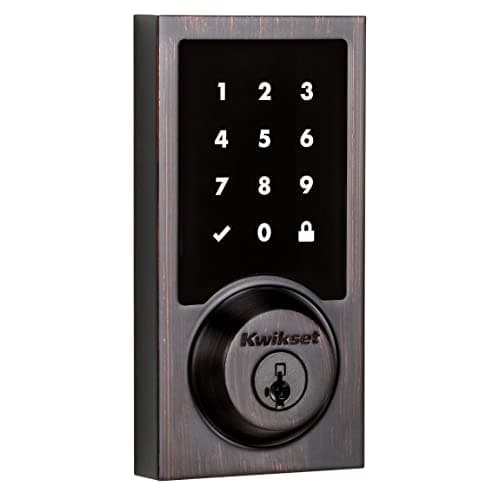
Best for Home Assistant and Z-Wave
Kwikset SmartCode 916 Z-Wave Touchscreen Deadbolt
The Z-Wave workhorse. No Wi-Fi, no manufacturer cloud — it joins a Z-Wave hub such as Home Assistant, Hubitat or SmartThings and is controlled entirely on your own network.
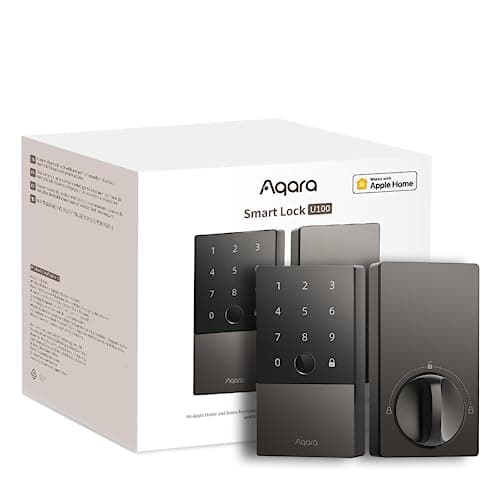
Best for Apple Home
Aqara Smart Lock U100
The Apple-household pick that is not a Schlage price. Home Key tap-to-unlock, a fingerprint reader, a keypad and a mechanical key, and it speaks to Apple Home, Google Home and Alexa out of the box.

Best overall smart lock
Yale Assure Lock 2 (Wi-Fi, keyed)
The modular one. Yale sells the same lock body in keyed and key-free, touchscreen and keypad, with the radio as a swappable module — so you buy the connectivity you want instead of the connectivity that shipped.
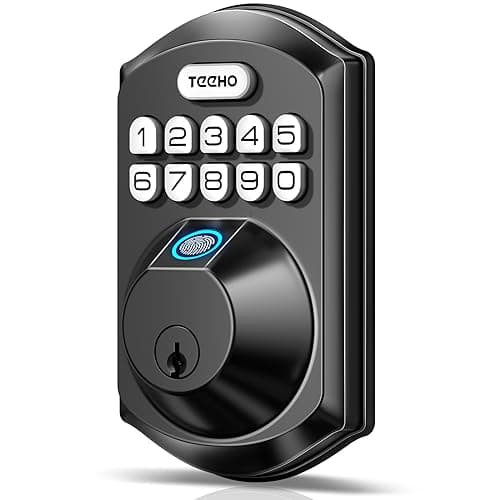
Best cheap keyless deadbolt
TEEHO TE002 Fingerprint Deadbolt
A fingerprint and keypad deadbolt at a fraction of the branded price, with no radio at all — which is exactly why it is cheap, and also why nothing about it can be remotely attacked.
#ad · As an Amazon Associate we earn from qualifying purchases.
Questions
Frequently asked
Will my smart lock open if the internet goes out?
Do I need a hub for a smart lock?
Which smart lock protocol has the best battery life?
Can I add remote access to a Bluetooth lock later?
Does a Wi-Fi smart lock slow down my network?
Keep reading
Related
Receipts
Sources
- Thread Group — Thread network specification and border router requirements
- Connectivity Standards Alliance — Matter specification and device types
- Connectivity Standards Alliance — Zigbee
- Z-Wave Alliance — protocol documentation
- Home Assistant — Z-Wave, Zigbee, Thread and Matter integrations
- Kwikset — SmartCode Z-Wave deadbolt documentation
- Yale Home — Assure Lock 2 network module documentation
- Aqara — Smart Lock U100 and hub requirements
We do not run a testing lab and we do not pretend to. Specifications come from the manufacturer's own published documents and from published standards; prices come from the live Amazon API. Where a figure is not published, the page says “not published” rather than guessing. Read the full method.