HUB 06 · Guides
How to Choose a Smart Lock: Six Decisions, in Order
Most smart-lock regret comes from deciding on features and discovering the door, the connectivity, or the battery afterward. Reverse that. Settle the six that bind first.
We earn a commission if you buy through our links. It does not change the price you pay, and it does not decide our picks — our selection criteria are published in full. How this works.
How do I choose a smart lock?
Choose a smart lock by working through six decisions in order: whether you replace the whole deadbolt or retrofit the inside only, whether it fits your door, how you want to unlock, how it connects, how it is powered, and whether the maker publishes a BHMA grade. Match those to your door and household, not to a feature list.
The six, in the order that eliminates the most options fastest.(1) Install type — full replacement or interior retrofit. (2) Door fit — backset, cross-bore, thickness. (3) Entry methods — key, code, fingerprint, phone, auto-unlock. (4) Connectivity — Bluetooth, Wi-Fi, or Thread/Matter, and what still works offline. (5) Power and battery. (6) The published BHMA grade. Answer them top to bottom and the field of dozens collapses to the two or three that fit.
The reason to go in this order is that the early decisions are hard constraints and the late ones are preferences. If you rent, install type rules out most of the catalog before you have looked at a single fingerprint reader. If your door is non-standard, fit rules out more. Preferences like which unlock method you love only matter among the locks that survive the constraints. This guide lives under the guides hub; work down the six and the roundup you should land on becomes obvious.
1. Install type: full replacement or interior retrofit
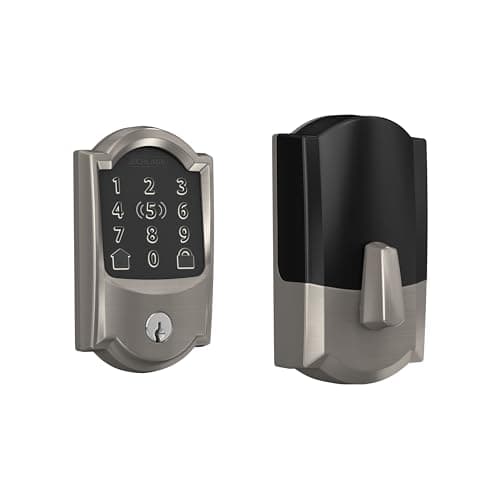
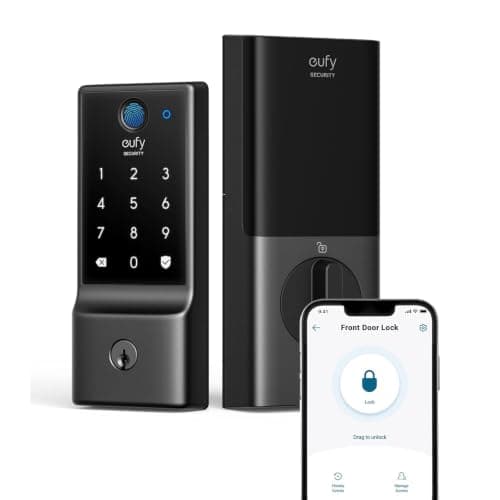
This is the first fork and it removes the most options. A full deadbolt replacementtakes out your existing deadbolt entirely and installs a new lock body, keypad, and interior escutcheon in its place. You own the outside of the door, so you get an exterior keypad, a fingerprint reader, or a tap-to-unlock pad — the features most people picture when they picture a smart lock. The Yale Assure Lock 2, the Schlage Encode Plus, and the eufy Smart Lock C220 are all full replacements.
An interior-only retrofitleaves your existing deadbolt in place and clamps a motor over the inside thumbturn to turn it for you. The exterior of the door does not change at all, and you keep your existing key and cylinder. That makes it the answer for renters and anyone who cannot modify the door: nothing is drilled and the original hardware goes back on at move-out. The SwitchBot Lock Ultra is the retrofit here. The trade-off is equally clear — there is no exterior keypad in the box, and the motor is only as reliable as the deadbolt underneath it, so a stiff bolt that already needs a shoulder against the door will jam a retrofit. If you rent or will not touch the door, the shortlist is retrofits; the field is ranked in our no-drilling renters roundup.
2. Door fit: backset, cross-bore, thickness
A full-replacement lock has to physically fit your door, and three measurements decide it: the backset (edge of the door to the center of the bore, standardized at 2-3/8 in or 2-3/4 in), the cross-bore diameter (2-1/8 in on modern doors, but 1-1/2 in on some older ones, which is a hard stop), and the door thickness (1-3/8 in to 1-3/4 in is the normal supported range; thicker doors need an extension kit). Most builder-grade doors from the last forty years match all three, but the ones that do not cause the majority of smart-lock returns.
Two things follow. First, measure before you order and check the number against the model's install manual, not the marketing copy — the full procedure is laid out in our guide to whether a smart lock fits your door. Second, this is the other reason a retrofit is the safe answer when your measurements come back non-standard: because it drives your existing deadbolt rather than replacing it, backset, bore, and thickness stop mattering entirely.
3. Entry methods: key, code, fingerprint, phone, auto-unlock
Now the preferences begin. A smart lock can offer several ways in, and households rarely agree on one, so the practical move is to list who lives there and how each of them will want to unlock the door.
- Physical key. A keyed lock keeps a mechanical cylinder as a fallback, which matters if you hand a key to a contractor or want a non-electronic way in. The keyed Yale Assure Lock 2 retains this; some minimalist locks drop the keyway on purpose.
- Code / keypad. A touchscreen or button keypad lets anyone in with a PIN and no phone, and codes keep working with the internet down. This is the workhorse method for families and guests. If a keypad is the priority, start from our best smart locks roundup, which leads with keypad-equipped full replacements.
- Fingerprint.A reader unlocks in well under a second with nothing to remember or carry — the fastest method for regular users. The eufy Smart Lock C220 is the budget route into fingerprint; the field is ranked in our fingerprint door locks roundup.
- Phone / tap-to-unlock. Bluetooth proximity or a tap-to-unlock pad (the Schlage Encode Plus supports Apple Home Key, so an iPhone or Apple Watch tap opens it) suits people who always have a phone and never a code in memory.
- Auto-unlock. The lock senses your phone approaching and unlocks hands-free. Convenient with an armful of groceries, but worth confirming it re-locks reliably, since a geofence that misfires is the most common complaint about the feature.
4. Connectivity: Bluetooth, Wi-Fi, Thread/Matter — and what works offline
Connectivity decides what the lock can do when you are not standing at the door, and the three common radios behave very differently. Bluetoothonly reaches a phone within range, so a Bluetooth-only lock is excellent at the door and unreachable from work unless a hub carries it — which is exactly the SwitchBot Lock Ultra's arrangement, where remote access runs through a SwitchBot hub rather than the lock itself. Wi-Fi built into the lock gives you remote control with no bridge to buy or power, as on the eufy C220, at the cost of being the heaviest possible battery draw. Thread and Matterconnect the lock into a cross-brand smart-home fabric through a hub, with low power draw and vendor independence; the Yale Assure Lock 2's swappable radio module means a Matter upgrade is a card swap rather than a new lock.
The point most buyers miss: the core functions of a good lock — codes, fingerprint, the keypad, manual operation — keep working with the internet completely down, because the radio only carries remote access and notifications. Connectivity is about reach, not about whether the door opens. If remote unlocking and whether a lock needs the internet is the live question for you, read whether smart locks need Wi-Fi before you weigh the radios.
5. Power and battery reality
Almost every residential smart lock runs on batteries, and the radio you chose in step four largely sets how long they last. A built-in Wi-Filock keeps its radio awake to stay reachable, which is the heaviest drain — the eufy C220's own record calls this out, and you should expect shorter runs from any always-on Wi-Fi lock. A Bluetooth or Thread lock sips far less and goes proportionally longer between changes. Cell type matters too: most full replacements take 4x AA alkalines, some take more for a bigger reservoir, and a retrofit like the SwitchBot Lock Ultra uses a rechargeable pack instead of a steady diet of disposables.
Two things make battery life a non-event rather than a chore. First, every credible lock warns you well before it dies, so you are replacing cells on a schedule, not getting locked out. Second, a well-aligned strike halves the work the motor does; a lock fighting a misaligned bolt on every cycle drains far faster than the spec suggests. Fix the door before you blame the battery.
6. The published BHMA grade
The last decision is the one buyers skip and should not: does the manufacturer publish a BHMAgrade for the lock? The Builders Hardware Manufacturers Association grading (Grade 1, 2, or 3) rates a lock's physical durability and security against a published standard — cycle counts, bolt strength, and forced-entry resistance. It is not a marketing number a brand assigns itself; it is a third-party benchmark, and a lock that carries a grade has been measured against it.
The catch is that most smart-lock brands do not publish one, which is why it is a genuine differentiator when a brand does. Schlage's deadbolt line is the reference point for BHMA Grade 1 in residential locks, and the Encode Plus inherits that pedigree — if a published grade on the lock body matters more to you than any smart feature, that is where it leads. When no grade is published, weight the mechanical basics you can see: a solid metal bolt, a full 1 in throw, and a reinforced strike do more for real-world security than any electronic feature.
The six decisions as a matrix
| Lock | Install | Entry | Connectivity | Power | Published BHMA |
|---|---|---|---|---|---|
| Yale Assure Lock 2 | Full replacement | Code, key, app | Wi-Fi + Bluetooth, swappable module | 4x AA | Varies by line |
| Schlage Encode Plus | Full replacement | Code, Apple Home Key, app | Built-in Wi-Fi + Bluetooth | 4x AA | Grade 1 pedigree |
| eufy Smart Lock C220 | Full replacement | Fingerprint, code, key | Built-in Wi-Fi | 4x AA (heavier draw) | Not published |
| SwitchBot Lock Ultra | Interior retrofit | App; fingerprint keypad in the bundle | Bluetooth; hub for remote | Rechargeable pack | Not applicable (retrofit) |
Which section pointed you where
Step 1 (install) sent you to retrofits. If you rent or will not modify the door, you are choosing among interior-only locks and the exterior stays as it is. The SwitchBot Lock Ultra is the reversible pick; the whole no-drill field is ranked in the no-drilling renters roundup.
Step 3 (entry) sent you to fingerprint. If the fastest hands-free unlock is the priority and you own the door, start from the fingerprint locks roundup; the eufy C220 is the budget route in, with built-in Wi-Fi as the trade against battery life.
Steps 4 and 6 (connectivity and grade) sent you to the flagships.If you want a documented BHMA grade and Apple Home Key, the Schlage Encode Plus leads on pedigree. If you want the flexibility to change radios later without buying a new lock, the Yale Assure Lock 2's swappable module is the reason it is the overall pick. Both, and the rest of the full-replacement field, sit in our best smart locks roundup.
The mistake buyers make
They start at step three — they fall for a fingerprint reader or a tap-to-unlock demo, buy the lock, and then find out it will not fit a rented door, or that its built-in Wi-Fi eats batteries, or that the brand publishes no grade. The features are the fun part and the last part. Settle install type and door fit first, decide how much reach you need from the connectivity, be honest about the battery consequence, and check for a published grade — then, and only then, pick the lock whose entry method you like best from the two or three that survived. If you are still unsure whether you even need one, or whether your door can take one, start with the door-fit guide and work back to here.
The hardware
The hardware this guide is about
The products this guide refers to, with prices pulled live from Amazon and dated on every card. Full rankings live in the roundups linked above.

Best overall smart lock
Yale Assure Lock 2 (Wi-Fi, keyed)
The modular one. Yale sells the same lock body in keyed and key-free, touchscreen and keypad, with the radio as a swappable module — so you buy the connectivity you want instead of the connectivity that shipped.
- ProductNo image
Best no-drill retrofit
SwitchBot Lock Ultra Touch Combo (with Hub Mini)
The credible way to make a rented door smart without drilling a hole. It mounts over the existing thumbturn, keeps your key, and this bundle puts the fingerprint keypad and the hub in the same box — so codes and remote access both work the day it arrives.
Best build quality
Schlage Encode Plus Wi-Fi Deadbolt
The one with the strongest published hardware pedigree. Schlage's deadbolt line is the reference point for BHMA Grade 1 in residential locks, and the Plus adds Apple Home Key so you tap a phone or watch instead of typing.
Best budget fingerprint lock
eufy Smart Lock C220
Fingerprint plus built-in Wi-Fi at the bottom of the price band that includes both. eufy's whole pitch is no monthly fee, and the lock line holds to it.
#ad · As an Amazon Associate we earn from qualifying purchases.
Questions
Frequently asked
What is the most important thing when choosing a smart lock?
Can I put a smart lock on a rented door?
Do I need Wi-Fi in the lock, or is Bluetooth enough?
How long do smart lock batteries last?
What does a BHMA grade tell me?
Does a smart lock still work if the internet goes down?
Keep reading
Related
- Best smart locksThe full-replacement field, ranked, once you own the door.
- Best no-drilling smart locks for rentersInterior retrofits for a rented or unmodifiable door.
- Best fingerprint door locksIf the fastest hands-free unlock is your priority.
- Will a smart lock fit my door?The five measurements to take before you buy a replacement.
Receipts
Sources
- Yale Home — Assure Lock 2 specifications, module system, and install manuals
- Schlage — Encode Plus documentation, BHMA grading, and Apple Home Key support
- eufy — Smart Lock C220 fingerprint and Wi-Fi specifications
- SwitchBot — Lock Ultra retrofit mounting and hub requirements
- Builders Hardware Manufacturers Association (BHMA) — residential lock grading standards
- Connectivity Standards Alliance — Matter for smart locks
- Thread Group — the low-power mesh many smart locks use
We do not run a testing lab and we do not pretend to. Specifications come from the manufacturer's own published documents and from published standards; prices come from the live Amazon API. Where a figure is not published, the page says “not published” rather than guessing. Read the full method.