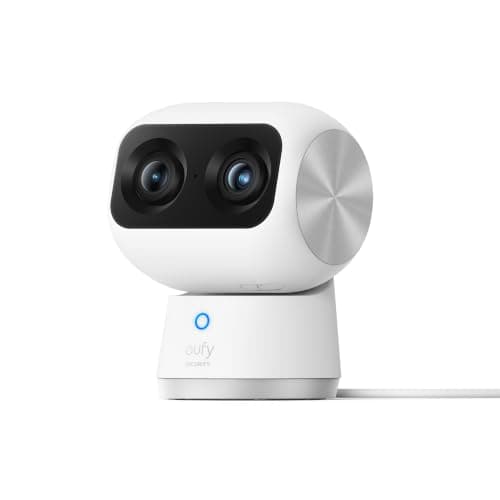
The best camera for a window position is the eufy Indoor Cam S350: mains powered so it can sit on the sill indefinitely, 4K with a second telephoto lens and 8x zoom so it can pick detail out of a street scene, and recording to a card in the camera with no plan. But read the next section before you buy anything, because the single biggest problem with window cameras is not the camera — it is the glass.
Why cameras behind glass go blind at night
Almost every security camera lights its own scene after dark using infrared LEDs ringed around the lens. Point one at a window and those LEDs illuminate the glass directly in front of them. Glass reflects a portion of that infrared straight back into the sensor, and the camera, seeing a bright wall of light inches away, does exactly what it should: it stops down. The result is a night recording of a glowing white haze with nothing behind it. This is not a defect and no amount of resolution fixes it. It is a reflection, and it happens to cheap cameras and expensive ones alike.
There are three ways out, and the first is the one that matters:
- Turn the infrared off.Any camera worth putting at a window must let you disable night vision in its app. With the LEDs off, the camera falls back on whatever ambient light comes through the window — a streetlight, a porch light, a lit driveway — and on a lit street that produces a genuinely usable image. On an unlit rural lane it produces nothing, and no setting will change that.
- Kill the reflection physically. Push the lens flush against the pane so there is no air gap for light to bounce back through, and switch off any indoor light behind the camera. A dark room behind the lens and glass touching the front of it removes most of the problem even with IR still enabled.
- Put the camera outside. The unglamorous answer, and often the correct one. An outdoor camera on the wall beside the window sees everything the window camera hoped to see, at night, in weather, with its own illumination working exactly as designed.
Check for a night vision off switch before you buy.It is the one specification that decides whether a camera works at a window, and it is almost never on the box. If the manufacturer's app does not let you disable infrared, the camera will record a white haze every night and there is no workaround short of moving it.
How we ranked them
Whether infrared can be disabled comes first, because a camera that cannot is disqualified from this position outright. Then the lens: a window camera is usually watching a street or a drive at some distance, so optical zoom is worth far more here than it is on a doorway camera. Then power, since a sill has no weatherproofing problem but often no convenient outlet either. Then storage, on the same principle as the rest of this site — footage on a card you own costs nothing to keep, and footage in a rented cloud costs every month forever. The rubric is at our methodology, compiled from published specifications rather than from testing.
Compiled from manufacturer specifications, August 2026. Night-time results behind glass depend on ambient light outside and lighting in the room behind the camera.| Camera | Lens | Power | Storage | Best window use |
|---|
| eufy Indoor Cam S350 | 4K wide + telephoto, 8x zoom | Mains | microSD in camera | Street or driveway watch with detail |
|---|
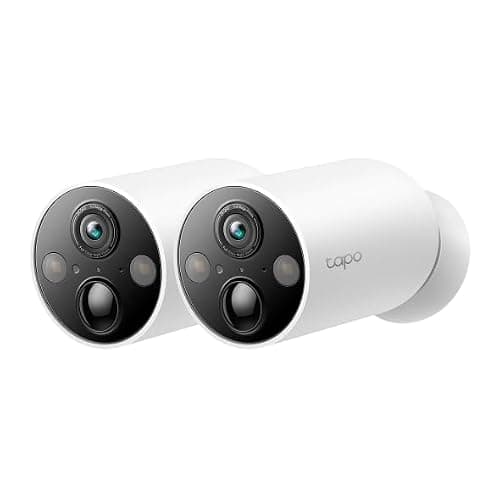
| TP-Link Tapo MagCam 2K+ | 2K+ single lens | Rechargeable battery | microSD in camera | Temporary or movable position |
|---|
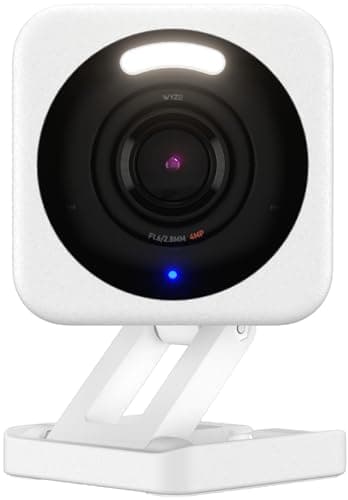
| Wyze Cam v4 | 2.5K single lens | Mains | microSD in camera | Cheapest usable sill camera |
|---|
| eufy SoloCam S340 | 3K wide + telephoto, 360° pan | Integrated solar | Onboard local storage | Mounted outside, above the window |
|---|
eufy Indoor Cam S350 — the one to put on the sill
Two lenses in one body: a 4K wide view for the whole scene and a telephoto with 8x zoom for picking a plate or a face out of it. That combination is the reason it wins a window position specifically. A window camera is almost always looking further than an indoor camera would — across a garden, down a drive, along a street — and a single wide lens spreads its pixels so thin at that distance that everything is a smudge. Optical zoom moves pixels to where the detail is instead of cropping into an image that never had it.
It is mains powered, which suits a sill near an outlet and rules out a sill that is not, and it records to a card in the camera with no plan required for recording, playback or notifications. Being a pan-and-tilt camera, it can also be aimed away from the window entirely when you are home, which is a privacy control worth having on a device that lives in a room you use. Its limitation is the obvious one: it is an indoor camera, so the glass problem above is fully yours to manage, and it belongs behind a window that faces something lit. The rest of the indoor field is ranked in our indoor cameras roundup.
TP-Link Tapo MagCam — for a window you have not settled on
A battery camera on a magnetic mount, which makes it the only camera here you can reposition in ten seconds. That is more useful at a window than it sounds, because the correct window is rarely the one you first thought: the reflection is worse than expected, the angle clips a hedge, the streetlight is behind rather than in front. Being able to try four positions in an evening without drilling anything is worth a lot, and the same magnet lets you move it outside once you have decided.
The trade is battery life and event-only recording. It sleeps between motion events, which means it will not be running when a slow-moving scene develops outside, and it needs recharging on a cadence set by how busy the view is. As a permanent street-watching camera on a sill, the mains-powered options above and below beat it. As the camera you use to work out where the camera should go, nothing else here is close. It is covered alongside the rest of the wire-free field in our wireless cameras roundup.
Wyze Cam v4 — the cheapest way to try this at all
2.5K, mains powered, records to a microSD card, and cheap enough that putting one at a window to find out whether the idea works at your house is a trivial decision. For a lit street with the infrared switched off and the lens against the glass, it produces a usable picture at a price that makes the other cameras on this page look like a considered investment.
Two honest caveats. There is no optical zoom, so distant detail is limited in the way described above — this is a camera that tells you something happened, not one that identifies who. And while local card recording is free, Wyze reserves some of its detection features for its Cam Plus plan, so the free experience is more basic than the marketing implies. Neither of those stops it being the right first purchase for a window you are not sure about. It anchors the cheap end of our budget camera roundup too.
eufy SoloCam S340 — the answer when the glass wins
Included because for a great many people the honest recommendation is to stop trying to shoot through a window. If the view you want is a dark garden, an unlit lane or anything where ambient light will not carry the scene, no indoor camera behind glass will give you a usable night image, and the correct move is a camera on the outside wall above that window. The SoloCam S340 carries its own solar panel, pans a full 360 degrees, pairs a wide lens with a zoom lens and stores footage on board with no plan — so it needs neither a cable nor a subscription, which removes the two reasons people put a camera indoors in the first place.
There are real reasons to keep a camera inside: a rental agreement that forbids fixing anything to the exterior, a listed facade, a position a ladder cannot safely reach, or a neighbor relationship you would rather not test. Those are all legitimate, and if one applies, work the glass problem with the settings above and accept the night-time limitation. If none applies, mount outside. It is a better camera position in every respect, and the full field is in our outdoor cameras roundup.
Setting up a window camera so it actually works
Four adjustments do almost all of the work, and all four are free. Switch infrared night vision off in the app — this is the big one, and it should be the first thing you change. Push the lens flush to the glass so there is no air gap for a reflection to form in; a small foam or rubber spacer ring around the lens does this neatly and also blocks stray light from the side. Turn off, or curtain off, any light source in the room behind the camera, because that lamp is now part of your image. And clean the outside of the pane, which sounds trivial until you see what a month of road film does to a zoomed shot at night.
One more thing worth planning rather than discovering: motion detection through glass is less reliable than motion detection outdoors, because many cameras weight infrared change heavily and glass blocks it. Expect to lean on the camera's software person detection rather than raw motion, and to set the sensitivity higher than you would outside. If your window faces a busy street, do the opposite — draw a detection zone that excludes the sidewalk and the road, or you will get an alert every time a car passes. The general principles are in our camera placement guide.
How to choose a camera for a window
- Can the infrared be turned off?If not, stop — that camera cannot work at a window at night. Every camera on this page can.
- Is there ambient light outside? A streetlight, a porch light or a lit drive means an indoor camera can work with the IR off. Full darkness means it cannot, and you want an outdoor camera instead.
- How far away is the thing you want to see? Beyond about the width of a front garden, a single wide lens will not identify anybody. Buy optical zoom or accept that you are recording that something happened rather than who did it.
- Is there power at the sill? Mains is far better for a permanent window position, because a battery camera at a busy window works hard and needs recharging often.
What decides the price
The lens, mostly. A second telephoto lens with real optical zoom is the expensive part of the eufy S350 and the SoloCam S340, and at a window — where you are usually looking further than the camera was designed for — it is the upgrade that changes what the footage is worth. Resolution is the cheaper number and the less useful one: 4K spread across a wide street scene still cannot resolve what a zoomed 2K frame catches easily. Beyond that you are paying for power design and storage, and on this page every camera stores locally with no plan required for recording or playback, so the running cost is the same across all four: nothing.
The mistake buyers make
They put a camera at a window, leave every setting on its default, check the footage a week later and find seven nights of white haze. The infrared switch is the whole ballgame, and it is in the app rather than on the box. The second most common mistake is expecting a window camera to replace an outdoor one — it cannot, because glass costs you the night image, reduces motion-detection reliability, and puts a reflective surface between the lens and everything you care about. Use a window camera for what it is genuinely good at: a lit street, a driveway with a lamp on it, a shared hallway, or a rental where mounting outside is not allowed. For everything else, mount outside. The four-question framework that applies to any camera is in how to choose a security camera, and the whole category starts at the cameras hub.