Skip to content
SensorLatch

HUB 05 · Doorbells

The Best Video Doorbells for Apartments

No transformer, no drilling, and a hallway too narrow for a wide lens. The apartment problem is a different problem, and it changes which doorbell is right.

By Stephen V.Updated How we pick
#ad

We earn a commission if you buy through our links. It does not change the price you pay, and it does not decide our picks — our selection criteria are published in full. How this works.

The short answer

Quick picks

#ProductBest forScorePrice
01
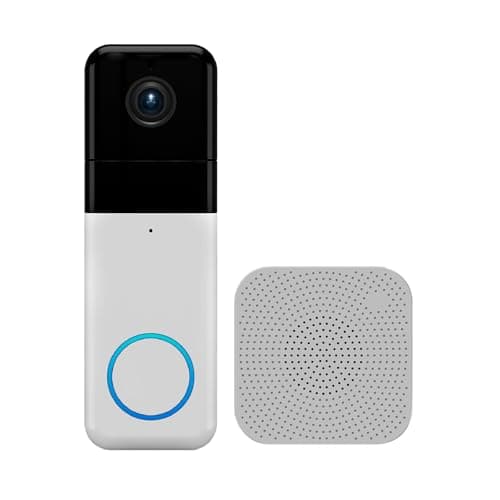
Wyze Wyze Wireless Video Doorbell Pro (with chime)
Wyze Wireless Video Doorbell Pro (with chime)

1440 HD in a 1:1 head-to-toe frame with the chime included, so the parcel on the step is in shot without a second downward lens — with the brand caveat that applies to every Wyze product.

Best 1:1 doorstep view
7.3
$103.98Amazon
02
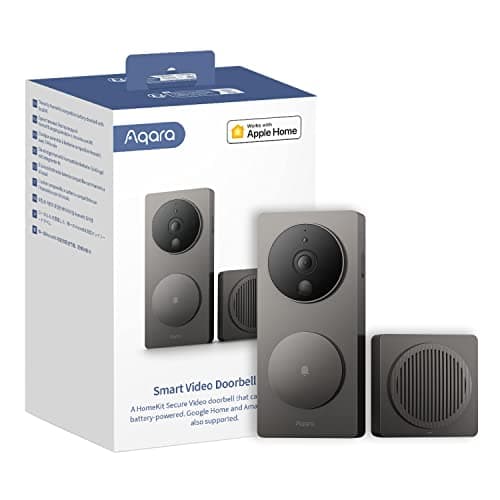
Aqara Aqara Video Doorbell G4 (with chime)
Aqara Video Doorbell G4 (with chime)

The HomeKit Secure Video doorbell that also does local face recognition and local automations — the one to buy if your house runs on Apple Home rather than on a manufacturer's app.

Best for Apple Home
8.1
$79.99Amazon
03
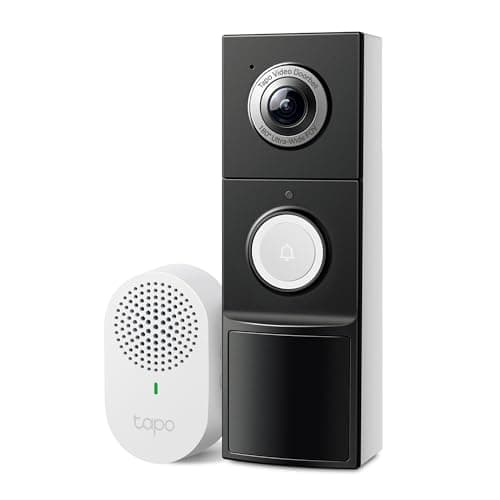
TP-Link Tapo TP-Link Tapo 2K+ Video Doorbell with Chime
TP-Link Tapo 2K+ Video Doorbell with Chime

Wired or battery, 180-degree field of view, chime included and a card slot — the most flexible install in this group and the one least likely to be blocked by your wiring.

Best flexible install
8.7
$99.99Amazon
04
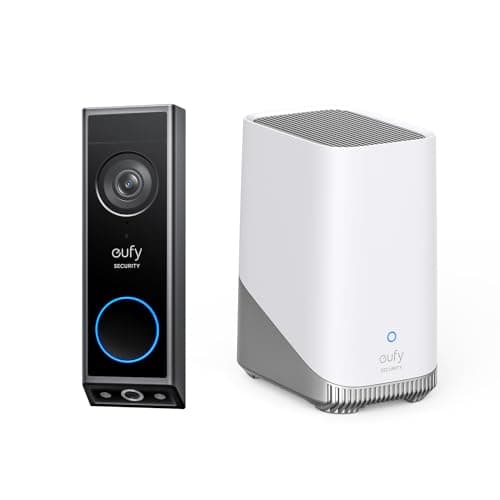
eufy eufy Video Doorbell E340 with HomeBase 3
eufy Video Doorbell E340 with HomeBase 3

The E340 sold with a HomeBase 3 in the box, so the doorbell footage lands on expandable local storage alongside the rest of a eufy estate — and the base is what rings indoors. Buy this version if you are building the system, not just the doorbell.

Best doorbell for a eufy system
8.8
$279.98Amazon

#ad · Prices pulled live from the Amazon Product API, last checked Aug 29, 2026. Where we have no verified live price we show none — we would rather leave a gap than print a number that has gone stale. Scores are our own, compiled from published specs; they are not test results.

The best video doorbell for an apartment is the Wyze Wireless Video Doorbell Pro. Its 1:1 field of view is the right shape for a corridor — as tall as it is wide, so it frames a person head to toe and the parcel at their feet instead of two meters of the wall opposite — and it is battery powered with its own plug-in chime, so nothing has to be wired and nothing has to be asked of a landlord.

Why an apartment is a different problem

Buying guides for video doorbells are written for houses, and three of their assumptions are wrong in a flat. They assume there is a doorbell transformer behind the existing button to wire into — in most apartments there is not, or it belongs to a building-wide intercom you must not touch. They assume you can drill into the door frame — in a rented flat you usually cannot, and in a condo the corridor may be common property that is not yours to modify. And they assume a wide-angle lens is a good thing, which is true across a driveway and actively unhelpful in a corridor a meter and a half wide.

There is a fourth difference nobody mentions: your camera is pointed at a shared space. In a house the doorbell sees your own path. In an apartment it sees the corridor your neighbors walk down and, quite often, their front door. That is worth thinking about before you mount anything, and it is a reason to prefer a doorbell whose detection zones can be trimmed and whose footage stays on hardware in your flat.

The field of view is the specification that changes.A 160-degree wide-angle lens across a front garden is coverage. The same lens at the end of a corridor is a fisheye view of a wall with a small person in the middle. In a tight space you want a tall, square-ish frame — a 1:1 or head-to-toe aspect ratio — because the useful information is vertical: the face, the parcel, and the space between them.

How we ranked them

Mounting first: battery power with an adhesive or bracket mount, because that is the only install available to most renters. Then whether a chime is included in the box, since without a transformer the doorbell has nothing to ring — a plug-in chime is not an accessory in an apartment, it is the doorbell's only voice. Then the shape of the field of view, for the corridor reason above. Then storage and running cost on the same principle as the rest of this site: footage that lands on a card or a base in your home costs nothing to keep, and footage that lands in a rented cloud costs every month for as long as you own the device. The rubric is published at our methodology and is compiled from manufacturer specifications, not from testing.

Compiled from manufacturer specifications, August 2026. Battery life varies with traffic, temperature and detection settings.
DoorbellPowerChime includedView shapeWhere footage lands
Wyze Wireless Video Doorbell ProRechargeable batteryYes1:1, head to toeCard or cloud, plan for AI features
Aqara Video Doorbell G4Battery or wiredYes, doubles as the hubStandard, HomeKit Secure VideoLocal card in the chime, or iCloud+
TP-Link Tapo Video DoorbellBattery or wiredYes180° wideLocal card
eufy Video Doorbell E340 with HomeBase 3Rechargeable battery or wiredHomeBase includedDual camera, doorstep viewHomeBase, no plan

Wyze Wireless Video Doorbell Pro — the right shape for a corridor

The 1:1 aspect ratio is the whole argument. Most doorbells shoot a wide letterbox because they were designed to watch an approach; this one shoots a square, which in a narrow hallway means the frame is filled by the person at the door from head to feet rather than by the wall behind them. In a house that is a nice extra. In a corridor where the opposite wall is two paces away it is the difference between footage that identifies somebody and footage that shows the top of a head.

It is battery powered with a plug-in chime in the box, so the install is a bracket, a charge and a plug socket inside the flat. That is genuinely everything an apartment needs. The honest limitation is the running cost model: local recording works, but Wyze reserves some of its detection features for its Cam Plus plan, so the free experience is more basic than the marketing suggests. If you want the full picture on which doorbells gate what behind a plan, that is our doorbell subscription guide.

Aqara Video Doorbell G4 — the chime that is also the brain

The G4's chime is not a speaker, it is the system. It plugs into a socket inside your flat, holds the microSD card, does the recognition work and connects to your network, which means the doorbell outside your door is a battery camera and everything that stores or decides anything lives on your side of the door. For an apartment that arrangement is unusually neat: the exposed part is cheap to replace and holds nothing, and the valuable part is indoors.

It also runs battery or wired, does local face recognition on the chime rather than in somebody's cloud, and works with HomeKit Secure Video for anyone in the Apple ecosystem — which is why it wins the Apple category in our main doorbell roundup and has its own review here. It is 1080p where the rest of this page is 2K or better, so it is the least detailed image in the ranking. At corridor distances that matters far less than it would across a garden, which is precisely why it places this high on an apartment page and lower on a house one.

TP-Link Tapo Video Doorbell — the flexible install

Battery or wired, a chime in the box, 2K+, and local card storage with no plan for recording or playback. It is the doorbell to buy if you are not certain how long you are staying: battery for the flat you rent now, wired later if you move somewhere with a transformer, and no purchase wasted either way.

Its 180-degree field of view is the reason it does not win here. That is a genuinely good specification on a house, where it lets a single doorbell see the whole porch and the path; in a narrow corridor it spends most of its pixels on the wall opposite and distorts the edges of the frame where a neighbor's door usually sits. Wide is not free. If your entrance is a lobby or a wide shared landing rather than a tight corridor, that calculation flips and this becomes the strongest option on the page.

eufy Video Doorbell E340 with HomeBase 3 — local storage, no plan, at a price

A 2K dual-camera doorbell that ships with its own HomeBase 3, so recording, playback and alerts all work with nothing subscribed, ever. The dual camera gives a dedicated view of the doorstep as well as the person, which in an apartment is a parcel-shaped benefit: it sees what was left at the door as well as who left it.

Two apartment-specific caveats. It is the most expensive way onto this page, and a chunk of that price is the HomeBase, which is a piece of equipment you have to find a shelf and a socket for in a flat where both are scarce. And local storage means the footage lives in your home, which is a strength against a cloud subscription and a weakness if the box itself walks — less of a concern behind a locked apartment door than in a house, but worth naming. If subscription-free operation is the priority above all else, this is the pick, and the wider case is in our subscription-free doorbell roundup.

Mounting one without damaging anything

The install question in an apartment is almost always “what can I put up that comes down cleanly?” Three approaches cover nearly every case. The simplest is a heavy-duty adhesive mount on the door frame or the door itself — the doorbells here are light enough for it, but choose a mount rated well above the device weight, clean the surface with alcohol first, and expect a warm-weather adhesive to behave differently from a cold-corridor one. The second is a no-drill bracket that hooks over the top of the door or clamps to the frame, which is the most reversible option of all and the one to prefer if you expect to move.

The third is worth considering precisely because it is unglamorous: mount it just inside your own door frame, angled out, rather than on the corridor wall. It keeps the hardware entirely within your demise, avoids any argument about common parts, and in a narrow corridor loses you very little coverage. Whatever you choose, check your lease and your building rules before you fix anything to a shared surface — and check whether the building intercom already has a camera function you are about to duplicate.

The neighbor question

A doorbell in a corridor films a space other people use, and often films the door opposite. This is not a reason to skip one, but it is a reason to set it up deliberately. Trim the motion detection zones so the camera is not recording every trip to the bin store; most of these doorbells let you mask regions and set person-only detection, which cuts both the nuisance alerts and the amount of neighbor footage you are storing. Angle the device at your own threshold rather than down the length of the hallway. Consider turning off continuous audio recording if the app allows it separately, since audio in a shared corridor is more intrusive than video and less useful to you.

Local storage helps here too, for a reason that has nothing to do with money: footage of your neighbors sitting on a card in your flat is a smaller commitment than the same footage sitting on a company's servers indefinitely. That argument runs through everything on this site, and it is set out in full in our local storage versus cloud guide.
In detail

The picks, in full

01
Wyze Wyze Wireless Video Doorbell Pro (with chime)

Best 1:1 doorstep view

Wyze Wireless Video Doorbell Pro (with chime)

1440 HD, 1:1 aspectBattery poweredChime includedNight vision
1:1 head-to-toe viewCloud features are plan-gated
7.3/10

1440 HD in a 1:1 head-to-toe frame with the chime included, so the parcel on the step is in shot without a second downward lens — with the brand caveat that applies to every Wyze product.

Storage
6.5
No-sub value
6.5
Install
9
Image
7.5
Ecosystem
7

What it gets right

  • The 1:1 aspect ratio shows the full doorstep without a second downward camera
  • Chime is in the box rather than a separate purchase
  • Wire-free, so a house with no transformer can still use it

What it doesn't

  • Read Wyze's published security incident history before putting a camera at your front door
  • The better detection features sit behind Cam Plus

What it costs to run

Rechargeable battery. Basic alerts are free; AI detection needs Cam Plus.

Skip this if…

the brand's security record matters to you. Wyze has publicly disclosed incidents; that is a documented fact, not a rumor, and a front-door camera is exactly where it counts most.

$103.98on Amazon

Price last checked Aug 29, 2026. Prices move constantly — Amazon's at checkout is the one that counts.

#ad · we may earn a commission from this link to Wyze Wireless Video Doorbell Pro (with chime)

02
Aqara Aqara Video Doorbell G4 (with chime)

Best for Apple Home

Aqara Video Doorbell G4 (with chime)

1080pHomeKit Secure VideoLocal face recognitionBattery or wired
Local automations1080p only
8.1/10

The HomeKit Secure Video doorbell that also does local face recognition and local automations — the one to buy if your house runs on Apple Home rather than on a manufacturer's app.

Storage
8.5
No-sub value
8
Install
8.5
Image
6.5
Ecosystem
9

What it gets right

  • HomeKit Secure Video keeps footage in your iCloud rather than a manufacturer's cloud
  • Face recognition runs on the device, so the processing never leaves the house
  • Chime unit is included and doubles as the Wi-Fi bridge

What it doesn't

  • 1080p, where the rest of this group is 2K
  • HomeKit Secure Video needs an iCloud+ plan and an Apple home hub

What it costs to run

AA cells or wired. Local automations are free; HomeKit Secure Video storage needs iCloud+.

Skip this if…

resolution matters more than integration. At 1080p this is the softest image in the group — you are buying it for the Apple Home behavior, and if you are not, buy the eufy or the Tapo.

$79.99on Amazon

$89.9911% off

Price last checked Aug 29, 2026. Prices move constantly — Amazon's at checkout is the one that counts.

#ad · we may earn a commission from this link to Aqara Video Doorbell G4 (with chime)

03
TP-Link Tapo TP-Link Tapo 2K+ Video Doorbell with Chime

Best flexible install

TP-Link Tapo 2K+ Video Doorbell with Chime

2K+Wired or battery180° field of viewChime included
No subscriptionLocal microSD
8.7/10

Wired or battery, 180-degree field of view, chime included and a card slot — the most flexible install in this group and the one least likely to be blocked by your wiring.

Storage
9
No-sub value
9
Install
9.5
Image
8
Ecosystem
8

What it gets right

  • 180-degree view is tall enough to show a doorstep parcel without a second camera
  • Runs wired or on battery, so no house is excluded
  • Chime in the box and person, vehicle and package detection without a plan

What it doesn't

  • Battery mode reduces standby recording as on every battery doorbell
  • 2K+ single lens gives less doorstep detail than eufy's dedicated downward camera

What it costs to run

Transformer or rechargeable battery. No subscription for recording, detection or playback.

Skip this if…

package detection is the entire reason you are buying. A wide single lens is a compromise; the eufy E340's second downward camera is genuinely better at it.

$99.99on Amazon

$109.999% off

Price last checked Aug 29, 2026. Prices move constantly — Amazon's at checkout is the one that counts.

#ad · we may earn a commission from this link to TP-Link Tapo 2K+ Video Doorbell with Chime

04
eufy eufy Video Doorbell E340 with HomeBase 3

Best doorbell for a eufy system

eufy Video Doorbell E340 with HomeBase 3

2K dual cameraWired or batteryHomeBase 3 includedExpandable local storage
No subscriptionExpandable local storage
8.8/10

The E340 sold with a HomeBase 3 in the box, so the doorbell footage lands on expandable local storage alongside the rest of a eufy estate — and the base is what rings indoors. Buy this version if you are building the system, not just the doorbell.

Storage
9.5
No-sub value
9.5
Install
8.5
Image
8.5
Ecosystem
8

What it gets right

  • Bundled HomeBase 3 gives real retention — eufy publishes expandable local storage up to 16TB — and a place for other eufy cameras to record too
  • A paired HomeBase is one of the devices eufy lists as a chime for the E340, which is the thing the doorbell loses on battery
  • Runs wired or on battery, so a house with no transformer is not excluded

What it doesn't

  • Substantially more expensive than the E340 on its own
  • Redundant purchase if you already own a HomeBase

What it costs to run

Rechargeable battery, or wired to an existing transformer. No subscription for recording, playback or alerts.

Skip this if…

you already have a HomeBase 3. You would be paying for a second one. Buy the E340 on its own and pair it with the base you already have.

$279.98on Amazon

$349.9820% off

Price last checked Aug 29, 2026. Prices move constantly — Amazon's at checkout is the one that counts.

#ad · we may earn a commission from this link to eufy Video Doorbell E340 with HomeBase 3

How to choose a doorbell for an apartment

  1. How wide is the space in front of your door? A tight corridor wants a tall 1:1 or head-to-toe view. A lobby or a wide landing wants a wide-angle lens. This is the decision most buyers never make deliberately.
  2. Is there a chime in the box? With no transformer, a doorbell without an included plug-in chime makes no sound anywhere except your phone. Every doorbell on this page includes one; many popular models do not.
  3. What can you attach it to? Adhesive, a no-drill bracket, or inside your own frame. Confirm the lease position before you buy hardware that assumes screws.
  4. Where should the footage live? A card or a base in your flat costs nothing to keep and does not accumulate a bill. A cloud plan does, every month, for as long as you own the doorbell.

What decides the price

Storage design, mostly. The cheapest doorbells here put a card slot in the device or the chime and stop there; the most expensive ships a base station that turns the doorbell into part of a system. Between those, you are paying for sensor quality and for the second camera that gives a dedicated doorstep view. Battery capacity barely moves the price and traffic moves the runtime far more than the specification does — a doorbell on a busy corridor works several times harder than the same doorbell on a quiet landing. What is not in any of these prices is a mandatory monthly fee: every doorbell here records and plays back without one, and the arithmetic on what the alternative costs is in our subscription cost comparison.

The mistake buyers make

They buy the doorbell with the widest lens because wider sounds like more, then mount it in a corridor and wonder why the footage is a curved wall with a small figure in the center. The second mistake is buying a doorbell that assumes existing wiring: in a flat there is usually nothing behind the button but a building intercom you must not disturb, which makes a battery model with its own chime the only workable design. Get those two right and everything else on this page is a matter of taste. The rest of the category, including every wired option for anyone who does have a transformer, is at the doorbells hub, and the battery-specific field is in our battery video doorbell roundup.

How we picked

Products we claim to have tested: 0

Everyone in this category says they tested a dozen locks on their own front door. We have not tested any, and we say so. Here is what we do instead: read the manufacturer's manual and spec sheet, record the published protocol, power and storage figures, check the published standard where one exists, compute what the device costs to keep running, and cite all of it so you can check the work. Prices come live from Amazon's API and disappear rather than go stale.

The scores above are judgments from that documented research — not bench measurements. The full rubric, including what disqualifies a product, is published in full.

Questions

Frequently asked

Can you install a video doorbell in an apartment?
Yes, if you choose a battery model with an included plug-in chime and a mount that does not need screws. Adhesive mounts and no-drill brackets both work, and mounting just inside your own door frame avoids any question about common parts. Check your lease and building rules before fixing anything to a shared corridor surface.
Do apartment video doorbells need wiring?
No. Every doorbell on this page runs on a rechargeable battery, and each ships with a plug-in chime that sits in a socket inside your flat. That matters because most apartments have no doorbell transformer to wire into — the button by the door often belongs to a building intercom that is not yours to modify.
What field of view do I want for a narrow hallway?
A tall one. A 1:1 or head-to-toe aspect ratio frames a person from face to feet and shows the parcel on the floor; a 180-degree wide lens in a narrow corridor spends most of its pixels on the wall opposite and distorts the edges. Wide angles are for approaches and gardens, not corridors.
Is it legal to point a doorbell camera at a shared hallway?
Rules vary by building, lease and jurisdiction, so check yours rather than ours. What is good practice everywhere: angle the camera at your own threshold rather than down the hallway, mask or trim the detection zones so you are not recording neighbors going about their day, and prefer local storage so any footage of shared space stays in your flat.
Do these doorbells need a subscription?
Not for recording and playback. The eufy stores to its own HomeBase, the Aqara to a card in its chime, and the Tapo to a card in the device, all with no plan. Wyze records to a card free but keeps some detection features for its Cam Plus tier. None of them requires a subscription to answer the door.

Keep reading

Receipts

Sources

We do not run a testing lab and we do not pretend to. Specifications come from the manufacturer's own published documents and from published standards; prices come from the live Amazon API. Where a figure is not published, the page says “not published” rather than guessing. Read the full method.