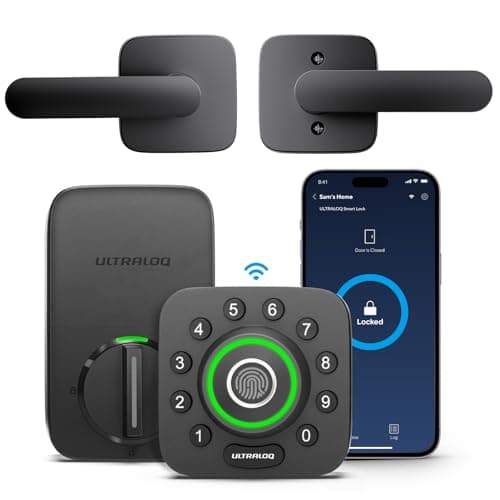
The Ultraloq U-Bolt Pro is the fingerprint lock to buy when you want the most ways into a door for the money: a fingerprint on the knob, a keypad code, the app, Bluetooth, auto-unlock on approach, and a mechanical key — with Wi-Fi built into the lock rather than a plug-in bridge. Everything below follows from those two facts, six credentials and an on-board radio, including the two places they cost you. The listing we link is the version that ships the matching lever handle alongside the deadbolt, so the door gets a set rather than a bolt on its own. It is our pick for best fingerprint lock.
Six ways in, and the reader is where your hand already is
The pitch is coverage. Every person who uses the door gets the method that suits them, and nobody is locked out because they left one thing behind. The fingerprint reader sits on the outside knob, where your hand already lands as you reach for the door — not on a separate pad you have to aim for — so an enrolled thumb is the fastest entry there is. A keypad code covers a guest or a cleaner who should not be enrolled as a print. The app and Bluetooth cover a phone in hand, and auto-unlock can throw the bolt as you walk up so you never break stride. Underneath all of it is a real mechanical key in a cylinder, the fallback that works when a battery is dead and a phone is flat at the same time. Six routes in is more than almost anything at this price, and it is the whole reason the lock earns its place on the smart locks hub.
The keypad has one more trick worth naming: anti-peep entry. You can pad a real code with junk digits front and back, and as long as your true code appears somewhere in the string the lock opens — so a stranger watching over your shoulder cannot read the code off your hand. It is a small feature that matters on a door a lot of people walk past.
Built-in Wi-Fi versus a bridge
The U-Bolt Pro puts the Wi-Fi radio inside the lock. That is the convenient answer and the less convenient one at the same time, and it is worth understanding which you are getting. The convenience is real: there is no separate bridge to buy, find a socket for, and lose when it is unplugged by accident, and remote unlock works from anywhere with a connection out of the box. Locks that offload the radio to a plug-in bridge or a low-power Thread mesh sip far less battery, but they also add a box to the network and a thing to keep powered. The U-Bolt Pro trades that away for a single self-contained unit.
The cost of putting Wi-Fi in the door is power, which is the segue to the running cost below. A Wi-Fi radio is the heaviest continuous draw a battery lock can carry — heavier than Bluetooth, much heavier than Thread — so a built-in-Wi-Fi lock trades battery life for the convenience of needing nothing else. That is not a flaw so much as a design choice, and it is the same choice the eufy C220 and the Kwikset Halo make. What matters is going in with your eyes open, because the headline that this lock needs no hub is true, and the footnote that it therefore drinks more battery is also true.
The four-AA running cost
The U-Bolt Pro runs on four AA cells, and there is no subscription attached to anything it does — fingerprint, code, app control and remote unlock over its own Wi-Fi are all included with the hardware. The honest note is that the built-in radio makes those four cells work harder than they would in a Bluetooth lock, so plan on a shorter run between changes than a lock with no on-board Wi-Fi. Two habits stretch it: enroll a code as a backup so a finger that will not read does not send you into the app and spin the radio up, and let the lock throw its own bolt on auto-lock rather than reaching for the app each time. The general version of squeezing more out of any lock's cells is in how long smart lock batteries last, and if a lock that reaches you from anywhere without a hub is worth a few more battery changes to you, this is a good way to buy it.
Fingerprint reliability: enroll a code as well
The fingerprint reader is the reason to buy this lock, and it is also the part that needs the most honest framing, because the limitation is physics, not brand. Capacitive fingerprint sensors read the ridges of a finger by their tiny electrical properties, and those properties change when a finger is wet, cold, dry, or worn from manual work — which is exactly the state a hand is in on a rainy morning at the front door. Every capacitive reader from every brand shares this; it is not an Ultraloq fault. The practical answer is the same on all of them: enroll a keypad code as well, for every person who relies on a print, so a finger that will not read on a cold wet day is a code away from in, not a person stuck on the step. Enroll two fingers each while you are at it, so a bandaged thumb has a spare.
Installing it as a full deadbolt
The U-Bolt Pro replaces the entire deadbolt, so this is a lock for a door you own or a landlord who has agreed in writing, not a rental you have to hand back untouched. The physical fit is what to confirm first: check the door thickness, the backset and the bore against Ultraloq's published ranges before ordering, because a thick door, an unusual backset or a non-standard bore is the thing that turns a screwdriver job into a return. The general fit check is in will a smart lock fit my door and the steps are in how to install a smart lock. One Ultraloq nicety at install time: the bundled door sensor tells you the door is actually shut, not merely that the bolt threw, so an auto-lock does not drive the bolt into an open frame. Align the strike properly and set it up, and it saves you the classic smart-lock failure of a door that reports locked while standing open.
What keeps working with no plan
At the door, the U-Bolt Pro is fully usable with the internet down: the fingerprint reader, the keypad code, the mechanical key and Bluetooth all work locally with no connection and no subscription. The built-in Wi-Fi adds the remote layer — unlock from work, a notification when a code is used, a check that you locked up — and that too carries no monthly fee; it is included with the lock. That is the entire commercial difference between this and a lock that gates remote features behind a plan: here the hardware price is the whole price. If never paying a subscription is a firm rule for you, this lock passes, and so does the wider no-subscription philosophy set out across the smart locks hub.
The honest cons
- Fingerprint readers degrade in weather.Wet, cold or worn fingers read worse on any capacitive sensor, so enroll a code as a backup — on an exposed door you will use it more than you expect.
- Built-in Wi-Fi is the heaviest power draw. The no-hub convenience costs battery life; expect a shorter run on four AAs than a Bluetooth or Thread lock would give.
- The app ecosystem is smaller.Ultraloq's third-party integrations lag the Yale and Schlage lines, so if you are building around a specific smart-home platform, confirm support before you commit.
Who should skip it
Anyone whose entry door faces weather with no overhang.A capacitive fingerprint reader is the first thing to misread when the sensor is wet or your hands are cold, and on an exposed north-facing door you will end up typing the code most mornings anyway — in which case a cheaper keypad lock does the same job for less. The fingerprint premium only pays off on a sheltered door.
Anyone who wants the longest possible battery life. Built-in Wi-Fi is the hungriest radio a lock can carry. If you would rather change cells rarely and are willing to run a bridge or a Thread lock to get there, this is not the design for you.
Anyone building tightly around one smart-home platform. The integration list is thinner than the big Yale and Schlage catalogs, so if deep, first-class support for a particular ecosystem is the deciding factor, check the compatibility before buying rather than after.
The thing this lock cannot tell you
Whether a door or window elsewhere in the house is open. A smart lock, even one with a bundled door sensor, knows about its own doorway and nothing beyond it — not the back door, not a ground-floor window, not the garage side door. A handful of contact sensors report that plain binary fact for a fraction of the price per opening, and they are ranked at best door and window sensors. The rest of the lock category, retrofit and full deadbolt, is on the smart locks hub.
How this review was compiled
Products we claim to have tested: zero. We have not fitted this lock to a door, and we are not going to pretend a lab we do not have. What this review is built from is Ultraloq's published product and support documentation, its installation guide and battery notes, the way capacitive fingerprint readers behave in the cold and wet, and the general engineering of built-in-Wi-Fi battery locks — every one of which is a source you can open yourself, and they are listed below. The scoring rubric and the weightings behind it are published in full at methodology, so you can disagree with our conclusion using the same public material we used to reach it.
The alternatives worth comparing
eufy Smart Lock C220 — if you want fingerprint and Wi-Fi cheaper
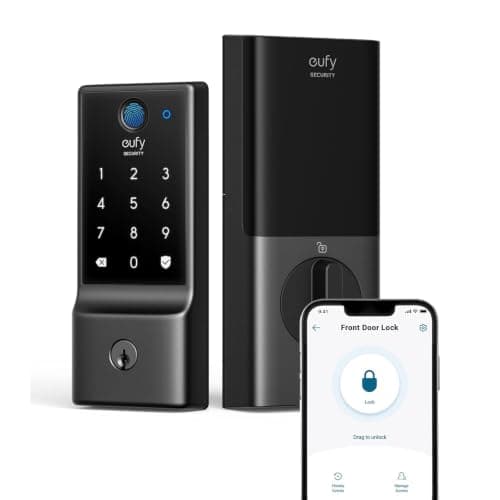
The same core idea — fingerprint, code, key and built-in Wi-Fi on a full deadbolt — at the bottom of the price band that includes both, with no plan gating any feature. It gives up some of the U-Bolt Pro's polish and its anti-peep keypad, and its built-in Wi-Fi carries the same heavy battery draw, but for a buyer who wants the fingerprint-plus-Wi-Fi combination for the least money it is the honest recommendation. The head-to-head is at Ultraloq vs eufy Smart Lock.
Kwikset Halo — if you want built-in Wi-Fi and self-re-keying
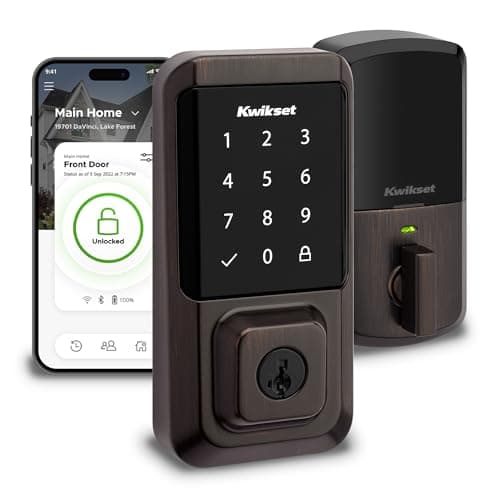
A touchscreen keypad rather than a fingerprint reader, with the same no-hub built-in Wi-Fi, and one property neither eufy nor Ultraloq has: SmartKey re-keying, which lets you re-key the physical cylinder yourself in under a minute when a set of keys goes missing. Kwikset also publishes a BHMA grade for the Halo line. The caution worth reading first is that SmartKey cylinders have been the subject of published bypass research, so treat the key as convenience, not as the security layer. If self-re-keying is the feature you want, it is on the keypad door locks list.
Where the U-Bolt Pro sits between them
The eufy C220 is the cheaper way into fingerprint-plus-Wi-Fi. The Kwikset Halo is the built-in-Wi-Fi keypad with self-re-keying. The U-Bolt Pro is the one to buy when you want the fastest fingerprint entry — a reader on the knob where your hand already is — the most ways in of the three, and the anti-peep keypad, and you accept the shorter battery life that built-in Wi-Fi brings on a sheltered door. That is a specific buyer, and for that buyer it is the best fingerprint lock here. The whole category is indexed on the smart locks hub.