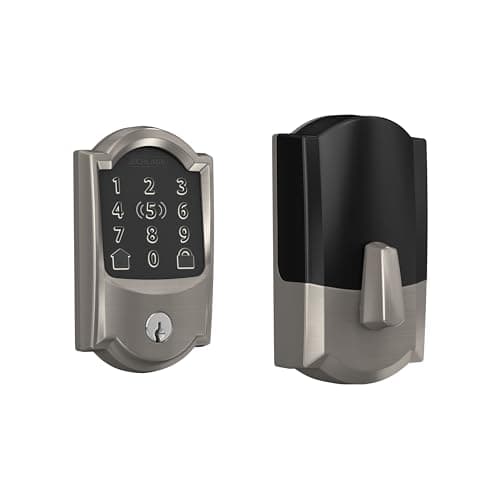
The Schlage Encode Plus is the lock to buy when the deciding factor is the hardware itself. Schlage's deadbolt line is the reference point most people mean when they say a residential lock is well built, it carries a published BHMA Grade 1, and the Plus folds in built-in Wi-Fi with no separate bridge and Apple Home Key. It is ranked second on our best smart deadbolts page and appears in the wider best smart locksfield — and this is why.
The pedigree, and the one number that earns it
Most smart-lock brands do not publish a BHMA grade at all. BHMA, the residential lock grading scheme, rates a deadbolt on resistance to force, wear and manipulation across a three-grade scale, and testing to it costs money that a lot of makers would rather not spend or advertise. Schlage does, and its deadbolts are the ones the whole category is quietly measured against. The Encode Plus carries the line's published Grade 1 — the top residential grade.
That single published number is the reason to buy this lock over a nicer-featured competitor. It is worth being precise about what it means and does not mean: a grade is a rating of the physical deadbolt's resistance, not of the software, the radio or your door frame. A Grade 1 bolt in a jamb with a short strike screw into soft trim is not a Grade 1 installation. But as a floor for the mechanical half of the lock, a published grade is evidence a standard was met rather than a marketing adjective, and that is a genuinely different thing to buy. For the reference against our top pick, which publishes Grade 2, see Schlage Encode Plus vs Yale Assure Lock 2.
Built-in Wi-Fi, with nothing else to power
The Encode Plus puts the Wi-Fi radio inside the lock. There is no bridge, no hub, no plug-in box halfway down the hall that has to stay powered and paired for the lock to reach your phone. That sounds minor until you have owned a lock whose remote access depends on a separate bridge that drops off the network, at which point the lock is blamed for the bridge's fault. One unit, one thing to keep on your Wi-Fi, remote access included with no subscription. The trade for that convenience is power, which the battery section gets to below, because a radio living in a battery-powered lock is the dominant draw in the whole device.
Apple Home Key: excellent, and wasted on the wrong household
The headline feature that separates the Plus from the standard Encode is Apple Home Key. With it, an iPhone or Apple Watch unlocks the door with a tap — you hold the phone near the lock and it opens, no app to launch, no code to type. It works from the Wallet, and because it uses the phone's secure element it keeps working when the phone has dropped into power reserve, which is the moment you are most likely to be locked out by a dead battery. For an Apple household this is the nicest way to open a door that this category offers.
Now the honest part, because it decides whether you should buy the Plus or the cheaper Encode. A meaningful share of the premium the Plus commands over the standard Encode is Home Key. In an Android household, Home Key does nothing — there is no tap-to-unlock, and you are paying for a feature you cannot use. This is not a knock on the lock; it is a knock on buying the wrong version of it. If nobody in the house carries an iPhone or an Apple Watch, the standard Encode gives you the same Schlage pedigree, the same built-in Wi-Fi and the same codes for less, and the Plus is simply the wrong SKU. Buy the Plus for Home Key or do not buy the Plus.
Battery arithmetic: four AA cells, and what is actually drawing them
The Encode Plus runs on four AA alkaline cells in the interior escutcheon. Manufacturer battery-life figures in this category are published without a stated duty cycle — cycles per day, temperature, radio configuration — so they are not comparable between brands and we do not quote them as if they were. What is comparable is the reservoir and the load.
The reservoir.Published cell datasheets put an AA alkaline at roughly 2,000 to 2,900 mAh at low drain. Four in series is about 6 volts, so the pack holds on the order of 15 watt-hours. That is a large reservoir by this category's standards — the same four-AA arrangement our top pick uses, and several times what the single-cell in-bore locks carry.
The load, and why the radio wins.The motor is a short, heavy pull — a second or so of current, a handful of times a day. The always-on Wi-Fi radio is a small, continuous pull, every second of every day, and in a built-in-Wi-Fi lock like this one it is the dominant term. This is the single most useful thing to understand about the Encode Plus battery life: the lock is not drained by being used, it is drained by being reachable. A lock whose radio holds an association with your access point around the clock will go through cells faster than a Bluetooth or Thread design that sleeps between events — that is the cost of built-in Wi-Fi with no bridge, paid in AA cells rather than in a second device. The full mechanism is in how long do smart lock batteries last.
Two practical notes that apply to any four-AA lock. Use alkaline unless Schlage's documentation says otherwise, because lithium AA cells have a different discharge curve and a lock reads voltage to estimate remaining life, so the low warning can arrive late. And replace all four cells together from the same pack; a mismatched set is the most common cause of a lock that cries low battery, then runs fine for another two months.
What still works with the internet down
Everything that happens at the door. The touchscreen keypad, the codes stored in the lock, the motor, the auto-lock timer and the mechanical key are all local and never routed through the Wi-Fi to begin with. Apple Home Key's tap-to-unlock happens between your phone and the lock directly, so it works at the door regardless of your broadband. What an outage costs you:
- Unlocking from anywhere that is not your doorstep
- Push notifications when the bolt moves
- Voice assistants and any cloud-side automation
- Adding or revoking a code from the app rather than at the keypad
That last one is the practical one. If the connection is down and you need to kill a code, you do it standing at the door with the programming sequence from the manual, which is worth reading once before you need it. People reasonably assume a Wi-Fi lock stops being a lock when the Wi-Fi stops; it does not, and the general shape of this across brands is in do smart locks need wifi.
Fit and install: check before you order
This is a full deadbolt replacement, not a retrofit. You are taking the existing deadbolt out and putting this one in the same holes, which means three measurements have to agree with Schlage's published ranges before you order:
- Backset— door edge to bore center, 2-3/8 in or 2-3/4 in on almost every North American door
- Cross-bore diameter— usually 2-1/8 in
- Door thickness— the published range, commonly 1-3/8 in to 1-3/4 in
Our will a smart lock fit my doorguide shows exactly where to hold the tape measure. It is a screwdriver install on a door already bored for a deadbolt — no drilling, no wiring, usually well under an hour. Two physical realities the product photography understates: the interior escutcheon is large because it houses the motor and four AA cells, so on a narrow door edge, beside a handle set, or in front of a storm door you should measure the clearance first; and the batteries live in the door, so the inside face is going to look like a piece of hardware. Before you fit anything, throw the existing bolt by hand with the door open and then closed — if closed is stiffer, the strike is misaligned and the new lock's motor will fight it every cycle. Fix the strike, not the lock.
Honest cons
- Price. It is one of the most expensive locks in the category, and you are paying for the grade and the Home Key, not for more entry methods than cheaper locks offer.
- The Home Key premium is dead weight off Apple. Covered above: in an Android household a large slice of the Plus premium buys nothing, and the standard Encode is the right lock.
- Built-in Wi-Fi is the heaviest battery draw a lock can carry. The convenience of no bridge is paid for in shorter intervals between cell changes than a Bluetooth or Thread lock would ask.
- No key-free option to remove the cylinder.The keyed cylinder is a no-power fallback, but it also keeps a pickable, bumpable keyway in the door — the oldest attack in residential security.
Who should skip it
Anyone not in the Apple ecosystem, at least on the Plus.Without an iPhone or Apple Watch, Home Key is inert and you are overpaying for the standard Encode. This is the lock's own stated disqualifier, and it is the single most important sentence on the page for an Android buyer.
Renters.This replaces the whole deadbolt, so you are removing the landlord's hardware and reinstalling it at move-out. A retrofit that leaves the existing lock in place is the correct product, and those are ranked at best smart locks without drilling.
Anyone who values a future-proof radio over a build grade.The Encode Plus has no module bay; the radio it ships with is the radio it dies with. If being able to follow a changing smart-home standard matters more to you than one BHMA grade step, our top pick with its swappable module is the better long bet — the full argument is in the Yale Assure Lock 2 review, and the two are set head to head at Schlage Encode Plus vs Yale Assure Lock 2.
The thing this lock cannot tell you
Whether the door is shut. The Encode Plus, like every lock in this category, reports the position of its bolt, so a bolt thrown into an open doorway reads as locked in the app. A contact sensor on the frame closes that gap for a small fraction of what this lock costs, and it is the pairing worth making the same evening — same buyer, same screwdriver. The ranked options are at best door and window sensors. And if you want to see where the Encode Plus sits against the whole field before you commit, start from the smart locks hub.
How this review was put together
Products we claim to have tested: zero. We have not put this lock on a door, and we will not imply otherwise. This review is built from Schlage's published product and support documentation, the installation manual and its stated fit ranges, the BHMA residential grading scheme, and published AA cell datasheets for the battery arithmetic above. Every one of those is a source you can open yourself, and they are listed below. Our scoring rubric and the weightings behind the metric scores are published in full at methodology, so you can disagree with our conclusion using the same public material.
The alternatives worth comparing
Yale Assure Lock 2 — if a future-proof radio beats one grade step
Our top overall pick, and the sharpest contrast with the Schlage. The Yale puts its radio on a swappable module, so a protocol change is a card swap rather than a new lock, and it retains a keyed cylinder in the version we rank. It publishes Grade 2 to the Schlage's Grade 1, so on pure hardware the Schlage is the stronger single purchase — but on a door you keep for years, the ability to follow a changing standard without pulling hardware out is worth more to many buyers than the one-grade step. The full case is in the Yale Assure Lock 2 review, and the decision rule is in Schlage Encode Plus vs Yale Assure Lock 2.
Ultraloq U-Bolt Pro — if you want more ways in for less
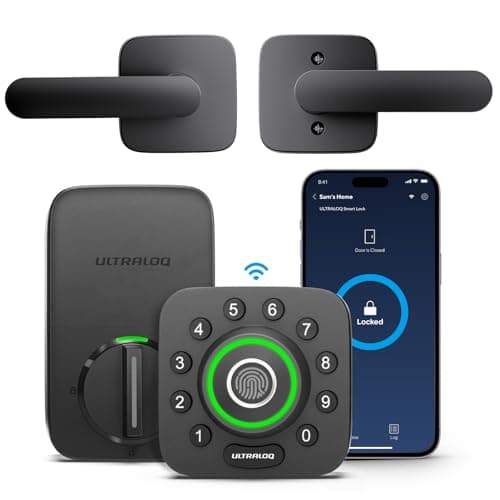
The opposite value proposition. Where the Schlage sells a grade and a polished Apple integration, the Ultraloq sells breadth: fingerprint, code, app, Bluetooth, auto-unlock and a key, with built-in Wi-Fi rather than a bridge, at a lower price. The trade is a smaller app ecosystem and a fingerprint reader that, like any capacitive reader, struggles on an exposed, weather-facing door. If “every door opens every way” matters more than a published grade, it is the better buy, and it is ranked on best smart locks.
Where the Schlage sits
It is the best single-purchase hardware of the three, bought for the published Grade 1 and, in an Apple household, for Home Key. It is not the most future-proof — that is the Yale — and it is not the most entry methods for the money — that is the Ultraloq. If the number on the box is what you are buying, and an iPhone is what you carry, this is the lock. The rest of the category, retrofits and radio-free keypad deadbolts included, is indexed at the smart locks hub.