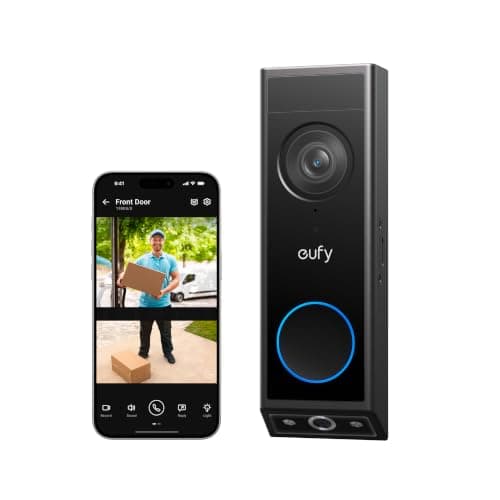
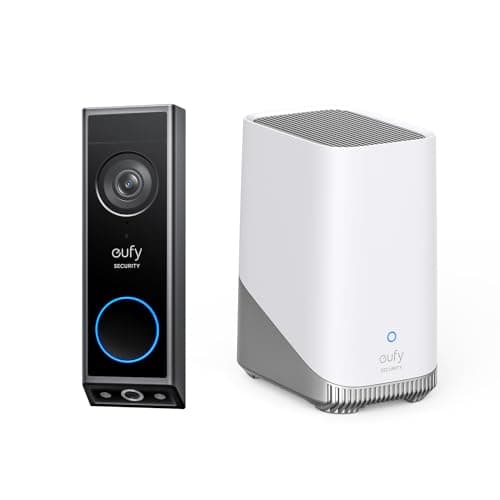
The best battery video doorbell is the eufy Video Doorbell E340 with HomeBase 3. It needs no transformer at all, records locally to the HomeBase that comes in the box, and aims a second camera straight down at the step, so you see the parcel and not just the person — with no monthly plan. If an audible indoor bell matters to you, that included HomeBase is the single reason it wins.
This is the companion page to our main best video doorbells ranking, and it exists because that page begins with a question a large number of houses answer noto: do you have a doorbell transformer? A wired doorbell runs on a low-voltage circuit that was installed to ring a mechanical bell, fed by a small transformer wired into a junction box somewhere in the house. Plenty of homes never had one — a brick or stone facade with no bell, a flat, a newer build with a wireless push button, or any rented door where changing the wiring is not yours to change. For all of those, the transformer question is a dead end, and the honest answer is a doorbell that runs on a rechargeable cell and ignores your wiring entirely.
What this page does not repeat. The wiring check, the transformer voltage math, and the mechanical-chime module all live on the wired roundup, because they only matter to a doorbell that is wired. Here the wiring is gone, so the three things that decide a battery doorbell take its place: how it wakes up, how often you recharge it, and what makes a noise inside the house. Work through those three in order and the field narrows fast.
The best battery video doorbells, compared
Compiled from manufacturer specifications and published support documentation, August 2026. Two of these (the Tapo and the eufy E340) also run wired; every model here can be installed with no wiring on a rechargeable cell, which is the reason it is on this page.| Model | Power | Chime included? | Storage | Plan needed? | Doorstep (package) view |
|---|
| eufy Video Doorbell E340 with HomeBase 3 | Battery or wired | Yes — the included HomeBase pairs as the indoor chime | Expandable local storage in the HomeBase | No | Yes, a dedicated second camera aimed at the step |
|---|
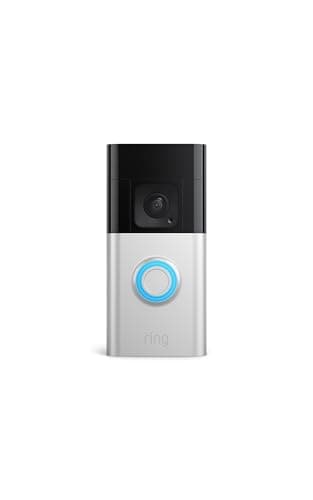
| Ring Battery Doorbell Plus | Battery | No — the Ring Chime is a separate accessory | Ring's cloud only | Yes, for any recorded clip | Yes, via a head-to-toe aspect ratio |
|---|
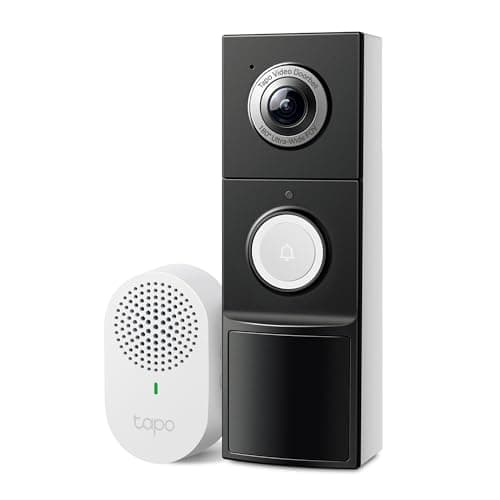
| Tapo 2K+ Video Doorbell | Battery or wired | Yes, a plug-in chime is in the box | Local microSD | No | Yes, via a tall 180-degree field of view |
|---|
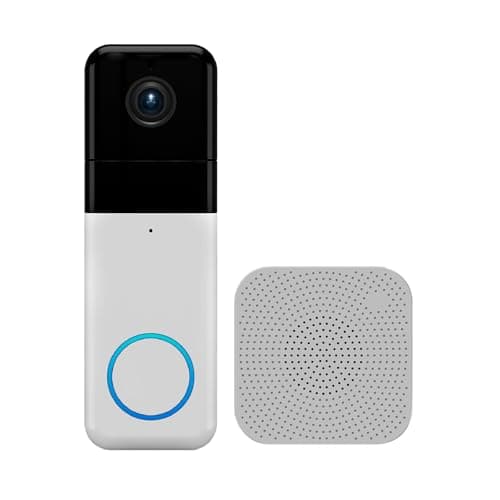
| Wyze Video Doorbell Pro | Battery | Yes, a plug-in chime is in the box | Cloud; the better detection sits behind Cam Plus | Partly — basic alerts are free | Yes, via a 1:1 aspect ratio |
|---|
| eufy Video Doorbell E340 | Battery or wired | No indoor chime in battery mode — app alerts only | Local, on the device or a paired eufy HomeBase | No | Yes, a dedicated second camera aimed at the step |
|---|
The three trade-offs every battery doorbell makes
A battery doorbell removes the wiring problem, which is the whole reason to buy one. It does not remove the physics of running a camera off a cell you have to recharge. Three consequences follow, and they are the same three whatever the badge on the front says.
One: it sleeps, so there is a wake-up delay and no pre-roll
A wired doorbell has a constant supply, so it can keep its camera and radio awake around the clock and hold a short rolling buffer — a pre-roll — of the seconds before a motion event. A battery doorbell cannot afford that. It sleeps until a passive-infrared or radar sensor fires, then wakes, boots the camera, and starts recording. The result is a fraction of a second between the trigger and the first frame, which is why a fast visitor is occasionally half-out of frame at the start of a clip, and why battery doorbells generally do not give you a continuous timeline you can scrub. You get discrete event clips, not a rolling record. For most front doors that is fine; if you specifically want a 24/7 timeline, you want a wired camera, and that argument is on the wired roundup.
No model here escapes that wake-up delay, and none of the published specifications we could find claims a detection method that removes it. What you can change is how often the sensor fires at all: trimming the motion zones so the doorbell ignores the pavement is the single biggest lever on both false alerts and battery life, and on a battery unit every false trigger is also a small withdrawal from the cell.
Two: you recharge it, and traffic sets the cadence
Manufacturers publish a headline battery figure — a number of months — but it is close to meaningless on its own, because it is quoted at some unstated number of events per day. Every wake event records, encodes and transmits, and that is where the charge goes. A doorbell on a quiet cul-de-sac that fires four times a day can run for months. The identical doorbell facing a public sidewalk, triggering on every pedestrian, dog and passing car, can want a recharge in a few weeks. Same hardware, same cell, an order of magnitude apart on cadence — and the variable is your street, not the spec sheet.
The practical upshot is that the first thing to do after mounting any battery doorbell is trim its motion zones so the sidewalk and the road fall outside them. That one adjustment is usually the difference between charging monthly and charging a couple of times a year. It is covered again in the buyer's guide below because it is the single most commonly skipped step.
Three: what actually rings inside the house
This is the question people forget until the first week, when a visitor knocks because the doorbell only rang on a phone that was face-down on silent. A wired doorbell can drive the existing mechanical bell. A battery doorbell has no such circuit, so an audible indoor bell has to come from something in the box, and the five picks here split three ways:
- A plug-in chime in the box.The Tapo and the Wyze both include one. You plug it into a socket somewhere central and it rings, independent of anyone's phone. This is the cleanest outcome for a battery doorbell.
- The base station is the chime.The eufy E340 + HomeBase 3 bundle ships with a HomeBase that sits indoors, stores the footage, and is one of the devices eufy lists as a chime for this doorbell — so you are not buying a separate plug-in, and the thing that makes the noise is also the thing that keeps the recordings.
- Phone notifications, or an accessory you buy separately.The Ring does not include a chime; the Ring Chime is an add-on. The eufy E340 in battery mode has no indoor chime at all — you are on app alerts and the doorbell's own speaker unless you wire it. For a household of two with phones in hand, fine. For a family, a home office at the back of the house, or anyone who silences their phone in the evening, it is a real gap.
Where the footage goes, and what a plan gates
Removing the wiring does not remove the storage question — it is the same question as the rest of the camera category, and on a battery doorbell it decides the running cost. Local storage means a microSD card in the unit or a drive in a base station indoors, paid for once. Cloud storage means a monthly plan, paid for as long as you own the doorbell. The full version of that argument is in local storage vs cloud security cameras.
Three of the five here keep every core function working with no plan. The eufy bundle records to the HomeBase in the box, the bare eufy E340 records to its own on-device storage or a HomeBase you supply, and the Tapo records to a microSD card — full playback, no subscription. The Wyze is a partial case: basic motion alerts are free, but its better person, package and vehicle detection sits behind Cam Plus.
The Ring Battery Doorbell Plus is the honest exception, and it needs stating plainly because its hardware is good enough that people buy it without reading the line. Without a Ring Home plan, it records nothing you can watch later.You get a live view and a notification, and that is all — the clip is not retained anywhere you can open it. That is published, not a trick, and for a household that only wants a live intercom at the door it is a legitimate product. But it is a different product from what most people think a doorbell is, and if never paying a subscription is your actual rule, it is the wrong pick and the Tapo is the right one. The two philosophies are set out side by side at Ring vs eufy, and the subscription-free field is filtered at best video doorbells without a subscription.
The doorstep view is what earns the money
A doorbell mounted at button height and aimed straight out sees a person from the chest up and misses the ground entirely — which means it misses the parcel, the note left on the step, and the dog. Manufacturers solve this two ways, and they are not equally good.
The cheap solution is a taller frame: a 1:1 aspect ratio, a head-to-toe crop, or a very tall field of view, so the ground in front of the door falls inside the shot. The Ring, the Tapo and the Wyze all do this. It works and it costs nothing extra, but the step sits at the very bottom of a wide frame, where the lens distortion is worst and the pixels are most stretched.
The expensive solution is a second camera pointed straight down. Both eufy entries here do that, and it is why the HomeBase 3 bundle leads this page: a dedicated lens on the step returns a properly framed, properly exposed image of what is on the ground rather than the fisheye corner of a wide-angle shot. If package deliveries are the actual reason you are shopping, that second lens is the feature worth paying for — and the eufy E340 gets its own full review because that dual-camera design is the most interesting thing in the category.
Which battery doorbell to buy
- You want the best battery doorbell, full stop. eufy Video Doorbell E340 with HomeBase 3. The HomeBase in the box gives you real local retention and an audible indoor chime in one unit, the second camera frames the step, and nothing is gated behind a plan. It is the most expensive way onto this page, and that is the honest catch.
- You want the best-supported battery hardware and you will pay for it. Ring Battery Doorbell Plus. The alerts are the fastest and most reliable here, the app is the best in the category, and the accessory ecosystem is the largest — but budget for a Ring Home plan and a separate Chime, because without the plan it keeps no footage. If you will not subscribe, do not buy this one.
- You want no plan and the most forgiving install. Tapo 2K+ Video Doorbell. Chime in the box, a microSD card holds the footage, person and package detection are free, and because it runs on battery orwire it is the least likely of these to be blocked by whatever you find behind the button later. A single wide lens gives less doorstep detail than eufy's downward camera, which is its one real compromise.
- You want the whole doorstep from one lens.Wyze Video Doorbell Pro. It shows the full doorstep in a 1:1 frame and includes a chime, without the second downward camera the eufys use. Read Wyze's published security-incident history before you put any camera at your front door — that is a documented fact to weigh, not a rumor.
- You already own a eufy HomeBase.The bare eufy Video Doorbell E340 in battery mode. It is the cheaper path to eufy's dual-camera design, and it records to the base you already have. It ranks last here only because on battery with no base of its own it loses its indoor chime entirely — app alerts only — which is exactly the weakness the bundled HomeBase fixes. Wired, the E340 is a different and stronger animal, which is why it heads the wired roundup rather than this one.
How we compiled this
Products we claim to have tested: zero. Nearly every other page in this category tells you someone charged five doorbells and lived with them for a month. We have not, and we would rather say so than imply a lab we do not have. What we do instead is read each manufacturer's published specification, installation guide and support documentation — especially the quiet lines about what a plan gates and what a battery mode gives up — work out the running cost, and cite it. Rankings weight storage location, usability with no plan, install flexibility, the image system and the ecosystem, and every pick carries a specific reason to skip it. The full rubric is at methodology, and the rest of the category, wired and battery, is indexed on the doorbells hub.
How to choose a battery video doorbell
First, confirm you actually need battery
Battery is the right answer for a specific house, not a better answer in general. If you have a working doorbell transformer, a wired doorbell gives you a continuous timeline, an audible bell through the existing chime, and no recharging — and it is usually the better buy. Battery earns its place when there is no transformer, when the facade is brick or stone with no bell to tap into, or when the door is rented and the wiring is not yours to touch. If you are not sure which camp you are in, the fifteen-minute wiring check on the wired roundup settles it before you spend anything.
What actually decides the price
In rough order: the camera system, where a second downward lens is the most expensive feature in this group and the one that changes daily use the most; the included base station or hub, which is why the eufy HomeBase 3 bundle costs more than a bare doorbell and also why it needs no separate chime and no plan; the included accessories, meaning a plug-in chime in the box rather than sold separately; and the on-device processing for person, package and vehicle detection. What does notshow up in the purchase price on the cloud-based models is storage — it has been moved into a monthly line item, which is the entire commercial design of that half of the category.
The mistake buyers make
The most common one is buying a battery doorbell with no chime in the box and discovering in week two that the house has no audible bell any more, only phone alerts. Check what rings before you buy: a plug-in unit (Tapo, Wyze), a base station that chimes (the eufy E340 + HomeBase 3 bundle), or nothing included (Ring, and the bare E340 on battery). The second most common mistake is leaving the motion zones wide open, so the doorbell triggers on the sidewalk all day and wants charging every few weeks — trim the zones on day one. The third is mounting height: a doorbell replaced at the height of the old button, often around 120cm, is a good height for faces and a poor angle for the step unless it has a downward lens or a very tall frame.
Tuning the recharge cadence
Battery life on these is a setting as much as a spec. Beyond trimming the motion zones, the levers that matter are detection sensitivity, whether you record every event or only person and package events, clip length, and how often you open the live view — each live view spins the camera and radio up at full power. A doorbell tuned to record people and parcels rather than every leaf, on a sensible sensitivity, is the one that goes months between charges. A doorbell left on factory defaults facing a busy street is the one people complain about online. Most of the difference is configuration, not hardware.
The five-year number
Compare the hardware plus five years of whatever keeps it working. A local-storage doorbell — the eufy pair or the Tapo — is the purchase price plus a card or the bundled base, and then nothing. A cloud-only doorbell like the Ring is the purchase price plus sixty monthly payments, and plan pricing in this category has moved upward more than once. We keep that comparison as a maintained table at subscription costs compared rather than printing a figure here that would be stale within a quarter.
What a doorbell still will not tell you
A doorbell watches one approach — the front step. It has nothing to say about the back door, a ground-floor window, or the garage side door, and it cannot tell you a door has been opened, only that something moved in front of a lens. A few contact sensors cover those openings for a fraction of the price per point and report a plain binary fact instead of a judgment about pixels. Those are ranked at best door and window sensors, and if you are still deciding whether a doorbell earns its place at all, is a video doorbell worth it makes the case both ways.