Skip to content
SensorLatch

HUB 07 · Comparisons

Aqara vs SwitchBot

Two brands that look like competitors and are really specialists. One sells a sensing estate that runs locally; the other sells motors that operate hardware you already own.

By Stephen V.Updated How we pick
#ad

We earn a commission if you buy through our links. It does not change the price you pay, and it does not decide our picks — our selection criteria are published in full. How this works.

Verdict

The bottom line

Buy Aqaraif you are building a sensor estate — doors, windows, motion, leaks — that should keep working when the internet does not. Its devices speak Zigbee or Matter over Thread, and the hub is a protocol hub: a Zigbee coordinator, a Thread border router and a Matter controller that runs automations in the house. Buy SwitchBotwhen the thing you want to automate cannot be replaced — a rented door's deadbolt, a garage opener, a curtain, a button on an appliance. Its devices are Bluetooth and reach the network through a hub, which is a weaker architecture and the right one when the alternative is changing hardware you are not allowed to change. Most houses that care about this distinction end up with Aqara sensing and one SwitchBot motor.

The short answer

Quick picks

#ProductBest forScorePrice
01
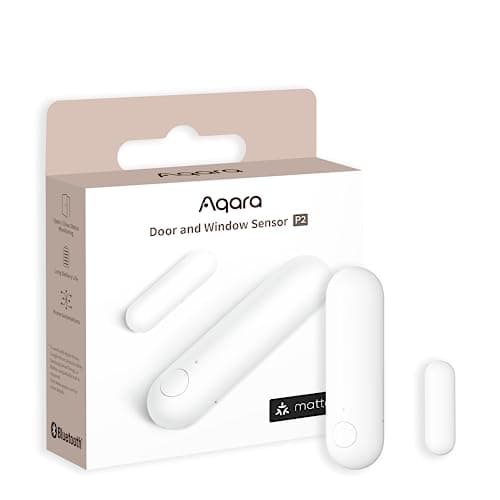
Aqara Aqara Door and Window Sensor P2
Aqara Door and Window Sensor P2

Thread, and that is the whole point. It joins a Matter fabric directly, so it reports to Apple Home, Google Home, SmartThings or Home Assistant without Aqara's cloud anywhere in the path.

Best door and window sensor
8.8
$27.99Amazon
02
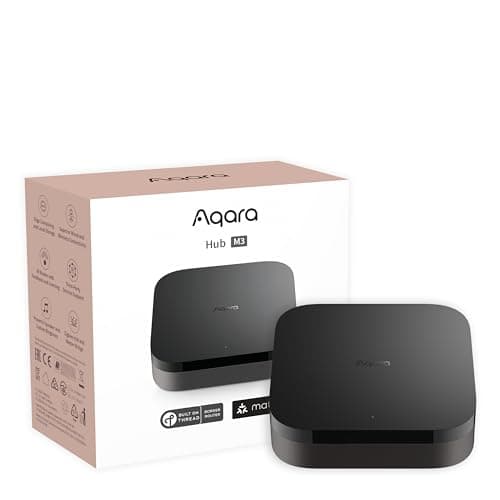
Aqara Aqara Hub M3
Aqara Hub M3

Matter controller, Thread border router, Zigbee coordinator, PoE and an IR blaster in one box — the single most useful purchase for anyone building a local, subscription-free sensor estate.

Best smart home hub for security
8.7
$139.99Amazon
03
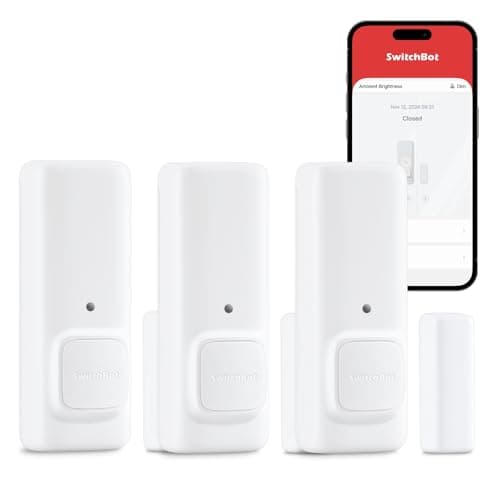
SwitchBot SwitchBot Contact Sensor
SwitchBot Contact Sensor

A contact sensor with a built-in motion detector and its own audible alert, so it does something useful before you have bought a hub or picked an ecosystem.

Best standalone alarm sensor
8.0
$35.99Amazon
04
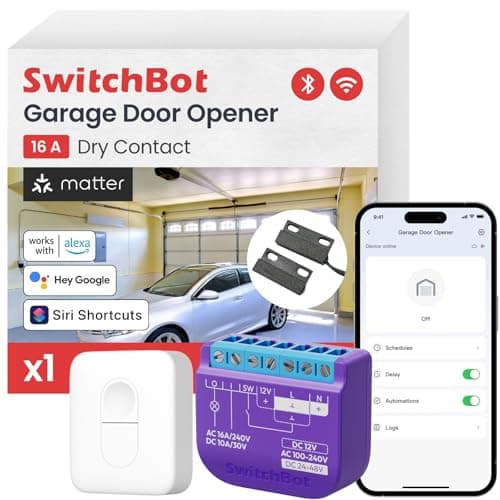
SwitchBot SwitchBot Smart Garage Door Opener (with remote)
SwitchBot Smart Garage Door Opener (with remote)

The compatibility answer. SwitchBot publishes a checker covering more than 1,600 opener models, it is Matter certified, and Bluetooth keeps the door working from the driveway when the Wi-Fi is out.

Widest opener compatibility
8.0
$44.99Amazon

#ad · Prices pulled live from the Amazon Product API, last checked October 15, 2026. Where we have no verified live price we show none — we would rather leave a gap than print a number that has gone stale. Scores are our own, compiled from published specs; they are not test results.

These two brands sit next to each other in every search result and solve different problems. The confusion is understandable: both sell contact sensors, both sell motion sensors, both sell smart locks, both sell a hub, and both position themselves as the affordable alternative to a monitored alarm. The difference that matters is architectural, it is published by both companies, and once you see it the choice stops being a brand preference.

Where the radio lives

Aqara's devices carry a mesh radio. The older and cheaper range is Zigbee 3.0, which needs an Aqara hub to join; the newer range — the Door and Window Sensor P2 is the one this site ranks first — is Matter over Thread, which joins a Matter fabric directly through any Thread border router you already own, with no Aqara hub and no Aqara account in the path at all. Either way the sensor is a full member of a local network that exists in your house.

SwitchBot's devices are Bluetooth. That is a deliberate choice — it is cheap, it sips power and it lets a device work straight out of the box with a phone next to it — and it has one consequence: Bluetooth does not reach the rest of your house, so anything beyond standing-next-to-it range goes through a SwitchBot hub, which bridges Bluetooth to Wi-Fi. SwitchBot also publishes Matter support through that hub for a specific, named list of device types rather than for everything it sells. The exception is worth knowing because it is the brand's better engineering: its mains-powered controllers, the Matter-certified garage opener among them, carry Wi-Fi and Matter in the device and need no SwitchBot hub at all. The pattern is that anything running on a battery is Bluetooth and anything plugged into the wall may not be. A bridge is one more box to power, one more point of failure, and a translation layer between your device and your platform.

Neither brand charges a subscription for its core functions, which is why both appear repeatedly in this site's rankings. The comparison is about architecture, not about recurring cost. Protocol by protocol, the mechanism is in Z-Wave vs Zigbee vs Matter.

The two hubs are not the same kind of product

This is the single most misread line item when people compare these brands on price. The Aqara Hub M3 is a protocol hub: a Zigbee coordinator for Aqara's mesh devices, a Thread border router for its Thread ones, a Matter controller that can expose the lot to Apple Home, Google Home, Alexa or SmartThings, with an Ethernet and PoE option and automations that execute on the box. Unplug your router and those automations keep firing, because the logic is in the house.

A SwitchBot hub is a bridge. Its job is to put Bluetooth devices onto the network and to present the supported ones to a Matter platform; it is also an infrared blaster, which is a genuinely useful trick for old air conditioners and televisions that have no smart anything. What it is not is a place where your automation logic lives independently of a vendor. The hub costs less than Aqara's for a reason, and the reason is the capability gap. The hub-buying decision in full — including the case for using a HomePod or Apple TV you already own instead of either — is in best smart home hubs for security.

Compiled from both manufacturers' published product and support documentation, October 2026.
 AqaraSwitchBot
Device radioZigbee 3.0, or Matter over Thread on newer modelsBluetooth LE bridged by a hub; Wi-Fi and Matter on some mains-powered models
Hub roleZigbee coordinator, Thread border router, Matter controllerBluetooth-to-Wi-Fi bridge, Matter bridge, IR blaster
Works with no hub at allThread models yes, via any Thread border router; Zigbee models noBattery devices locally, with a phone beside them; mains Matter models fully
Matter exposureHub acts as controller and bridge for its device rangePublished for a named list of device types, not all products
Automations during an outageExecute on the hubDepend on the bridge and, for several features, the cloud
Strongest categorySensing: contact, motion, leak, temperatureActuation: retrofit locks, openers, curtains, button pressers
Lock designReplacement deadbolts and handle setsRetrofit over the existing thumbturn, key still works
Stand-alone alarmNo; the hub or platform makes the noiseYes, the contact sensor has its own audible alert

What each brand is actually for

Aqara is a sensing company. Its catalog is dense with small, cheap, long-lived devices that report a state change and then go quiet for a year: contact sensors, motion sensors, leak sensors, vibration and multi-state sensors, temperature and humidity. That shape of device is where Zigbee and Thread are strongest, which is why the brand leads our door and window sensor rankings and the no-hub list. Its locks and cameras are competent and are not the reason to pick the brand.

SwitchBot is a mechanical company. Its best products are motors: a retrofit lock that grips the thumbturn you already have, a garage controller, a curtain mover, a bot that physically presses a button on a device that has no network interface at all. Nothing Aqara makes competes with that, and it is why SwitchBot ranks where it does in the no-drilling renter lock roundup and in our smart garage door opener rankings. Its sensors are decent and do one thing neither Aqara nor most competitors do: the contact sensor has a siren in it, so a single sensor on a side door makes a noise with no hub, no platform and no account.

Where each one disappoints people

Aqara's failure mode is the hub requirement nobody reads. A Zigbee sensor bought without a hub joins nothing; a Thread sensor bought without a Thread border router joins nothing. Neither the box nor the listing says this clearly enough, and it is the most common reason an Aqara device comes back. Aqara's app is also the only comfortable place to configure its hubs, which is a soft form of lock-in even on a system that otherwise runs locally. When sensors do drop off a mesh, the cause is usually structural rather than defective hardware — the diagnosis order is in our sensor troubleshooting guide.

SwitchBot's failure mode is range and dependency. Bluetooth through two internal walls is unreliable in a way a mesh is not, so the sensor at the back of the house is the one that stops reporting. Features arrive tied to the app and the bridge rather than to an open interface, and the Matter device list is explicitly partial, so a device you bought may be invisible to your platform even though the brand “supports Matter”. On the lock side the retrofit design has its own hard limit: a motor driving your existing deadbolt is only as good as that deadbolt, and a stiff bolt will jam a SwitchBot that would have had no trouble with a well-aligned one.

The decision rule

Buy Aqara ifyou are putting sensors on more than two openings, you want the automations to survive an internet outage, or you intend to run the house from Apple Home, Home Assistant or SmartThings rather than from a brand's app. The entry purchase is a hub plus a Zigbee multipack; the better purchase, if you already own an Apple TV, HomePod mini or another Thread border router, is a Thread sensor and no hub at all.

Buy SwitchBot ifthe hardware you want to automate must stay exactly as it is — a rented door, a landlord's deadbolt, a garage opener, an appliance with a physical button — or if you want one door to alarm audibly today with nothing else installed. Buy the bundle that includes the hub rather than the device alone, because remote access is not optional once you have lived with it for a week.

Buy both if your situation is the common one: Aqara sensors reporting to a hub that runs the logic, plus a SwitchBot motor on the one thing you cannot replace. They coexist fine, and in a Matter-centric house they coexist without either app being the center of anything.

Buy neither ifwhat you want is cameras. Neither brand is the answer there — that field is ranked in best home security cameras and the brand-level camera comparisons are on the comparisons hub. And if the real question is which platform to build on rather than which brand of device to buy, that is best smart home ecosystem for security. How we score hardware without a test lab is published at our methodology.
In detail

The picks, in full

01
Aqara Aqara Door and Window Sensor P2

Best door and window sensor

Aqara Door and Window Sensor P2

Matter over Thread1x CR2032Thread border router requiredLocal automations
Local, no cloudThread border router required
8.8/10

Thread, and that is the whole point. It joins a Matter fabric directly, so it reports to Apple Home, Google Home, SmartThings or Home Assistant without Aqara's cloud anywhere in the path.

Local control
9.5
Battery
9
Ecosystem
9
Install
9
Value
7.5

What it gets right

  • Matter over Thread means it is not tied to Aqara's app or servers — the sensor belongs to your smart home, not to a vendor
  • Local automations keep running when the internet is down, which is precisely when you want a door sensor to work
  • A single CR2032 in a device that only radios on state change is the best battery-life shape in home security

What it doesn't

  • Absolutely requires a Thread border router — this is not optional
  • More expensive per sensor than Zigbee alternatives

What it costs to run

1x CR2032. No hub subscription, no cloud account required for local automations.

Skip this if…

…you have no Thread border router. Without an Apple TV 4K, HomePod mini, Google Nest Hub (2nd gen), SmartThings Station or an equivalent, this sensor will not join anything — and nothing on the box or the listing tells you that clearly enough.

$27.99on Amazon

$29.997% off

Price last checked October 15, 2026. Prices move constantly — Amazon's at checkout is the one that counts.

#ad · we may earn a commission from this link to Aqara Door and Window Sensor P2

02
Aqara Aqara Hub M3

Best smart home hub for security

Aqara Hub M3

Matter controllerThread border routerZigbee + BLE + Wi-Fi + PoELocal automations
Local automationsNo subscription
8.7/10

Matter controller, Thread border router, Zigbee coordinator, PoE and an IR blaster in one box — the single most useful purchase for anyone building a local, subscription-free sensor estate.

Local control
9.5
Protocols
10
Ecosystem
9
Install
8
Value
7

What it gets right

  • One box makes both the Thread sensors and the Zigbee sensors on this site work
  • Automations execute locally, so the house keeps working with the internet down
  • PoE option means one cable for power and network

What it doesn't

  • Expensive as hubs go
  • Aqara's own app remains the best way to configure it, which is a soft lock-in

What it costs to run

Mains or PoE. No subscription; local automations are free.

Skip this if…

…you own an Apple TV or HomePod mini and only need Thread. Those already act as Thread border routers, and if Zigbee is not in your plan the M3 is solving a problem you do not have.

$139.99on Amazon

$159.9913% off

Price last checked October 15, 2026. Prices move constantly — Amazon's at checkout is the one that counts.

#ad · we may earn a commission from this link to Aqara Hub M3

03
SwitchBot SwitchBot Contact Sensor

Best standalone alarm sensor

SwitchBot Contact Sensor

Contact + motionBluetoothLocal audible alertHub for remote alerts
Works without a hubHub required for phone alerts
8.0/10

A contact sensor with a built-in motion detector and its own audible alert, so it does something useful before you have bought a hub or picked an ecosystem.

Local control
8
Battery
8
Ecosystem
7
Install
9
Value
8

What it gets right

  • Detects both the door opening and movement in front of it, which two separate devices would otherwise cover
  • Makes a noise on its own — useful on a garage side door where a phone notification is not enough
  • Cheapest route to a working alarm on a single door with nothing else installed

What it doesn't

  • Phone notifications and automations need a SwitchBot hub
  • Bluetooth range is a real constraint in a house with thick internal walls

What it costs to run

Replaceable cells. No subscription; the hub is hardware.

Skip this if…

…you want notifications on your phone while you are out. Without a SwitchBot hub this is a local noisemaker — it will not reach you at work.

$35.99on Amazon

Price last checked October 15, 2026. Prices move constantly — Amazon's at checkout is the one that counts.

#ad · we may earn a commission from this link to SwitchBot Contact Sensor

04
SwitchBot SwitchBot Smart Garage Door Opener (with remote)

Widest opener compatibility

SwitchBot Smart Garage Door Opener (with remote)

Matter over Wi-Fi + BluetoothTwo wires to the opener terminals1,600+ opener models listedNo vendor hubHandheld remote included
Matter certifiedNo subscriptionWires to the opener
8.0/10

The compatibility answer. SwitchBot publishes a checker covering more than 1,600 opener models, it is Matter certified, and Bluetooth keeps the door working from the driveway when the Wi-Fi is out.

Local control
8.5
No-sub value
9.5
Door state
6
Compatibility
9.5
Install
6.5

What it gets right

  • SwitchBot's published compatibility tool covers more than 1,600 opener models across more than 200 brands, which is the widest stated coverage in this group
  • Bluetooth control works with the Wi-Fi down, so a router reboot does not strand anyone outside the garage
  • Matter certified over Wi-Fi, so Apple Home, Google Home, Alexa and SmartThings see it as a standard device
  • Doubles as a Bluetooth repeater for other SwitchBot devices, which is genuinely useful when the garage sits at the end of the house

What it doesn't

  • Installation means two wires onto the opener's terminals at ceiling height — a ladder and a screwdriver, not an adhesive pad
  • SwitchBot does not publish how the app determines the door's open or closed state, and no separate position sensor is described in the listing
  • 2.4GHz Wi-Fi only, which is a problem in exactly the place this product goes: a detached or metal-clad garage at the edge of coverage

What it costs to run

No subscription. Mains-powered from the opener, so there is no battery to replace in the controller.

Skip this if…

…you are not willing to get on a ladder and land two wires on the opener's screw terminals. Every other pick on this page installs without touching the motor unit, and this one does not.

$44.99on Amazon

Price last checked October 15, 2026. Prices move constantly — Amazon's at checkout is the one that counts.

#ad · we may earn a commission from this link to SwitchBot Smart Garage Door Opener (with remote)

Before you commit to either brand

  1. Count your openings. One door is a SwitchBot question. Six openings is an Aqara question, because per-sensor cost and battery life start to dominate and a mesh handles density better than a pile of Bluetooth links.
  2. Check what border router you already own.An Apple TV 4K, a HomePod mini, a recent Nest Hub or a SmartThings Station is a Thread border router, which makes Aqara's Thread sensors a no-hub purchase and changes the cost comparison completely.
  3. Decide whether you are allowed to change the lock.If the answer is no, the comparison is over: SwitchBot's retrofit is the design that leaves the cylinder and every household key untouched. Why that matters mechanically is in can you use your existing key with a smart lock.
  4. Ask what has to work with the internet down.If the answer includes anything, the logic needs to live on hardware in your house, which is the Aqara hub's whole proposition and not the SwitchBot bridge's.

What the price difference is really buying

On a per-device basis the two brands are close, and SwitchBot's hub is cheaper. The gap opens on capability rather than on hardware cost: Aqara's hub is three radios and a local automation engine, SwitchBot's is a bridge and an IR blaster. If you only ever want remote access to two devices, you are better off with the cheaper bridge and you should buy it without guilt. If the plan is a dozen sensors, local automations and a platform that outlives either company's app, the Aqara hub is the cheaper purchase over five years even though it costs more today. The full sensor field, across both brands and several others, is on the sensors hub.

How we picked

Products we claim to have tested: 0

Everyone in this category says they tested a dozen locks on their own front door. We have not tested any, and we say so. Here is what we do instead: read the manufacturer's manual and spec sheet, record the published protocol, power and storage figures, check the published standard where one exists, compute what the device costs to keep running, and cite all of it so you can check the work. Prices come live from Amazon's API and disappear rather than go stale.

The scores above are judgments from that documented research — not bench measurements. The full rubric, including what disqualifies a product, is published in full.

Questions

Frequently asked

Is Aqara or SwitchBot better for home security?
Aqara, for the sensing layer that security actually depends on: its devices speak Zigbee or Matter over Thread, and its hub runs automations locally so a door opening still triggers something with the internet down. SwitchBot is better when the job is operating hardware you cannot replace — a rented door's deadbolt, a garage opener, a curtain.
Do Aqara sensors need a hub?
Aqara's Zigbee sensors do. Its Matter-over-Thread models, including the Door and Window Sensor P2, do not need an Aqara hub — but they absolutely need a Thread border router, which may be an Apple TV, HomePod mini, recent Nest Hub or SmartThings Station you already own. Without one, nothing joins.
Do SwitchBot devices need a hub?
For anything remote, yes. The devices are Bluetooth, so they work with a phone beside them and need a SwitchBot hub to reach your network, your phone when you are out, and a Matter platform. The exception is the contact sensor's own audible alert, which sounds with nothing else installed.
Does SwitchBot work with Matter?
Through its hub, and for a published list of device types rather than for everything it sells. Check that your specific model is on SwitchBot's supported list before buying it for a Matter platform — “the brand supports Matter” and “this product is exposed to Matter” are different statements.
Can you use Aqara and SwitchBot together?
Yes, and it is a common setup. Each brand brings its own hub, and both can present their supported devices to a Matter platform such as Apple Home, Google Home, Alexa or SmartThings, where the automations can mix devices from both. The practical version is Aqara sensing with one SwitchBot motor on the thing that cannot be replaced.

Keep reading

Receipts

Sources

We do not run a testing lab and we do not pretend to. Specifications come from the manufacturer's own published documents and from published standards; prices come from the live Amazon API. Where a figure is not published, the page says “not published” rather than guessing. Read the full method.