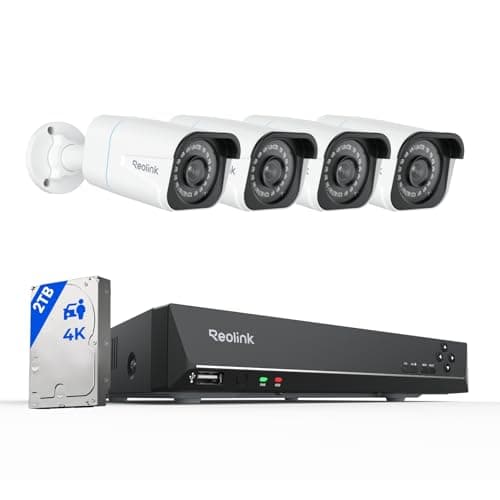
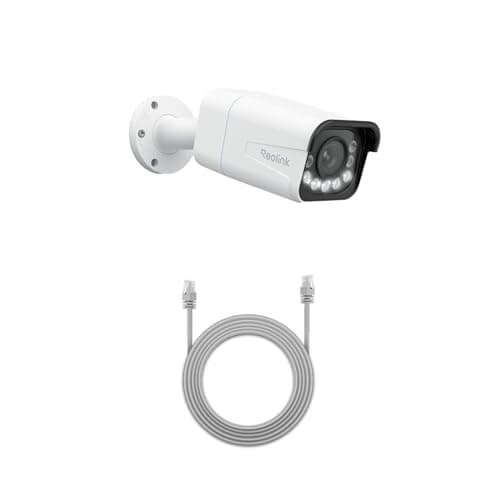
An IP camera and an NVR are not two options. The camera captures video and puts it on your network; the network video recorder receives that video, stores it, indexes it and, on a PoE recorder, powers the camera down the same cable. The real question behind the search is simpler: do I need a recorder, or is a memory card in the camera enough?
What each layer actually does
An IP camera is a self-contained device: sensor, lens, encoder and a network connection. Most modern ones also take a microSD card, so a single camera can record on its own with no other equipment at all. That is genuinely sufficient for a lot of households and it is the arrangement most of the cameras on this site use.
An NVR is the box the cameras report to. It gives you three things a card in a camera cannot: one timeline across every camera, so you scrub through an incident rather than checking four apps; storage measured in terabytes rather than the couple of hundred gigabytes a card holds, which is what makes weeks of continuous recording possible; and, on a PoE recorder, power to each camera down its Ethernet cable, which removes an outlet from every mounting position. It also keeps recording when your internet is down, because none of it depends on the internet.
Compiled from manufacturer specifications, August 2026. Card capacity limits vary by camera model. | IP camera with a card | IP cameras plus an NVR |
|---|
| Storage | microSD in each camera | Terabytes on a shared drive |
|---|
| Playback | One camera at a time, in the app | One timeline across all cameras |
|---|
| Continuous recording | Limited by card size | Practical for weeks |
|---|
| Power | Outlet at each camera | PoE from the recorder |
|---|
| If a camera is stolen | The footage goes with it | The footage is already on the recorder |
|---|
| Sensible camera count | One to three | Four or more |
|---|
When a card in the camera is enough
One to three cameras, event-based recording, and no ambition to expand: a card in each camera does the job and costs nothing extra. The Reolink RLC-811A is a good illustration — a 4K PoE camera with 5x optical zoom that records to its own card and streams RTSP, so it works standalone today and drops into a recorder later without being replaced. That upgrade path is worth paying attention to when you buy, because a camera that only talks to its manufacturer's app has no path at all.
The honest limits of the card-only approach: playback is per-camera and clumsy once there are several, retention is capped by the card, and if the camera is taken, the recording goes with it. None of those matters much at two cameras. All of them matter at six.
When you need the recorder
Four or more cameras, or any requirement for continuous footage, and the recorder stops being optional. Continuous recording is the clearest trigger: it answers “what happened between two and four in the morning,” which event clips cannot, and no reasonable card holds enough of it. Multiple cameras is the second: hunting through four separate app timelines to reconstruct one incident is the sort of task people do once and then buy an NVR.
A prepackaged system like the Reolink 8-channel kit answers all of this in one purchase — cameras, recorder, drive, and free channels to expand into — and it is ranked alongside the alternatives in our camera systems roundup. The cost is cabling: PoE means an Ethernet run to every camera, which is the trade examined in our PoE versus Wi-Fi guide.
The decision rule. Use cameras with cards if you have three or fewer, want event clips rather than continuous footage, and are not planning to expand. Add an NVRwhen you cross four cameras, when you need continuous recording, or when you want the footage to survive the camera being removed. Either way, buy cameras that publish RTSP and ONVIF so today's standalone camera can join tomorrow's recorder.
Why a recorder is not just a hard drive
It is tempting to think of an NVR as a disk with a network port, and that mental model causes two expensive misunderstandings. The first is bandwidth. Several 4K cameras streaming at once is real network traffic, and a PoE recorder solves that by putting the cameras on its own dedicated switch ports rather than on your home network at all — which is why a PoE NVR system does not slow your broadband down and a set of Wi-Fi cameras absolutely can.
The second is decoding. Recording several high-resolution streams and letting you play them back simultaneously is processing work, and every recorder has a limit expressed in channels and total throughput. That limit is why a recorder rated for eight cameras is not simply a four-camera recorder with more sockets, and why adding two panoramic dual-lens cameras to a nearly full system can behave differently from adding two ordinary ones.
There is a third feature people meet without noticing: sub-streams. Cameras generally publish a full-resolution main stream for recording and a small low-resolution stream for live preview, and the recorder uses each where it makes sense. That is how you can watch eight cameras at once on a phone over a slow connection while every one of them is still recording in 4K. If you have ever wondered why a live grid looks soft but the playback is sharp, that is why.
How each one is wired
The physical arrangements differ more than the terminology suggests. A standalone IP camera with a card needs power at the camera and a Wi-Fi signal that reaches it, or an Ethernet run if it is a wired model. That is one decision per camera, and the awkward one is usually power rather than data.
A PoE NVR system needs one Cat6 run from the recorder to each camera and nothing else at all: the same cable carries the power and the video, so there is no outlet required at any camera position. That is a genuine simplification at each camera and a genuine amount of work in the loft, and it is the whole substance of the choice examined in PoE versus Wi-Fi. It also means the system does not depend on your Wi-Fi at all, which removes the most common cause of camera dropouts in a normal house.
NVR, DVR and CCTV: the words people mix up
Three terms get used interchangeably and mean different things. An NVRrecords from IP cameras over a network cable; the camera does the encoding and sends digital video. A DVRrecords from analog cameras over coaxial cable and does the encoding itself in the box — older technology, still sold, and the reason someone with existing coax may be told they cannot use IP cameras without adapters. CCTV is the general term for a closed camera system and covers both, so it describes an arrangement rather than a technology.
For a new install the answer is IP and an NVR: better resolution, one cable per camera for power and data, and interoperability if the cameras support ONVIF. The only reason to consider a DVR is existing coax you would rather reuse than replace, and even then it is worth pricing the cable run before committing to older cameras.
What neither one saves you from
A recorder does not improve a badly placed camera, and it does not add detail a lens never captured. If a camera is aimed at a wide scene from too far away, the NVR faithfully stores hours of footage in which nobody is identifiable. Position and lens choice come first — that is how to choose a security camera and where to place them— and the recorder is what you add once the cameras are right. Nor does either arrangement involve a subscription: everything described on this page runs on hardware you own, which is the contrast drawn in local storage versus cloud.