HUB 06 · Guides
Can You Use Your Existing Key With a Smart Lock?
It depends entirely on whether the lock replaces your cylinder or sits behind it. One kind keeps every key you own; the other hands you a new set and a drawer problem.
We earn a commission if you buy through our links. It does not change the price you pay, and it does not decide our picks — our selection criteria are published in full. How this works.
Verdict
The bottom line
Yes, if you buy a retrofitsmart lock. A retrofit clamps onto the inside of the deadbolt you already have and turns the thumbturn, so the exterior cylinder, the keyway and every key in the household stay exactly as they are — which is why it is the standard answer for renters and for anyone with a key safe, a dog walker or a cleaner already holding keys. No, if you buy a replacementdeadbolt: the whole lock comes out and the new one arrives with its own cylinder and its own keys, so your old keys open nothing. If you want one key for the whole house afterwards, there are three routes — buy a lock with a re-keyable cylinder, order keyed-alike locks together, or pay a locksmith to re-key the new cylinder to your existing key.
The mechanical reason the answer splits in two
A key does not open a lock; it rotates a cylinder, and the cylinder drives the bolt. So the question “will my key still work?” is really “does this smart lock replace my cylinder?” There are only two possible answers, and every product in the category is one or the other.
A retrofit leaves the existing deadbolt entirely alone. It is a motor and a battery pack in a housing that fits over the interior thumbturn, gripping it and turning it on command. From outside the door, nothing has changed: same cylinder, same keyway, same keys, same locksmith record. The August and the Yale Approach are the well-known examples.
A replacementremoves your deadbolt completely — interior assembly, exterior escutcheon, bolt and cylinder — and installs a new lock through the same bore holes. Keyed models ship a new cylinder with two or three new keys. Key-free models ship no cylinder at all, which means there is no keyhole and therefore no key to use, lose or pick. The purchase decision between the two shapes, on grounds other than the key, is in our retrofit versus replacement guide.
This is also the renter answer.A retrofit keeps the landlord's hardware in place and reverses with a screwdriver, so nothing on the door was ever modified and the original keys still work for the letting agent. That combination is why retrofits dominate our no-drilling renter roundup.
If you are buying a replacement, three ways back to one key
- Buy a lock with a re-keyable cylinder.Kwikset's SmartKey system lets you re-key the cylinder yourself in about a minute with the tool in the box and a working key — so the new lock can be made to accept the key you already carry. That is a genuine convenience, and it has a documented trade-off: SmartKey cylinders have been the subject of published bypass research, so treat self-re-keying as convenience rather than as the security layer.
- Order keyed-alike.If you are changing several locks at once, most manufacturers can supply them keyed to the same key within a line. It has to be decided at the point of ordering, not afterwards, and it generally only works within one brand's keyway — a Schlage and a Yale will not share a key.
- Have the new cylinder re-keyed. A locksmith can re-pin a standard cylinder to your existing key, assuming the keyways are compatible. This is the route that works with a lock you have already bought, and it costs a call-out.
What does not work: filing a key, buying a “universal” cylinder, or expecting an adapter. Keyways are physical profiles, and there is no electronic answer to a mechanical mismatch.
Do you even want a keyhole?
Worth asking, because the keyed and key-free versions of the same lock are usually sold side by side and the decision is not obvious.
Keep the cylinder if:you hand keys to a contractor, cleaner or relative who will not use a code; you want a mechanical fallback that owes nothing to batteries or firmware; or the door is your only entrance and you are not comfortable with a single electronic route in. Note that a keyed lock is not the only outage answer — codes are verified inside the lock and keep working with no power or network, which is covered in our power-outage guide.
Go key-free if: everybody in the household will use a code or a fingerprint; you would rather not have a cylinder at all, because the cylinder is the part of most domestic locks that published attacks target; and you have a second door with a mechanical lock as the ultimate fallback. The security case either way, by protocol and by mechanism, is in our guide to smart lock security risks and are smart locks safe.
Three practical things people discover late
A retrofit inherits your lock's faults.If the existing deadbolt sticks, binds or needs a shove, a motor will not fix it — no amount of torque corrects a strike plate that is 2mm out, and the motor will chew through batteries trying. Free the bolt by hand first; if it does not turn smoothly with two fingers, fix the strike before fitting anything.
A key safe changes the calculation.If there is a key safe on the wall for a carer or a cleaner, a retrofit keeps the whole arrangement working untouched. A replacement means re-keying the safe contents too, and a key-free replacement means the safe becomes pointless — which may be the point, since codes can be issued and revoked remotely. Managing those is in our guide to guest codes.
Your old keys are still a live risk.If the reason you are buying a smart lock is that a set of keys went missing, a retrofit does not solve your problem — the missing key still opens the cylinder it always opened, and the motorized thumbturn above it changes nothing. That case specifically calls for a replacement lock, or a re-key, or the Kwikset route above.
The hardware this question applies to
The four below are one per answer rather than a ranking: the best-known retrofit, the retrofit with a fingerprint pad in the box, the replacement with a re-keyable cylinder, and the replacement sold in both keyed and key-free versions. Their prices come live from the Amazon API and were last checked October 15, 2026. The whole category is at the smart locks hub, ranked in our main roundup, with the rubric at our methodology.
The hardware
The hardware this guide is about
The products this guide refers to, with prices pulled live from Amazon and dated on every card. Full rankings live in the roundups linked above.
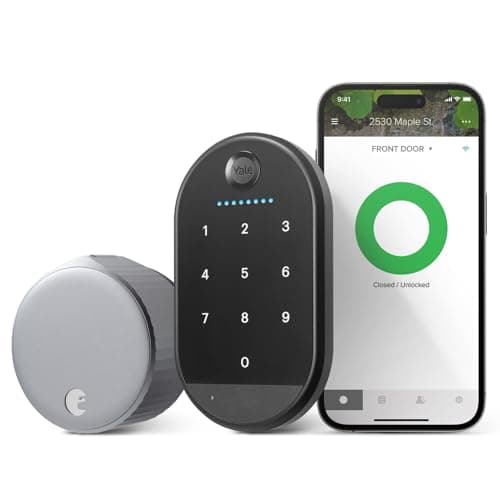
Best for renters
August Wi-Fi Smart Lock (with Yale Keypad)
The retrofit that started the category. It clamps onto the inside of your existing deadbolt and turns the thumbturn — the outside of the door does not change at all, which is why it is the default answer for renters. The listing we link is the bundle, so the Yale Keypad that gives it code entry is in the same box.
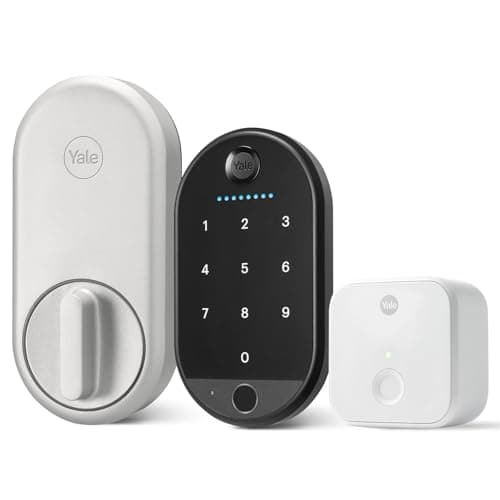
Best retrofit with a keypad option
Yale Approach Lock with Wi-Fi
Yale's answer to August, built by the same parent. A retrofit that keeps the exterior and your keys, and the bundle we link ships the biometric keypad with it, so code and fingerprint entry arrive without changing anything on the door.
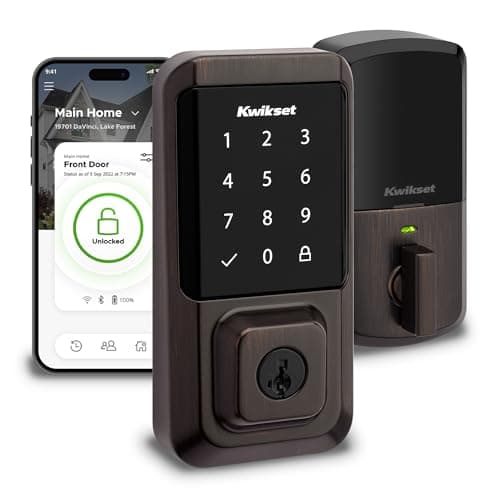
Best re-keyable lock
Kwikset Halo Wi-Fi Smart Lock
Built-in Wi-Fi, a touchscreen keypad and SmartKey re-keying — you can re-key the cylinder yourself in under a minute without a locksmith, which is a genuinely useful property when a set of keys goes missing.

Best overall smart lock
Yale Assure Lock 2 (Wi-Fi, keyed)
The modular one. Yale sells the same lock body in keyed and key-free, touchscreen and keypad, with the radio as a swappable module — so you buy the connectivity you want instead of the connectivity that shipped.
#ad · As an Amazon Associate we earn from qualifying purchases.
Questions
Frequently asked
Will a smart lock work with my existing key?
Can I keep one key for the whole house after fitting a smart lock?
Do smart locks come with physical keys?
Is a retrofit smart lock less secure because it keeps the old cylinder?
I lost a key. Will a smart lock fix that?
Keep reading
Related
- Retrofit versus replacement smart locksThe same split, decided on everything other than the key.
- Best smart locks for rentersThe retrofits that keep the landlord's cylinder and your keys.
- How to install a smart lockIncluding freeing a sticking bolt before a motor inherits the problem.
- Will a smart lock fit my door?Settle the measurements before the keyway question matters.
Receipts
Sources
- August — Wi-Fi Smart Lock retrofit installation documentation and existing-key behavior
- Yale Home — Approach Lock retrofit documentation and Assure Lock 2 keyed / key-free versions
- Kwikset — SmartKey re-keying documentation and procedure
We do not run a testing lab and we do not pretend to. Specifications come from the manufacturer's own published documents and from published standards; prices come from the live Amazon API. Where a figure is not published, the page says “not published” rather than guessing. Read the full method.