HUB 01 · No Subscription
Security Camera Subscription Costs, Compared
The model, not a number: how to compute what a camera plan costs you over one, three and five years, and the plan structure of every major vendor.
We earn a commission if you buy through our links. It does not change the price you pay, and it does not decide our picks — our selection criteria are published in full. How this works.
A camera subscription is not a monthly cost, it is a multi-year commitment quoted monthly. This page gives you the arithmetic to convert one into the other, the plan structure of the six vendors that matter, and a direct route to each vendor's own published pricing so you are working from today's number rather than one we wrote down months ago.
Why this page publishes a model and not a price.Plan pricing in this category changes, and it changes upward. Arlo has raised its plan pricing more than once. Ring has restructured its plans and renamed them. A page that hardcoded “$X per month” would be wrong within months and would keep being cited long after it was wrong, which is worse than useless to somebody trying to make a purchase. So we publish the two things that do not go stale: the formula, and the shape of each vendor's plan. You supply today's rate from the vendor's own page — every one is linked below. Our commitment is to re-audit the plan structures in this table quarterly. Last structural audit: July 2026. Next scheduled: October 2026.
The formula
Every camera subscription in this category resolves to one of two shapes. Both are one line of arithmetic.
Per-device plans charge for each camera you enroll:
total = monthly fee x 12 x years x number of cameras
Per-household plans charge once and cover every camera at the address:
total = monthly fee x 12 x years
The camera count drops out of the second formula entirely, which is the whole reason vendors sell both. It also produces a clean decision rule, below.
A fully worked example
The rate here is a placeholder, not anybody's real price. It is chosen because it is a round number, and it is labeled as a supposition so that nothing on this page can be mistaken for a quote. Substitute the figure you find on the vendor's own page.
Suppose your plan is $10 per month for one camera. Then:
| Cameras | 1 year | 3 years | 5 years | The arithmetic |
|---|---|---|---|---|
| 1 camera | $120 | $360 | $600 | 10 x 12 x years x 1 |
| 2 cameras | $240 | $720 | $1,200 | 10 x 12 x years x 2 |
| 4 cameras | $480 | $1,440 | $2,400 | 10 x 12 x years x 4 |
| 6 cameras | $720 | $2,160 | $3,600 | 10 x 12 x years x 6 |
Two things are worth sitting with. First, the five-year column at four cameras is larger than the cost of a complete four-camera recording system with its own drive that has no plan at all. Second, the number keeps growing after year five, because a subscription has no end date. That is the entire argument this site is built on, expressed as multiplication rather than as an opinion.
The per-household crossover
If a vendor sells both a per-device tier and a per-household tier, there is a camera count at which the household tier becomes cheaper. It is:
crossover cameras = household monthly fee / per-device monthly fee
Suppose the per-device tier is $10 and the household tier is $20. The crossover is at two cameras: at one camera the per-device tier is cheaper, at two they are equal, and at three or more the household tier wins and keeps winning. Work this out before you enroll the first camera, because most people add cameras one at a time and never revisit the tier they picked when they had one.
The break-even against buying hardware instead
Subscription-free hardware generally costs more up front, because the vendor is not expecting to make the money back monthly. The question is how long it takes the plan to overtake the premium:
years to break even = hardware premium / (monthly fee x 12 x cameras)
If the subscription-free setup costs $200 more up front and the plan is $10 per month for two cameras, that is 200 / (10 x 12 x 2) = 0.83 years. Ten months. After that, every month is saving. Run the same arithmetic with your own numbers before you accept anyone's claim — including ours — about which route is cheaper.
Plan structure by vendor
This is the part that does not go stale as fast as pricing does, and it is the part that actually changes what you should buy. The cells describe structure: who the plan is charged against, whether the free tier retains footage at all, and roughly what moves between tiers. No dollar figures appear here by design. Every vendor's own pricing page is linked in the section below.
| Vendor | Charged per device or per household? | Does the free tier retain footage? | What the entry tier unlocks | What higher tiers add | Subscription-free route in the same brand |
|---|---|---|---|---|---|
| Ring | An entry tier priced per device, with household tiers above it | No. Without a plan, cameras and doorbells give live view and notifications and save nothing you can watch later | Recorded video history and clip saving | Whole-home coverage, extended warranty terms and alarm monitoring | None for cameras. Ring Alarm works unmonitored |
| Arlo | A per-camera tier and an unlimited-cameras tier | No. Recorded video requires the plan | Cloud recording and cloud-side detection | Higher resolution recording, more cameras, extra detection categories | Local storage via an Arlo base station, a separate purchase |
| Nest (Google) | Per household — one plan covers every camera at the address | Partially. Google publishes a short rolling window of event history at no cost; check the current length on their page | Longer event video history | Continuous 24/7 recording on wired models, longer retention, familiar faces | None. Nest cameras are cloud-first by design |
| Wyze | Both: a per-camera tier and an unlimited-cameras tier | Yes for local storage. A card in the camera records without a plan; free cloud event clips are short | Full-length event clips and AI detection categories | Unlimited cameras on one plan and extended cloud retention | microSD recording in the camera, free |
| Blink | A per-device tier and an unlimited-devices tier | Not in the cloud. Local storage is free but requires a Sync Module 2 and your own USB drive | Cloud clip storage and sharing | All devices on one plan, extended warranty terms | Sync Module 2 with USB storage — extra hardware, no fee |
| eufy | Optional cloud plans, sold per device or in multi-device tiers | Yes. Local recording and full playback work with no plan on the camera or a HomeBase | Off-site cloud backup of clips | Longer cloud retention and more devices | The default. Local storage on the camera or a HomeBase |
Check this yourself — every vendor's own pricing page
This is the most important section on the page. Do not take a number from us, from a review site, or from a forum post of unknown age. Every one of these vendors publishes its current plan pricing on its own site, and that page is the only source that is correct today.
- Ring — plan tiers and what each includes: ring.com
- Arlo — Arlo Secure plan tiers and camera limits: arlo.com
- Nest (Google) — Nest Aware tiers and free event history length: store.google.com
- Wyze — Cam Plus tiers, per-camera and unlimited: wyze.com
- Blink — plan tiers and Sync Module local storage documentation: blinkforhome.com
- eufy — optional cloud plans and local storage options: eufy.com
When you have the number, put it in the formula at the top of this page. Three multiplications and you have a five-year figure you can compare against hardware.
Four things that are not in the monthly fee
The headline rate understates the commitment in four specific ways, and all four are checkable rather than speculative.
Price changes over the term
A five-year projection at today's rate assumes today's rate holds for five years. In this category it historically has not. When you run the model, run it a second time at a higher rate and treat the gap as your exposure. You cannot know the future rate; you can know that the arithmetic is sensitive to it, which is itself a reason to prefer hardware you own.
Camera count creep
Almost nobody stops at one camera. On a per-device plan, each camera you add multiplies the recurring cost, and the addition happens months apart so the total never gets re-examined. Model the number of cameras you expect to end up with, not the number you are buying today.
The switching cost when you leave
Footage held in a vendor cloud generally leaves with the plan. If you cancel, the history is not yours to keep unless you exported it, and cameras with no local storage option cannot be repurposed onto anything else. Hardware locked to one base station has the same property. This is not a fee, but it is a cost, and it is worth pricing in before you commit an estate to one vendor.
What the plan replaces
Being fair to the other side: a plan does buy something a card in a camera cannot, namely off-site copies of your footage. If a camera is stolen, the cloud already has the clip and your card does not. That single property is the honest case for paying, and we would rather name it than pretend the choice is one-sided. Everything else that plans have traditionally bundled — person and vehicle detection, package alerts, face recognition — increasingly runs on the device. eufy runs face recognition on the HomeBase, Reolink runs detection on the camera, and TP-Link ships person, vehicle and package detection with no plan. Detection quality was a strong argument for subscriptions five years ago and is a much weaker one now.
What to buy instead, if the model persuades you
The four products alongside this page are the subscription-free equivalents of the four things people usually subscribe for: an outdoor camera, a wired camera with continuous recording, a video doorbell, and an alarm system. Each records and plays back without a plan, and each is ranked in full on its own page — cameras at the best cameras without a subscription, doorbells at the best doorbells without a subscription, and storage architectures at the local storage roundup.
If you are comparing two specific budget brands rather than the whole field, the head-to-head is at eufy vs Wyze — the cleanest example of a brand that removed the subscription against one that kept a partial version of it. And the argument about what local storage does and does not protect against is in local storage vs cloud security cameras.
How this page is maintained
The plan structures above are read from each vendor's own published pricing page and dated. They are re-audited quarterly, and the date at the top of this section is the last time that happened. If a vendor restructures its tiers between audits, the table will be behind — which is precisely why every row ends with a link to the source rather than with a number from us. Our scoring rubric, our sourcing rules and the reason we publish no figures we cannot re-derive from a public page are all set out on our methodology page. Everything in this cluster ladders up to the subscription-free hub.
The hardware
The hardware this guide is about
The products this guide refers to, with prices pulled live from Amazon and dated on every card. Full rankings live in the roundups linked above.

Best subscription-free outdoor camera
eufy SoloCam S340 (solar, dual camera)
Solar panel, pan and tilt, dual lenses and onboard storage — no wire, no monthly fee, and no recording leaving the device unless you choose to send it.
Best wired camera
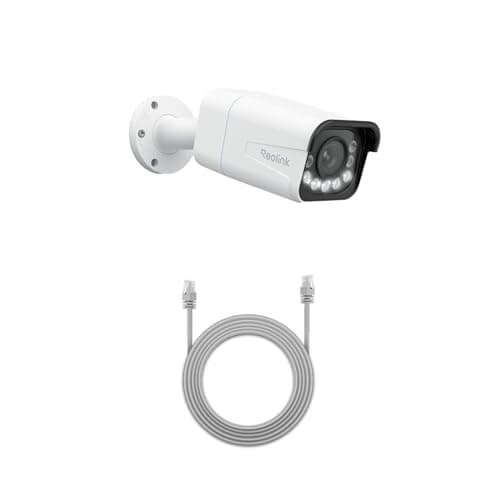
Reolink RLC-811A (4K PoE, 5x zoom)
One cable for power and data, 4K with a real 5x optical zoom, and continuous recording to a card or an NVR. This is the camera for someone who wants a serious install rather than a convenient one.
Best video doorbell
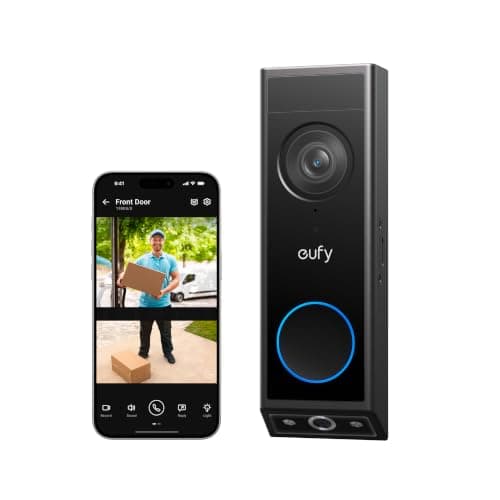
eufy Video Doorbell E340 (dual camera)
Two cameras — one on the visitor, one pointed down at the doorstep — so you see the parcel as well as the person. Records locally, wired or battery, no plan.
Best subscription-free alarm system
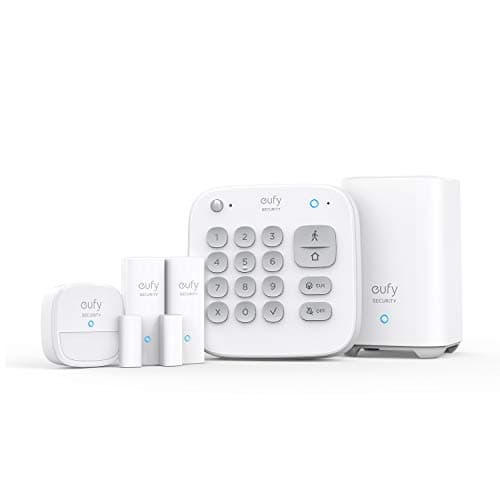
eufy 5-Piece Home Alarm Kit
Keypad, motion sensor and two entry sensors around a HomeBase, with no monitoring plan attached and none required. A self-monitored alarm you own outright.
#ad · As an Amazon Associate we earn from qualifying purchases.
Questions
Frequently asked
Why does this page not just list the prices?
How do I work out what a camera subscription will cost me?
Is a per-camera or a whole-home plan cheaper?
Which camera brands genuinely have no subscription?
Is there anything a subscription buys that local storage cannot?
How often is this page updated?
Keep reading
Related
- Best security cameras without a subscriptionThe seven cameras this model points you toward.
- Best local storage security camerasCard, base station or recorder — the three ways to own your footage.
- Best home security systems without a subscriptionSelf-monitored alarms, and when monitoring is worth paying for anyway.
- eufy vs WyzeNo subscription against a partial one, on comparable hardware.
Receipts
Sources
- Ring — plan tiers and what each includes (vendor pricing page)
- Arlo — Arlo Secure plan tiers and camera limits (vendor pricing page)
- Google Store — Nest Aware tiers and free event history (vendor pricing page)
- Wyze — Cam Plus tiers, per-camera and unlimited (vendor pricing page)
- Blink — plan tiers and Sync Module 2 local storage (vendor pricing page)
- eufy Security — optional cloud plans and local storage options
- Reolink — subscription-free local and NVR recording documentation
- TP-Link — Tapo and Kasa on-device detection documentation
We do not run a testing lab and we do not pretend to. Specifications come from the manufacturer's own published documents and from published standards; prices come from the live Amazon API. Where a figure is not published, the page says “not published” rather than guessing. Read the full method.