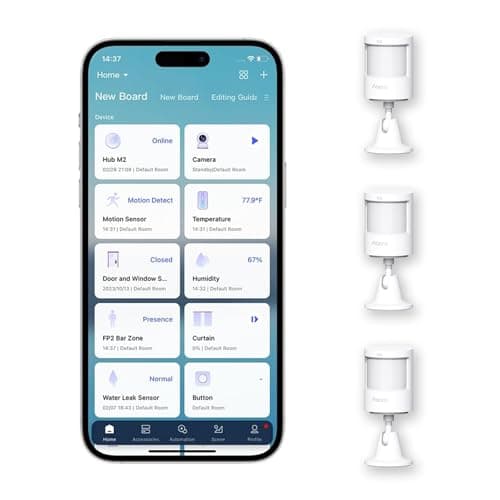
The Aqara Motion Sensor P1 is our pick for best motion sensorfor a plain reason: it gets the two things a PIR sensor has to get right. It lets you set exactly how long it waits before it decides the room is empty, and it lasts years on coin cells because it spends almost all of its life asleep. Everything else on this page follows from those two facts — including the one limitation you have to accept before you buy it.
What it is, and what passive infrared can and cannot see
The P1 is a passive-infrared (PIR) motion sensor. Behind its lens is a segmented window that divides the field of view into a fan of narrow zones, and the sensor watches for the infrared signature of a warm body crossing from one zone into the next. It is not seeing a person; it is seeing the changeas heat moves across its field. That single fact explains the P1's whole character. It is why it is inexpensive, why it barely uses power, and why its coverage — a published 150-to-170-degree spread — is measured as an arc from a corner rather than a room it “watches.”
It also explains the limitation. A PIR sensor detects movement, not presence. Cross the room and it fires instantly; sit down and hold still and, within seconds, you have stopped crossing zone boundaries and the sensor reports the room empty. If your mental model is a sensor that knows whether anyone is there, adjust it now: the P1 knows whether anyone is moving. For the overwhelming majority of jobs — lights that come on when you walk in, a notification when a room should be still — that is exactly right. For the narrow set of jobs that need true occupancy, it is the wrong tool, and I will point you at the right one below.
The adjustable timeout is the setting that matters
Most motion sensors give you a fixed cooldown — a period after the last detected movement before the sensor resets and reports “clear.” Set that period wrong and the sensor is useless in opposite directions: too short and the lights snap off while you are standing at the counter with your hands full; too long and they burn for a quarter of an hour after you have left the house.
The P1 makes that interval adjustable across a wide 1-to-200-second range, and that is the feature I would pay for. It means you can tune each sensor to its room: a couple of seconds in a hallway where you only ever pass through, a minute or more at a kitchen counter or a desk where a person legitimately pauses. Paired with the sensitivity setting, it is the difference between a motion sensor you forget about and one you end up disabling out of irritation. If you take one thing from this review, take this: the timeout is not a minor preference, it is the whole user experience, and the P1 is one of the few affordable sensors that hands it to you.
It needs an Aqara Zigbee hub — not Thread
The P1 speaks Zigbee, and Zigbee needs a coordinator, so this sensor is not a complete purchase on its own: it requires an Aqara Zigbee hub. That is the single most important thing to know before ordering, because nothing about a small battery sensor signals that it cannot work alone.
Note also what it is not: it is not a Thread device, so it does not join a Matter fabric directly the way a Thread sensor does. Whether the P1 shows up in Apple Home, Google Home or a broader Matter setup depends entirely on which Aqara hub you pair it with and whether that hub bridges its Zigbee devices out to those platforms — check the specific hub's documentation, because the capability lives in the hub, not the sensor. If protocols are new to you, or you are weighing Zigbee against Thread for the rest of the house, the trade-offs are laid out in our Matter and smart-home-security explainer. The short version: Zigbee through an Aqara hub is mature, local and reliable, but it ties this sensor to Aqara's hub rather than to an open fabric.
Battery: a coin cell, and why it lasts
Aqara publishes a five-year battery life for the P1, and unlike headline figures in many categories, this one is believable from the mechanism. A PIR sensor has no emitter to power — it is a detector that sleeps, wakes on a heat change, radios a short Zigbee message, and goes back to sleep. It is not maintaining a Wi-Fi association or a continuous radio link around the clock the way a mains-hungry device does. The current it draws between events is tiny, so a coin cell's modest reservoir stretches across years rather than months.
The practical implications are the good kind. There is no subscription and no running cost beyond an occasional cell. A three-pack — how the P1 is sold — kits out several rooms at once, and you are unlikely to be back in the battery drawer for a long time. The one thing worth knowing: because it wakes on movement, a sensor pointed somewhere with constant traffic or a nearby heat source that keeps tripping it will radio more often and shorten that life. Placement, again, is doing more work than the datasheet.
Placement: corner mount, and keeping pets out of frame
A PIR sensor rewards being mounted correctly more than almost any other smart-home device. Two rules cover most of it. First, mount in a corner at about head height and aim the sensor so people cross its fan of zones sidewaysrather than walking straight into it — crossing zone boundaries laterally trips it far faster than approaching head-on. Second, keep the lens pointed away from windows, heating vents, and anything warm that moves; a register blowing hot air or a sunbeam tracking across the floor is, to a PIR, a moving heat difference indistinguishable from a person.
Pets are the placement problem the P1 cannot fully solve. As its own record states, a passive-infrared sensor at this price does not do reliable pet immunity, and a cat on a windowsill or a dog more than a few kilograms will trigger it. You can reduce this by angling the sensor upward so the floor where the animal walks falls below the active zones, but treat that as mitigation, not a guarantee. If you share the covered room with a substantial pet and you are arming the sensor for anything alert-worthy, be honest with yourself that false triggers are likely.
The honest cons
- PIR blind spots. The segmented lens creates gaps between zones, especially at range and directly toward the sensor. Someone can move slowly straight at it and be detected late. Aim across the space, not along the approach.
- Blind to a still person. This is the one you must accept. Stop moving and the P1 reports the room empty. It is a motion sensor, not a presence sensor, and no setting changes that.
- Hub required. No Aqara Zigbee hub, no sensor. Budget for the hub if you do not already run one.
- Pets. No dependable pet immunity at this price point, as covered above.
Who should skip it
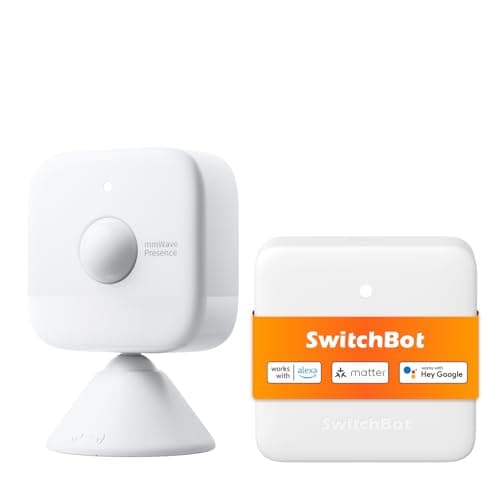
Anyone who needs to detect a still, occupied room.If the job is lights that stay on while you sit and read, or occupancy for a home office, a PIR sensor will switch off on you every time you go quiet. That is an mmWave radar job — the SwitchBot mmWave in our motion sensor roundup is the pick, at the cost of mains power and some tuning.
Anyone with larger pets in the covered room.The P1's own skip line says it plainly: pets more than a few kilograms will trip it, and a 3am alert from a cat on a sill is the fastest route to unplugging the sensor entirely.
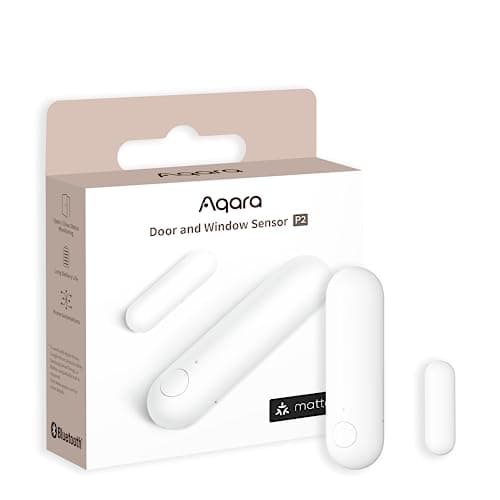
Anyone who wants a hub-free, Thread-native device. If your house is built on Matter over Thread and you refuse to add an Aqara Zigbee hub, the P1 is the wrong shape. For contact sensing there is the Thread-native Aqara Door and Window Sensor P2, which joins a Matter fabric directly — though it detects an opening, not motion.
The thing it cannot tell you
Whether a door is actually open. A motion sensor reports that something moved in a volume of air; it cannot report the plain binary fact that a specific door or window is ajar. For entrances, a contact sensor gives you that for a small fraction of the effort, and the two complement each other — motion inside the room, contact on the openings. The ranked contact options are at best door and window sensors, and the full family lives on the sensors hub. If you are covering the doors anyway, the same buyer usually wants the lock to report its own state too — that ranking is at best smart locks, and everything here runs on the same Zigbee or Thread network you are already standing up.
How this review was put together
Products we claim to have tested: zero. We have not mounted this sensor on a wall and we are not going to imply otherwise. What this review is built from is Aqara's published specification and support documentation for the P1 and its hubs, the coin-cell longevity that the PIR mechanism makes plausible, and the physics of passive infrared, which is settled and citable. Every source is listed below, and the scoring rubric behind the metric scores is published in full at methodology so you can reach your own conclusion from the same public material.
The alternatives worth comparing
SwitchBot mmWave — if you need presence, not motion
The one thing the P1 cannot do is hold a room “occupied” while people sit still, and that is exactly what the SwitchBot mmWave radar is for. It reads the micro-motion of a breathing body, so lights stay on while you read and go off only when the room is genuinely empty. The trade-offs are real: it wants mains power rather than a coin cell, it needs a SwitchBot hub for automations, and because millimeter-wave passes through thin walls it must be zoned so it stops counting the next room. Buy it for occupancy automation, not as a security detector. It is the presence pick on our motion sensor roundup.
Aqara Door and Window Sensor P2 — if you want Thread with no Aqara hub
If the Zigbee-hub requirement is the sticking point and your house is built on Matter over Thread, the P2 is the sensor that fits that world — it joins a Matter fabric directly through a Thread border router, with no Aqara cloud in the path and local automations that keep running when the internet is down. The catch is that it is a different sensor for a different job: it reports a door or window opening, not motion in a room. Many buyers end up wanting both — the P1 for movement inside, the P2 on the openings — and the full contact-sensor field is ranked at best door and window sensors.