HUB 06 · Guides
Local Storage vs Cloud Security Cameras
Three local architectures, one cloud model, and the trade nobody in this category states plainly: local footage does not survive the camera being taken.
We earn a commission if you buy through our links. It does not change the price you pay, and it does not decide our picks — our selection criteria are published in full. How this works.
Is local storage or cloud better for security cameras?
Local storage wins on cost, privacy and outage resilience; cloud wins on one thing that matters, which is surviving the camera being stolen or destroyed. Local comes in three forms — a card in the camera, a base station, or an NVR — and they are not equivalent to each other.
This is the decision underneath every camera purchase on this site, and it is usually presented as a value judgment when it is really an architecture question. The honest version is that each model fails differently, and you should pick the one whose failure mode you can live with rather than the one with the better marketing.
The four architectures
1. microSD in the camera
A card slot in the camera body. Footage is written to the card and played back through the app when your phone can reach the camera. The Reolink Argus line, the Tapo cameras and the eufy SoloCam S340 all work this way.
It is the cheapest possible local storage, it adds nothing to install, and it has no ongoing cost of any kind. Two limitations are structural. First, capacity: a card holds days of event clips or a much shorter window of continuous recording, and when it fills it overwrites the oldest footage. Second, and more important, the recording and the thing being recorded are the same object. If the camera goes, the evidence goes.
A practical note that nobody prints on the box: use a high-endurance card rated for continuous video writing. Standard cards are designed for photographs — occasional writes, mostly reads. A security camera writes continuously for years, and a standard card in that duty cycle fails, silently, and you discover it on the day you need the footage. Check a sample recording from every camera once a month. It takes two minutes and it is the maintenance step everyone skips.
2. A base station
A hub inside the house holds the storage, and the cameras stream to it over the manufacturer's own wireless link. eufy's HomeBase 3 is the example here: up to 16 TB of expandable storage and face recognition that runs on the base rather than in somebody else's data center.
This solves the theft problem for the cameras — take a camera and the footage of the camera being taken is already indoors — and it lifts retention from days to months. It also moves the processing local, so the intelligence in the system is not a cloud service that can be re-priced. The costs are that the base is another mains device, that it typically serves only that manufacturer's cameras (the HomeBase 3 records eufy devices and nothing else), and that you have concentrated everything into one box that is itself in the house.
3. An NVR
A network video recorder with a hard drive, fed by PoE cameras over Ethernet. The Reolink 8-channel system with four 4K cameras and a 2 TB drive is the shape of it.
This is the endgame for subscription-free video. Continuous 24/7 recording across every camera, weeks of retention, no wireless link to drop, no account tier, no manufacturer able to change the terms later, and cameras that keep recording while the internet is down because nothing about the recording path touches the internet. PoE also means one cable per camera for power and data, so there is no charging cycle and no battery.
The cost is the cable. Running four Ethernet drops is a weekend or a contractor, and it is why this architecture stays a minority choice despite being technically the strongest one. It is covered in full in our local storage camera roundup.
4. Cloud
The camera uploads to the manufacturer's servers and you stream it back. Ring and Arlo are built this way, and on those platforms recorded footage requires a plan — the Ring Stick Up Cam's record on this site says it plainly: without a subscription it does not save a single clip you can watch later.
Cloud has a genuine advantage that local architectures cannot match, and it deserves to be stated without hedging: the footage is already off-site. It survives the camera being stolen, the house being damaged, and the recorder being taken. It also needs no maintenance, cannot fill up, and is accessible from anywhere without you configuring anything. If your threat model is theft of the equipment itself, cloud is structurally better and no amount of preference for local changes that.
The comparison
| Dimension | microSD in camera | Base station | NVR | Cloud |
|---|---|---|---|---|
| Ongoing cost | None | None | None | A recurring plan, usually per camera or per household |
| Up-front cost | Lowest — a card | Base plus cameras | Highest — recorder, drive, cabling | Low — camera only |
| Internet goes down | Keeps recording | Keeps recording | Keeps recording | Recording stops or buffers briefly |
| Power goes down | Stops (battery cameras keep going) | Stops unless on a UPS | Stops unless on a UPS | Stops at the camera |
| Camera is stolen | Footage goes with it | Footage is indoors, safe | Footage is indoors, safe | Footage is off-site, safe |
| Recorder or base is stolen | Not applicable | Everything is lost | Everything is lost | Not applicable |
| Typical retention | Days | Weeks to months | Weeks to months | Whatever the plan tier allows |
| Who can access it | You, physically | You, on your network | You, on your network | You, the vendor, and anyone with lawful process or your account |
| Maintenance | Check the card periodically | Drive health, firmware | Drive health, firmware | None |
Cost over time
Local storage is a purchase; cloud storage is a rent. That difference compounds, and it compounds fastest on platforms that charge per camera, because the cost of adding a fifth camera is not the camera — it is the camera plus a permanent increase in the monthly line item.
We do not quote plan figures on this page because they change and because a stale number is worse than no number. The dated, sourced arithmetic at one, three and five years, taken from each vendor's own published pricing, is in our subscription cost comparison. What is worth internalizing here is the shape rather than the amount: a local system has a high first-year cost and a flat curve afterwards, while a cloud system has a low first-year cost and a line that never stops rising and is not under your control.
The second cost nobody mentions is the exit cost. Footage in a vendor's cloud is usually exportable one clip at a time. Cancel the plan and history typically becomes inaccessible. Footage on your own drive is a folder.
How much storage do you actually need?
Retention on a local system is arithmetic, not a plan tier, and the arithmetic is straightforward enough to do before you buy. Take the camera's bitrate — every manufacturer publishes it, and on a 4K camera it is typically in the region of a few megabits per second at the default quality setting. Multiply by seconds, divide by eight, and you have bytes.
As a shape rather than a promise: a single 4K stream recording continuously consumes somewhere in the order of tens of gigabytes per day, so a 2 TB drive holds weeks of one camera or a shorter window of four. Event-only recording cuts that by an order of magnitude, which is why a card in a battery camera can hold a useful history despite being small. Motion-triggered recording on a busy street lands somewhere between the two, and lands closer to continuous than people expect.
Two adjustments follow. If you are cabling an NVR, buy a bigger drive than the arithmetic suggests, because retention is the one thing you cannot retrofit after the incident you needed it for. And check whether your recorder supports different retention per camera; a driveway usually deserves more history than a side passage, and spending the drive where it matters is free.
What survives what
Run through the failure cases honestly, because this is where the marketing on both sides is weakest.
An internet outage. Local keeps recording, without exception. Cloud cameras generally stop recording; some buffer a short period locally and upload on reconnection, but that is a mitigation rather than a solution. If you live somewhere with unreliable service, this alone decides it.
A power cut. Everything mains-powered stops, including your router, your base station and your NVR. Battery and solar cameras keep recording to their own cards, which makes a solar camera with a microSD slot the only architecture here that survives losing both power and internet. A UPS on the recorder and the network switch closes most of the gap for a wired system, and is worth the modest cost.
The camera is taken. Card-in-camera loses the footage. Everything else keeps it. This is the honest argument against the cheapest local option, and it is why mounting height matters more than people think — a camera you can reach is a camera and its recording in one bag.
The recorder is taken. This is the honest argument against local generally, and it is not addressed by any local architecture on its own. The eufyCam 3 record on this site states it plainly: everything lives on the HomeBase, and if the base goes, the recordings go with it. The mitigations are physical — put the recorder somewhere non-obvious, not next to the front door — or hybrid, which is the next section.
The vendor changes the deal. A local system is unaffected. A cloud system is entirely exposed: price increases, tier restructuring, feature migration behind a higher plan, or the service being discontinued. This has happened repeatedly across the category and it is the risk that local storage is really buying you out of.
Who can actually see your footage
With local storage the answer is short: you, on your network, plus anyone who gets onto that network or into that building. With an NVR that is not exposed to the internet, the attack surface is genuinely small.
With cloud storage the list is longer and it is not a criticism of any particular vendor, it is just how the architecture works: you, anyone with your account credentials, the vendor's systems and whichever staff have administrative access under their internal controls, and anyone who obtains it through lawful process served on the vendor rather than on you. Reasonable people weigh that differently. What is not reasonable is not knowing.
One caveat cuts against a naive reading of “local means private.” Several nominally local systems still route thumbnails, notifications or remote viewing through vendor infrastructure, and at least one major brand in this space has had a publicly disclosed discrepancy between its marketing and its actual cloud handling. Read the vendor's own published disclosures before treating any consumer system as hermetically local. The genuinely local option is an NVR or a camera with RTSP and ONVIF feeding software you run yourself, which is why the cameras we rank highest for local control are the ones that publish those protocols.
The hybrid answer
These are not mutually exclusive, and the strongest practical setup uses both. Record everything locally for retention and cost, and let a small number of cameras also push event clips somewhere off-site so that a total loss of the equipment does not mean a total loss of evidence. Several no-subscription systems offer optional cloud backup as an extra rather than as the core storage, which is the right shape: your footage is yours by default, with an off-site copy as insurance rather than as the product.
If you run Home Assistant, Frigate or Blue Iris, a camera with RTSP and ONVIF support gives you the same thing with more control: continuous local recording plus whatever off-site copy you configure. Reolink publishes RTSP and ONVIF across much of its range, which is the main reason those cameras keep appearing in self-hosted setups.
Start with the local storage camera roundup if you have decided, or the general camera roundup if you are still weighing it. Our methodology explains how these judgments were compiled from published specifications and vendor pricing pages, and the other explainers are on the guides hub.
The hardware
The hardware this guide is about
The products this guide refers to, with prices pulled live from Amazon and dated on every card. Full rankings live in the roundups linked above.
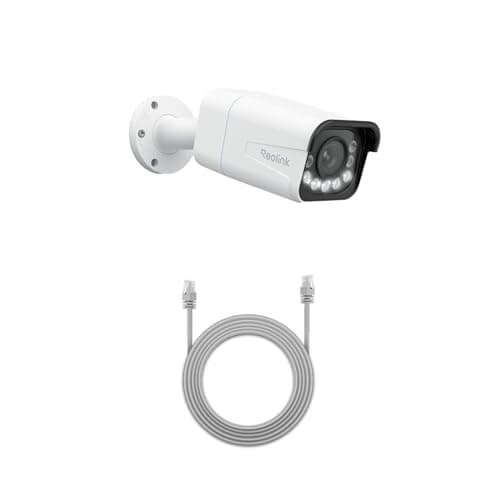
Best wired camera
Reolink RLC-811A (4K PoE, 5x zoom)
One cable for power and data, 4K with a real 5x optical zoom, and continuous recording to a card or an NVR. This is the camera for someone who wants a serious install rather than a convenient one.
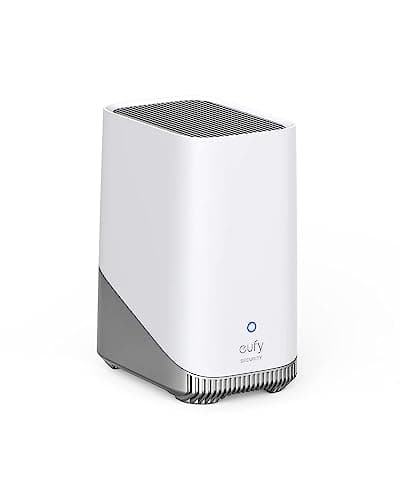
Best local storage base
eufy HomeBase 3 (S380)
The box that makes eufy's no-subscription claim true. Up to 16TB of expandable local storage and on-device face recognition, so the processing and the footage both stay in your house.

Best subscription-free outdoor camera
eufy SoloCam S340 (solar, dual camera)
Solar panel, pan and tilt, dual lenses and onboard storage — no wire, no monthly fee, and no recording leaving the device unless you choose to send it.
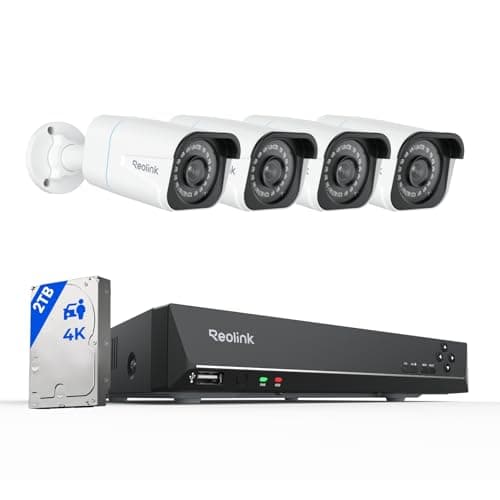
Best complete local system
Reolink 8CH 4K PoE System with NVR + 2TB
Four 4K PoE cameras, an eight-channel recorder and a 2TB drive in one box. Continuous recording, nothing in anybody's cloud, and no monthly anything — the endgame of subscription-free.
#ad · As an Amazon Associate we earn from qualifying purchases.
Questions
Frequently asked
Do security cameras work without wifi?
How long does a microSD card last in a security camera?
What happens to local footage if the camera is stolen?
Is cloud storage safer than local storage?
Can I use a security camera with Home Assistant?
Keep reading
Related
- Do security cameras need a subscription?When you can skip the monthly fee, and the cameras that let you.
- Best local storage security camerasThe cameras and systems that record without a plan.
- Subscription costs comparedThe dated arithmetic at one, three and five years.
- Best home security camerasThe full ranked field, storage type stated on every pick.
- Ring vs eufyThe cloud model against the local model, head to head.
Receipts
Sources
- Reolink — RTSP and ONVIF support documentation
- Reolink support — NVR, PoE and recording documentation
- eufy — HomeBase and local storage documentation
- Ring support — video recording and plan requirements
- Arlo — storage and Arlo Secure plan documentation
- ONVIF — open interface specification for IP cameras
- SD Association — memory card endurance and application classes
- Home Assistant — camera and Frigate integration documentation
We do not run a testing lab and we do not pretend to. Specifications come from the manufacturer's own published documents and from published standards; prices come from the live Amazon API. Where a figure is not published, the page says “not published” rather than guessing. Read the full method.