Skip to content
SensorLatch

HUB 02 · Smart Locks

The Best Smart Locks With a Key Backup

A keyhole is a fallback and an attack surface at the same time. These six keep the key, and the ranking is about whose cylinder you end up living with.

By Stephen V.Updated How we pick
#ad

We earn a commission if you buy through our links. It does not change the price you pay, and it does not decide our picks — our selection criteria are published in full. How this works.

Verdict

The bottom line

Buy the Yale Assure Lock 2 in its keyed version. It is the pick that keeps a conventional mechanical cylinder in a lock whose electronics you can upgrade later, which is the right shape for a front door you want to keep for a decade. Two situations change the answer. If a set of keys has ever gone missing, buy the Kwikset Halo: its SmartKey cylinder re-keys at home in about a minute, so you retire a lost key without paying a locksmith — at a documented trade-off we spell out below. If you want to keep the key you already carry, the SwitchBot Lock Ultra Touch Combo is the only pick here that does not introduce a new keyway at all, because it leaves your existing deadbolt and its cylinder in the door. The budget pick is the Veise Keyless Entry Keypad Deadbolt — the cheapest lock on this site that gives you a code pad and keeps a key, with no app, no radio and nothing to subscribe to. Prices on the cards are live and stamped November 24, 2026.

The short answer

Quick picks

#ProductBest forScorePrice
01
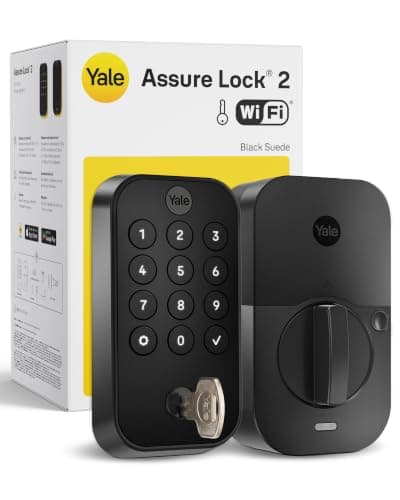
Yale Yale Assure Lock 2 (Wi-Fi, keyed)
Yale Assure Lock 2 (Wi-Fi, keyed)

The modular one. Yale sells the same lock body in keyed and key-free, touchscreen and keypad, with the radio as a swappable module — so you buy the connectivity you want instead of the connectivity that shipped.

Best overall smart lock
8.3
$179.90Amazon
02
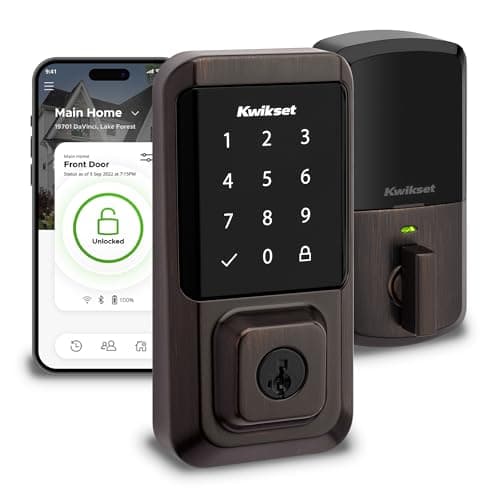
Kwikset Kwikset Halo Wi-Fi Smart Lock
Kwikset Halo Wi-Fi Smart Lock

Built-in Wi-Fi, a touchscreen keypad and SmartKey re-keying — you can re-key the cylinder yourself in under a minute without a locksmith, which is a genuinely useful property when a set of keys goes missing.

Best re-keyable lock
7.4
$191.99Amazon
03
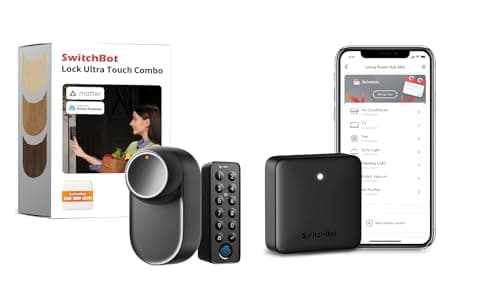
SwitchBot SwitchBot Lock Ultra Touch Combo (with Hub Mini)
SwitchBot Lock Ultra Touch Combo (with Hub Mini)

The credible way to make a rented door smart without drilling a hole. It mounts over the existing thumbturn, keeps your key, and this bundle puts the fingerprint keypad and the hub in the same box — so codes and remote access both work the day it arrives.

Best no-drill retrofit
8.2
$151.88Amazon
04
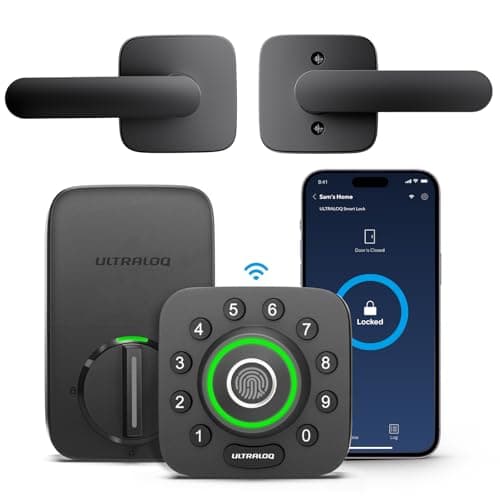
Ultraloq Ultraloq U-Bolt Pro Wi-Fi (with Handle)
Ultraloq U-Bolt Pro Wi-Fi (with Handle)

The most entry methods for the money: fingerprint, code, app, Bluetooth, auto-unlock and a mechanical key, with built-in Wi-Fi rather than a bridge. If you want every door to open every way, this is the cheapest route there — and the listing we link ships the matching handle set with the deadbolt.

Best fingerprint lock
7.9
$142.49Amazon
05
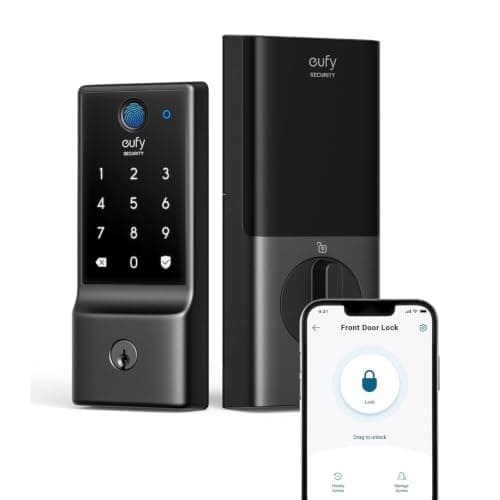
eufy eufy Smart Lock C220
eufy Smart Lock C220

Fingerprint plus built-in Wi-Fi at the bottom of the price band that includes both. eufy's whole pitch is no monthly fee, and the lock line holds to it.

Best budget fingerprint lock
7.4
$89.99Amazon
06
Veise Veise Keyless Entry Keypad Deadbolt
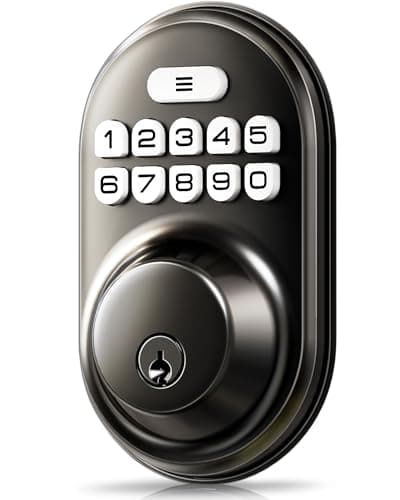
Veise Keyless Entry Keypad Deadbolt

The cheapest thing on this site that solves a real problem: a backlit code pad on a door that currently only takes a key, with auto-lock and an anti-peek entry mode.

Best budget keypad lock
7.2
$29.12Amazon

#ad · Prices pulled live from the Amazon Product API, last checked November 24, 2026. Where we have no verified live price we show none — we would rather leave a gap than print a number that has gone stale. Scores are our own, compiled from published specs; they are not test results.

The best smart lock with a key backup is the Yale Assure Lock 2 in its keyed version: a conventional cylinder in a lock whose radio is a swappable module. The budget pick is the Veise Keyless Entry Keypad Deadbolt. What follows is the part the product pages skip — a keyhole is not a free safety net, and whose cylinder you end up with is a real decision.

Almost every page about keyed smart locks treats the key as a yes-or-no checkbox. It is not. Once a lock has a keyway, four separate questions open up, and they are the reason this page is ranked the way it is.

The four questions a keyhole actually raises

1. Whose keyway is it? A full deadbolt replacement brings its own cylinder, so the key in your pocket stops working and everyone who holds a spare needs a new one. A retrofit does the opposite: the SwitchBot Lock Ultra mounts on the inside of the deadbolt that is already there, so the exterior and the key are untouched. If several people hold keys to your door, that difference is the whole decision.

2. Can you re-key it yourself? Kwikset's SmartKey cylinders on the Halo and the SmartCode 916 re-key at home with a tool and the new key — no locksmith, no cylinder swap. That is genuinely useful after a contractor, a tenant or a house-sitter has had a key, and it is a capability no other brand on this page offers.

3. What does the cylinder cost you in security? This is the part we will not skip. SmartKey cylinders have been the subject of published bypass research. The convenience of self-re-keying has a documented trade-off, and if the physical cylinder is the layer you are relying on, read that research before buying the Halo. Treat SmartKey as key management, not as key security.

4. Is the key your only offline fallback? On most of these locks it is not. The keypad and, where fitted, the fingerprint reader are local functions that work with the internet down and the hub unplugged; the key is the fallback for a flat battery, not for an outage. Two of the six here — the Veise and, in its own way, the fingerprint-and-code field generally — have no radio at all, so the question never arises. The mechanism is in do smart locks work in a power outage.

Key-free is a real option, and sometimes the better one. A keyway is the one part of a lock that can be picked, bumped or drilled, and several strong locks are sold with no cylinder at all. If nobody in your household needs a metal key, a key-free variant removes an attack surface. This page is for the households that do need one — and most do, because a flat battery at 11pm has to have an answer.

The best keyed smart locks, compared

The columns are the four questions above, made literal.

Compiled from Yale, Kwikset, SwitchBot, ULTRALOQ, eufy and Veise product and support documentation, November 2026. Prices appear only on the cards above, pulled live and dated November 24, 2026.
LockKeywayRe-key at homeOther entry methodsRadio
Yale Assure Lock 2 (keyed)New conventional cylinderNoTouchscreen code, appWi-Fi + Bluetooth, swappable module
Kwikset HaloNew SmartKey cylinderYes — SmartKeyTouchscreen code, appWi-Fi
SwitchBot Lock Ultra Touch ComboYour existing cylinder, untouchedWhatever your deadbolt supportsFingerprint, code, appBluetooth + bundled Hub Mini
Ultraloq U-Bolt Pro Wi-FiNew cylinderNoFingerprint, code, app, auto-unlockWi-Fi + Bluetooth
eufy Smart Lock C220New cylinderNoFingerprint, code, appWi-Fi
Veise Keypad DeadboltNew cylinderNoBacklit code pad, anti-peek entryNone

Which one your household points to

A front door you intend to keep: the Yale Assure Lock 2, keyed. You get an ordinary cylinder, and when the protocol landscape moves the radio is a card swap rather than a new lock.

Keys have gone astray before: the Kwikset Halo, with the published bypass research read first. Nothing else here lets you retire a lost key in a minute.

Several people hold a key, or you rent: the SwitchBot Lock Ultra. Every existing key keeps working because the existing cylinder never leaves the door, and nothing is drilled.

You want fingerprint entry and a key: the Ultraloq U-Bolt Pro for the most entry methods, or the eufy C220 for the same combination at a lower price. Enroll a code on either one regardless — capacitive readers misread wet and cold fingers.

The least money that solves the real problem: the Veise. It is the budget pick because it is the cheapest thing here that fixes the actual failure — a door that only takes a key — while keeping the key as a fallback and adding auto-lock and anti-peek code entry. It cannot tell you anything about the door, which is what a contact sensor next to it is for.

In detail

The picks, in full

01
Yale Yale Assure Lock 2 (Wi-Fi, keyed)

Best overall smart lock

Yale Assure Lock 2 (Wi-Fi, keyed)

Wi-Fi + Bluetooth4x AAFull deadbolt replacementTouchscreen keypad
Works offline (keypad)No subscription for core use
8.3/10

The modular one. Yale sells the same lock body in keyed and key-free, touchscreen and keypad, with the radio as a swappable module — so you buy the connectivity you want instead of the connectivity that shipped.

Security
8.5
Door fit
8
Offline
9
Battery
7.5
Ecosystem
8.5

What it gets right

  • Codes and manual operation keep working with the internet down — the radio only carries remote access and notifications
  • Module system means a Matter or Z-Wave upgrade is a card swap, not a new lock
  • Keyed version retains a physical cylinder, which matters if you ever hand a key to a contractor

What it doesn't

  • Replaces the entire deadbolt, so the interior escutcheon is large and visible
  • Four AAs in the door means the battery compartment is part of the install, not hidden inside

What it costs to run

4x AA alkaline. No subscription is required for codes, app unlock or notifications.

Skip this if…

…you rent. This is a full deadbolt replacement — you are removing the landlord's hardware, drilling nothing new but swapping everything, and you will need to reinstall the original on move-out. A retrofit like the SwitchBot Lock Ultra or August leaves the existing deadbolt in place.

$179.90on Amazon

$259.9931% off

Price last checked November 24, 2026. Prices move constantly — Amazon's at checkout is the one that counts.

#ad · we may earn a commission from this link to Yale Assure Lock 2 (Wi-Fi, keyed)

02
Kwikset Kwikset Halo Wi-Fi Smart Lock

Best re-keyable lock

Kwikset Halo Wi-Fi Smart Lock

Built-in Wi-FiTouchscreen4x AASmartKey re-key
No subscription
7.4/10

Built-in Wi-Fi, a touchscreen keypad and SmartKey re-keying — you can re-key the cylinder yourself in under a minute without a locksmith, which is a genuinely useful property when a set of keys goes missing.

Security
7
Door fit
8
Offline
8
Battery
6.5
Ecosystem
7.5

What it gets right

  • SmartKey lets you re-key the physical cylinder yourself when keys go astray
  • No hub or bridge — the lock joins your Wi-Fi directly
  • Kwikset publishes a BHMA grade for the Halo line, which many competitors do not

What it doesn't

  • Wi-Fi in a battery lock is power-hungry compared with Bluetooth or Thread designs
  • SmartKey cylinders have been the subject of published bypass research — treat them as convenience, not as the security layer

What it costs to run

4x AA alkaline. No subscription for app, codes or remote unlock.

Skip this if…

…the cylinder is doing your security work. If a physical key is your fallback and you care about pick and bypass resistance, read the published research on SmartKey cylinders first — the convenience of self-re-keying has a documented trade-off.

$191.99on Amazon

$213.0010% off

Price last checked November 24, 2026. Prices move constantly — Amazon's at checkout is the one that counts.

#ad · we may earn a commission from this link to Kwikset Halo Wi-Fi Smart Lock

03
SwitchBot SwitchBot Lock Ultra Touch Combo (with Hub Mini)

Best no-drill retrofit

SwitchBot Lock Ultra Touch Combo (with Hub Mini)

Retrofit (interior only)Fingerprint keypad in the boxRechargeable pack, 12-month ratingHub Mini included
No drillingHub included
8.2/10

The credible way to make a rented door smart without drilling a hole. It mounts over the existing thumbturn, keeps your key, and this bundle puts the fingerprint keypad and the hub in the same box — so codes and remote access both work the day it arrives.

Security
7
Door fit
9.5
Offline
8
Battery
8.5
Ecosystem
8

What it gets right

  • Genuinely reversible — nothing is drilled and the original deadbolt is untouched
  • Rechargeable pack you top up over USB-C, rated at 12 months, rather than a steady diet of disposable cells
  • Fingerprint keypad and hub are both in this bundle, so codes and remote access need no second order

What it doesn't

  • The lock itself is Bluetooth — remote access, Matter and voice assistants run through the bundled Hub Mini, which is a second box to place and keep powered
  • A motorized unit turning a stiff thumbturn is only as reliable as the deadbolt underneath it
  • Jimmy proof and mortise doors need SwitchBot's accessory kit, which is a separate purchase

What it costs to run

Rechargeable pack, topped up over USB-C. No subscription — this bundle already includes the hub that carries remote access.

Skip this if…

…your deadbolt is stiff. A retrofit motor drives your existing bolt, so a lock that already needs a shoulder against the door to throw will jam, drain the battery, and report failures. Fix the strike alignment first, or replace the deadbolt outright.

$151.88on Amazon

$248.9939% off

Price last checked November 24, 2026. Prices move constantly — Amazon's at checkout is the one that counts.

#ad · we may earn a commission from this link to SwitchBot Lock Ultra Touch Combo (with Hub Mini)

04
Ultraloq Ultraloq U-Bolt Pro Wi-Fi (with Handle)

Best fingerprint lock

Ultraloq U-Bolt Pro Wi-Fi (with Handle)

Fingerprint + code + keyBuilt-in Wi-Fi4x AAHandle set included
No subscriptionWorks offline (code + print)
7.9/10

The most entry methods for the money: fingerprint, code, app, Bluetooth, auto-unlock and a mechanical key, with built-in Wi-Fi rather than a bridge. If you want every door to open every way, this is the cheapest route there — and the listing we link ships the matching handle set with the deadbolt.

Security
8
Door fit
8
Offline
9
Battery
7
Ecosystem
7.5

What it gets right

  • Fingerprint reader is on the outside knob where your hand already is, not on a separate pad
  • Bundled door sensor tells you the door is actually shut, not just that the bolt threw
  • Anti-peep code entry lets you pad a real code with junk digits in front of a stranger

What it doesn't

  • Fingerprint readers of any brand degrade with wet, cold or worn fingers — always enroll a code as well
  • The app ecosystem is smaller than Yale's or Schlage's, so third-party integrations lag

What it costs to run

4x AA alkaline. No subscription for fingerprint, code, app or remote unlock.

Skip this if…

…your entry door faces weather with no overhang. Capacitive fingerprint readers are the first thing to misread when the sensor is wet or your hands are cold, and on an exposed north-facing door you will end up typing the code anyway — in which case a cheaper keypad lock does the same job.

$142.49on Amazon

$209.9932% off

Price last checked November 24, 2026. Prices move constantly — Amazon's at checkout is the one that counts.

#ad · we may earn a commission from this link to Ultraloq U-Bolt Pro Wi-Fi (with Handle)

05
eufy eufy Smart Lock C220

Best budget fingerprint lock

eufy Smart Lock C220

Fingerprint + code + keyBuilt-in Wi-Fi4x AAFull deadbolt
No subscription
7.4/10

Fingerprint plus built-in Wi-Fi at the bottom of the price band that includes both. eufy's whole pitch is no monthly fee, and the lock line holds to it.

Security
7.5
Door fit
8
Offline
8
Battery
6.5
Ecosystem
7

What it gets right

  • Wi-Fi is in the lock, so there is no bridge to buy, site and power
  • Fingerprint, keypad, app and key covers every household member's preference
  • eufy does not gate lock features behind a plan, which is not true of every brand here

What it doesn't

  • Built-in Wi-Fi in a battery lock is the heaviest possible power draw — expect shorter runs than a Bluetooth or Thread lock
  • Fewer third-party integrations than the Yale and Schlage lines

What it costs to run

4x AA alkaline. No plan required for any function including remote unlock.

Skip this if…

…you want Matter or Thread. This is a Wi-Fi lock and it stays a Wi-Fi lock — there is no module to swap and no protocol upgrade path, so a house built around a Matter fabric should look at the Yale module system or the Aqara U100 instead.

$89.99on Amazon

$169.9947% off

Price last checked November 24, 2026. Prices move constantly — Amazon's at checkout is the one that counts.

#ad · we may earn a commission from this link to eufy Smart Lock C220

06
Veise Veise Keyless Entry Keypad Deadbolt

Best budget keypad lock

Veise Keyless Entry Keypad Deadbolt

Code + keyNo wireless radio4x AAAnti-peek code entry
Fully offlineNo app or remote access
7.2/10

The cheapest thing on this site that solves a real problem: a backlit code pad on a door that currently only takes a key, with auto-lock and an anti-peek entry mode.

Security
6
Door fit
8
Offline
10
Battery
8.5
Ecosystem
3.5

What it gets right

  • Auto-lock means the door secures itself behind you, which is the single most common real-world failure it fixes
  • Anti-peek entry lets you type junk digits around the real code in front of a delivery driver
  • Nothing to pair, update, or account for — it works out of the box forever

What it doesn't

  • No fingerprint, no app, no notifications
  • No published BHMA grade we could find

What it costs to run

4x AA alkaline. No service, no subscription, no account.

Skip this if…

…this is your only front-door lock and you want any kind of alerting. It cannot tell you the door was opened; a $15 contact sensor next to it is what does that job.

$29.12on Amazon

$46.9638% off

Price last checked November 24, 2026. Prices move constantly — Amazon's at checkout is the one that counts.

#ad · we may earn a commission from this link to Veise Keyless Entry Keypad Deadbolt

Before you buy a keyed lock: check the door, then the cylinder

Two measurements decide whether any deadbolt replacement here will fit, and neither is printed on the front of the box: the backset (the distance from the edge of the door to the centre of the bore, normally 2 3/8in or 2 3/4in) and the door thickness. Our fit guide walks the measurements with a tape measure. A retrofit like the SwitchBot sidesteps both questions, which is part of why it is the safe answer on an unfamiliar door.

Then think about the cylinder as a component with its own lifespan. A conventional keyway can be upgraded by a locksmith later; a SmartKey cylinder trades some of that for the ability to re-key it yourself. Neither is wrong, but they are opposite bets, and the brand you choose here locks the bet in for as long as the lock is on the door.

Finally, do not let the keyhole do work it cannot do. A cylinder is the one part of the lock a stranger can interact with, and published research exists on bypassing specific designs. The things that actually resist a kicked door are the frame fixings: three-inch screws into the stud and a reinforced strike plate, covered in how to secure your front door and set in context in are smart locks safe.
How we picked

Products we claim to have tested: 0

Everyone in this category says they tested a dozen locks on their own front door. We have not tested any, and we say so. Here is what we do instead: read the manufacturer's manual and spec sheet, record the published protocol, power and storage figures, check the published standard where one exists, compute what the device costs to keep running, and cite all of it so you can check the work. Prices come live from Amazon's API and disappear rather than go stale.

The scores above are judgments from that documented research — not bench measurements. The full rubric, including what disqualifies a product, is published in full.

Questions

Frequently asked

Do all smart locks have a key backup?
No. Many are sold in both keyed and key-free versions, and some designs have no cylinder at all. The six on this page all keep a physical key, but you have to buy the right variant — the Yale Assure Lock 2, for example, exists in a key-free version that looks identical in photographs.
Can I keep my existing key with a smart lock?
Only with a retrofit. The SwitchBot Lock Ultra Touch Combo mounts over the inside of your existing deadbolt and never touches the cylinder, so every key already cut for that door keeps working. Every full replacement on this page brings its own keyway. The detail is in can you use your existing key with a smart lock.
Is a keyhole a security weakness on a smart lock?
It is an additional attack surface, yes — a cylinder can be picked, bumped or drilled, where a key-free lock has nothing to attack mechanically. Whether that matters depends on your threat model; in practice most forced entries go through the frame, not the cylinder. If the cylinder is doing your security work, read the published research on your specific keyway design first, especially for SmartKey.
What happens when the batteries die?
On a keyed lock, you use the key. That is the entire argument for buying one. On a key-free lock you are relying on the low-battery warnings and, on some models, an external contact you can jump from a battery pack. Either way the lock warns you for weeks first — the arithmetic is in how long smart lock batteries last.
Which keyed smart lock is cheapest?
The Veise keypad deadbolt, by a wide margin, and it is the budget pick here for that reason. It has no radio, so there is no app, no notification and no remote unlock — but it does add a backlit code pad and auto-lock to a door that previously only took a key, and it keeps the key. Check the live figure on the card above, stamped November 24, 2026.

Keep reading

Receipts

Sources

We do not run a testing lab and we do not pretend to. Specifications come from the manufacturer's own published documents and from published standards; prices come from the live Amazon API. Where a figure is not published, the page says “not published” rather than guessing. Read the full method.